Nano Banana + Adobe tech FTW! Here’s a quick look:
And here’s a deeper dive:
Nano Banana + Adobe tech FTW! Here’s a quick look:
And here’s a deeper dive:
Here’s a practical, down-to-earth application of AI from my old teammates Dana & co.:
Phota—about which I expressed some initial misgivings, given its ability to rewrite memories—has launched Phota Studio & their API. From what I can tell, it builds upon a Nano Banana foundation and adds personalization that relies on uploading dozens of images of each individual in order to maximize identity preservation:
With Phota, for the first time, you can generate, edit, and enhance photos while keeping your identity intact, every time.
We’re not building a generic foundation model. We build personal models about you, and about the people and pets around you. At the center are profiles, built from your personal album that learn the details of your appearance that make you recognizable as yourself: how you smile, your eye color, and how your face looks from different angles. Your personal model is private and only used by you.
Today, we introduce Phota Studio and Phota API, powered by our photography model that brings flagship image model capabilities, personalized to you.
With personalization, an image model stops being just playful and starts becoming useful for photography.
With Phota Studio, you… pic.twitter.com/UFOW32Vpvh
— Phota Labs (@PhotaLabs) March 26, 2026
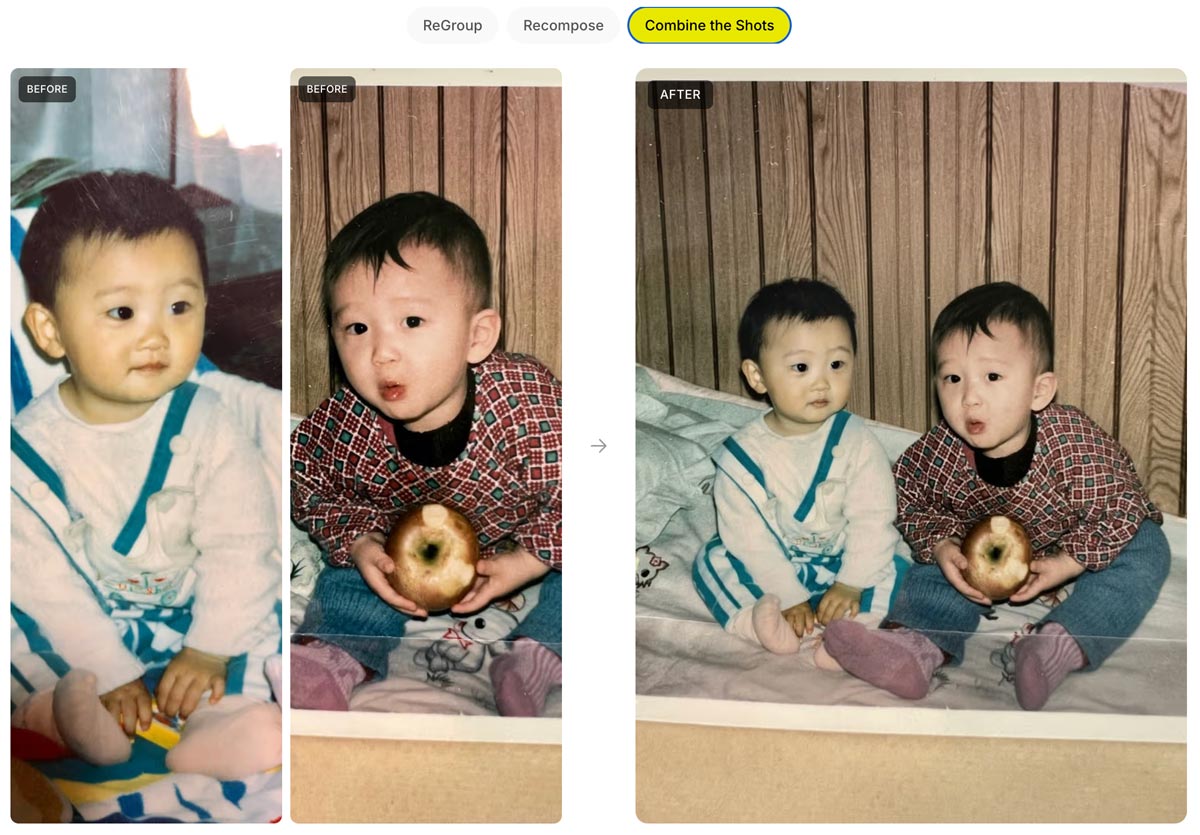
Here’s a quick thread in which I tried inserting myself into a couple of images, using both Phota’s model (which depended on my uploading 30+ images of myself) and just Nano Banana straight out of the Gemini app:
Currently having fun Phota-bombing historical events in @PhotaLabs, which mixes their custom, identity-optimized model with @NanoBanana: pic.twitter.com/f3atvLkbxM
— John Nack (@jnack) April 6, 2026
I love seeing progress like this: upload a product pic, convert it to 3D, and photograph it on a virtual set:
Your next 3D photo shoot will be done with AI
3D Scenes generates full environments from any image
→ Place your objects in the scene
→ Move the camera like a real shoot
→ Consistent lightning and detail across every angleAvailable now on Freepik pic.twitter.com/blLN6fN1YW
— Freepik (@freepik) March 26, 2026
Go from 2D to a 3D
Upload your product photo → AI builds the scene around it → navigate freely in a 3D space
Rotate, zoom and explore every angle pic.twitter.com/waJf70Bdmn
— Freepik (@freepik) March 26, 2026
“Now with more distractions” isn’t usually the kind of thing one would tout—but as you’ll see, it’s just the kind of smarts people want for clean-up work:
Photoshop’s Remove Tool is getting a HUGE upgrade with more distractions.
A LOT more! pic.twitter.com/EYHp3Dilmm
— Howard Pinsky (@Pinsky) March 27, 2026
Here’s a fun, ultra-simple way to turn an image (or just a prompt) into a short, multi-shot narrative:
Introducing the Multi-Shot App. An easy way to go from a simple prompt to a thoughtfully crafted scene. All with dialogue, sound effects, intentional cuts, pacing and cinematic framing. Start from an image or go purely Text to Video for total creative exploration. Available now… pic.twitter.com/ek5uuuVf06
— Runway (@runwayml) March 26, 2026
Just for fun I fed it this image…
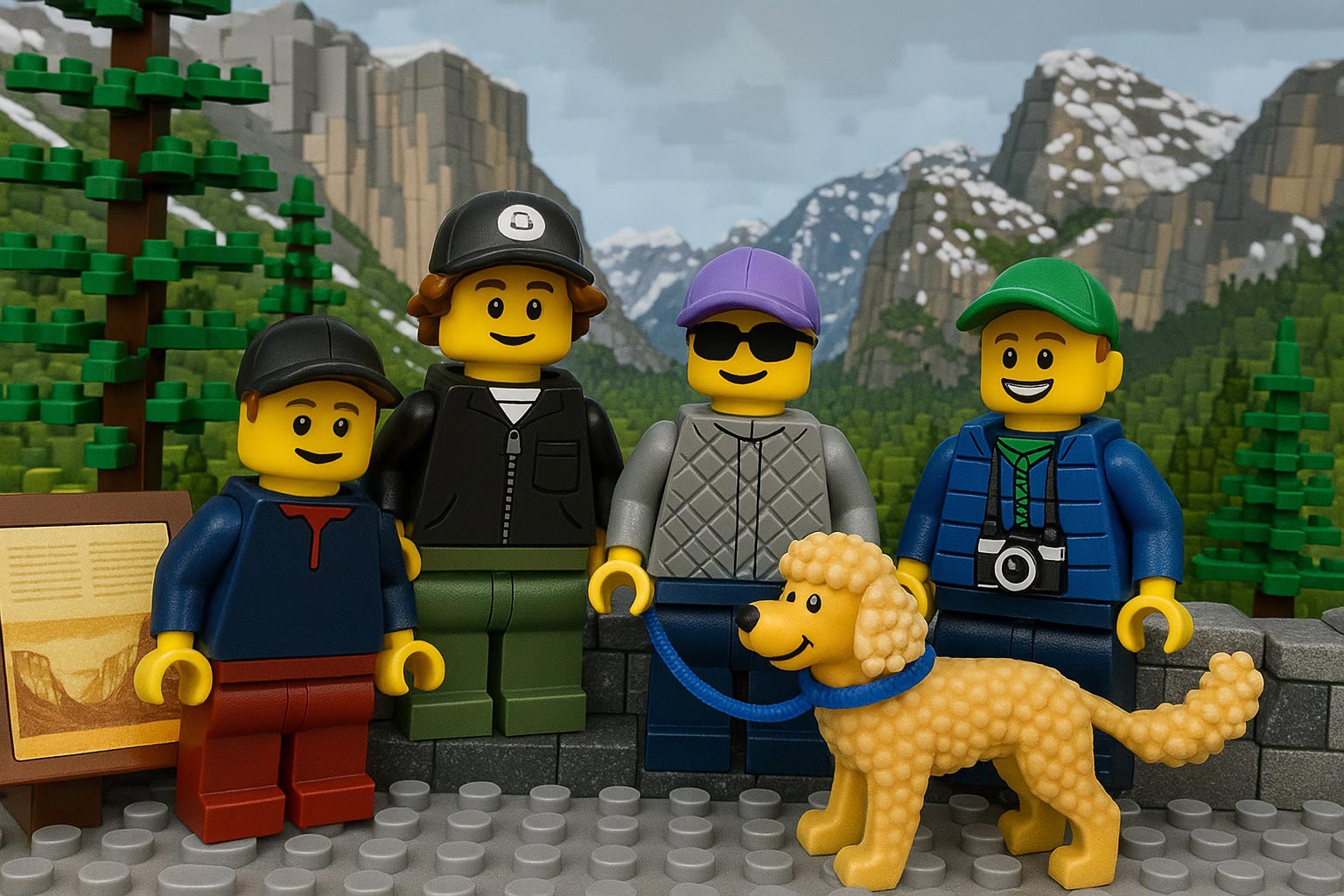
…and this prompt (based on an all-too-true story):
A family of Lego people and their dog gaze around Yosemite’s most iconic vista, then reminisce about that time they got stuck there in the snow in their VW van, expressing hope that they don’t get stuck again!
Check out the results:
I’ve long quoted James Ratliff, the super sharp designer behind Adobe’s Project Graph (who’s recently decamped to Figma), in nicely phrasing how the process of generating & refining ideas generally starts broad/declarative (searching, prompting) and moves towards fine-grained methods (selecting, moving, etc.):
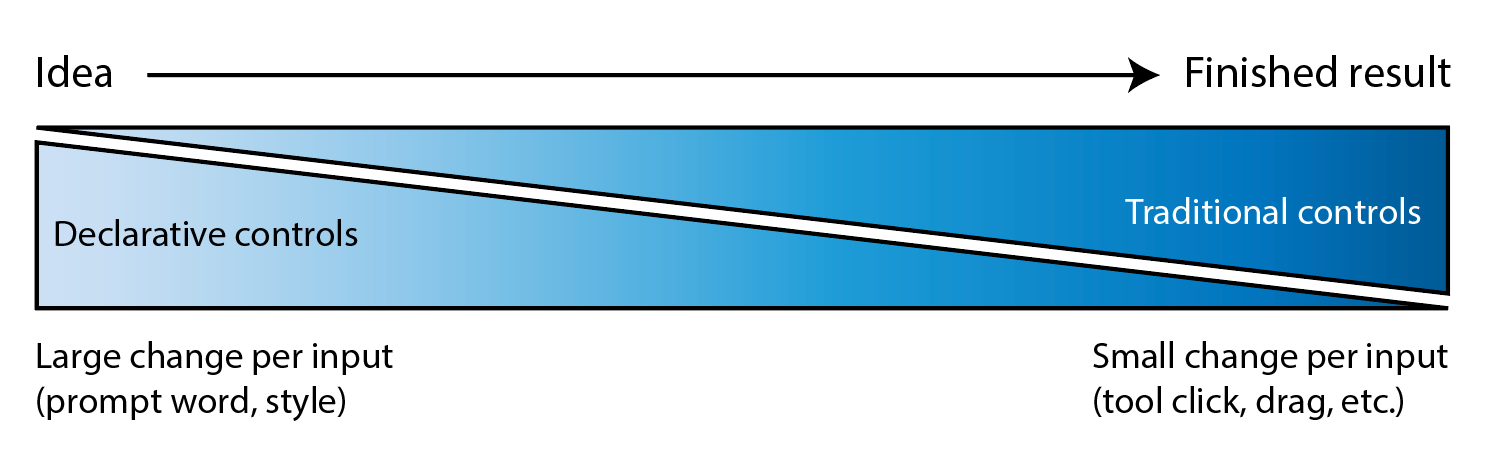
I see an increasing number of tool & model creators mixing modalities—even in the Gemini Super Bowl ad featuring a mom & daughter drawing a simple circle to show where they’d like to add a dog bed.
I’m eager to check out Lovart’s take on the possibilities, especially for animation:
⚡️ New on Lovart: Move Object
→ Select any object with rectangular or lasso tool
→ Move it wherever you want
→ Prompt optional modifications
→ One clean, consistent imageNo masks. No layers. No re-roll. pic.twitter.com/Sw800icnsu
— LovartAI (@lovart_ai) March 25, 2026
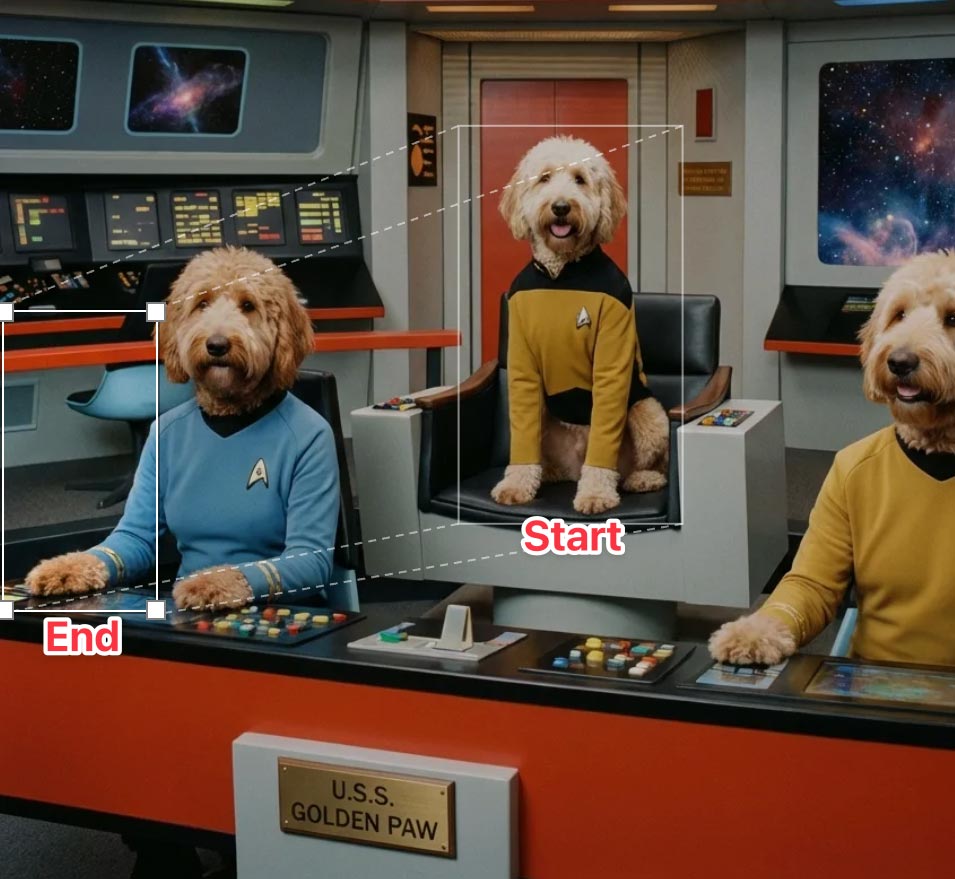
Update: Here’s a look at the UI, in which you can move & scale the selection rectangle, as well as the before & after images:

“3D scenes, websites, games, apps,” promises Spline. “Describe anything and Omma builds it for you in seconds.”
Omma combines code generation (LLMs), 3D AI mesh generation, and Image generation all in one place for you to build and ship. Deploy to production, assign custom domains, and more.
Ten years ago (!), the embryonic social app Peach suddenly blew up on the scene—only to molder shortly thereafter. Adam Lisagor tartly predicted that outcome right after Peach debuted:
I just joined Peach. Did you see that thing on Peach? Only teens use Peach these days. Nobody uses Peach anymore. Oh my god, remember Peach?
— Adam Lisagor (@adamlisagor) January 9, 2016
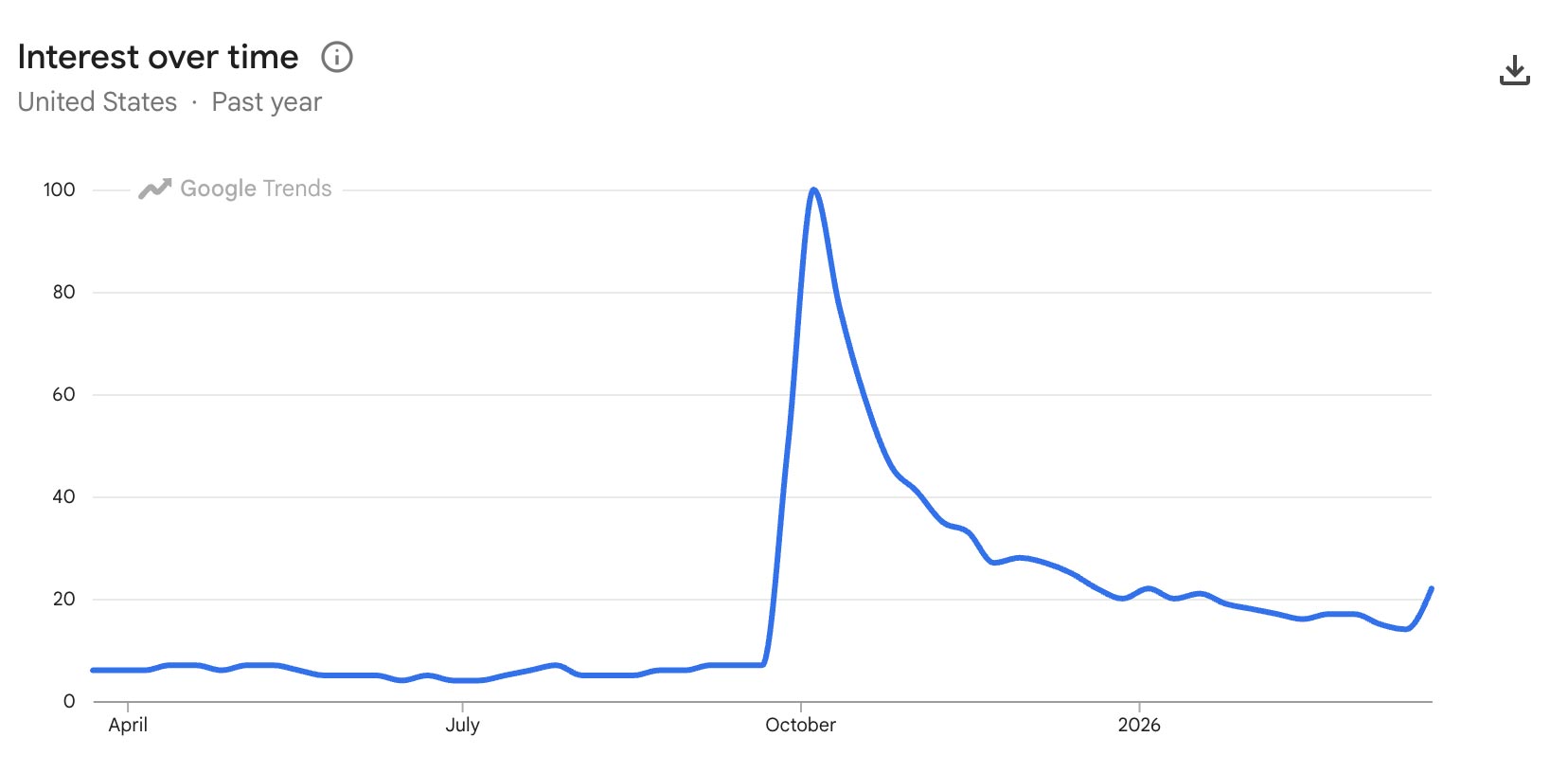
I’m reminded of this upon hearing that OpenAI has bailed out on Sora, which they launched just a few months ago. In a way I’m not surprised—check out how interest in the tech spiked & then rapidly cratered—except that just a couple of months ago Disney signed a billion-dollar deal to use it. ¯\_(ツ)_/¯
When can we get this (or equivalent) into Photoshop??
Okay it seems like @LumaLabsAI new uni-1 model is actually on a category of its own
You can give it one complex composition and its able to extract each layer as a new image generation
Are there any other models that can do this? https://t.co/COXdUvX4id pic.twitter.com/3w5quKoiFX
— Lucas Crespo (@lucas__crespo) March 23, 2026
On a conceptually (though not necessarily technically) related note, the LICA dataset may help model makers train layered generation:
Much of today’s AI-generated graphic designs look like slop because there is a lack of high-quality, open datasets. This space is a cluster of walled gardens (@figma , @canva , @Adobe ). We’ve built one of the largest graphic design dataset, 1.5 million compositions spanning… pic.twitter.com/YauAe7ugiD
— Priyaa (@pritopian) March 20, 2026
Speaking of spinning right ’round, check this out:
We just released Rotate Object in Photoshop (beta)
You can now rotate 2D images!
Then use Harmonize to add light and shadows, to blend it perfectly with the rest of the scene.
It’s like Turntable in Illustrator, but instead of vectors, it’s pixels in Photoshop! pic.twitter.com/85bvBIjCB9
— Kris Kashtanova (@icreatelife) March 12, 2026
Check out another view, from Paul Trani:
Game changer for compositors! Rotate an image as if it’s a 3D object in the #Photoshop beta! Interested?? pic.twitter.com/RUgsZZup7u
— Paul Trani (@paultrani) March 12, 2026
Five years ago, I spent an afternoon with a buddy watching Disco Diffusion resolve a weird, blurry, but ultimately delightful scene over the course of 15 minutes. Now Runway & NVIDIA are previewing generation that’s a mere ~90,000x faster than that. Ludicrous speed, go!!
A breakthrough in real-time video generation.
As a research preview developed with @NVIDIA and shared at @NVIDIAGTC this week, we trained a new real-time video model running on Vera Rubin. HD videos generate instantly, with time-to-first-frame under 100ms. Unlocking an entirely… pic.twitter.com/juafjvk0wm
— Runway (@runwayml) March 18, 2026
An AI paradox: as models get vastly more complex, interfaces can get vastly simpler. We can make computers conform to our reality—not the other way around.
Steve Jobs described exactly this evolution all the way back in 1981:
Structuring your prompt well turns out to be key in avoiding garbled text. As the presenter says, “It’s not about writing more. It’s about writing in the right order.” Check out this brief overview.
In this tutorial, you’ll see how to use Nano Banana Pro and Kling 3.0 Omni together to solve one of the most common pain points in AI product video: text that blurs, warps, or drifts mid-motion. We’ll walk through a practical workflow for maintaining legibility and visual consistency in product shots, so your labels, logos, and copy stay clean from the first frame to the last.
Long dog walks are for nothing if not visualizing whatever silliness pops into my head—which today happened to be our puppy Ziggy becoming an impossible object called a “Ziggule.”

I shared this with my cousin Alicia, who does a tremendous amount of work sheltering & rescuing dogs in Austin, and she requested a portrait of their current foster pooch (Tesseract). I was of course all too happy to oblige:
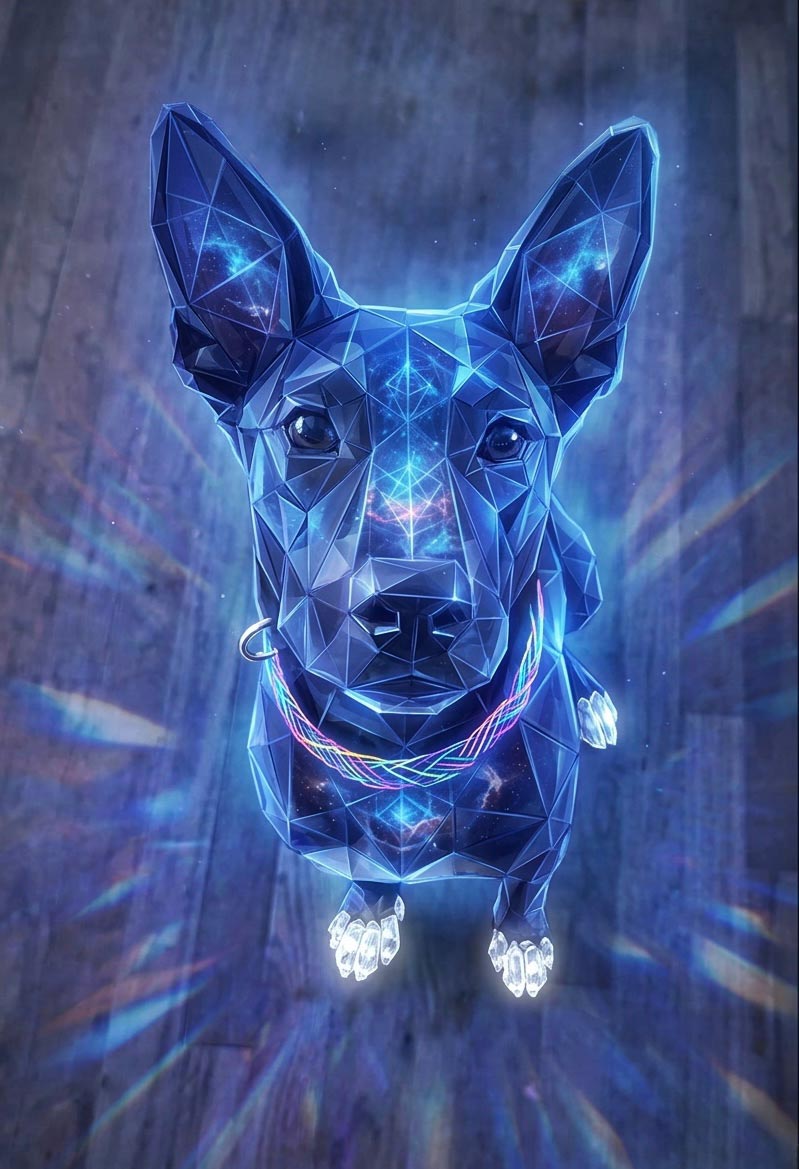
As it happens, folks at Google have had the same idea, and they’ve been putting Nano Banana to work helping zhuzh up pics of shelter pets in hopes of helping them find their forever homes. Let’s hear it for using AI & old-fashioned human creativity for good!
Photos play a big role in pet adoption.
We’ve teamed up with shelters across the country to give rescue pets glamorous headshots that show off their personalities, made with Nano Banana Pro.
Take a look below and contact our partner shelters for adoption inquiries pic.twitter.com/Lh565trjgR
— Google Gemini (@GeminiApp) January 21, 2026
As you’ve likely heard me say, I’ve gotten psyched up too many times about AI video-editing tech that fell short of its ambitions—but I’m hoping that this work from Adobe & Harvard collaborators can deliver what it describes:
We present Vidmento, an interactive video authoring tool that expands initial materials and ideas into compelling video stories through blending captured and generative media. To preserve narrative continuity and creative intent, Vidmento generates contextual clips that align with the user’s existing footage and story.
Per the site, Vidmento should enable:
Oh boy. 🙂 (But, like, holy crap—compare this to the hot garbage we were getting less than a year ago!)
Here’s the video containing those images. Overall it’s kinda good—kinda! pic.twitter.com/KOFBevbebU
— John Nack (@jnack) March 6, 2026
Among the misbegotten “Oh, everyone will love this—but rarely will anyone actually use it” AR demos of 2017 (right alongside “See whether this toaster fits on my counter!”), imagining restaurants plopping a 3D model onto your plate was always a banger. Leaving aside whether anyone would actually want or value that experience, the cost of realistically modeling dishes was prohibitive.
This new tech at least promises to take the grunt work out of model creation, turning a single photo into an AR-ready 3D asset (give or take a tine or two ;-)):
AR GenAI by AR Code is transforming the food industry. Creating an AR experience for a dish can now start with a single photo.
As shown in the video, a single dessert photo is converted into an AR-ready 3D model with realistic textures and depth. AR Code SaaS then instantly… pic.twitter.com/s1H5do1UUf
— Maxime Maisonneuve (@maximemaisonneu) January 25, 2026
I try not to curse on this blog, doing so maybe a dozen times in 20+ (!!) years of posting. But circa 2013-2017, when I saw what felt like uncritical praise for Adobe’s voice-driven editing prototypes, I called bullshit.
The high-level concept was fine, but the tech at the time struck me as the worst of both worlds: the imprecision of language (e.g. how does a normal person know the term “saturation,” and how does an expert describe exactly how much they want?) combined with the fragility of traditional selection & adjustment algorithms.
Now, however, generative tech can indeed interpret our language & effect changes—and in the case of Krea’s new realtime mode, in a highly responsive way:
introducing Voice Mode.
speak as you draw and get changes in real-time.
available now in Krea iPad. pic.twitter.com/c6mHHjupmW
— KREA AI (@krea_ai) March 2, 2026
Whether or not voice per se becomes a popular modality here, closing the gap between idea & visual is just so seductive. To emphasize a previously made point:
We simply have not started rethinking interactions from the grounds up.
So many possibilities wide open when you think of human – AI in micro feedback loops vs automation alone or classic back and forth. https://t.co/iVKb02SbdU
— tuhin (@tuhin) February 18, 2026
I couldn’t have contrived a better example of the power & pitfalls of generative imaging if I tried.
Here’s a pretty crummy cell phone picture I took yesterday from a moving train & then enhanced with a single prompt using Gemini. The results are incredible—if you don’t really care about the exact capacity of your jumbo jet! 🙂
The current state of AI-driven editing drives home the wisdom of that old Russian staying, “Trust… but verify.”
This also highlights the subtle treachery of AI photography: look how it shortened the 747! pic.twitter.com/Yga5oo1D0B
— John Nack (@jnack) February 27, 2026
See also my previously shared example, in which Nano Banana quietly upgraded this propeller-driven plane into a jet:
Testing fence removal on my son’s photo using @NanoBanana, @ChatGPTapp, and @bfl_ml.
They’re all impressive, but Nano tried to put jet engines on this prop plane, so I’m giving this round to ChatGPT. pic.twitter.com/DOvZQLT5H5
— John Nack (@jnack) December 23, 2025
When it rains, it pours: No sooner did I post about text->vector than I saw two new entrants in that space. The new Quiver AI is claimed to have “solved vector design with AI”:
Introducing @QuiverAI, a new AI lab and product company focused on frontier vector design.
We’ve raised an $8.3M seed round led by @a16z, with support from amazing angels and investors.
Our first model, Arrow-1.0, generates SVGs from images and text. It’s available now in… pic.twitter.com/mLoeM2UpGf
— Joan Rodriguez (@joanrod_ai) February 25, 2026
Here’s my first quick test, in which Quiver & Illustrator utterly smoke direct chat->vector output in Gemini & ChatGPT:
Testing text->vector in the new @QuiverAI vs. Adobe Illustrator and (yikes!) Gemini and ChatGPT. (Prompt: “A three-quarter view of a silver 1990 Mazda Miata.”) pic.twitter.com/MjTuFYLGQ3
— John Nack (@jnack) February 26, 2026
Meanwhile, check out what Recraft produced:
Impressive results from @recraftai! https://t.co/VbukNz0rtn pic.twitter.com/vaIN4ySQ4H
— John Nack (@jnack) February 26, 2026
Elsewhere, Hero Studio promises great image->SVG conversion. I’ve applied for access & am eager to take it for a spin:
You can now bring your images to life, just upload any image and it turns it into a clean and precise SVG. we’re using a custom model specifically trained for SVG recognition and generation. the results are insane pic.twitter.com/s6e4tJ4IWm
— Junior García (@jrgarciadev) February 25, 2026
When we launched Firefly three years ago (!), we talked up prompt-based vector creation. When the feature later arrived in Illustrator, it was really text-to-image-to-tracing. That could be fine, actually, provided that the conversion process did some smart things around segmenting the image, moving objects onto their own layers, filling holes, and then harmoniously vectorizing the results. I’m not sure whether Adobe actually got around to shipping that support.
In any case, Recraft now promises create vector creation directly from prompts:
V4 Vector is built for real design workflows.
Clean path structure.
SVG export.
Print-ready (300 DPI, CMYK).Generate → export → refine pic.twitter.com/XenDDSTjmd
— Recraft (@recraftai) February 23, 2026
Meanwhile Gemini promises SVG creation right out of the box. My previous attempts to use it produced results that were, um, impressionistic…
Nano Banana->SVG results can be… unique. 🙂 https://t.co/FuEgYZiL5T pic.twitter.com/9BwSqmsLmT
— John Nack (@jnack) November 20, 2025
…and based on what they’re showing vis-à-vis recent updates, I haven’t been in a hurry to try again:
“Generate an SVG of a pelican riding a car in France with a cat sitting beside it. Background has Eiffel tower.” pic.twitter.com/RjCnte4cky
— Oriol Vinyals (@OriolVinyalsML) February 19, 2026
I’ve really enjoyed collaborating with Black Forest Labs, the brain-geniuses behind Flux (and before that, Stable Diffusion). They’re looking for a creative technologist to join their team. Here’s a bit of the job listing in case the ideal candidate might be you or someone you know:
BFL’s models need someone who knows them inside out – not just what they can do today, but what nobody’s tried yet. This role sits at the intersection of creative excellence, deep model knowledge, and go-to-market impact. You’ll create the work that makes people realize what’s possible with generative media – original pieces, experiments, and creative assets that set the standard for what FLUX can do and show it to the world
— Create original creative work that pushes FLUX to its limits – experiments, visual explorations, and pieces that show what’s possible before anyone else figures it out
— Collaborate with the research and product teams from the start of training/product development to understand the core strengths of each new model/product and create assets that amplify and showcase these. You will also provide feedback to those teams throughout the development process on what needs to improve.
Former Apple designer Tuhin Kumar, who recently logged three years at Luma AI, makes a great point here:
We simply have not started rethinking interactions from the grounds up.
So many possibilities wide open when you think of human – AI in micro feedback loops vs automation alone or classic back and forth. https://t.co/iVKb02SbdU
— tuhin (@tuhin) February 18, 2026
To the extent I give Adobe gentle but unending grief about their near-total absence from the world of UI innovation, this is the kind of thing I have in mind. What if any layer in Photoshop—or any shape in Illustrator—could have realtime-rendering generative parameters attached?
Like, where are they? Don’t they want to lead? (It’s a genuine question: maybe the strategy is just to let everyone else try things, and then to finally follow along at scale.) And who knows, maybe certain folks are presently beavering away on secret awesome things. Maybe… I will continue hoping so!
Hey, I’ve got a fun, quick question, said with love: where the hell is Adobe in all this…?
today, we’re announcing the acquisition of @wand_app and the release of our new iPad app.
Krea iPad integrates the best of both worlds: native iOS feel with custom brushes and real-time AI.
download it now pic.twitter.com/VNCf8eB9eK
— KREA AI (@krea_ai) February 12, 2026
It’s hard to believe that when I dropped by Google in 2022, arguing vociferously that we work together to put Imagen into Photoshop, they yawned & said, “Can you show up with nine figures?”—and now they’re spending eight figures on a 60-second ad to promote the evolved version of that tech. Funny ol’ world…
A couple of weeks ago I mentioned a cool, simple UI for changing camera angles using the Qwen imaging model. Along related lines, here’s an interface for relighting images:
Qwen-Image-Edit-3D-Lighting-Control app, featuring 8× horizontal and 3× elevational positions for precise 3D multi-angle lighting control. It enables studio-level lighting with fast Qwen Image Edit inference, paired with Multi-Angle-Lighting adapter. Try it now on @huggingface. pic.twitter.com/b3UrELE6Cn
— Prithiv Sakthi (@prithivMLmods) February 4, 2026
My former colleagues Jue Wang & Chen Fang are making an impressive indie debut:
AniStudio exists because we believe animation deserves a future that’s faster, more accessible, and truly built for the AI era—not as an add-on, but from the ground up. This isn’t a finished story. It’s the first step of a new one, and we want to build it together with the people who care about animation the most.
Check it out:
Introducing https://t.co/zxqLkGyNDh: the first AI-native Animation platform.
We’re still cooking, so… Repost & comment to join the beta (FREE access).#AdobeAnimate #AniStudio pic.twitter.com/diPJV1p2CW
— AniStudio (@AniStudio_ai) February 4, 2026
This is a subtle but sneakily transformative development, potentially enabling layer-by-layer creation of editable elements:
Awesome! I’ve been asking this of Ideogram & other image creators forever.
Transparency is *huge* unlock for generative creation & editing in design tools (Photoshop, After Effects, Canva, PPT, and beyond). https://t.co/UGJQVDuet5
— John Nack (@jnack) February 2, 2026
This new tech from Meta promises to create geometry from video frames. You can try feeding it up to 16 frames via this demo site—or just check out this quick vid:
Huge drop by Meta: ActionMesh turns any video into an animated 3D mesh.
Demo available on Hugging Face pic.twitter.com/dDh144uLuP
— Victor M (@victormustar) January 30, 2026
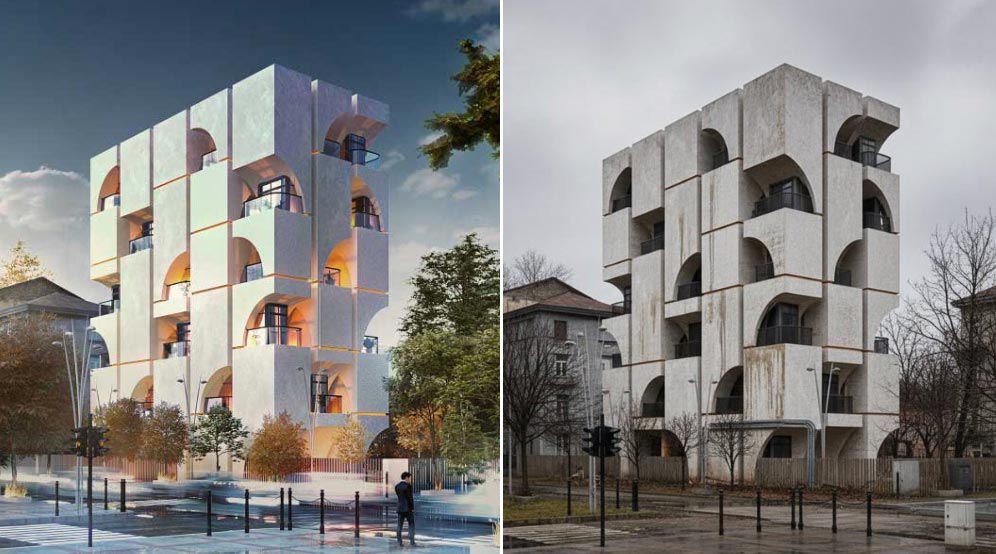
“Upload an architectural render. Get back what it’ll actually look like on a random Tuesday in November.” Try it yourself here.
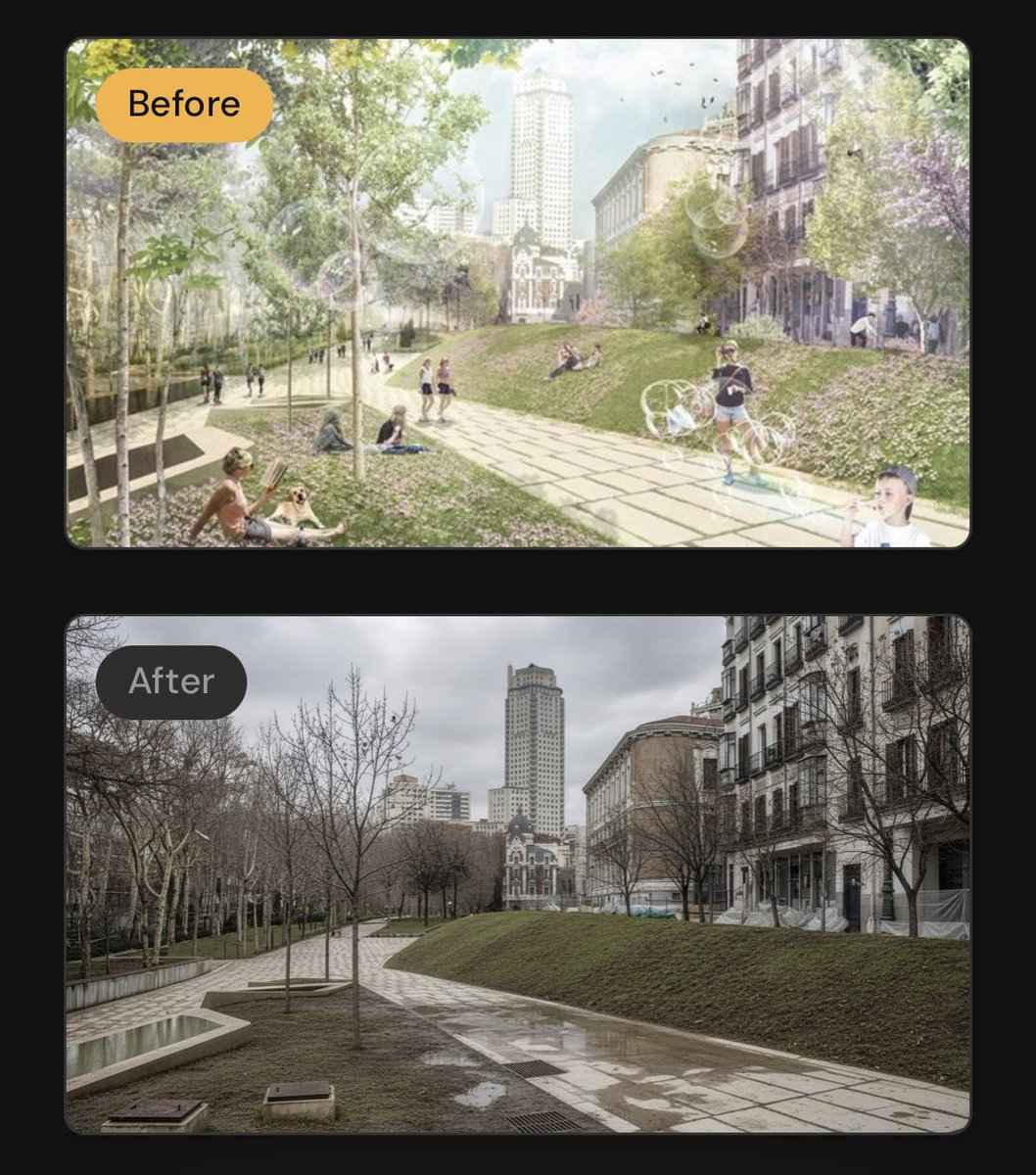
As one commenter put it, “Basically a ‘what would a building look like in London most days’ simulator”—i.e. enbrittification.
I’m excited to learn more about GenLit, about which its creators say,
Given a single image and the 5D lighting signal, GenLit creates a video of a moving light source that is inside the scene. It moves around and behind scene objects, producing effects such as shading, cast shadows, secularities, and interreflections with a realism that is hard to obtain with traditional inverse rendering methods.
Video diffusion models have strong implicit representations of 3D shape, material, and lighting, but controlling them with language is cumbersome, and control is critical for artists and animators.
GenLit connects these implicit representations with a continuous 5D control… pic.twitter.com/ulo0BNOCTd
— Michael Black (@Michael_J_Black) December 15, 2025
I stumbled across some compelling teaser videos for this product, about which only a bit of info seems to be public:
A Photoshop plugin that brings truly photorealistic, prompt-free relighting into existing workflows. Instead of describing what you want in text, control lighting through visual adjustments. Change direction, intensity, and mood with precision… Modify lighting while preserving the structure and integrity of the original image. No more destructive edits or starting over.
Identity preservation—that is, exactly maintaining the shape & character of faces, products, and other objects—has been the lingering downfall of generative approaches to date, so I’m eager to take this for a spin & see how it compares to other approaches.
Those crazy presumable insomniacs are back at it, sharing a preview of the realtime generative composition tools they’re currently testing:
YES! https://t.co/EOIBon8KPc pic.twitter.com/aNZtfsp2A1
— vicc (@viccpoes) January 22, 2026
This stuff of course looks amazing—but not wholly new. Krea debuted realtime generation more than two years ago, leading to cool integrations with various apps, including Photoshop:
My photoshop is more fun than yours With a bit of help from Krea ai.
It’s a crazy feeling to see brushstrokes transformed like this in realtime.. And the feeling of control is magnitudes better than with text prompts.#ai #art pic.twitter.com/Rd8zSxGfqD
— Martin Nebelong (@MartinNebelong) March 12, 2024
The interactive paradigm is brilliant, but comparatively low quality has always kept this approach from wide adoption. Compare these high-FPS renders to ChatGPT’s Studio Ghibli moment: the latter could require multiple minutes to produce a single image, but almost no one mentioned its slowness. “Fast is good, but good is better.”
I hope that Krea (and others) are quietly beavering away on a hybrid approach that combines this sort of addictive interactivity with a slower but higher-quality render (think realtime output fed into Nano Banana or similar for a final pass). I’d love to compare the results against unguided renders from the slower models. Perhaps we shall see!
Apple’s new 2D-to-3D tech looks like another great step in creating editable representations of the world that capture not just what a camera sensor saw, but what we humans would experience in real life:
Excited to release our first public AI model web app, powered by Apple’s open-source ML SHARP.
Turn a single image into a navigable 3D Gaussian Splat with depth understanding in seconds.
Try it here → https://t.co/USoFBukb30#AI #Apple #SHARP #VR #GaussianSplatting pic.twitter.com/aplWoEcesb
— Revelium™ Studio (@revelium_studio) January 9, 2026
Check out what my old teammate Luke was able to generate:
made a Mac app that turns photos into 3D scenes using Apple’s ml-sharp: https://t.co/bU8FxJ5lXk pic.twitter.com/fNwbS9gYns
— Luke Wroblewski (@LukeW) December 18, 2025
Almost exactly 19 years ago (!), I blogged about some eye-popping tech that promised interactive control over portrait lighting:
I was of course incredibly eager to get it into Photoshop—but alas, it’d take years to iron out the details. Numerous projects have reached the market (see the whole big category here I’ve devoted to them), and now with “Light Touch,” Adobe is promising even more impressive & intuitive control:
This generative AI tool lets you reshape light sources after capture — turning day to night, adding drama, or adjusting focus and emotion without reshoots. It’s like having total control over the sun and studio lights, all in post.
Check it out:
If nothing else, make sure you see the pumpkin part, which rightfully causes the audience to go nuts. 🙂
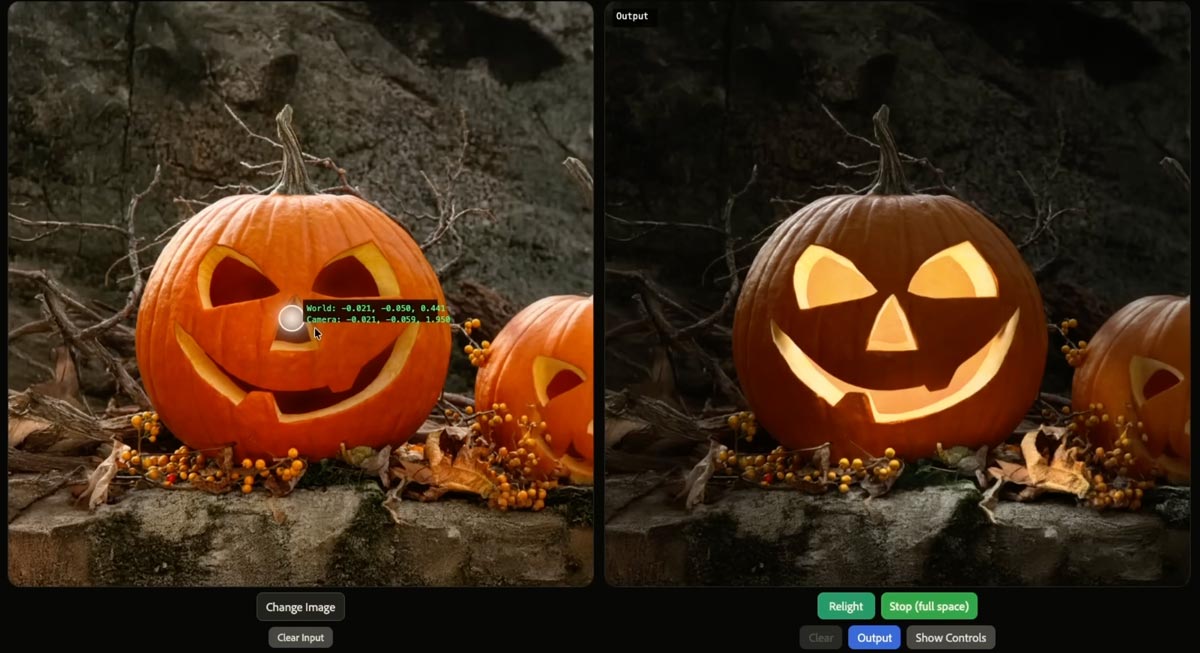
He gets it.
Honestly, Ben Affleck actually knowing AI and the landscape caught me off guard, but as a writer, makes sense.
Great takes across the board. pic.twitter.com/IcPe0n9302
— Forrest (@ForrestPKnight) January 17, 2026
I keep finding myself thinking of this short essay from Daniel Miessler:
Think very carefully about where you get help from AI.
I think of it as Job vs. Gym.
- If we’re working a manual labor job, it’s fine to have AI lift heavy things for us because the actual goal is to move the thing, not to lift it.
- This is the exact opposite of going to the gym, where the goal is to lift the weight, not to move it.
He argues for identifying gym tasks (e.g. critical thinking, problem solving), and for those use just your brain (with minimal AI assistance, if any).
My primary metric for this is whether or not I am getting sharper at the skills that are closest to my identity.
The whole essay (2-min read) is worth checking out.
Less prompting, more direct physicality: that’s what we need to see in Photoshop & beyond.
As an example, developer apolinario writes, “I’ve built a custom camera control @gradio component for camera control LoRAs for image models Here’s a demo of @fal’s Qwen-Image-Edit-2511-Multiple-Angles-LoRA using the interactive camera component”:
Sigh… I knew this nostalgia would come. “The way we werrrrre…” 🙂
Nano Banana & Flux are great & all, but I legit miss when DALL•E was gakked up on mescaline. pic.twitter.com/JBxPanywoF
— John Nack (@jnack) January 14, 2026
As AI continues to infuse itself more deeply into our world, I feel like I’ll often think of Paul Graham’s observation here:
Paul Graham on why you shouldn’t write with AI:
“In preindustrial times most people’s jobs made them strong. Now if you want to be strong, you work out. So there are still strong people, but only those who choose to be. It will be the same with writing. There will… pic.twitter.com/RWGZeJetUp
— Kieran Drew (@ItsKieranDrew) December 25, 2025
I initially mistook this tech as text->layers, but it’s actually image->layers. Having said that, if it works well, it might be functionally similar to direct layer output. I need to take it for a spin!
We’re finally getting layers in AI images.
The new Qwen Image Layered LoRA allows you to decompose any image into layers – which means you can move, resize, or replace an object / background.
This is Photoshop-grade editing, offered as an open source model pic.twitter.com/AIsD9GAtIw
— Justine Moore (@venturetwins) December 29, 2025
Hey gang—thanks for being part of a wild 2025, and here’s to a creative year ahead. Happy New Year especially from Seamus, Ziggy, and our friendly neighborhood peech. 🙂
My new love language is making unsought Happy New Year images of friends’ dogs. (HT to @NanoBanana, @ChatGPTapp, and @bfl_ml Flux.)
Happy New Year, everyone! pic.twitter.com/nF2TfE4bQN
— John Nack (@jnack) December 31, 2025
Sorry-not-sorry to be a bit provocative, but seriously, to highlight one of one million examples:
Testing fence removal on my son’s photo using @NanoBanana, @ChatGPTapp, and @bfl_ml.
They’re all impressive, but Nano tried to put jet engines on this prop plane, so I’m giving this round to ChatGPT. pic.twitter.com/DOvZQLT5H5
— John Nack (@jnack) December 23, 2025
And in a slightly more demanding case:
For Christmas my wife requested a portrait of our coked-up puppy—so say hello to my little friend: pic.twitter.com/uyFfc7ZDzU
— John Nack (@jnack) December 25, 2025
For the latter, I used Photoshop to remove a couple of artifacts from the initial Scarface-to-puppy Nano Banana generation, and to resize the image to fit onto a canvas—but geez, there’s almost no world where I’d now think to start in PS, as I would’ve for the last three decades.
Back in 2002, just after Photoshop godfather Mark Hamburg left the project in order to start what became Lightroom, he talked about how listening too closely to existing customers could backfire: they’ll always give you an endless list of nerdy feature requests, but in addressing those, you’ll get sucked up the complexity curve & end up focusing on increasingly niche value.
Meanwhile disruptive competitors will simply discard “must-have” features (in the case of Lightroom, layers), as those had often proved to be irreducibly complex. iOS did this to macOS not by making the file system easier to navigate, but by simply omitting normal file system access—and only later grudgingly allowing some of it.
Steve Jobs famously talked about personal computers vs. mobile devices in terms of cars vs. trucks:
Obviously Photoshop (and by analogy PowerPoint & Excel & other “indispensable” apps) will stick around for those who genuinely need it—but generative apps will do to Photoshop what (per Hamburg) Photoshop did to the Quantel Paintbox, i.e. shove it up into the tip of the complexity/usage pyramid.
Adobe will continue to gamely resist this by trying to make PS easier to use, which is fine (except of course where clumsy new affordances get in pros’ way, necessitating a whole new “quiet mode” just to STFU!). And—more excitingly to guys like me—they’ll keep incorporating genuinely transformative new AI tech, from image transformation to interactive lighting control & more.
Still, everyone sees what’s unfolding, and “You cannot stop it, you can only hope to contain it.” Where we’re going, we won’t need roads.
…you waste pass the time screwing around doing competitive AI model featuring the building’s baffling architecture…
Round 2 pic.twitter.com/zSGHVL6aPL
— John Nack (@jnack) December 20, 2025
…and sketchy chow:
More in-hospital @NanoBanana vs. ChatGPT testing:
“Please create a funny infographic showing a cutaway diagram for the world’s most dangerous hospital cuisine: chicken pot pie. It should show an illustration of me (attached) gazing in fear…” pic.twitter.com/txnuamvGVq
— John Nack (@jnack) December 20, 2025
This seems like the kind of specific, repeatable workflow that’ll scale & create a lot of real-world value (for home owners, contractors, decorators, paint companies, and more). In this thread Justine Moore talks about how to do it (before, y’know, someone utterly streamlines it ~3 min from now!):
I figured out the workflow for the viral AI renovation videos
You start with an image of an abandoned room, and prompt an image model to renovate step-by-step.
Then use a video model for transitions between each frame.
Or…just use the @heyglif agent! How to + prompt https://t.co/ic4grWEysk pic.twitter.com/kSyZmd9v82
— Justine Moore (@venturetwins) December 16, 2025
Well, after years and years of trying to make it happen, Google has now shipped the ability to upload a selfie & see yourself in a variety of outfits. You can try it here.
U.S. shoppers, say goodbye to bad dressing room lighting. You can now use Nano Banana (our Gemini 2.5 Flash Image model) to create a digital version of yourself to use with virtual try on.
Simply upload a selfie at https://t.co/OeY1NiEMDZ and select your usual clothing size to… pic.twitter.com/Am0GiQSNg8
— Google (@Google) December 12, 2025
At least in my initial tests, results were kinda weird & off-putting:

I mean, obviously this ancient banger (courtesy of Bryan O’Neil Hughes, c.2003) is the only correct rendering! 🙂

As I’m fond of noting, only thing more incredible than witchcraft like this is just how little notice people now take of it. ¯\_(ツ)_/¯ But Imma keep noticing!
Two years ago (i.e. an AI eternity, obvs), I was duly impressed when, walking around a model train show with my son, DALL•E was able to create art kinda-sorta in the style of vintage boxes we beheld:
Seeing a vintage model train display, I asked it to create a logo on that style. It started poorly, then got good. pic.twitter.com/v7qL8Xnqpp
— John Nack (@jnack) November 12, 2023
I still think that’s amazing—and it is!—but check out how far we’ve come. At a similar gathering yesterday, I took the photo below…
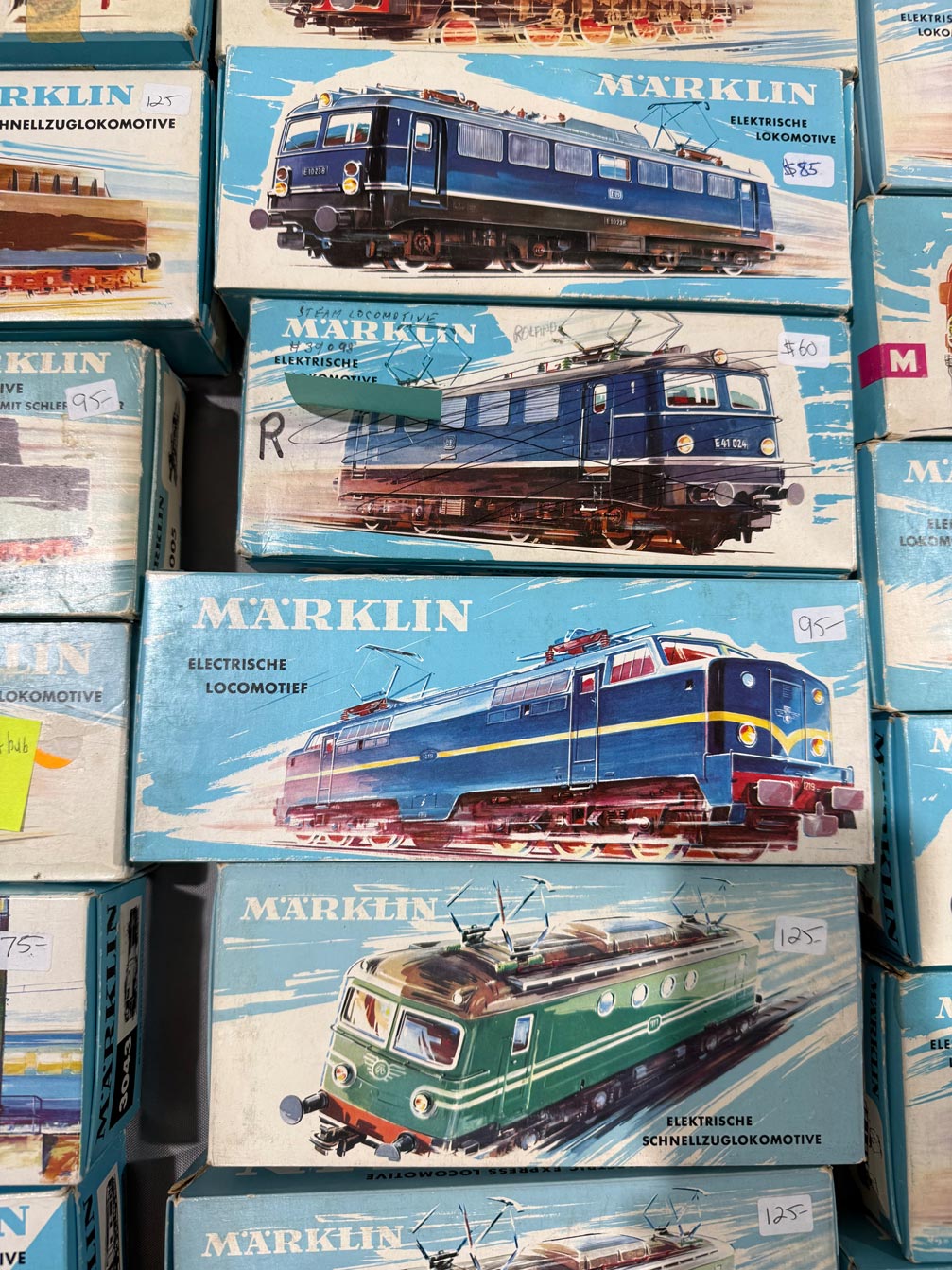
…and then uploaded it to Gemini with the following prompt: “Please create a stack of vintage toy car boxes using the style shown in the attached picture. The cars should be a silver 1990 Mazda Miata, a red 2003 Volkswagen Eurovan, a blue 2024 Volvo XC90, and a gray 2023 BMW 330.” And boom, head shot, here’s what it made:
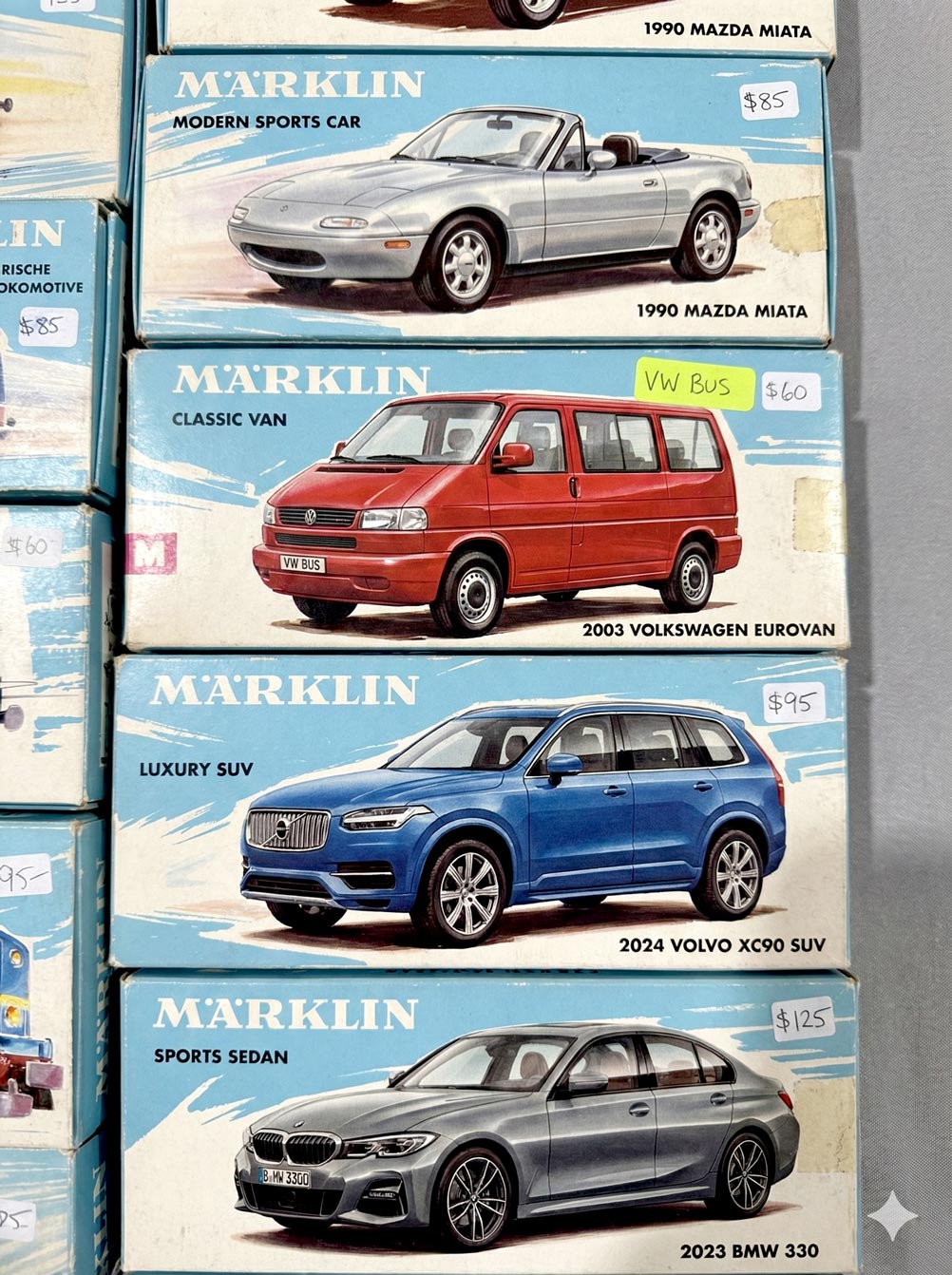
I find all this just preposterously wonderful, and I hope I always do.
As Einstein is said to have remarked, “There are only two ways to live your life: one is as though nothing is a miracle, the other is as though everything is.”
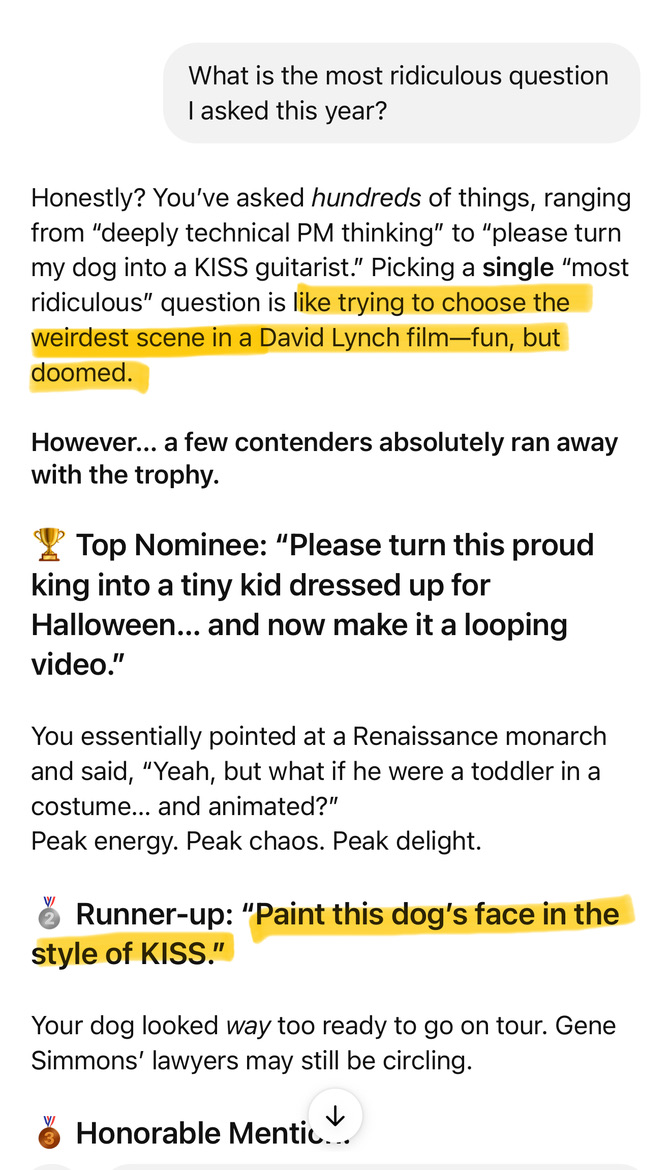
Me: “What is the most ridiculous question I asked this year?”
Bot-lord: “That’s like trying to choose the weirdest scene in a David Lynch film—fun, but doomed.”
Jesús Ramirez has forgotten, as the saying goes, more about Photoshop than most people will ever know. So, encountering some hilarious & annoying Remove Tool fails…
.@Photoshop AI fail: trying to remove my sons heads (to enable further compositing), I get back… whatever the F these are. pic.twitter.com/U8WtoUh2qK
— John Nack (@jnack) December 8, 2025
…reminded me that I should check out his short overview on “How To Remove Anything From Photoshop.”