If you’re gonna drop $110,000 on a camera (in this case the Phantom Flex4K, “a camera that debuted last year and can shoot RAW 4K video at a blazing-fast 1000 frames per second for 5 second bursts”), you may as well risk life, limb, and property to capture some amazing footage, right?
Category Archives: Photography
“How to Teach Google What a Story Is”
Here’s a great piece on Google+ Stories from The Atlantic:
Google wanted to solve a problem we can all understand. People take so, so many photographs and yet they actually do very little with them. A chosen few are posted to Instagram. Most sit in vast wastelands of thumbnails on phones or in iPhoto never to be seen after the moment of their creation.
“You come back from a trip with 300 photos and no one is trying to help you do anything with them,” said Google social web engineer Joseph Smarr. “You think about how people deal with that, and the main way is to not share anything. The second biggest thing is to share one little vignette or Instagram. Or the worst thing is they dump the whole 300 photos in an album. And that doesn’t tell a story in a meaningful way. It’s just a series of pictures. It’s just a monotone drum beat with no fills: boom-boom-boom-boom.”
So Smarr and his teammates—product designer Brett Lider and user experience designer Clement Ng—set a task for themselves. They wanted to create software that would have rhythm and flow like “actual storytelling.” Actual humanstorytelling.
Fun detail: The project was codenamed “Boswell,” after James Boswell, Samuel Johnson’s biographer. I enjoyed calling it “Boz,” after, uh, not James Boswell.
Use your smartwatch as a trigger for your phone camera
Kind of a cool new feature from the Google Camera team. PetaPixel writes,
The update adds a the ability for owners of Android Wear smartwatches to use those watches as a remote shutter for Android-powered smartphones and smartcameras. And functionality isn’t limited to simply snapping a photo for you, either: a countdown feature is also enabled, letting you know just how long you can hold off to sneak in that last-minute smile… or photo-bomb.
“RE2PECT”
A lovely bit of filmmaking from Nike in tribute to Derek Jeter:
https://www.youtube.com/watch?v=X03_bNuihLU&app=desktop
Micro-quibble: I could do without being commanded to “Pay Your Respect” at the end—but let’s let that slide.
[YouTube]
Photography: “Waves of Grain”
Yet more fascinating time-lapse sanding: filmmaker Keith Skretch writes,
To create this strata-cut animation, I planed down a block of wood one layer at a time, photographing it at each pass. The painstaking process revealed a hidden life and motion in the seemingly static grain of the wood, even as the wood itself was reduced to a mound of sawdust.
Ennio Morricone, “The Big Gundown”
Let There Be Drones: MIT researchers develop automated aerial lighting
The future gets curiouser & curiouser. I’m ready for my close-up, Mr. Skynet.
As PetaPixel writes,
The long-term goal here is to allow photographers to use a whole fleet of drones in their work, never having to set up another light again. Just indicate the desired effect, and your little Skynet lighting system gets to work creating that effect and then maintaining it automatically until you move on to the next setup.

Bayhem: Sh*t gets real
“It’s not revolutionary—just the past with a bit of stank on it…”
I love the kind of cinematographic analysis that Tony Zhou applies to the work of Michael Bay (work that’s “important, though probably for all the wrong reasons“)
[YouTube]
Lightroom team confirms perpetual access to your work
Apropos of “You should never lose access to your work, period,” this assurance is great to see:
With Lightroom 5.5, at the end of a membership, the desktop application will continue to launch and provide access to the photographs managed within Lightroom as well as the Slideshow, Web, Book or Print creations that we know many photographers painstakingly create.
In short, you pay to keep creating new work; you don’t pay just to access what you’ve already created.
What if your camera met an electric sander—really, really slowly?
This is so weirdly fascinating.
With an edge sander, half a millimeter is sanded off each work piece (wood, walnut, transformer, skull or analogue camera) and photographed. About 650 photos are made into a short film, which contrasts the inner structure of nature and technology.
It starts slowly, but stick with it.
Photography: 360º Planetary Panoramas
“Levitation photography for dummies”
A couple of ex-Microsoft Research guys put together Levitagram, an admirably dirt-simple app for creating “levitation photos.” They say they’ve gotten half a million downloads and offer a couple of interesting details:
- Automatic photo alignment
- Color matching between shots
- The ability to remotely trigger the camera by clapping your hands
- Built-in inspiration feed of work made by others using the app
[YouTube]
Short film: Nike’s crowdsourced cricketers
108 different photographers captured bowlers, batsmen and fielders performing the same pre-decided action, with rather cool results:
Ad agency JWT writes,
The final TV spot includes 1,440 images stitched together from a bank of 225,001 crowd-sourced images of cricket crazy youth. The 1,440 seamless action images, captured by both cricket crazy youth and the 108 photographers, were chosen and stitched together to complete one action of the journey of one ball from bowler to batsman to fielder to keeper.
[YouTube] [Via Ben Jones]
A drone’s-eye view from inside fireworks
Jos Stiglingh used a DJI Phantom 2 & a GoPro Hero 3 to capture this unique perspective:
[YouTube]
Crazy GoPro/Oculus rig lets you see your life from above
I’ll bet this thing is super effective at driving girls away & recording their flight:
Lost due to equipment malfunction: The part where the Cobra Kais jump this dude & throw him into a drainage culvert.
[YouTube]
#nofilter: Fake authenticity
Spredfast tested the last 100,000 images that included the #nofliter hashtag to get a sample from the platform… Turns out that 11% of photos using the #nofilter hashtag on Instagram actually have a filter, a percentage that adds up to roughly 8.6 million photos.
Conversely, a young coworker of mine mentions that she sometimes tags photos with “#vsco” so they’ll draw more views, even when she hasn’t used VSCO tools to edit them.
Some people want to project the authenticity they believe comes with being filter-free, and others want membership in the cool-kid photography club (regardless of tool choice).
Short film: Slap Fight
Another curious bit of single-serving sociology:
In the spirit of the video of strangers kissing for the first time, a filmmaker got 40 of his acquaintances together and had them to slap each other in the face.
My favorite part of playing Doc in West Side Story was, night after night, cracking my slightly pretentious friend in the mouth.
[YouTube] [Via Bridgette W]
Journalist asks artists around the world to “make me beautiful”
Interesting work from Esther Honig:
Photoshop has become a symbol of our society’s unobtainable standards for beauty. My project, Before & After, examines how these standards vary across cultures on a global level. […]
With a cost ranging from five to thirty dollars, and the hope that each designer will pull from their personal and cultural constructs of beauty to enhance my unaltered image, all I request is that they ‘make me beautiful’.
Below is a selection from the resulting images thus far. They are intriguing and insightful in their own right; each one is a reflection of both the personal and cultural concepts of beauty that pertain to their creator.
Click through to her site to see the full set.

[Via]
Watch me demo Google’s new non-destructive cloud imaging
I joined Scott Kelby & Matt Kloskowski on The Grid yesterday, starting the product demo around 12:22, getting to the new edit list at 13:55, and talking about how computer vision enables applying interesting, editable looks around 17:00.
What do you think? Where should we go from here?
(Side note/business opportunity for you: I’ll pay good money for a human bark collar that zaps me every time I say “ah.” Good lord… I will fix that, period.)
[YouTube]
Gorgeous long-exposure photos of trams covered with LEDs
Fantastic images from Krisztian Birinyi. Click through to Colossal for more. You can buy prints on 500px.


A beautiful new landing page for Google+ Photos
Google adds controls for non-destructive, cloud-synced photography
Google’s been talking about non-destructive, mobile/Web photography for a long time, but until now the benefit has been mostly theoretical: You could apply edits to your images, but you didn’t have an interface for adjusting edits or moving them among images.
Until now.
Check out the newly upgraded G+ editor (i.e. Snapseed for Mac/Windows in all but name) shows the adjustments applied to your image, letting you adjust each one, delete them, and copy them from image to image.
To use the new feature:
- Open an image in the Google+ Web editor.
- Apply one or more edits (for example, choose Black & White and then add a frame).
- Click the “Edits” button in the lower-right corner.
- Note that each step you’ve applied appears in the list.
- To change the settings of any step, click its name in the list, then click the pencil icon.
- To delete a step, click its name in the list, then click the X icon to the right of the name.
- To copy the appearance you’ve applied on one image to another, click the “Copy” button underneath the list of edits, then use the arrow icons beneath the main image to move to another image, then click “Paste edits” (or “Paste” if edits already exist on the image).
The other interesting thing is that we’re starting to analyze images & then apply editable sets of adjustments. To start we’re detecting certain landscape & urban shots, then applying an interesting combination of blurs, HDR effects, and frames. I think that the combination of computer vision (being able to identify & classify image content) + application of style + editability is really promising.
Enjoy, and please let us know what you think!

I just saved a gig of HD space in ~90 seconds
…without losing any files or visual quality. 1.5GB of storage is now down to 500MB.
- In Lightroom select some raw files.
- Select Library->Convert to DNG.
- Choose “lossy” compression.
- Choose to delete the originals (scary sounding, but it shouldn’t be).
Honestly I’m thinking the misleading “lossy” option should be called “visually lossless,” because as I demonstrated the other day, there’s almost zero chance you’ll ever be able to perceive a difference between this & the lossless compression option. (You’d have to crank up a very dark photo by more than 4 exposure stops.)
Pass it on.
Pic Nix: Anonymized Instagram shaming
Wow—there is literally no way this could end badly. PetaPixel writes,
Pic Nix is a free online service that allows you to subtly and anonymously call out your friends for committing the most heinous of Instagram crimes. Created by ad agency Allen & Gerritsen, using Pic Nix is simple: just enter the name of the offender, choose from their list of 16 offenses, select one of the pre-written captions and submit your request.
[Vimeo]
Heresy: Should I just wholesale blow away my raw files?
…and replace them with lossy DNG proxies? Would I ever see a visual difference?
A) Yes. B) No.
So, a little background:
- Lightroom & the free DNG Converter added the ability to apply lossy compression when creating DNG files.
- When you apply this compression, your raw data get mapped from a higher bit depth (10-14 bits per channel) to 8 bit.
- That sounds horrible (“what about my highlight & shadow data?!”), but the mapping (quantization) is done cleverly, before a perceptual curve is applied. (See nerdy footnote if interested.)
- You retain the same white balance flexibility you always had.
- You save a lot of disk space—between 40% & 70% in my experience. (You can also elect to save at a reduced resolution, in which case you’ll obviously save a lot more.)
What I’ve always wondered—but somehow never got around to testing—is whether I’d be able to see any visual differences between original & proxy images. In short, no.
Here’s how I tested:
- I started with a typical photo taken by my wife—one with really under- and over-lit areas.
- I imported the original file into Lightroom, then exported a copy as DNG with lossy compression, then imported the copy back into LR (so that the original & proxy would sit side-by-side).
- Just to stress-test, I cranked up the Shadows to +100 and cranked down Highlights to -100.
- Then to stress things further, I used a brush to open up the shadows by another full stop.
- I copied & pasted settings from the original to the proxy.
- Failing to notice any visual differences at all, finally I opened the original & proxy versions as layers in Photoshop. I set the blending mode of the top layer to Difference in order to highlight any variation between the two versions.
- Having failed to see any difference even then (i.e. the result of Difference appeared to be pure black—i.e., identical pixels), I applied an Exposure adjustment layer and—just for yuks—cranked it up 14 stops.

You can download the layered TIFF if you really want to compare things for yourself.
I repeated the experiment with other images, including some with subtle gradients (e.g. a moonrise at sunset). The results were the same: unless I was being pretty pathological, I couldn’t detect any visual differences at all.
I did find one case where I could see a difference between the lossy & lossless versions: My colleague Ronald Wotzlaw shot a picture of the moon, and if I opened up the exposure by more than 4 stops, I could see a difference (screenshot). For +4 stops or less, I couldn’t see any difference. Here’s the original NEF & the DNG copies (lossless, lossy) if you’d like to try the experiment yourself.

No doubt a lot of photographers will tune out these findings: “Raw is raw, lossless is lossless, the end.” Fine, though I’m bugged by some photogs’ fetishistic, gear-porn qualities (the kind of guys who insist on getting a giant lens & an offsetting full-frame camera) & old-wives’ mentalities (“You can’t reformat your memory card with your computer: this one time, in 2003, my buddy tried it and it made his house burn down…”).
So, to each his or her own. As for me, I’m really, really encouraged by these findings, and I plan to start batch-converting my DNGs to be “lossy” (a great misnomer, it seems).
——
Nerdy footnote: Zalman Stern spent many years building Camera Raw & now works with me on Google Photos. He’s added a bit more detail about how things work:
“Downsampling” is reducing the number of pixels. Reducing the bit-depth is “quantizing.” The quantization is done in a perceptual space, which results in less visible loss than doing quantization in a linear space. Raw data of the sensor is linear where the data going into a JPEG has a perceptual curve applied. (“Gamma” and sRGB tone curves are examples of the general thing around perceptual curves.)
Dynamic range should be preserved and some small amount of quantization error is introduced. (Spatial compression artifacts, as in normal JPEG, are a different form of quantization error. That happens with proxies too.) Quantization error is interesting in that if it is done without patterning, it takes a very large amount of it to be visible.
The place you’d look for errors with lossy raw technology are things like noise in the shadows and patterning via color casts in highlights after a correction. That is the quantization error gets magnified and somehow ends up happening differently for different colors.
Inside Paul Trillo’s spinning world
In an interview on Vimeo, the filmmaker looks behind the scenes of making a crazy multi-phone archway to capture NYC street life:
[Vimeo]
Photography: “A Tribute to Discomfort”
From 14-year-old dropout to mountain adventurer to NatGeo cover photographer, Cory Richards gives a lightning tour of his life while meditating on how photography connects us. PopPhoto notes,
There are not many people who would survive a deadly avalanche, and then get up and keep climbing. There are fewer still who would keep taking photos. But that’s exactly what Richards did, and what part of what makes his photography so impressive.
You can read more in an interview with Cory on NatGeo’s site.

[Vimeo]
Photography: “Koh Yao Noi”
Treat yourself to five minutes of gorgeous aerial photography from Thailand courtesy of Philip Bloom together with After Effects (lens correction), Colorista (color correction), a Phantom 2 drone (featuring prop guards while buzzing young children), and a GoPro. (More info is in Philip’s blog post.)
[Vimeo]
Photoshop sneak peek: Focus masking
Looks like a neat way to differentiate in- vs. out-of-focus regions.
[YouTube] [Via Aravind Krishnaswamy]
D-Day remembered in illustration & photographs
- For D-Day Landing Sites Then and Now: Normandy Beaches in 1944 and 70 Years Later, Reuters photographer Chris Helgren compiled archival photos & then shot the same locations as they appear today.
- A pair of British artists, later assisted by some 500 volunteers, drew some 9,000 silhouettes on a D-Day landing beach to mark international Peace Day.

Quick tips: “5 Things You Need To Know About Your Lightroom 5 Catalog”
Good, solid tips from Terry White:
- Your Lightroom Catalogs can be stored anywhere. This means that, so long as you know you’ll have Internet, they could technically be stored on Dropbox, Google Drive, Creative Cloud, or the upcoming iCloud Drive to make for easy syncing across computers.
- “Automatically write changes to XMP” preference makes sure that edits in Lightroom carry over to other Adobe programs such as Photoshop and Bridge.
- “Optimize Catalog” command removed unused caches to speed up catalog performance.
- Advice on how to make the most of Adobe’s impressive Smart Previews feature.
- Move media across your drive directory using only Lightroom, not something such as Windows Explorer or Finder, both of which can leave data behind.
[YouTube]
Tongue-in-cheek “Portrait of an Instagram Artist”
Reminds me of one or two blowhard-y pro photographers I’ve met. 😉
[YouTube] [Via Franck Payen]
GoPro Friday: Would you, could you…
A non-destructive Snapseed engine arrives on iOS
I’m delighted to say that we’ve rewritten the Snapseed editing pipeline from the ground up, making it non-destructive & setting the stage for a really exciting future. Just yesterday it arrived on iOS inside the new Google+ app (which, by the way, offers to back up all your photos & videos for free). Engineer Todd Bogdan writes,
Easily perfect your photos with a powerful new editing suite in the Google+ app for iPhone and iPad. With these Snapseed-inspired tools you can crop, rotate, add filters and 1-tap enhancements like Drama, Retrolux, and HDR Scape, and more. Add a personal touch to your photos, then easily share them with friends and family. As an added bonus: you can start editing on one device, continue on another, and revert to your originals at any time!
The overall workflow is a work in progress (e.g. right now you don’t get an interface for re-editing your adjustments), but stay tuned: we’re starting to cook with gas.
Instagram adds sliders
For years at Adobe I’d joke, “If we’d come up with the idea for Instagram, we still wouldn’t have shipped it, because we’d still be debating, ‘Hmm—do you think we need 16 sliders per filter… or is it more like 32?’ The idea of no sliders at all (which makes people feel more confident, because you can’t feel too responsible for getting things really ‘right.'”
Well, there goes that joke: Instagram 6.0 (coming out today) adds the ability to fade filters plus make 9 or so adjustments.
If the new effects feel a bit buried in the editing flow, that’s the point. Systrom tells me “I believe that flexibility and simplicity are often at odds.” So instead of cramming the features into the main composition flow, they’re hidden behind the wrench so hardcore users can dig them out, but they don’t complicate things for casual users.
It’ll be interesting to see how people respond to these.
Quick demo: Selective color manipulation in Photoshop
A good, quick tour of some fundamentals—plus the often-forgotten (by me) On-Image Adjustment Tool:
[YouTube]
Demo: Transferring photographic style among faces
My old Adobe colleague Sylvain Paris & a team at MIT have long worked on enabling style transfer among images (see demos from 2010 & last year), and now they’re demonstrating new progress in a new SIGGRAPH paper:
Using off-the-shelf face recognition software, they first identify a portrait, in the desired style, that has characteristics similar to those of the photo to be modified. “We then find a dense correspondence — like eyes to eyes, beard to beard, skin to skin — and do this local transfer,” Shih explains.
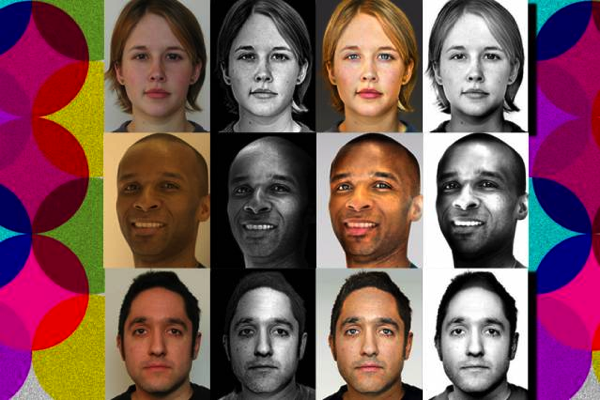
Check out this quick demo, including the ability to apply style to video (provided it’s a headshot):
Neat stuff. [YouTube]
Spin me right ’round: Neat multi-camera projects
Paul Trillo worked with Nokia to rig up 50 Lumia 1020 cameras & capture dizzying slices of New York life, complete with snatches of audio.
https://www.youtube.com/watch?v=LmDNjZM3Tu8
Here’s a peek behind the scenes:
https://www.youtube.com/watch?v=hHVkNcvxMZM
Elsewhere Jonas Ginter made a 360º tiny planet using an array of six GoPro cameras:
Cruising over lower Manhattan in a wingsuit
Watching this I couldn’t help wishing that SNL’s Stefon was there to chronicle New York’s hottest new club, Whoooosh!, currently descending onto a barge in the East River…
Quick demo: Using Photoshop’s Content-Aware Scale
Can you turn a square Instagram pic into an interesting landscape? Bryan O’Neil Hughes shows you how:
[YouTube]
Stephen Colbert tackles absurd photography patents
“It’s not ‘bullshit,’ but rather ‘male bovine fecal matter extruded on a longitudinal axis.’”
Enjoy. 🙂
[Via]
Check out the new Google+ Stories
If you’re like me (and most people), you take a trip, take a bunch of photos & videos, never really go through them, think “Oh, I really should make/share a gallery or something,” and then fail to do so—maybe feeling vaguely guilty about it.
Google+ Stories changes that.
My boss Anil writes,
No more sifting through photos for your best shots, racking your brain for the sights you saw, or letting your videos collect virtual dust. We’ll just gift you a story after you get home. This way you can relive your favorite moments, share them with others, and remember why you traveled in the first place.
Here’s a sample story made from Anil’s family photos. My colleague Ben says,
“We’ve added not just the photos and videos but the travel information, places and restaurants you went to along the way,” says Google + product manager Ben Eidelson. “We’ve given this all to you automatically when you’ve gotten back from whatever you’re doing so you don’t have to stress about that on top of doing your laundry and unpacking.”
Here’s a nice summary from Ben & USA Today’s Jefferson Graham:
Here’s the new Analog Efex Pro 2 in action
“Is Nik dead?”
Nope, not even a little. 🙂
Google’s photography evangelist, Brian Matiash, joined Scott Kelby & Matt Kloskowski to present the new Analog Efex Pro on last week’s episode of The Grid. Check out the new stuff in action as Brian answers questions from the audience. (You can jump ahead to around 17:20 in case the embed below doesn’t do that automatically.)
[YouTube]
“A Step Forward Into The Past”: Analog Efex Pro 2 reviewed
Gannon Burgett writes in PetaPixel,
After spending some time with the program, it seems as though Analog Efex Pro II is a great deal speedier than its predecessor. Not only is speed improved though, it offers a much more diverse array of filter options and far more precision in terms of nailing the toning of an image, adding grain, etc.
Overall, it’s a rather impressive improvement and while I was admittedly skeptical at first, it’s most certainly worthy of calling itself 2.0.
Three quick improvements to Google+ Photos on the Web
My new team is constantly working to polish the Google+ Photos experience. Recently we’ve introduced three small enhancements that make it easier to find, manage, and download your files:
- Easily find old photos you’ve just uploaded with the “Recently added” view (available via the “More” menu within Photos). This view sorts your collection according to upload date, rather than capture date, so all the images you’ve just added appear first.

- Want to see all the images from a particular camera model or manufacturer? Open any photo, look in the “Photo details” section, then click the name of your camera (for example “Nexus 5”). Google will search your library and show all matching images.

- Google+ can store full-resolution copies of your images, including RAW originals. That’s great, but how do you download the originals? Open any image in Google+ Photos, then choose “More->Download photo,” then choose “Original.”

As I say, the team is constantly cranking away, so let us know what else you’d like to see!
Introducing Analog Efex Pro 2, part of the Nik Collection
I’m delighted to announce that Google has just released Analog Efex Pro 2.0 for Mac & Windows, a big free update to the Nik Collection. I think you’re going to love the way you can sculpt blurs, make cool diptychs & triptychs, create really interesting double exposures, and more.
- New control points – Delivering one of the most requested features by our users, control points let you fine-tune the presence of Photo Plates, Light Leaks, the Dirt & Scratches filter, and Basic Adjustments using our U Point® Technology.
- New Cameras and Presets – Expanding on the Cameras from the previous version, you now have access to a larger assortment of new Cameras and presets that take advantage of the powerful filters of Analog Efex Pro 2, such as Black and White, Subtle Bokeh, and Simple Color.
- New creative ways to present your images – We’ve also built three new filters into the Camera Kit, that let you showcase your photos in truly creative ways with Motion Blur, Multilens, and Double Exposure.

You can download the update immediately via the Try Now button. (It’ll recognize your license if you’ve already bought the collection.)
Meanwhile, check out my colleague Brian Matiash putting AEP through its paces in this series:
Enjoy, and please let us know what you think!
[YouTube]
Photographers: Check out “The Grid,” live this afternoon
We’ll be showing something cool on Kelby TV’s The Grid (broadcasting live at 4pm Eastern/1pm Pacific). Stay tuned!
The Making Of Edward Burtynsky’s “Watermark”
Huge photography, hugely important subject:
Photographer Edward Burtynsky and director Jennifer Baichwal give us an inside look into the making of their cinematic feat, Watermark. The documentary was shot using groundbreaking 5K ultra high definition photography and aerial technology and explores mankind’s complicated relationship with water, using a diverse set of stories that challenge how easily we take it for granted.
[Via]
“Turn your damn phone or I’ll murder your family”
An interesting take on Vivian Maier
I really enjoyed hearing the enigmatic street photographer’s old neighbors remember her—and hearing how the remembrance brought them together.

Field Notes Shelterwood
Though it veers a bit close to fetishizing materials, I found this short film introducing a new notebook line compelling:
Thanks to the natural texture of the wood, no two “Shelterwood” memo books are the same but all share their origin in the same few hand-picked cherry trees from Northern Illinois and Southern Wisconsin. The wood covers are sustainably produced, with just a few 60″ logs converted into 5000 feet of “Sheer Veneer,” with very little waste (the waste is recycled into wood pellets to heat the factory!). The process can be seen in the film above.
[Vimeo]