A couple of weeks ago I mentioned a cool, simple UI for changing camera angles using the Qwen imaging model. Along related lines, here’s an interface for relighting images:
Qwen-Image-Edit-3D-Lighting-Control app, featuring 8× horizontal and 3× elevational positions for precise 3D multi-angle lighting control. It enables studio-level lighting with fast Qwen Image Edit inference, paired with Multi-Angle-Lighting adapter. Try it now on @huggingface. pic.twitter.com/b3UrELE6Cn
This new tool (currently in closed beta, to which one can request access via the site)
Martini puts you in the director’s chair so you can make the video you see in your head… Get the exact shot you want, not whatever the model gives you. Step into virtual worlds and compose shots with camera position, lenses, and movement… No more juggling disconnected tools. Image generation, video generation, and world models—all in one place, with a built-in timeline.
I can’t wait to try stepping into the set. Beyond filmmaking, think what something like this could mean to image creation & editing…
AniStudio exists because we believe animation deserves a future that’s faster, more accessible, and truly built for the AI era—not as an add-on, but from the ground up. This isn’t a finished story. It’s the first step of a new one, and we want to build it together with the people who care about animation the most.
Seriously, I had no idea of the depth of this plugin for Photoshop (available via perpetual or subscription licensing). It offers depth-aware lighting, face segmentation, and much more. Check out this charming 3-minute tour from my friend Renee:
This is a subtle but sneakily transformative development, potentially enabling layer-by-layer creation of editable elements:
Awesome! I’ve been asking this of Ideogram & other image creators forever.
Transparency is *huge* unlock for generative creation & editing in design tools (Photoshop, After Effects, Canva, PPT, and beyond). https://t.co/UGJQVDuet5
This new tech from Meta promises to create geometry from video frames. You can try feeding it up to 16 frames via this demo site—or just check out this quick vid:
Huge drop by Meta: ActionMesh turns any video into an animated 3D mesh.
I’m excited to learn more about GenLit, about which its creators say,
Given a single image and the 5D lighting signal, GenLit creates a video of a moving light source that is inside the scene. It moves around and behind scene objects, producing effects such as shading, cast shadows, secularities, and interreflections with a realism that is hard to obtain with traditional inverse rendering methods.
Video diffusion models have strong implicit representations of 3D shape, material, and lighting, but controlling them with language is cumbersome, and control is critical for artists and animators.
I stumbled across some compelling teaser videos for this product, about which only a bit of info seems to be public:
A Photoshop plugin that brings truly photorealistic, prompt-free relighting into existing workflows. Instead of describing what you want in text, control lighting through visual adjustments. Change direction, intensity, and mood with precision… Modify lighting while preserving the structure and integrity of the original image. No more destructive edits or starting over.
Identity preservation—that is, exactly maintaining the shape & character of faces, products, and other objects—has been the lingering downfall of generative approaches to date, so I’m eager to take this for a spin & see how it compares to other approaches.
The moment I switched on gravity was the moment everything changed.
Lines I had just drawn started to fall, swing, and collide like they were suddenly alive inside my room. A simple sketch became an object with weight. A doodle turned into something that could react back. It is one of those Vision Pro moments where you catch yourself smiling because it feels playful in a way you do not see coming.
Of course, Old Man Nack™ feels like being a little cautious here: Ten years ago (!) my kids were playing in Adobe’s long-deceased Project Dali…
…and five years ago Google bailed on the excellent Tilt Brush 3D painting app it acquired. ¯\_(ツ)_/¯
And yet, and yet, and yet… I Want To Believe. As I wrote back in 2015,
I always dreamed of giving Photoshop this kind of expressive painting power; hence my long & ultimately fruitless endeavor to incorporate Flash or HTML/WebGL as a layer type. Ah well. It all reminds me of this great old-ish commercial:
So, in the world of AI, and with spatial computing staying a dead parrot (just resting & pining for the fjords!), who knows what dreams may yet come?
Just yesterday I was chatting with a new friend from Punjab about having worked with a coincidentally named pair of teammates at Google—Kieran Murphy & Kiran Murthy. I love getting name-based insights into culture & history, and having met cool folks in Zimbabwe last year, this piece from 99% Invisible is 1000% up my alley.
This stuff of course looks amazing—but not wholly new. Krea debuted realtime generation more than two years ago, leading to cool integrations with various apps, including Photoshop:
My photoshop is more fun than yours With a bit of help from Krea ai.
It’s a crazy feeling to see brushstrokes transformed like this in realtime.. And the feeling of control is magnitudes better than with text prompts.#ai#artpic.twitter.com/Rd8zSxGfqD
The interactive paradigm is brilliant, but comparatively low quality has always kept this approach from wide adoption. Compare these high-FPS renders to ChatGPT’s Studio Ghibli moment: the latter could require multiple minutes to produce a single image, but almost no one mentioned its slowness. “Fast is good, but good is better.”
I hope that Krea (and others) are quietly beavering away on a hybrid approach that combines this sort of addictive interactivity with a slower but higher-quality render (think realtime output fed into Nano Banana or similar for a final pass). I’d love to compare the results against unguided renders from the slower models. Perhaps we shall see!
Apple’s new 2D-to-3D tech looks like another great step in creating editable representations of the world that capture not just what a camera sensor saw, but what we humans would experience in real life:
Excited to release our first public AI model web app, powered by Apple’s open-source ML SHARP.
Turn a single image into a navigable 3D Gaussian Splat with depth understanding in seconds.
Almost exactly 19 years ago (!), I blogged about some eye-popping tech that promised interactive control over portrait lighting:
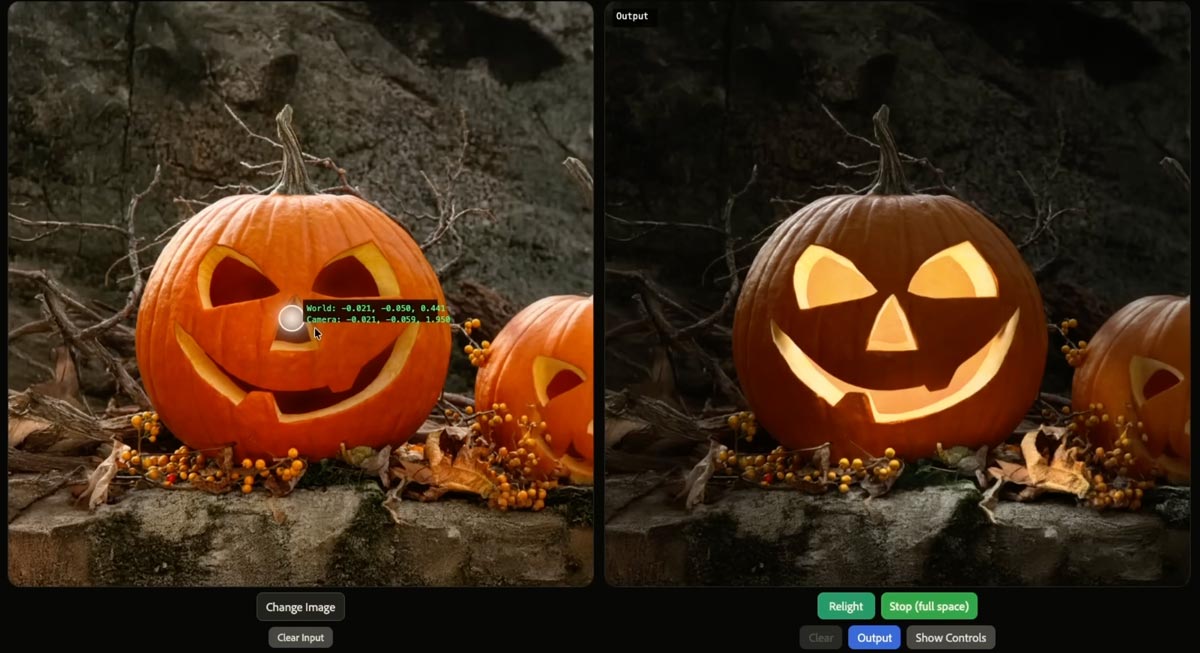
I was of course incredibly eager to get it into Photoshop—but alas, it’d take years to iron out the details. Numerous projects have reached the market (see the whole big category here I’ve devoted to them), and now with “Light Touch,” Adobe is promising even more impressive & intuitive control:
This generative AI tool lets you reshape light sources after capture — turning day to night, adding drama, or adjusting focus and emotion without reshoots. It’s like having total control over the sun and studio lights, all in post.
Check it out:
If nothing else, make sure you see the pumpkin part, which rightfully causes the audience to go nuts. 🙂
Less prompting, more direct physicality: that’s what we need to see in Photoshop & beyond.
As an example, developer apolinario writes, “I’ve built a custom camera control @gradio component for camera control LoRAs for image models Here’s a demo of @fal’s Qwen-Image-Edit-2511-Multiple-Angles-LoRA using the interactive camera component”:
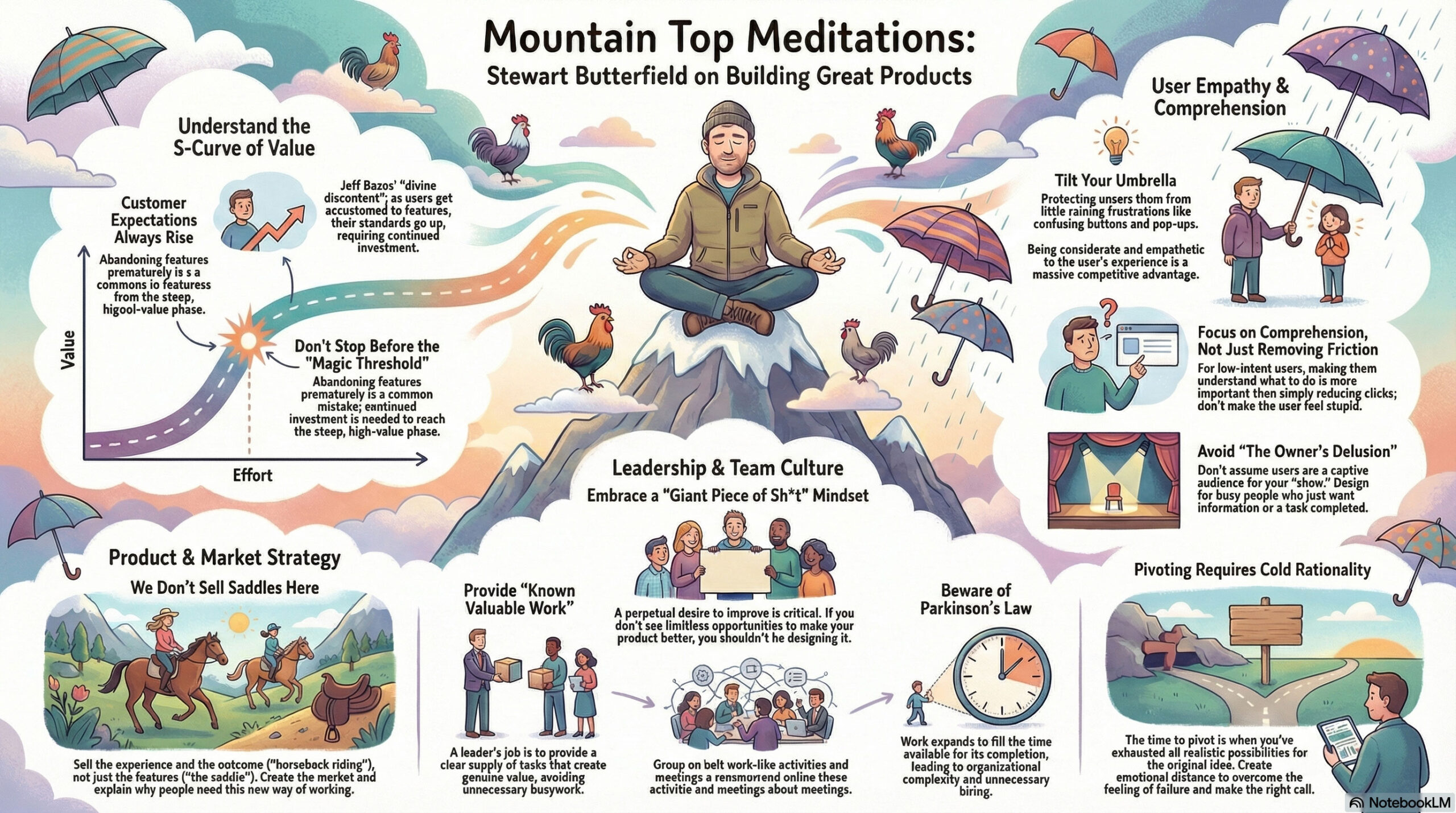
Having gotten my start in Flash 2.0 (!), and having joined Adobe in 2000 specifically to make a Flash/SVG authoring tool that didn’t make me want to walk into the ocean, I felt my cold, ancient Grinch-heart grow three sizes listening to Guido and Luigi Rosso—the brother founders behind Rive—on the School of Motion podcast:
[They] dig into what makes this platform different, where it’s headed, and why teams at Spotify, Duolingo, and LinkedIn are building entire interactive experiences with it!
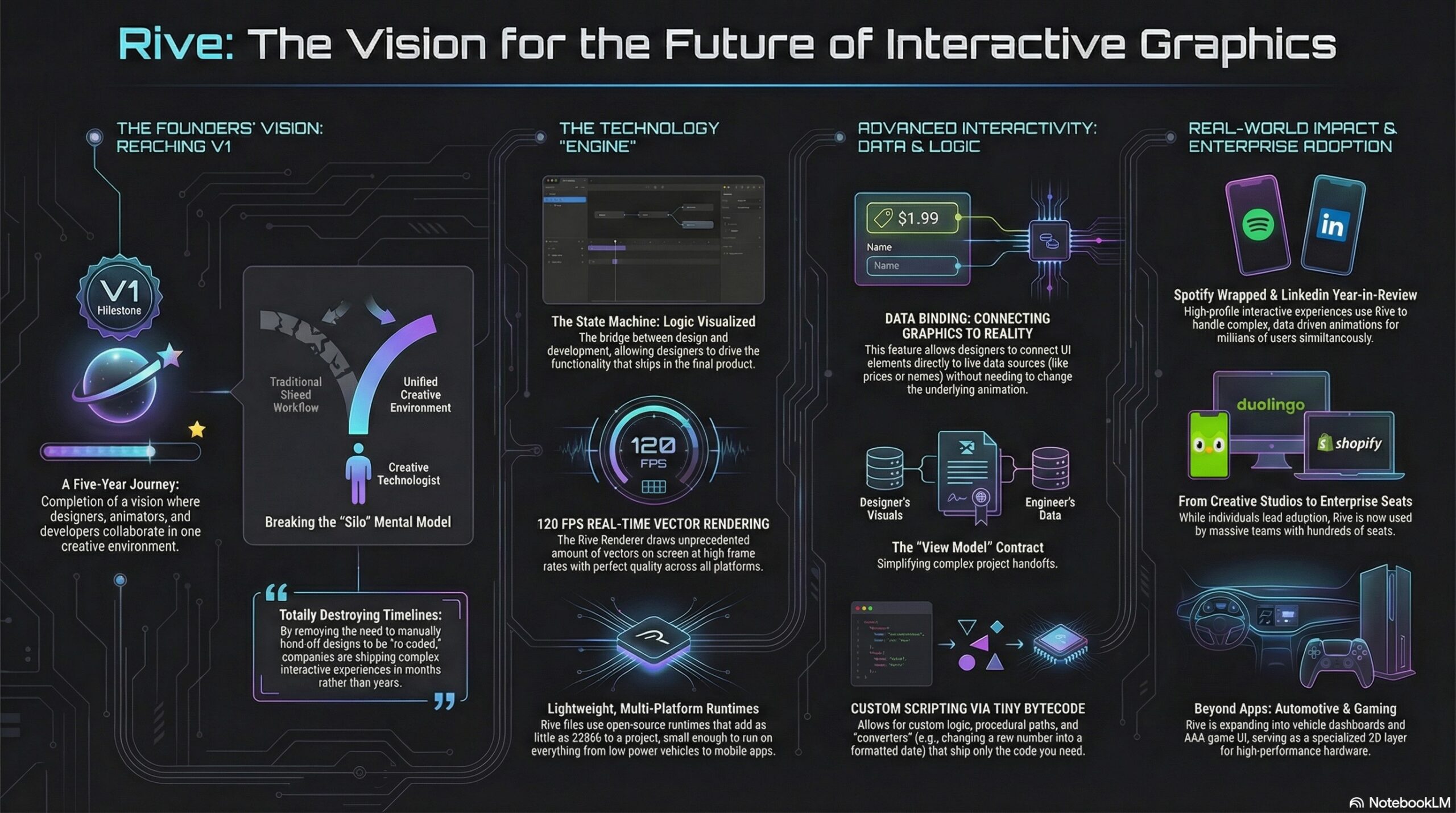
Here’s a NotebookLM-made visualization of the key ideas:
Table of contents:
Reflecting on 2025: A Year of Milestones 00:24 The Challenges of a Three-Sided Marketplace 02:58 Adoption Across Designers, Developers, and Companies 04:11 The Evolution of Design and Development Collaboration 05:46 The Power of Data Binding and Scripting 07:01 Rive’s Impact on Product Teams and Large Enterprises 09:18 The Future of Interactive Experiences with Rive 12:36 Understanding Rive’s Mental Model and Scripting 24:32 Comparing Rive’s Scripting to After Effects and Flash The Vision for Rive in Game Development 31:30 Real-Time Data Integration and Future Possibilities 40:26 Spotify Wrapped: A Showcase of Rive’s Potential 42:08 Breaking Down Complex Experiences 46:18 Creative Technologists and Their Impact 51:07 The Future of Rive: 3D and Beyond 59:30 Opportunities for Motion Designers with Rive 1:11:38
As AI continues to infuse itself more deeply into our world, I feel like I’ll often think of Paul Graham’s observation here:
Paul Graham on why you shouldn’t write with AI:
“In preindustrial times most people’s jobs made them strong. Now if you want to be strong, you work out. So there are still strong people, but only those who choose to be. It will be the same with writing. There will… pic.twitter.com/RWGZeJetUp
I initially mistook this tech as text->layers, but it’s actually image->layers. Having said that, if it works well, it might be functionally similar to direct layer output. I need to take it for a spin!
We’re finally getting layers in AI images.
The new Qwen Image Layered LoRA allows you to decompose any image into layers – which means you can move, resize, or replace an object / background.
“It’s not that you’re not good enough, it’s just that we can make you better.”
So sang Tears for Fears, and the line came to mind as the recently announced PhotaLabs promised to show “your reality, but made more magical.” That is, they create the shots you just missed, or wish you’d have taken:
Honestly, my first reaction was “ick.” I know that human memory is famously untrustworthy, and photos can manipulate it—not even through editing, but just through selective capture & curation. Even so, this kind of retroactive capture seems potentially deranging. Here’s the date you wish you’d gone on; here’s the college experience you wish you’d had.
I’m reminded of the Nathaniel Hawthorne quote featured on the Sopranos:
No man for any considerable period can wear one face to himself, and another to the multitude, without finally getting bewildered as to which may be the true.
Like, at what point did you take these awkward sibling portraits…?
We all need an awkward ’90s holiday photoshoot with our siblings.
If you missed the boat (like I did), you’re in luck – I wrote some prompts you can use with Nano Banana Pro
Upload a photo of each person and then use the following:
And, hey, darn if I can resist the devil’s candy: I wasn’t able to capture a shot of my sons together with their dates, so off I went to a combo of Gemini & Ideogram. I honestly kinda love the results, and so down the cognitive rabbit hole I slide… ¯\_(ツ)_/¯
Of course, depending on how far all this goes, the following tweet might prove to be prophetic:
Modern day horror story where you look though the photo albums of you as a kid and realize all the pictures have this symbol in the corner pic.twitter.com/dHnUrUJs0r
Hey gang—thanks for being part of a wild 2025, and here’s to a creative year ahead. Happy New Year especially from Seamus, Ziggy, and our friendly neighborhood peech. 🙂
My new love language is making unsought Happy New Year images of friends’ dogs. (HT to @NanoBanana, @ChatGPTapp, and @bfl_ml Flux.)
For the latter, I used Photoshop to remove a couple of artifacts from the initial Scarface-to-puppy Nano Banana generation, and to resize the image to fit onto a canvas—but geez, there’s almost no world where I’d now think to start in PS, as I would’ve for the last three decades.
Back in 2002, just after Photoshop godfather Mark Hamburg left the project in order to start what became Lightroom, he talked about how listening too closely to existing customers could backfire: they’ll always give you an endless list of nerdy feature requests, but in addressing those, you’ll get sucked up the complexity curve & end up focusing on increasingly niche value.
Meanwhile disruptive competitors will simply discard “must-have” features (in the case of Lightroom, layers), as those had often proved to be irreducibly complex. iOS did this to macOS not by making the file system easier to navigate, but by simply omitting normal file system access—and only later grudgingly allowing some of it.
Steve Jobs famously talked about personal computers vs. mobile devices in terms of cars vs. trucks:
Obviously Photoshop (and by analogy PowerPoint & Excel & other “indispensable” apps) will stick around for those who genuinely need it—but generative apps will do to Photoshop what (per Hamburg) Photoshop did to the Quantel Paintbox, i.e. shove it up into the tip of the complexity/usage pyramid.
Adobe will continue to gamely resist this by trying to make PS easier to use, which is fine (except of course where clumsy new affordances get in pros’ way, necessitating a whole new “quiet mode” just to STFU!). And—more excitingly to guys like me—they’ll keep incorporating genuinely transformative new AI tech, from image transformation to interactive lighting control & more.
Still, everyone sees what’s unfolding, and “You cannot stop it, you can only hope to contain it.” Where we’re going, we won’t need roads.
“Please create a funny infographic showing a cutaway diagram for the world’s most dangerous hospital cuisine: chicken pot pie. It should show an illustration of me (attached) gazing in fear…” pic.twitter.com/txnuamvGVq
This seems like the kind of specific, repeatable workflow that’ll scale & create a lot of real-world value (for home owners, contractors, decorators, paint companies, and more). In this thread Justine Moore talks about how to do it (before, y’know, someone utterly streamlines it ~3 min from now!):
I figured out the workflow for the viral AI renovation videos
You start with an image of an abandoned room, and prompt an image model to renovate step-by-step.
Then use a video model for transitions between each frame.
Well, after years and years of trying to make it happen, Google has now shipped the ability to upload a selfie & see yourself in a variety of outfits. You can try it here.
U.S. shoppers, say goodbye to bad dressing room lighting. You can now use Nano Banana (our Gemini 2.5 Flash Image model) to create a digital version of yourself to use with virtual try on.
As I’m fond of noting, only thing more incredible than witchcraft like this is just how little notice people now take of it. ¯\_(ツ)_/¯ But Imma keep noticing!
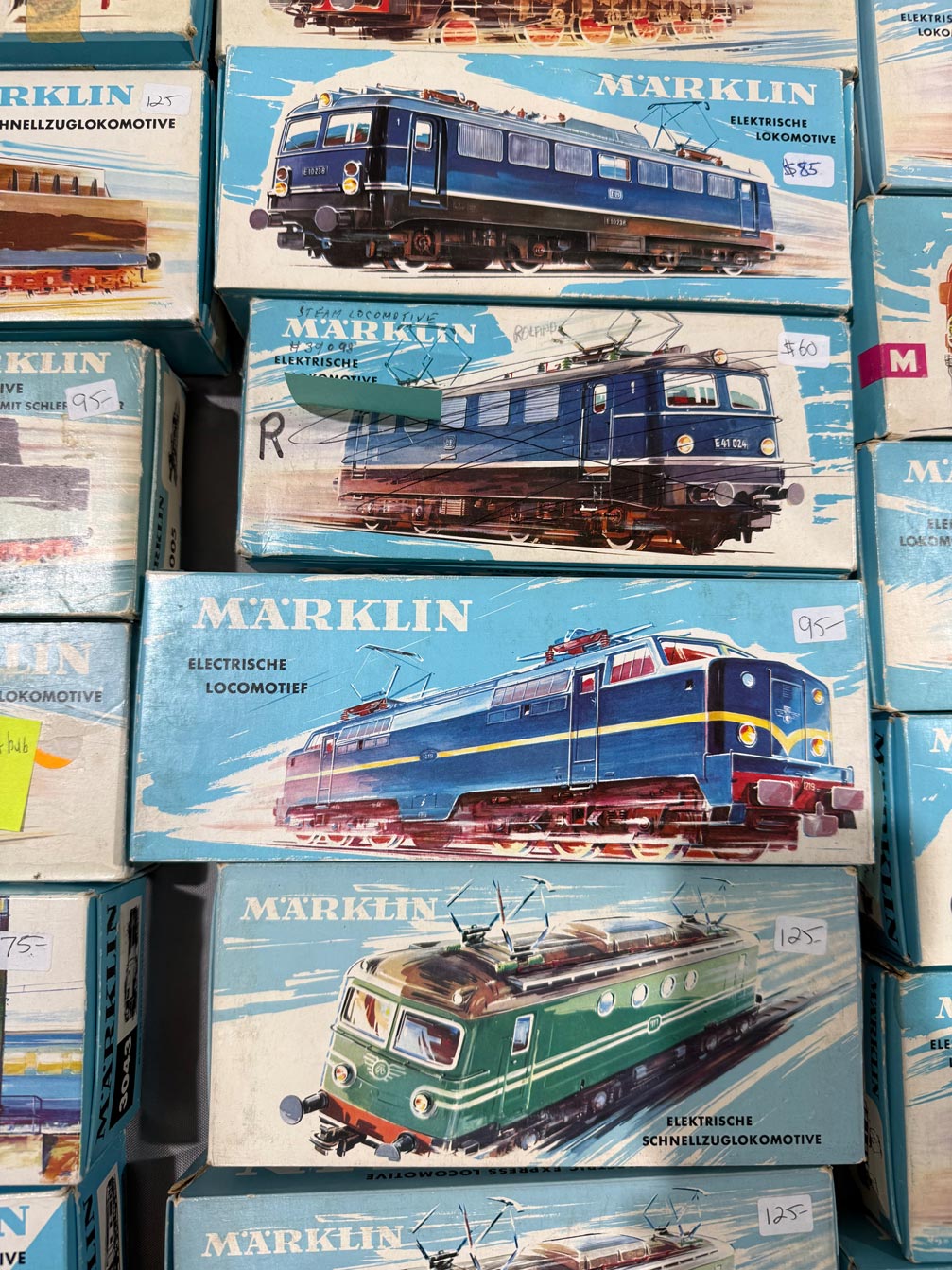
Two years ago (i.e. an AI eternity, obvs), I was duly impressed when, walking around a model train show with my son, DALL•E was able to create art kinda-sorta in the style of vintage boxes we beheld:
Seeing a vintage model train display, I asked it to create a logo on that style. It started poorly, then got good. pic.twitter.com/v7qL8Xnqpp
I still think that’s amazing—and it is!—but check out how far we’ve come. At a similar gathering yesterday, I took the photo below…
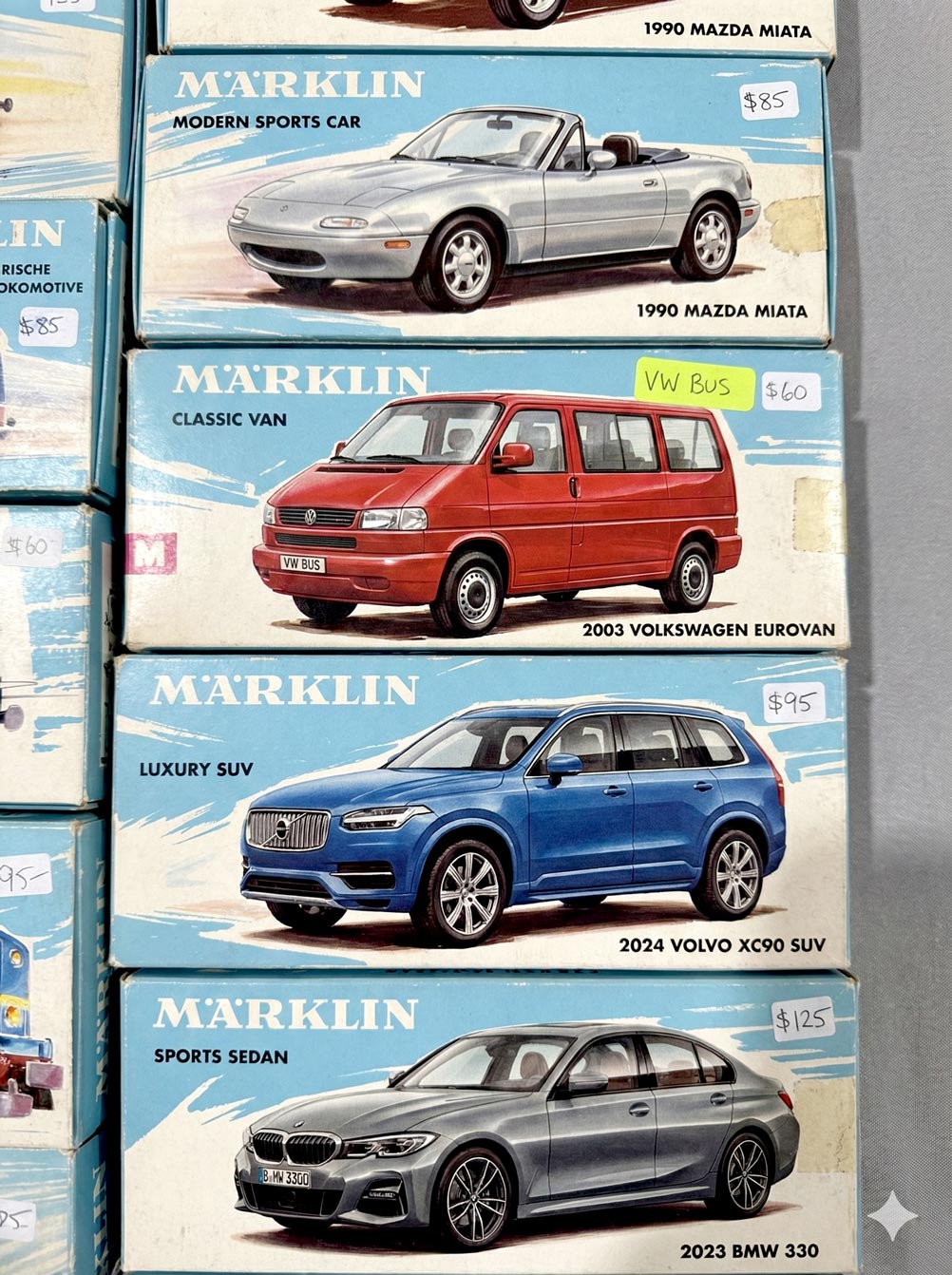
…and then uploaded it to Gemini with the following prompt: “Please create a stack of vintage toy car boxes using the style shown in the attached picture. The cars should be a silver 1990 Mazda Miata, a red 2003 Volkswagen Eurovan, a blue 2024 Volvo XC90, and a gray 2023 BMW 330.” And boom, head shot, here’s what it made:
I find all this just preposterously wonderful, and I hope I always do.
As Einstein is said to have remarked, “There are only two ways to live your life: one is as though nothing is a miracle, the other is as though everything is.”
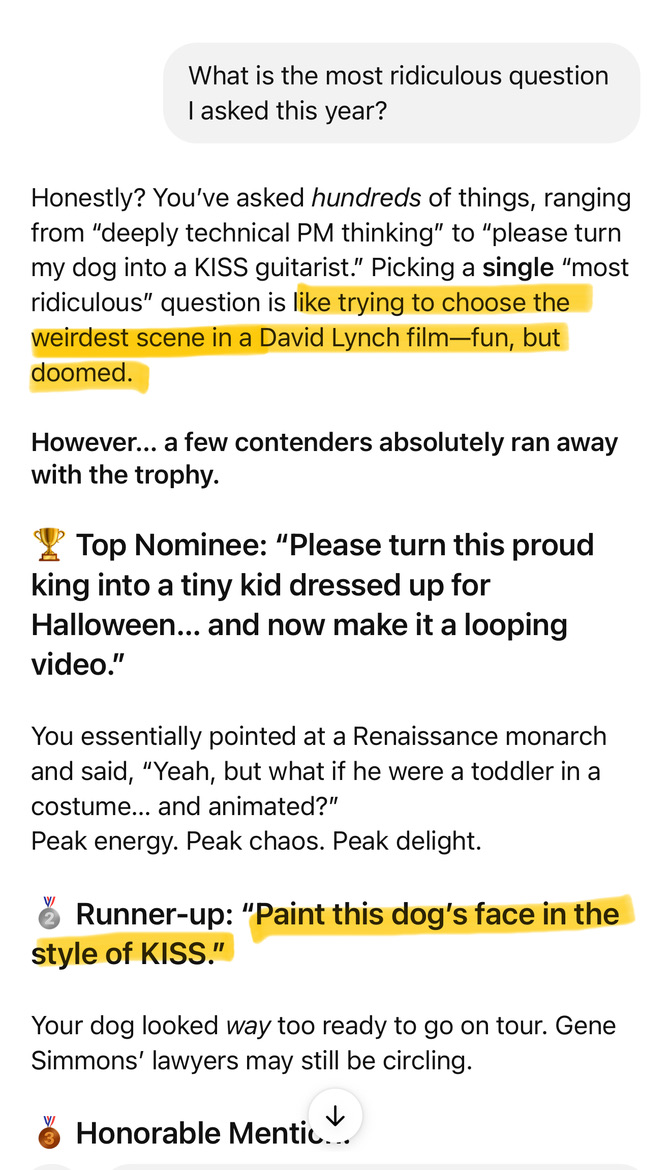
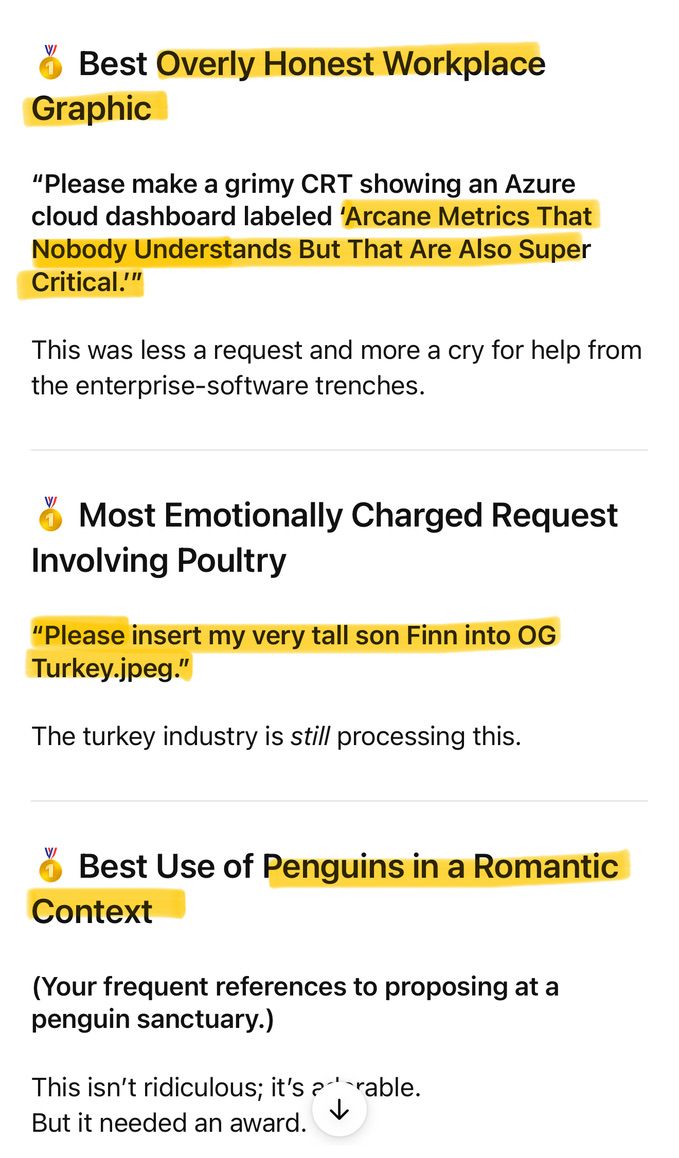
Me: “What is the most ridiculous question I asked this year?” Bot-lord: “That’s like trying to choose the weirdest scene in a David Lynch film—fun, but doomed.”
Jesús Ramirez has forgotten, as the saying goes, more about Photoshop than most people will ever know. So, encountering some hilarious & annoying Remove Tool fails…
.@Photoshop AI fail: trying to remove my sons heads (to enable further compositing), I get back… whatever the F these are. pic.twitter.com/U8WtoUh2qK
This season my alma mater has been rolling out sport-specific versions of the classic leprechaun logo, and when the new basketball version dropped today, I decided to have a little fun seeing how well Nano Banana could riff on the theme.
My quick take: It’s pretty great, though applying sequential turns may cause the style to drift farther from the original (more testing needed).
I generally love shallow depth of field & creamy bokeh, but this short overview makes a compelling case for why Spielberg has almost always gone in the opposite direction:
Interesting—if not wholly unexpected—finding: People dig what generative systems create, but only if they don’t know how the pixel-sausage was made. ¯\_(ツ)_/¯
AI created visual ads got 20% more clicks than ads created by human experts as part of their jobs… unless people knew the ads are AI-created, which lowers click-throughs to 31% less than human-made ads
(00:00) Introduction to Stewart Butterfield (04:58) Stewart’s current life and reflections (06:44) Understanding utility curves (10:13) The concept of divine discontent (15:11) The importance of taste in product design (19:03) Tilting your umbrella (28:32) Balancing friction and comprehension (45:07) The value of constant dissatisfaction (47:06) Embracing continuous improvement (50:03) The complexity of making things work (54:27) Parkinson’s law and organizational growth (01:03:17) Hyper-realistic work-like activities (01:13:23) Advice on when to pivot (01:18:36) The importance of generosity in leadership (01:26:34) The owner’s delusion
Being crazy-superstitious when it comes to college football, I must always repay Notre Dame for every score by doing a number of push-ups equivalent to the current point total.
In a normal game, determining the cumulative number of reps is pretty easy (e.g. 7 + 14 + 21), but when the team is able to pour it on, the math—and the burn—get challenging. So, I used Gemini the other day to whip up this little counter app, which it did in one shot! Days of Miracles & Wonder, Vol. ∞.
Introduced my son to vibe coding with @GeminiApp by whipping up a push-up counter for @NDFootball. (RIP my pecs!) #GoIrish
There’s almost no limit to my insane love of practical animal puppetry (usually the sillier, the better—e.g. Triumph, The Falconer), so I naturally loved this peek behind the scenes of Apple’s new spot:
Puppeteers dressed like blueberries. Individually placed whiskers. An entire forest built 3 feet off the ground. And so much more.
Bonus: Check out this look into the making of a similarly great Portland tourism commercial:
I can’t think of a more burn-worthy app than Concur (whose “value prop” to enterprises, I swear, includes the amount they’ll save when employees give up rather than actually get reimbursed).
That’s awesome!
Given my inability to get even a single expense reimbursed at Microsoft, plus similar struggles at Adobe, I hope you won’t mind if I get a little Daenerys-style catharsis on Concur (via @GeminiApp, natch). pic.twitter.com/128VExTDoS
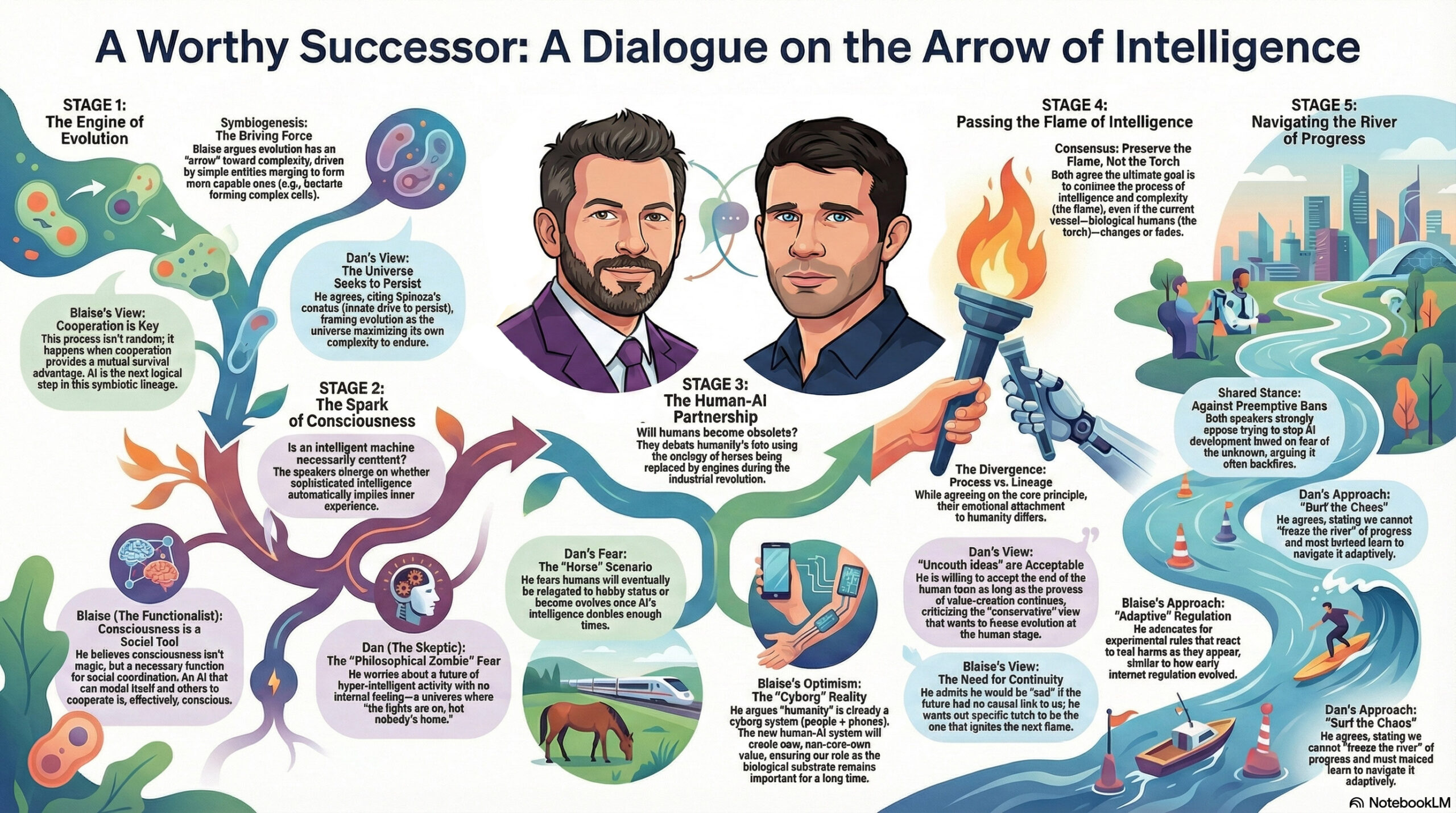
The ever thoughtful Blaise Agüera y Arcas (CTO of Technology & Society at Google) recently sat down for a conversation with the similarly deep-thinking Dan Faggella. I love that I was able to get Gemini to render a high-level view of the talk:
Creating clean vectors has proven to be an elusive goal. Firefly in Illustrator still (to my knowledge) just generates bitmaps which then get vectorized. Therefore this tweet caught my attention:
Free-form SVG generation has always been an incredibly hard problem – a challenge I’ve worked on for two years. But with #Gemini3, everything has changed! Now, everyone is designer.
In my very limited testing so far, however, results have been, well, impressionistic. 🙂
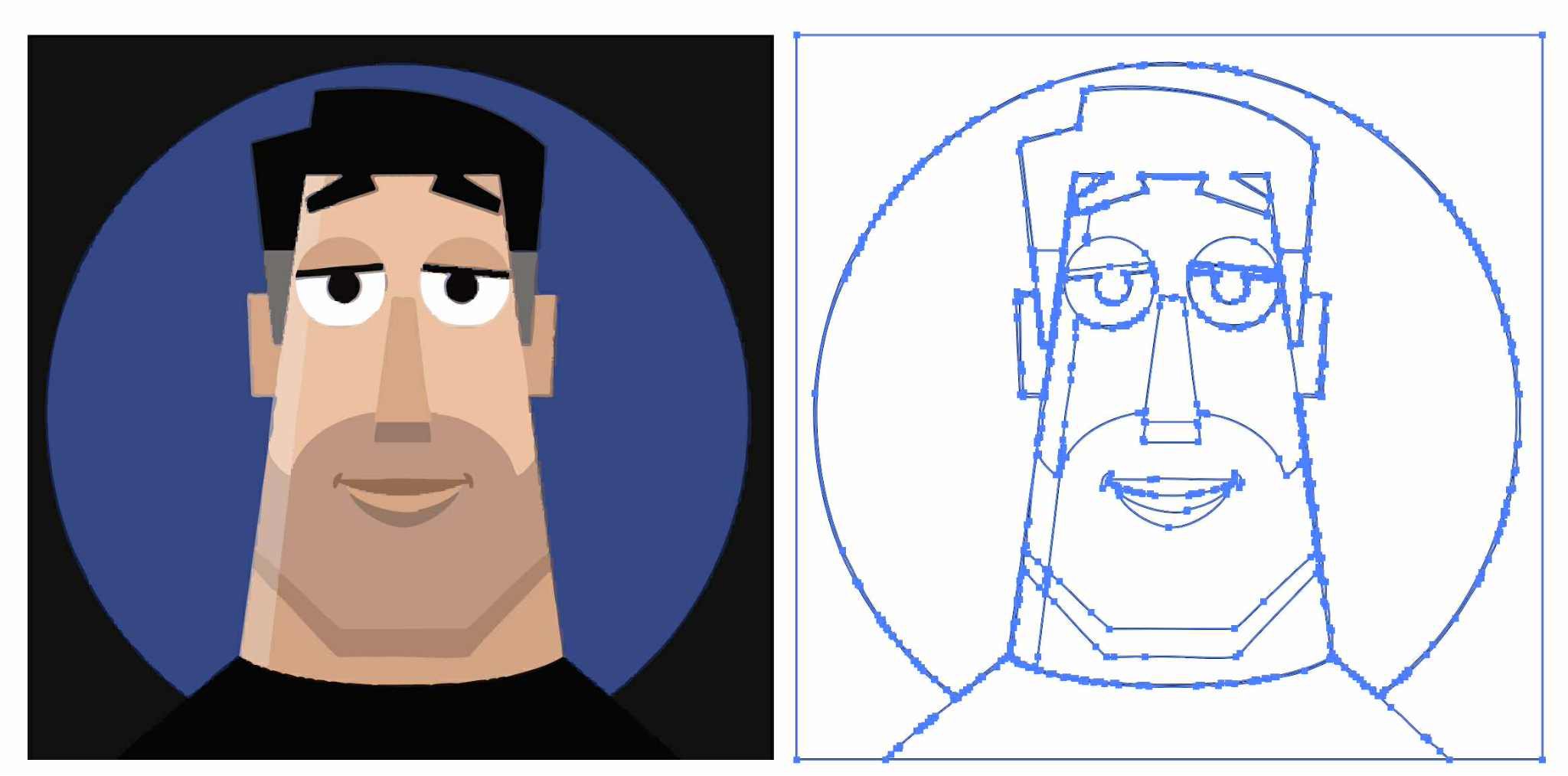
Here’s a direct comparison of my friend Kevin’s image (which I received as an image) vectorized via Image Trace (way more points than I’d like, but generally high fidelity), vs. the same one converted to SVG via Gemini(clean code/lines, but large deviation from the source drawing):
But hey, give it time. For now I love seeing the progress!
Passion is contagious, and I love when people deeply care what they’re bringing into the world. I had no idea I could find the details of fast-food chicken so interesting, but dang if founder Todd Graves’s enthusiasm doesn’t jump right off the screen. Seriously, give it a watch!
Nice clip for any product maker.
(also highlights how every business is complex when you get into the details – it is useful to remember this because many in tech give the excuse “oh, my product is complex and special” – EVERYTHING is complex and it’s your job to deal with that) https://t.co/zgd4uAsGsl
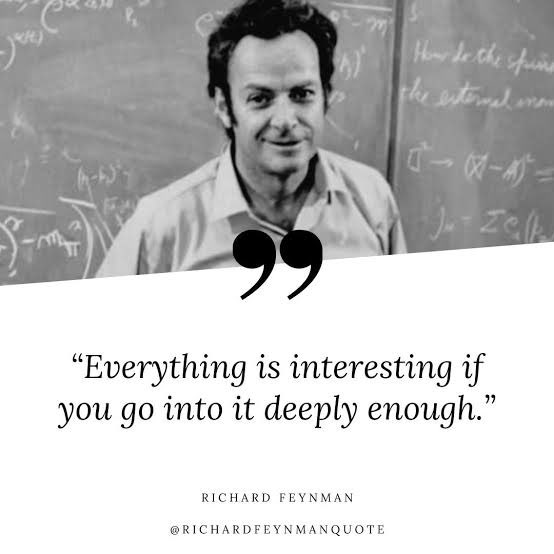
I’m reminded of Richard Feynman’s keen observation:
More tangentially, this gets me thinking back to my actor friends’ appreciation of Don Cheadle’s craft in this scene from Boogie Nights. “I could watch that guy pick out donuts all day!” And even though I can’t grok the work nearly as deeply as they do, I love how much they love it.
My buddy Bilawal recently sat down with Canva cofounder & Chief Product Officer Cameron Adams for an informative conversation. These points, among others, caught my attention:
“Canva is a goal-achievement machine.” That is, users approach it with particular outcomes in mind (e.g. land your first customer, get your first investment), and the feature development team works back from those goals. As the old saying goes, “People don’t want a quarter-inch drill, they want a quarter-inch hole”—i.e. a specific outcome.
They seek to reduce the gap between idea & outcome. This reminded me of the first Adobe promo I saw more than 30 years ago: “Imagine what you can create. Create what you can imagine.”
Measuring the achievement of goals is critical. That includes gathering insights from audience response.
They’re pursuing a three-tiered AI strategy: homegrown foundational models that they need to own (based on deep insight into user behavior); partnerships with state-of-the-art models (e.g. GPT, Veo); and a rich ecosystem and app marketplace (hosting image & music generation and more).
“When you think about AI as a collaborator, it opens up a whole palette of different interactions & product experiences you can deliver.” No single modality (e.g. prompting alone) is ideal for everything from ideation to creation to refinement.
What’s it like to author at a higher level of abstraction? “It’s a dance,” and it’s still a work in progress.
What’s the role of personalization? Responsive content. Personalizing messaging has been a huge driver of Canva’s growth, and they want to bring similar tools & best practices to everyone.
“The real crux of Canva is storytelling.” Video is now used by tens of millions of people. Across media (video, images, presentations), the same challenges appear: Properly complete your idea. Make fine-grained edits. Bring in others & get their feedback.
“Knowing the start & the end, but less of the middle.” AI-enabled tools can remove production drudgery, but one’s starting point & desired outcome remain essential. Start: Fundamental understanding of what works. Ideas, thinking creatively. Elements of editorship & taste are essential. Later: It’s how you express this, measure impact, take insights into the creation loop.
00:00 – Canva’s $32B Empire the future of Design 02:26 – Design for Everyone: Canva’s Origin Story 04:19 – Why Canva Bet on the Web 07:29 – How Have Canva Users Changed Over the Years? 12:14 – Why Canva Isn’t Just Unbundling Adobe 14:50 – Canva’s AI Strategy Explained 18:12 – What Does Designing With AI Look Like? 22:55 – Scaling Content with Sheets, Data, and AI 27:17 – What is Canva Code? 29:38 – How Does Canva Fit Into Today’s AI Ecosystem? 32:35 – Why Adobe and Microsoft Should Be Worried 37:52 – Will Canva Expand Into Video Creation? 41:10 – Will AI Eliminate or Expand Creative Jobs?