Category Archives: Photography

BeetleCopter in the Serengeti

Will Burrard-Lucas shows what one man with a GoPro & a tiny RC chopper can do:

He writes,

To get this footage I was sometimes a kilometre away from the copter, operating it via a live video feed. These devices have incredible potential in wildlife filmmaking and photography; they are quieter and more manoeuvrable than a normal helicopter so they can get closer to animals with minimal disturbance.

It would be cool to see him run this footage through the new GoPro lens correction support in Camera Raw.

[YouTube]

“Go F Your #Selfie”

Hearing this song on the radio the other day, I thought I might having an aneurysm (“Did they just name-check specific Instagram filters?”). Now I kinda want to jump out a window—and yet somehow I cannot look away.

On a theoretically related note, “An artist known as Billy Butcher imagined what would happen if various Marvel comic book heroes were all as selfie-absorbed as everyone else.” Check it out:

captainamerica

[YouTube]

Shattering photography at 10,000,000 fps

Fascinating footage of a ball breaking glass:

And no, I swear this blog isn’t devolving into just a re-share of PetaPixel, but they’ve been on a roll with good stuff lately. In this case they explain

Filmed with a HyperVision HPV-X camera made by Japanese manufacturer Shimadzu, the footage is slowed down so much that the ball, once it hits, appears fixed in space while the cracks in the glass slowly expand outward like an intricate spiderweb from the point of contact.

[YouTube]

#Hoffsome: David Hasselhoff photobombs your photos

Happy April Fool’s! Erik Murphy-Chutorian writes,

Google+ Auto Awesome is all about fun surprises that bring your photos to life… Now with Auto Awesome Photobombs, you too can get a celebrity photobomb—no red carpet required. We’re starting with surprise appearances by +David Hasselhoff, everyone’s favorite crime-fighting rockstar lifeguard.

Upload a new self-portrait, or a group photo with friends, and leave some room for The Hoff. He might just make your photo a little more #Hoffsome.

He even photobombed me in the café the other day.


IMG 1899 1


Robiou 1 1

“Stick bomb, stick bomb…”: A really unique Subaru commercial

Little did I know that a stick bomb is a “spring-loaded device constructed out of flat sticks woven together under tension,” much less that 30,000 of them + an RC toy Subaru would make for a really unique commercial:

http://www.youtube.com/watch?v=PvQ9InhEKu0

As usual I find the making-of video (capturing three days of work in a Japanese studio) even more interesting than the finished product:

http://www.youtube.com/watch?v=ZXOhyn1Lq54

[YouTube 1 & 2] [Via]

How did I miss out on Google Photos until now?

What if I told you that you could…

  • Automatically back up all your photos & videos from your iPhone, iPad, and/or Android devices, in the background & for free
  • Automatically back up all your images from your Mac and/or PC hard drive
  • View, manage, edit, and share all these images via the Web and native mobile apps
  • Have automatic & ever-improving enhancements like automatic panorama stitching, collage, & animation creation applied

And you could do it all for free, right now? That would be kinda great, no?

I don’t know quite how I overlooked all this before joining Google. I love having my iPhone shots seamlessly mixed in with my SLR images (including galleries I export from Lightroom right into Drive folders), and I’m finding the little animations fun to share.

Now, a couple of details for my fellow nerds:

  • From your hard drive you can back up an unlimited number of images at 2048×2048 (i.e. 4 megapixel0 resolution. These do not count against your storage quota. You can also back up a full 15GB for free at full res. After that pricing is as low as a penny per gigabyte per month ($10/mo. for 1TB).
  • You can back up your raw files by installing Google Drive, then view, share, and edit them via Google+.
  • You can download Picasa, then let the separate new Auto Backup utility automatically find & upload JPEGs (not raw files at the moment) from your hard drive & memory cards.

What do you think? What else do you need for this to be the most mind-bendingly awesome photo storage & sharing system in the world?

Birds in a photo interpreted as musical notes

So. Friggin’. Great.

Jarbas Agnelli explains,

Reading the newspaper one morning, I saw this picture of birds on the electric wires. I cut out the photo and decided to make a song, using the exact location of the birds as notes. I was just curious to hear what melody the birds were creating.

This work was made over the original photo, un-retouched, published in one of the biggest Brazilian newspapers, “O Estado de São Paulo” on 27/aug/2009, and shot by Paulo Pinto (note: I just erased the birds for effect at the end, but didn’t change their positions at all. What would be the point?). This short video demonstrates my interpretation of the birds as notes.

I hope that somewhere out there, some higher intelligence is playing music made as you & I go about our daily activities.

[YouTube] [Via]

A half-million-dollar portrait in platinum

I find the creation process far more beautiful than the results, at least in this case:

PetaPixel explains,

Starting at a cool $500K for a 23×32-inch “print,” these portraits are made out of tiny spheres of one of the most expensive metals on Earth: Platinum.

You get a half-hour meeting with the company, after which they will assign a photographer to come shoot you for a couple of hours. From there, the image is digitized, hand assembled with the 13,000 platinum spheres, and you end up with a halftone portrait worth a whopping half million dollars… or so they would like you to believe.

[YouTube]

Fantastic new cloud storage for photographers

1,000 gigs for 10 bucks a month. Wow; bring it on!

DriveOn

Check out the new pricing for Google Drive (which integrates with my product, Google Photos):

Storage is shared between Gmail, Drive, and Google+ Photos so you can focus on the content of your messages, files, and photos instead of how much you’re storing and where. Today, we’re making it more affordable for you to keep everything safe and easy to reach on any device, from everywhere.

We’ve lowered the price of our monthly storage plans to $1.99 for 100GB (previously $4.99), $9.99 for 1TB (previously $49.99), and $99.99 for 10TB, with even more storage available if you need it. You can sign up for one of these new storage plans at www.google.com/settings/storage. And of course, 15GB remains free.

In addition you can store an unlimited number of photos at 2048 resolution. To give it a spin, download Google Drive & start dropping in your raw files (or JPEGs, etc). They’ll sync with the cloud & be ready to edit & share via Google+.

What do you think? I’m still quite new to Google, so any & all feedback is welcome!

Gorgeous lighting animation from a simple flashlight

This cleverness makes me think of Russell Brown getting frisky with a flashlight & Photoshop Touch. Colossal quotes creator Michael Langan as saying,

There’s no CG in the video, just practical effects. Most of the video is lit by a single flashlight, drawn slowly over the landscape and later “echoed” up to 500 times to create patterns that fill the scene with light. We used a projector mounted to a motorized lazy susan to achieve the “sliver” shots of Nicole.

Enjoy:

[YouTube]

“The World’s First Sunset Hyperlapse from an Airplane”

Sunset plane ride + photographer + DSLR = striking imagery. Matthew Vandeputte describes his approach:

A hyperlapse is a special photography technique where you take a series of photos with similar framing while physically moving in between every shot. After stabilizing the footage with special software, you (quite literally in this case) create a flight through time and space. Because you’re shooting at a slower framerate than the usual 24/25/30 frames per second, the rendered video will show the world in fast-forward.

The whole article is worth the quick read.

[YouTube]

Sgt. Goldbug, Lego edition

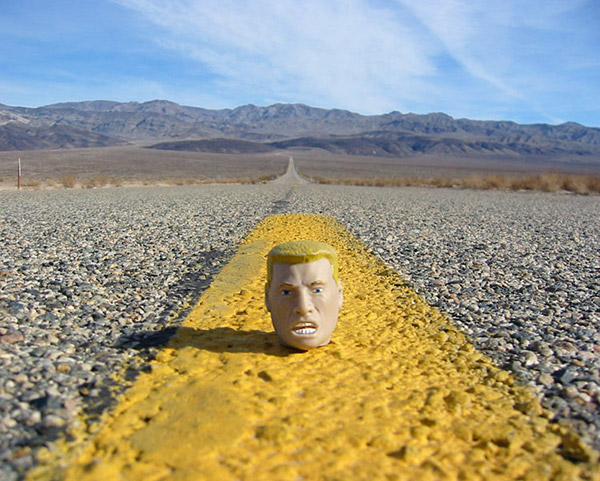
Years ago, being a crappy boyfriend, I bought Margot a bag of old-school rubber GI Joe heads from Seattle’s Archie McPhee. I took to photographing one of these dudes everywhere I went—e.g. out in Death Valley:

The Sarge

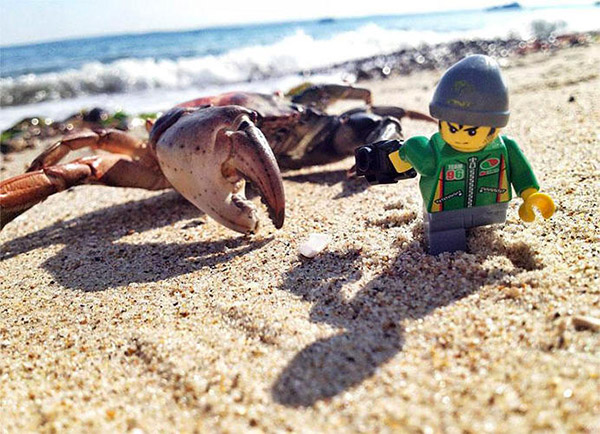
Noting his tendency to pop up a la the ubiquitous Goldbug in Richard Scarry stories, we granted him the rank of Sgt. Goldbug. I’m reminded of this seeing photographer Andrew Whyte’s much superior series featuring a Lego minifig:

MinifigCrab

Of the project he says,

“I love to document everyday things and build them into mini-series,” Whyte says. “But quite often there’s nothing cohesive about what I shoot from one day to the next. As soon as my kids discovered the camera accessory at the Lego store, which fits in the hand of a mini-figure, I worked out a way to start placing the character in my day-to-day shots and he became a cohesive element. For the whole year, I really never left home without the figure.”

Check out the article to see the gallery. [Via Laura Williams Argilla]

Multi-lens systems coming to phones

Interesting news from Engadget about a new system that promises depth sensing, better zoom, and more:

The big trick here is Corephotonics‘ use of two lenses with two different focal lengths. One lens is wide-angle, while the other is at 3x zoom. This means you can switch lenses to magnify more distant subjects without resorting to digital zoom. In the test set-up shown in the video above, which compared the dual-lens system side-by-side with a traditional smartphone camera (with both modules pointed at a test card around a foot away), the Corephotonics system outputted a clear 13-megapixel image regardless of whether it was at 1x or 3x zoom.


The (Tourist) Lady Vanishes

A few years back photographer Martin Evening took a series of photos…

6up sm
 
…then used them to create an interesting tutorial on how to make the moving tourists disappear via Photoshop Extended. I wanted to see how Google Photos would handle the same set of images.
 
I dragged the folder of photos into Google Drive (think Dropbox, in case you haven’t used it), which I’d linked to my Google Plus account. A little while later I got a message on my phone to check out the Auto Awesome photos that had been created. In the first example Google removed the moving objects, then enhanced the color and tone of the resulting image:
 
Fountain Eraser
 
This was entirely automatic: I did nothing more than back up my photos to the system. It also built an animation from the frames:
 
IMG 7024 MOTION
 

Pretty slick, eh?

I find this all deeply exciting. How can we bring imaging magic to everyone—to people who don’t know it’s possible, much less how to do it themselves?

Tesseract: Refocusing for the rest of us?

Tesseract promises “a new camera technology that allows you to perform SLR-like depth of field effects, digital refocusing, 3D color filters and much more on your mobile phone.” Noting its ability to generate separate layers, TechCrunch says, “It’s part RAW, part PSD but straight from your mobile device’s camera.”

Post-capture refocusing still strikes me as a parlor trick, but image segmentation to enable better extraction, compositing, and depth of field effects seems highly useful. You can get a bit more info from founder Kshitij Marwah’s recent talk.

Meanwhile, the company has released FOCII, a printable transparency mask that lets you “take any existing DSLR and convert into a light field camera for post capture refocusing with a simple $1 filter!”

[Vimeo 1 & 2]

Tour Indian cultural treasures with Google

Using photography + technology to bring people together with cultural richness; man, I love stuff like this. Gautam Gandhi writes,

Starting today, anyone with an Internet connection can explore the Taj Mahal and 29 of India’s most iconic national monuments through Street View on Google Maps and the Google Cultural Institute

Using the Street View Trekker, we’ve brought you images that let you virtually stroll through the vast grounds of Humayun’s Tomb, admire the red sandstone walls of Red Fort, and explore the ancient temples at Muvar Koil

[YouTube]

This GoPro footage cannot be real… can it?

You tell me. DesignTaxi writes,

In this video, a group of skydivers’ GoPro camera accidentally slips out of a member of the group’s hand. It drops from the plane, spinning tremendously and eventually lands in a pig pen.

All this while, the GoPro camera continues to record footage. It lands with the camera facing upwards, it quickly gets discovered by a pig, who is curious about the gadget’s existence in its pen.

Be advised: The ending did induce Margot to coin the phrase, “Operation Pig Tonsils.”

Photoshop vets doing interesting work

It’s nice to see my former teammates continuing to rock out: 

  • Storehouse was built by UI designer Mark Kawano. It’s a photo-centric iPad app billed as “the easiest way to create, share, and discover beautiful stories.”
  • Pictual comes to us from engineer Chintan Intwala, who engineered work like Puppet Warp & various GPU-enabled features. It’s “a beautiful, intelligent and simple picture-messaging app that uses design-magic to transform your words into pictures that encapsulate your mood, personality and emotion.”

Google {hearts} you

Heh—check out Google’s latest Auto Awesome feature, introduced for Valentine’s Day. Team member Vincent Mo writes,

Just in time for Valentine’s Day, we launched Auto Awesome Hearts! Just upload a photo of kissing or hugging, and Google Photos will add hearts automatically.

It even works on bear hugs. 😉

The fascinating thing for me isn’t so much this fun if slightly silly example, but rather the idea of using computer vision to understand the contents of photography, then do interesting things as a result. I might have an idea or two in that regard—and I’d like to hear yours.

Bearhug

Learn to tell stories through photography

Kickass pro photographer Mike Hill is one of the funniest, nicest guys you’ll meet, and he’s now released a promising online course, Narrative Photography: Storytelling with Photo Essays (click through for video):

Go behind the scenes on two Las Vegas photo shoots with professional photographer Mike Hill, and learn how to create captivating photo essays from start to finish. Navigate on-location demands, and collaborate with subjects for candid, authentic photos. Effectively frame compelling shots using compositional principles, and learn when and how to adjust available light with on and off-camera flash and affordable modifiers. Then, enjoy step-by-step guidance through Adobe Lightroom to quickly narrow down hundreds of photos to a small collection of shots that reveal your subject’s story.

Mike Hill shoots commercial, editorial and fine art photography. He has produced award-winning photo essays, and has a background as a Photo Editor and Art Director. His photographs have been honored by Paris Prix de la Photographie, PDN, National Geographic and American Photo. Mike teaches workshops on Adobe Lightroom, and is now bringing his expertise to Craftsy!

titlecard_507v3

mikehill_craftsy_class_photos_sm

[Via Bryan O’Neil Hughes]

Zoom Zoom: Google+ editor adds HDR, zooming

Snapseed has been a critical part of my mobile imaging workflow since its release, and after joining Google, the Nik team brought it to the Web. (Yes, you can use Snapseed-style editing right in your browser.) Just this weekend the team rolled out new features. André Meyer writes,

1. HDR Scape

With HDR Scape you can apply high dynamic range (HDR) effects to a single image, with a single click. HDR Scape is currently available in the Snapseed apps for Android and iOS, and today’s update brings the filter to Google+ on the web. You can see some examples here.

2. Zoom

Seeing your images up close is an important part of the editing process — from checking the focus point, to seeing how the “Drama” filter has changed your pixels. With today’s update, you can now use the magnifying glass to zoom in or out.

To give either feature a try, just open one of your photos on Google+ (using the Chrome browser), and click “Edit.” And if you say, “I don’t have images on Google+,” I’ll point out that Google will automatically back up all your images from iOS or Android. You can enjoy the free backup (and automatic enhancements, etc.) without needing to share those images publicly.

Photography: Gregory Heisler shares his craft

A few years back I had the pleasure of dropping in on renowned photographer Gregory Heisler at his New York studio, and I found myself captivated by the stories behind his portraits of Rudolph Giuliani, Muhammad Ali, George Bush, and many others. Here he whiteboards the tricky lighting for the Giuliani shoot:


If you dig that, here’s a 2-hour talk where he goes into more depth:

Join Gregory Heisler as he lovingly details the lore behind selected images from his professional career and the newly-published book, “Gregory Heisler: 50 Portraits: Stories and Techniques from a Photographer’s Photographer.

[YouTube 1 & 2] [Via]

Photoshop turns moving people into ghosts

Interesting work from Aaron Grimes. Sploid writes,

Aaron Grimes used Photoshop to blend regular footage at a 1/50th shutter speed into a new 24 frames per second with a 1-second shutter speed film. The result is, as he says, eerie.

According to Aaron,

What is done here is taking frames from video captured at 24fps with a 1/50th shutter speed and blending them together using Adobe Photoshop. The final product is a video that’s still played at 24fps but with a 1 second shutter speed.

The effect is eerie, causing things that do not move to remain sharp, but anything with motion to blur. The faster something moves to more faint it becomes. Where this is best shown is when something changes speed such as the shot of the man stopping in the street to check his phone, he almost appears out of nowhere, but when he walks off you can see his shape fade away.

[Vimeo]