I imagine you’re as fatigued by all this stuff as I am—but honestly this piece is really touching & beautifully composed.
Spanning more than 30 countries, the film includes a breadth of perspectives, from a 93-year old Malayan grandmother to a 19-year old Slovenian man, and includes an original score that was remotely performed by musicians from around the world.
Speaking of Googlers bending quarantine to creative ends, Zurich-based PM Lavinia Petrache has composed this trippy stop-motion tour of her apartment & the universe beyond:
How much do I love that after 35+ years doing this, Russell is still doing things like popping out of bed at 3am with madcap energy, just to make something beautiful? Enjoy:
Beginning with a man blowing his lips, an impressive compilation by Donato Sansone merges short clips of car crashes, fiery explosions, and punches thrown during a boxing match into a believable series of consequences.
Join my old friends & colleagues Phil Clevenger & Rick Miller tomorrow for what promises to be an informative online class/discussion. Topics include:
Quick history of the Lightroom UI and its influence on modern software design
The importance of choosing the right color space when editing your photos.
Creating custom camera profiles for your DSLR, cellphone, and drone cameras to achieve the best color fidelity.
The RAW advantage: recovering data from overexposed/underexposed images.
Using the Map module and GPS coordinates for location scouting.
Soft Proofing your photos to determine the most appropriate print color settings
Questions & Answers
About your hosts: Phil Clevenger: Senior Director, Experience Design, Adobe Experience Cloud. Original UI designer for Adobe Lightroom and author on two patents for UI innovations in the Lightroom 1.0 interface.
Rick Miller: Former Sr. Solutions Engineer/color management expert at Adobe Systems (Rick’s name appeared on the credit screens for Photoshop and Premiere Pro), Professional photographer, and currently a professor at USC. Rick previously taught at the Art Center College of Design in Pasadena, Cal Poly Pomona University, and assisted the LAPD’s Scientific Investigation Division in the forensic application of Photoshop.
During the COVID-19 crisis, we’re committed to supporting the community with complimentary access to Unity Learn Premium for three months (March 19 through June 20). Get exclusive access to Unity experts, live interactive sessions, on-demand learning resources, and more.
“This is certainly the coolest thing I’ve ever worked on, and it might be one of the coolest things I’ve ever seen.”
My Google Research colleague Jon Barron routinely makes amazing stuff, so when he gets a little breathless about a project, you know it’s something special. I’ll pass the mic to him to explain their new work around capturing multiple photos, then synthesizing a 3D model:
I’ve been collaborating with Berkeley for the last few months and we seem to have cracked neural rendering. You just train a boring (non-convolutional) neural network with five inputs (xyz position and viewing angle) and four outputs (RGB+alpha), combine it with the fundamentals of volume rendering, and get an absurdly simple algorithm that beats the state of the art in neural rendering / view synthesis by *miles*.
You can change the camera angle, change the lighting, insert objects, extract depth maps — pretty much anything you would do with a CGI model, and the renderings are basically photorealistic. It’s so simple that you can implement the entire algorithm in a few dozen lines of TensorFlow.
TBH the last thing I want is for coronavirus talk to infect (ahem) my escapist art-posting, but I’ve gotta give Markus Hofstätter props for the sheer effort he put into making this 7-frame animation with archaic tintype printing (or as my wife asked, lacking all context, “Why did that dude put a picture into a panini press?”). You can watch his process from the beginning (and check out PetaPixel for the full story), or just jump to the finished animation at the end:
Hmm—apparently Ricoh (maker of my O.G. Theta 360 camera) is planning to spin off a new company to make tiny, consumer cams. I wonder, do normal folks see enough value in making tiny planets or in posting interactive panos to make this take off? I guess we shall see.
For this particular project, Shiryaev used the stabilized version of the footage that NASA itself released in July of 2019 as a baseline. He then fed it through the same AI software that he’s been using to upscale all of the videos he’s released: Google’s DAIN interpolate frames and achieve 60fps, and Topaz Labs’ Gigapixel AI to upscale each frame and achieve 4K resolution.
[Please note: I don’t work on the Pixel team, and these opinions are just those of a guy with a couple of phones in hand, literally shooting in the dark.]
In Yosemite Valley on Friday night, I did some quick & unscientific but illuminating (oh jeez) tests shooting with a Pixel 4 & iPhone 11 Pro Max. I’d had fleeting notions of trying some proper astrophotography (side note: see these great tips from Pixel engineer & ILM vet Florian Kainz), but between the moon & the clouds, I couldn’t see a ton of stars. Therefore I mostly held up both phones, pressed the shutter button, and held my breath.
Check out the results in this album. You can see which camera produced which images by tapping each image, then tapping the little comment icon. I haven’t applied any adjustments.
Overall I’m amazed at what both devices can produce, but overall I preferred the Pixel’s interpretations. They were darker, but truer to what my eyes perceived, and very unlike the otherworldly, day-for-night iPhone renderings (which persisted despite a few attempts I made to set focus, then drag down the exposure before shooting).
Check out the results, judge for yourself, and let me know what you think.
Oh, and for a much more eye-popping Pixel 4 result, check out this post from Adobe’s Russell Brown:
What a fascinating 90-second peek into a clever trick that saved millions of dollars in production costs on Titanic. As a friend asks, “I wonder what became of all those reverse WHITE STAR LINE sweaters?”
the starboard side of the 90% scale ship was built for the film, but for the Southampton launch, which depicts the port side next to the doc, all props, costumes and signage were built flopped to double for the port side of the ship – the footage was then horizontally flopped pic.twitter.com/15llmvJ8z1
I’ve long heard that 19th-century audiences would faint or jump out of their seats upon seeing gripping, O.G. content like “Train Enters Station.” If that’s true, imagine the blown minds that would result from this upgraded footage. Colossal writes,
Shiryaev first used Topaz Lab’s Gigapixel AI to upgrade the film’s resolution to 4K, followed by Google’s DAIN, which he used to create and add frames to the original file, bringing it to 60 frames per second.
Check out the original…
…and the enhanced version:
Update: Conceptually related:
there’s an app called remini that enhances your blurry pictures & i’m never taking anything but macbook selfies ever again pic.twitter.com/KrRbcO4Ndp
To achieve this level of detail he shot the whole thing in 8K on a $25,000 RED Helium camera using a Canon 100mm f/2.8L Macro and a Canon MP-E 65mm f/2.8 1-5X Macro, and then edited the final product down to 4K resolution.
Pretty amazing to be able to compare a phone to a multi-thousand-dollar DSLR.
Ian talks about his experience shooting astrophotos with the Google Pixel 4 XL in the dark skies of the California deserts. Ian also makes some comparisons between the results from the Pixel Astrophotography mode, and his full-sized camera, the Sony a7S.
“It’s like a big fish made out of fish,” my 10yo son Henry just noted, “Fishception!”
Kottke, who says “Scary Sea Monster Really Just Hundreds of Tiny Fish in a Trench Coat,” notes:
“Try rewatching the video, picking one fish and following it the entire time. Then pick another fish and watch the video again. The juvenile striped eel catfish seem to cycle through positions within the school as the entire swarm moves forward.”
Like riders in a peleton, each taking their turn braving danger at the front.
Back when our boys were little, we’d plunge them under our bed covers (which in relative terms seemed like a titanic, undulating mass) in a ridiculous game called “KindaDEEP!” I was reminded of it by this wonderfully weird short film by Charlotte Arene:
Aryeh Nirenberg showed Earth’s rotation relative to the Milky Way through “A timelapse of the Milky Way… using an equatorial tracking mount over a period of around 3 hours.”
Eric Brummel created a similar piece at Font’s Point in the Anza-Borrego Desert:
While I wait for my Insta360 One R to arrive, I’m tiding myself over with content like this. I can’t wait to try shooting crazy-looking FPV-style shots without the chaos & risk of making high-speed moves, though I do worry about how this rig might interfere with the drone’s GPS receiver. I guess we’ll see!
In a recent experiment, Prague-based photographer Dan Vojtech decided to try out different focal lengths on the same portrait photo of himself and log the effects it had on it. The difference between 20mm and 200mm are unbelievable. So next time someone says that the camera adds 10 pounds, they’re not entirely wrong – it all depends on the equipment used.
From what I’ve tasted of desire, I hold with those who favor fire…
Wild that this can be captured on what David Lynch might call “your f***ing telephone“; wild too that it’s shared as vertical video (by Apple, which after 10+ years can’t be bothered to make iMovie handle this aspect ratio decently!)
I left Adobe in early 2014 part due to a mix of fear & excitement about what Google was doing with AI & photography. Normal people generally just want help selecting the best images, making them look good, and maybe creating an album/book/movie from them. Accordingly, in 2013 Google+ launched automatic filtering that attempted to show just one’s best images, along with Auto Enhancement of every image & “Auto Awesomes” (animations, collages, etc.) derived from them. I couldn’t get any of this going at Adobe, and it seemed that Google was on the march (just having bought Nik Software, too), so over I went.
Unfortunately it’s really hard to know what precisely constitutes a “good” image (think shifting emotional valences vs. technical qualities). For consumers one can de-dupe somewhat (showing just one or two images from a burst) and try to screen out really blurry, badly lit images. Even so, even consumers distrust this kind of filtering & always want to look behind the curtain to ensure that the computer hasn’t missed something. Therefore when G+ Photos transitioned into just Google Photos, the feature was dropped & no one said boo. Automatic curation is still used to suggest things like books & albums, but as you may have seen when it’s applied to your own images, results can be hit or miss.
So will pros trust such tech to help them sort through hundreds of similar images? Well… maybe? Canon’s prepping a subscription-based plug-in for the job:
The plugin is powered by the Canon Computer Vision AI engine and uses technical models to select photos based on a number of criteria: sharpness, noise, exposure, contrast, closed eyes, and red eyes. These “technical models” have customizable settings to give you some ability to control the process.
I’ve loved shooting with my Insta360 One Ex this past year, and the modular 360º One R looks wild—especially for its ability to break in half & get mounted to a drone. I ordered mine this morning.
Man, how great is it that after 35 years in the game (!!), Russell hasn’t lost a bit of his madcap energy. He’s bringing back The Russell Brown Show & starting out in nighttime Tokyo:
The clip above is fun, but the really meaty bits are in the associated tutorials he’s posting to his site; enjoy!
Hey everyone—happy holidays & Merry Christmas from me, Margot, Seamus, and the Micronaxx to you & yours. Thanks so much for being a reader (“the few, the ostensibly proud” 😛), and here’s to making more funky, inspiring discoveries in the new year. Meanwhile, here’s a quick glimpse of our tour of the holiday lights in Los Gatos (complete with throbbing fonky beatz in the tunnel of lights 🙃).
I’ll admit that I haven’t yet taken the plunge into photogrammetry, but this tutorial makes me think I just might be able to do it. (And as we close out 2019, let’s take a moment to note how bonkers it is that for the price of a few hundred dollars in flying gear, just about anyone can generate 3D geometry and share it to just about any device sporting a Web browser!)
I know this post might be of super niche interest, but I’m going to try out its recommendations tonight when we drive through holiday lights. I think the flowcharts basically boil down to “Go manual, keep ISO at 400 or lower, and bump it up/down to get the exposure right. Oh, and set shutter speed to 2x frame rate for no motion & 4x for moderate motion.” Any shooting tips you may have to share are most welcome as well!
“FM technology: that stands for F’ing Magic…” So said the old Navy radio repair trainer, and it comes to mind reading about how the Google camera team used machine learning plus a dual-lens setup to deliver beautiful portraiture on the Pixel 4:
With the Pixel 4, we have made two more big improvements to this feature, leveraging both the Pixel 4’s dual cameras and dual-pixel auto-focus system to improve depth estimation, allowing users to take great-looking Portrait Mode shots at near and far distances. We have also improved our bokeh, making it more closely match that of a professional SLR camera.
Now, you can turn a photo into a portrait on Pixel by blurring the background post-snap. So whether you took the photo years ago, or you forgot to turn on portrait mode, you can easily give each picture an artistic look with Portrait Blur in Google Photos.
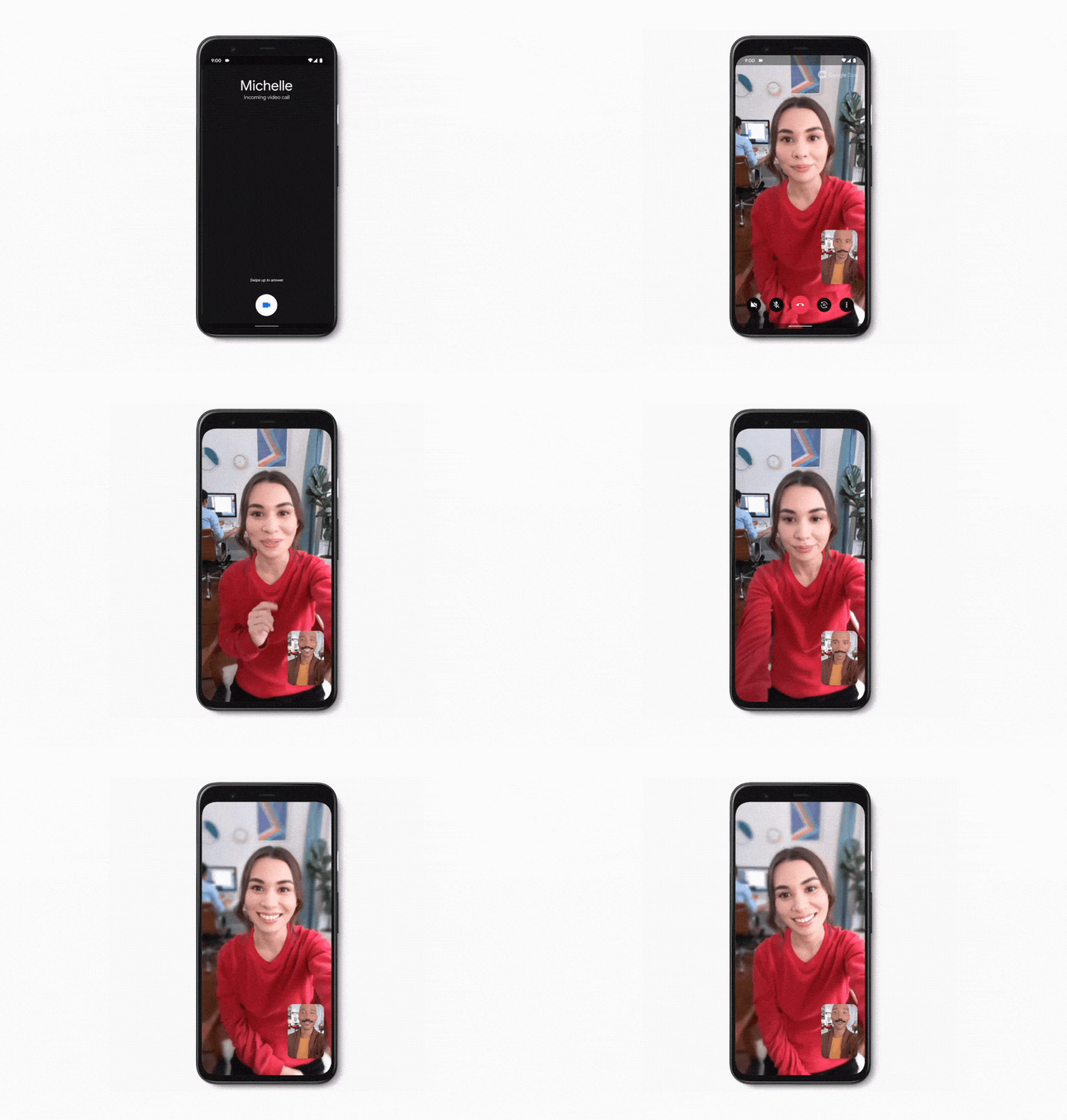
I’m also pleased to see that the realtime portrait-blurring tech my team built has now come to Google Duo for use during video calls:
I’ll always owe Russell Brown a great debt for bending the arc of my career, and I’m so happy to see him staying crazy after all these (35+!!) years at Adobe. In the entertaining video below, he squeezes great images out of phones & tablets while squeezing himself through the slot canyons of the Southwest—and not going all “127 Hours” in the process!
Prepare for retinal blast-off (and be careful if you’re sensitive to flashing lights).
What happens when everything in the world has been photographed? From multiple angles, multiple times per day? Eventually we’ll piece those photos and videos together to be able to see the entire history of a location from every possible angle.
“I sifted through probably ~100,000 photos on Instagram using location tags and hashtags, then sorted, and then hand-animated in After Effects to create a crowdsourced hyperlapse video of New York City,” Morrison tells PetaPixel. “I think the whole project took roughly 200 hours to create!”
Hey gang—I’m working my way out of the traditional tryptophan-induced haze enough to wish you a slightly belated Happy Thanksgiving. I hope you were able to grab a restful few days. Amidst bleak (for Cali) weather I was able to grab a few fun tiny planet shots (see below) and learn about how to attach a 360º cam to a drone (something I’ve not yet been brave/foolhardy enough to try):
With creation tools in Google Earth, you can draw your own placemarks, lines and shapes, then attach your own custom text, images, and videos to these locations. You can organize your story into a narrative and collaborate with others. And when you’ve finished your story, you can share it with others. By clicking the new “Present” button, your audience will be able to fly from place to place in your custom-made Google Earth narrative.
Take a look at how students & others are using it:
Here’s a 60-second-ish tour of the actual creation process:
My failure, year in & year out, to solve the problem at Adobe is part of what drove me to join Google in 2014. But even back then I wrote,
I remain in sad amazement that 4.5 years after the iPad made tablets mainstream, no one—not Apple, not Adobe, not Google—has, to the best of my knowledge, implemented a way to let photographers to do what they beat me over the head for years requesting:
Let me leave my computer at home & carry just my tablet** & camera
Let me import my raw files (ideally converted to vastly smaller DNGs), swipe through them to mark good/bad/meh, and non-destructively edit them, singly or in batches, with full raw quality.
When I get home, automatically sync all images + edits to/via the cloud and let me keep editing there or on my Mac/PC.
This remains a bizarre failure of our industry.
Of course this wasn’t lost on the Lightroom team, but for a whole bunch of reasons, it’s taken this long to smooth out the flow, and during that time capture & editing have moved heavily to phones. Tablets represent a single-digit percentage of Snapseed session time, and I’ve heard the same from the makers of other popular editing apps. As phones improve & dedicated-cam sales keep dropping, I wonder how many people will now care.
To be clear, this method is not the same as Photoshopping an image to add in contrast and artificially enhance the colors that are absorbed most quickly by the water. It’s a “physically accurate correction,” and the results truly speak for themselves.
And as some wiseass in the comments remarks, “I can’t believe we’ve polluted our waters so much there are color charts now lying on the ocean floor.”
Photogrammetry (building 3D from 2D inputs—in this case several source images) is what my friend learned in the Navy to refer to as “FM technology”: “F’ing Magic.”
Side note: I know that saying “Time is a flat circle” is totally worn out… but, like, time is a flat circle, and what’s up with Adobe style-transfer demos showing the same (?) fishing village year after year? Seriously, compare 2013 to 2019. And what a super useless superpower I have in remembering such things. ¯\_(ツ)_/¯
This new iOS & Android app (not yet available, though you can sign up for prerelease access) promises to analyze images, suggest effects, and keep the edits adjustable (though it’s not yet clear whether they’ll be editable as layers in “big” Photoshop).
I’m reminded of really promising Photoshop Elements mobile concepts from 2011 that went nowhere; of the Fabby app some of my teammates created before being acquired by Google; and of all I failed to enable in Google Photos. “Poo-tee-weet?” ¯\_(ツ)_/¯ Anyway, I’m eager to take it for a spin.