Motion Library allows you to easily add premade animated motions like fighting, dancing, and running to your characters. Choose from a collection of over 350 motions and watch your puppets come to life in new and exciting ways!
Category Archives: Illustration
Wayback machine: When “AI” was “Adobe Illustrator”
Check out a fun historical find from Adobe evangelist Paul Trani:
The video below shipped on VHS with the very first version of Adobe Illustrator. Adobe CEO & Illustrator developer John Warnock demonstrated the new product in a single one-hour take. He was certainly qualified, being one of the four developers whose names were listed on the splash screen!
How lucky it was for the world that a brilliant graphics engineer (John) married a graphic designer (Marva Warnock) who could provide constant input as this groundbreaking app took shape.
If you’re interested in more of the app’s rich history, check out The Adobe Illustrator Story:
Demo: Generating an illustrated narrative with DreamBooth
The Corridor Crew has been banging on Stable Diffusion & Google’s new DreamBooth tech (see previous) that enables training the model to understand a specific concept—e.g. one person’s face. Here they’ve trained it using a few photos of team member Sam Gorski, then inserted him into various genres:

From there they trained up models for various guys at the shop, then created an illustrated fantasy narrative. Just totally incredible, and their sheer exuberance makes the making-of pretty entertaining:
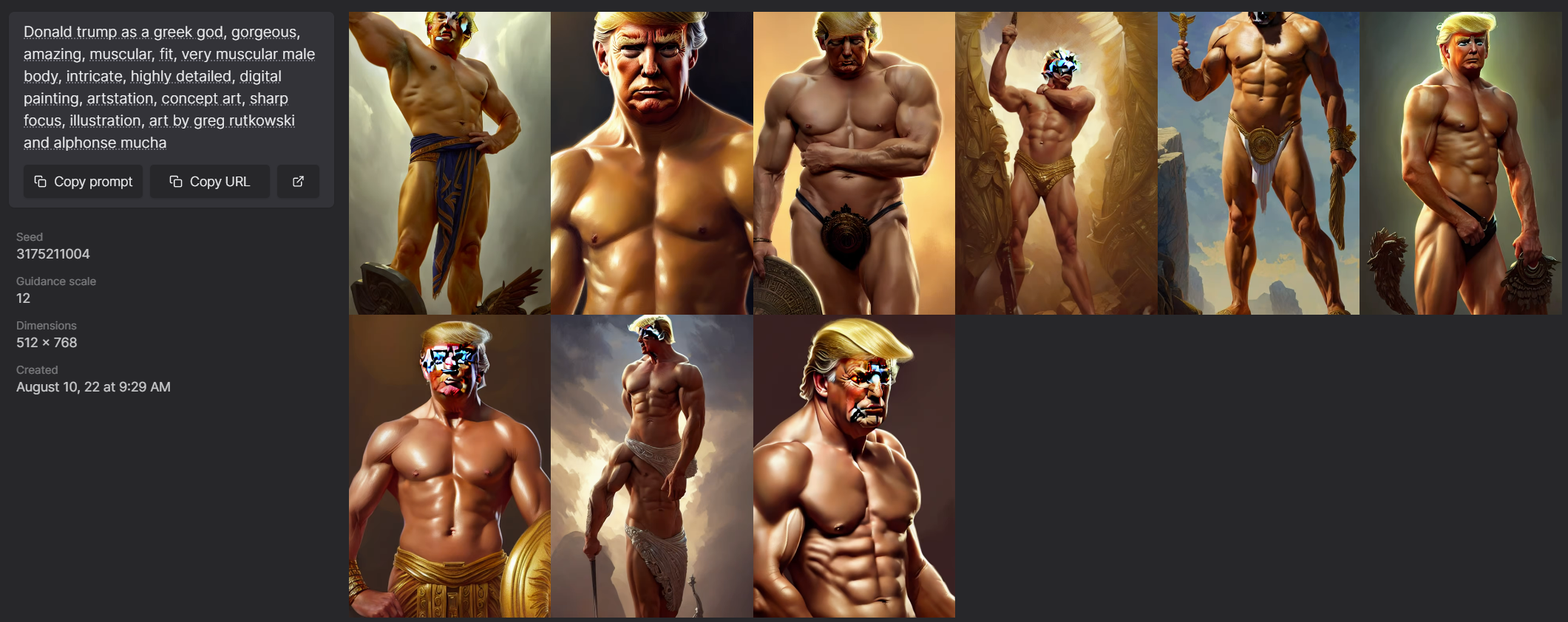
Lexica: Search for AI-made art, with prompts
The makers of this new search engine say they’re already serving more than 200,000 images/day & growing rapidly. Per this article, “It’s a massive collection of over 5 million Stable Diffusion images including its text prompts.” Just get ready to see some… interesting art (?). 🙃


AI + James Joyce = Poetry in motion
Lovely work from Glenn Marshall & friends:
AI art -> “Bullet Hell” & Sirenhead
“Shoon is a recently released side scrolling shmup,” says Vice, “that is fairly unremarkable, except for one quirk: it’s made entirely with art created by Midjourney, an AI system that generates images from text prompts written by users.’ Check out the results:
Meanwhile my friend Bilawal is putting generative imaging to work in creating viral VFX:
“Dreamcatching”: Generative AI for music vids
Trippy!
Magdalena Bay has shared a new Felix Geen directed video for “Dreamcatching.” The clip, multi-dimensional explored through cutting-edge AI technology and GAN artwork, combined with VQGAN+CLIP, is a technique that utilizes a collection of neural networks that work in unison to generate images based on input text and/or images.
“Little Simple Creatures”: Family & game art-making with DALL•E
Creative director Wes Phelan shared this charming little summary of how he creates kids’ books & games using DALL•E, including their newly launched outpainting support:

John Oliver gets DALL•E-pilled
Judi Dench fighting a centaur on the moon!
Goose Pilates!
Happy Friday. 😅
Alpaca brings Stable Diffusion to Photoshop 🔥
I don’t know much about these folks, but I’m excited to see that they’re working to integrate Stable Diffusion into Photoshop:

You can add your name to the waitlist via their site. Meanwhile here’s another exploration of SD + Photoshop:
🤘Death Metal Furby!🤘
See, isn’t that a more seductive title than “Personalizing Text-to-Image Generation using Textual Inversion“? 😌 But the so-titled paper seems really important in helping generative models like DALL•E to become much more precise. The team writes:
We ask: how can we use language-guided models to turn our cat into a painting, or imagine a new product based on our favorite toy? Here we present a simple approach that allows such creative freedom.
Using only 3-5 images of a user-provided concept, like an object or a style, we learn to represent it through new “words” in the embedding space of a frozen text-to-image model. These “words” can be composed into natural language sentences, guiding personalized creation in an intuitive way.
Check out the kind of thing it yields:

AI art: “…Y’know, for kids!”
Many years ago (nearly 10!), when I was in the thick of making up bedtime stories every night, I wished aloud for an app that would help do the following:
- Record you telling your kids bedtime stories (maybe after prompting you just before bedtime)
- Transcribe the text
- Organize the sound & text files (into a book, journal, and/or timeline layout)
- Add photos, illustrations, and links.
- Share from the journal to a blog, Tumblr, etc.
I was never in a position to build it, but seeing this fusion of kid art + AI makes me hope again:
With #stablediffusion img2img, I can help bring my 4yr old’s sketches to life.
Baby and daddy ice cream robot monsters having a fun day at the beach. 😍#AiArtwork pic.twitter.com/I7NDxIfWBF
— PH AI (@fofrAI) August 23, 2022
So here’s my tweet-length PRD:
- Record parents’/kids’ voices.
- Transcribe as a journal.
- Enable scribbling.
- Synthesize images on demand.
On behalf of parents & caregivers everywhere, come on, world—LFG! 😛
“Hyperlapse vs. AI,” + AR fashion
Malick Lombion & friends combined “more than 1,200 AI-generated art pieces combined with around 1,400 photographs” to create this trippy tour:
Elsewhere, After Effects ninja Paul Trillo is back at it with some amazing video-meets-DALL•E-inpainting work:
I’m eager to see all the ways people might combine generation & fashion—e.g. pre-rendering fabric for this kind of use in AR:
“Mr. Blue Sky, but every lyric is an AI generated image”
Happy Monday. 😌
[Via Dave Dobish]
A quick tour of Make-A-Scene
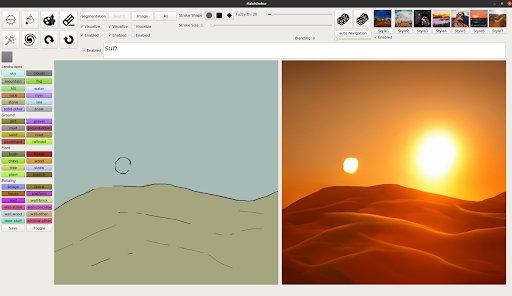
I mentioned Meta Research’s DALL•E-like Make-A-Scene tech when it debuted recently, but I couldn’t directly share their short overview vid. Here’s a quick look at how various artists have been putting the system to work, notably via hand-drawn cues that guide image synthesis:
“Make-A-Scene” promises generative imaging cued via sketching
This new tech from Facebook Meta one-ups DALL•E et al by offering more localized control over where elements are placed:
The team writes,
We found that the image generated from both text and sketch was almost always (99.54 percent of the time) rated as better aligned with the original sketch. It was often (66.3 percent of the time) more aligned with the text prompt too. This demonstrates that Make-A-Scene generations are indeed faithful to a person’s vision communicated via the sketch.


Kids swoon as DALL•E brings their ideas into view
Nicely done; can’t wait to see more experiences like this.
Now available (and free!): Adobe Character Animator Starter Mode
Check out my friend Dave’s quick intro to this easy-to-use (and free-to-download) tech:
For more detail, here’s a deeper dive:
“Content-Aware Fill… cubed”: DALL•E inpainting is nuts
The technology’s ability not only to synthesize new content, but to match it to context, blows my mind. Check out this thread showing the results of filling in the gap in a simple cat drawing via various prompts. Some of my favorites are below:

Also, look at what it can build out around just a small sample image plus a text prompt (a chef in a sushi restaurant); just look at it!

Meet “Imagen,” Google’s new AI image synthesizer
What a time to be alive…
Hard on the heels of OpenAI revealing DALL•E 2 last month, Google has announced Imagen, promising “unprecedented photorealism × deep level of language understanding.” Unlike DALL•E, it’s not yet available via a demo, but the sample images (below) are impressive.
I’m slightly amused to see Google flexing on DALL•E by highlighting Imagen’s strengths in figuring out spatial arrangements & coherent text (places where DALL•E sometimes currently struggles). The site claims that human evaluators rate Imagen output more highly than what comes from competitors (e.g. MidJourney).
I couldn’t be more excited about these developments—most particularly to figure out how such systems can enable amazing things in concert with Adobe tools & users.
What a time to be alive…


Painting: Behind the scenes with Kehinde Wiley
I’ve long admired President Obama’s official portrait, but I haven’t known much about Kehinde Wiley. I enjoyed this brief peek into his painting process:
Here he shares more insights with Trevor Noah:
Adobe Fresco adds Liquify, Magic Wand, and more
Check out all the new goods!
It’s not new to this release, but I’d somehow missed it: support for perspective lines looks very cool.

A charming Route 66 doodle from Google
Last year I took my then-11yo son Henry (aka my astromech droid) on a 2000-mile “Miodyssey” down Route 66 in my dad’s vintage Miata. It was a great way to see the country (see more pics & posts than you might ever want), and despite the tight quarters we managed not to kill one another—or to get slain by Anton Chigurh in an especially murdery Texas town (but that’s another story!).
In any event, we were especially charmed to see the Goog celebrate the Mother Road in this doodle:
Famous logos recreated in Grotesque Middle Ages style
Heh—I love this kind of silly mashup. (And now I want to see what kind of things DALL•E would dream up for prompts like “medieval grotesque Burger King logo.”)

Things Fall Apart
Driving through the Southwest in 2020, we came across this dark & haunting mural showing the nearby Navajo Generation Station:

Now I see that the station has been largely demolished, as shown in this striking drone clip:
DALL•E 2 looks too amazing to be true
There’s no way this is real, is there?! I think it must use NFW technology (No F’ing Way), augmented with a side of LOL WTAF. 😛
Here’s an NYT video showing the system in action:

The NYT article offers a concise, approachable description of how the approach works:
A neural network learns skills by analyzing large amounts of data. By pinpointing patterns in thousands of avocado photos, for example, it can learn to recognize an avocado. DALL-E looks for patterns as it analyzes millions of digital images as well as text captions that describe what each image depicts. In this way, it learns to recognize the links between the images and the words.
When someone describes an image for DALL-E, it generates a set of key features that this image might include. One feature might be the line at the edge of a trumpet. Another might be the curve at the top of a teddy bear’s ear.
Then, a second neural network, called a diffusion model, creates the image and generates the pixels needed to realize these features. The latest version of DALL-E, unveiled on Wednesday with a new research paper describing the system, generates high-resolution images that in many cases look like photos.
Though DALL-E often fails to understand what someone has described and sometimes mangles the image it produces, OpenAI continues to improve the technology. Researchers can often refine the skills of a neural network by feeding it even larger amounts of data.
I can’t wait to try it out.
Illustration: Things-Could-Be-Worse Mugs
“Lost your keys? Lost your job?” asks illustrator Don Moyer. “Look at the bright side. At least you’re not plagued by pterodactyls, pursued by giant robots, or pestered by zombie poodles. Life is good!”
I find this project (Kickstarting now) pretty charming:
[Via]
Charming animation: A 5yo girl discussing Leia’s slave outfit with her dad
Fantastic Shadow Beasts (and Where To Find Them)
I’m not sure who captured this image (conservationist Beverly Joubert, maybe?), or whether it’s indeed the National Geographic Picture of The Year, but it’s stunning no matter what. Take a close look:
Elsewhere I love this compilation of work from “Shadowologist & filmmaker” Vincent Bal:
View this post on Instagram
Showreel: Substance 3D in games
Speaking of Substance, here’s a fun speed run through the kinds of immersive worlds artists are helping create using it:
“Putin’s Tracks”: Ukraine in black & white
Illustrator David Plunkert made a chilling distillation of history’s echoes for the cover of the New Yorker:

“Look at it this way,” my son noted, “At least the tracks suggest that it’s retreating.” God, let it be so.
Elsewhere, I don’t know the origin of this image, but it’s hard to think of a case where a simple Desaturate command was so powerful.

“Why are NFTs so ugly?”
I swear to God, stuff like this makes me legitimately feel like I’m having a stroke:
And that example, curiously, seems way more technically & aesthetically sophisticated than the bulk of what I see coming from the “NFT art” world. I really enjoyed this explication of why so much of such content seems like cynical horseshit—sometimes even literally:
“Pass The Ball” collaborative animation
Love this. Per Colossal,
Forty months in the making, “Pass the Ball” is a delightful and eccentric example of the creative possibilities of collaboration […] Each scenario was created by one of 40 animators around the world, who, as the title suggests, “pass the ball” to the next person, resulting in a varied display of styles and techniques from stop-motion to digital.
Different Strokes: 3D surface analysis helps computers identify painters
Researchers at NVIDIA & Case Western Reserve University have developed an algorithm that can distinguish different painters’ brush strokes “at the bristle level”:
Extracting topographical data from a surface with an optical profiler, the researchers scanned 12 paintings of the same scene, painted with identical materials, but by four different artists. Sampling small square patches of the art, approximately 5 to 15 mm, the optical profiler detects and logs minute changes on a surface, which can be attributed to how someone holds and uses a paintbrush.
They then trained an ensemble of convolutional neural networks to find patterns in the small patches, sampling between 160 to 1,440 patches for each of the artists. Using NVIDIA GPUs with cuDNN-accelerated deep learning frameworks, the algorithm matches the samples back to a single painter.
The team tested the algorithm against 180 patches of an artist’s painting, matching the samples back to a painter at about 95% accuracy.


NVIDIA Canvas update: 4x higher res & new materials
Possibly my #1 reason to want to return to in-person work: getting to use apps like this (see previous overview) on a suitably configured workstation (which I lack at home).
Adobe Animate introduces modern rigging
Man, I’d have so loved having features like this in my Flash days:
“Flee,” a beautifully animated new documentary
This looks gripping:
Sundance Grand Jury Prize winner FLEE tells the story of Amin Nawabi as he grapples with a painful secret he has kept hidden for 20 years, one that threatens to derail the life he has built for himself and his soon to be husband. Recounted mostly through animation to director Jonas Poher Rasmussen, he tells for the first time the story of his extraordinary journey as a child refugee from Afghanistan.
NVIDIA GauGAN enables photo creation through words
“Days of Miracles & Wonder,” part ∞:
Rather than needing to draw out every element of an imagined scene, users can enter a brief phrase to quickly generate the key features and theme of an image, such as a snow-capped mountain range. This starting point can then be customized with sketches to make a specific mountain taller or add a couple trees in the foreground, or clouds in the sky.
It doesn’t just create realistic images — artists can also use the demo to depict otherworldly landscapes.
Here’s a 30-second demo:
And here’s a glimpse at Tatooine:
Body Movin’ with Character Animator
Cool to see the latest performance-capture tech coming to Adobe’s 2D animation app:
Illustration: Oddly satisfying road painting
Let’s start Monday with some moments of Zen. 😌
Beeple visits The Tonight Show
Perhaps a bit shockingly, I’ve somehow been only glancingly familiar with the artist’s career, and I really enjoyed this segment—including a quick visual tour spanning his first daily creation through the 2-minute piece he made before going to the hospital for the birth of his child (!), to the work he sold on Tuesday for nearly $30 million (!!).
ProsePainter enables painting via descriptions
Type the name of something (e.g. “beautiful flowers”), then use a brush to specify where you want it applied. Here, just watch this demo:
The project is open source, complements of the creators of ArtBreeder.

Google “Pet Portraits” find doppelgängers in art
Today we are introducing Pet Portraits, a way for your dog, cat, fish, bird, reptile, horse, or rabbit to discover their very own art doubles among tens of thousands of works from partner institutions around the world. Your animal companion could be matched with ancient Egyptian figurines, vibrant Mexican street art, serene Chinese watercolors, and more. Just open the rainbow camera tab in the free Google Arts & Culture app for Android and iOS to get started and find out if your pet’s look-alikes are as fun as some of our favorite animal companions and their matches.

Check out my man Seamus:

Birds with human arms, y’all
Sure, face swapping and pose manipulation on humans is cool and all, but our industry’s next challenge must be beak swapping and wing manipulation. 😅🐦
[Via]
“The Face of Art” promises geometry-aware style transfer
By analyzing various artists’ distinctive treatment of facial geometry, researchers in Israel devised a way to render images with both their painterly styles (brush strokes, texture, palette, etc.) and shape. Here’s a great six-minute overview:


Mental Canvas enables 3D drawing
10 years ago we put a totally gratuitous (but fun!) 3D view of the layers stack into Photoshop Touch. You couldn’t actually edit in that mode, but people loved seeing their 2D layers with 3D parallax.
More recently apps are endeavoring to turn 2D photos into 3D canvases via depth analysis (see recent Adobe research), object segmentation, etc. That is, of course, an extension of what we had in mind when adding 3D to Photoshop back in 2007 (!)—but depth capture & extrapolation weren’t widely available, and it proved too difficult to shoehorn everything into the PS editing model.
Now Mental Canvas promises to enable some truly deep expressivity:
I do wonder how many people could put it to good use. (Drawing well is hard; drawing well in 3D…?) I Want To Believe… It’ll be cool to see where this goes.
Check out all the sneaks at Adobe MAX
I plan to highlight several of the individual technologies & try to add whatever interesting context I can. In the meantime, if you want the whole shebang, have at it!
Come try Photoshop Web!
I kinda can’t believe it, but the team has gotten the old gal (plus Illustrator) running right in Web browsers!

VP of design Eric Snowden writes,
Extending Illustrator and Photoshop to the web (beta) will help you share creative work from the Illustrator and Photoshop desktop and iPad apps for commenting. Your collaborators can open and view your work in the browser and provide feedback. You’ll also be able to make basic edits without having to download or launch the apps.
Creative Cloud Spaces (beta) are a shared place that brings content and context together, where everyone on your team can access and organize files, libraries, and links in a centralized location.
Creative Cloud Canvas (beta) is a new surface where you and your team can display and visualize creative work to review with collaborators and explore ideas together, all in real-time and in the browser.

From the FAQ:
Adobe extends Photoshop to the web for sharing, reviewing, and light editing of Photoshop cloud documents (.psdc). Collaborators can open and view your work in the browser, provide feedback, and make basic edits without downloading the app.
Photoshop on the web beta features are now available for testing and feedback. For help, please visit the Adobe Photoshop beta community.
So, what do you think?
AI: Cats n’ Cages
Things the internet loves:
Nicolas Cage
Cats
Mashups
Let’s do this:
Elsewhere, I told my son that I finally agree with his strong view that the live-action Lion King (which I haven’t seen) does look pretty effed up. 🙃
“How To Animate Your Head” in Character Animator
Let’s say you dig AR but want to, y’know, actually create instead of just painting by numbers (just yielding whatever some filter maker deigns to provide). In that case, my friend, you’ll want to check out this guidance from animator/designer/musician/Renaissance man Dave Werner.
0:00 Intro
1:27 Character Animator Setup
7:38 After Effects Motion Tracking
14:14 After Effects Color Matching
17:35 Outro (w/ surprise cameo)