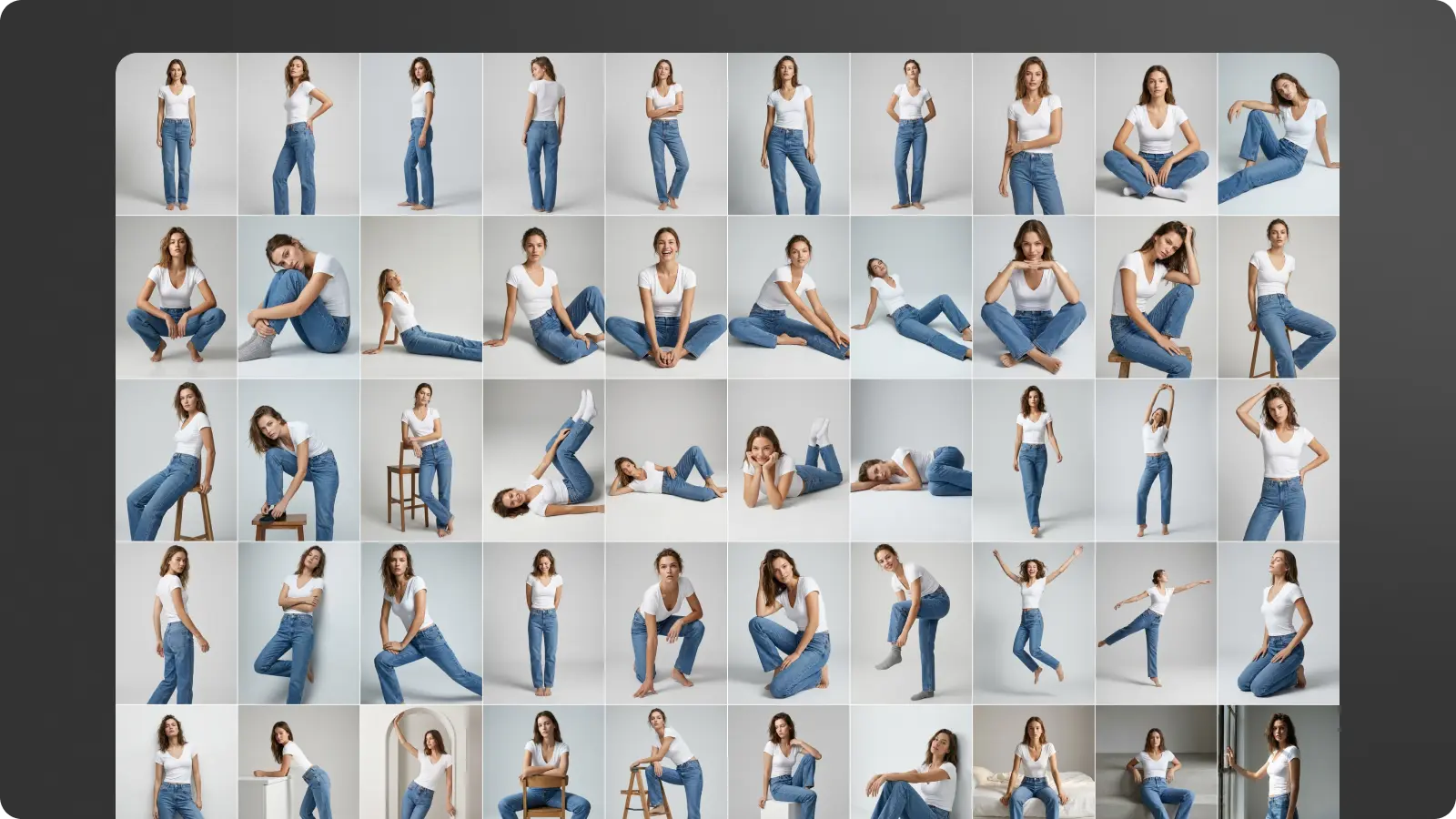
Still think that AI is all about slop-machine randomness vs. artistic control? CrossViewWarp (see details & more examples) is one of many emerging technologies challenging that view:
CrossViewWarp allows you to change the camera arc of an existing video while maintaining the motion.
Wow—provided quality & resolution can be made high enough, tell me how soon tech like this can come to Photoshop & Lightroom:
Depth-aware light injection in TypeGPU
I got a 448×448 monocular depth model down to ~8 ms on my M4 Pro across ~250 dispatches, which is fast enough to use in realtime 😀 Since the inference is written directly in TypeGPU, I can just feed the depth buffer straight into the… pic.twitter.com/txDXqc88l6
My friend Dave (Adobe designer for Firefly video) brings his characteristic wit to the tribulations of just trying to “sell some junk” in the age of AI-infused design:
Given that we’re taking our eldest son to start life as a University of Colorado Buffalo tomorrow (!), it was only fitting that we communed with a few real buffs in Yellowstone over the last few days. Here’s an Insta gallery:
Bonus wildlife from the trip: in Boise we dropped by the The World Center for Birds of Prey and got to see this handsome crew in action. (Inside-baseball detail: hopefully you’d never know that I was obliged to photograph the first owl shown through a dense set of bars on his enclosure. Nano Banana in Photoshop to the rescue!)
It’s a very imperfect analogy, but I feel like as AI video fully passes the “can this pass for real” test, we’ll break into new & more interesting territory—much as painting did once photography took the “does this replicate reality” crown.
Here’s a handful of fun, beautiful animations rendered in a variety of styles. The fact of them being powered by new models is kind of incidental—as it should be: all that matters is what moves people & what helps artists do that.
Just think for a moment about the potential Seedance 2.5 has for children’s storytelling.
Bringing an animated story to life for your kids has never been easier.
Today, a solar eclipse over Poland. The first such one in 72 years. The last time people looked up at the sky like that was in 1954 – through soot-covered glass, on Constitution Square in Warsaw. I froze that moment and flew through it with a camera. All the way to the sun. Zdzisław Wdowiński / PAP, 1954
Dziś zaćmienie słońca nad Polską. Pierwsze takie od 72 lat.
Ostatni raz ludzie patrzyli tak w niebo w 1954 roku – przez zakopcone szkiełka, na Placu Konstytucji w Warszawie.
Zamroziłem tamten moment i przeleciałem przez niego kamerą. Aż do słońca.
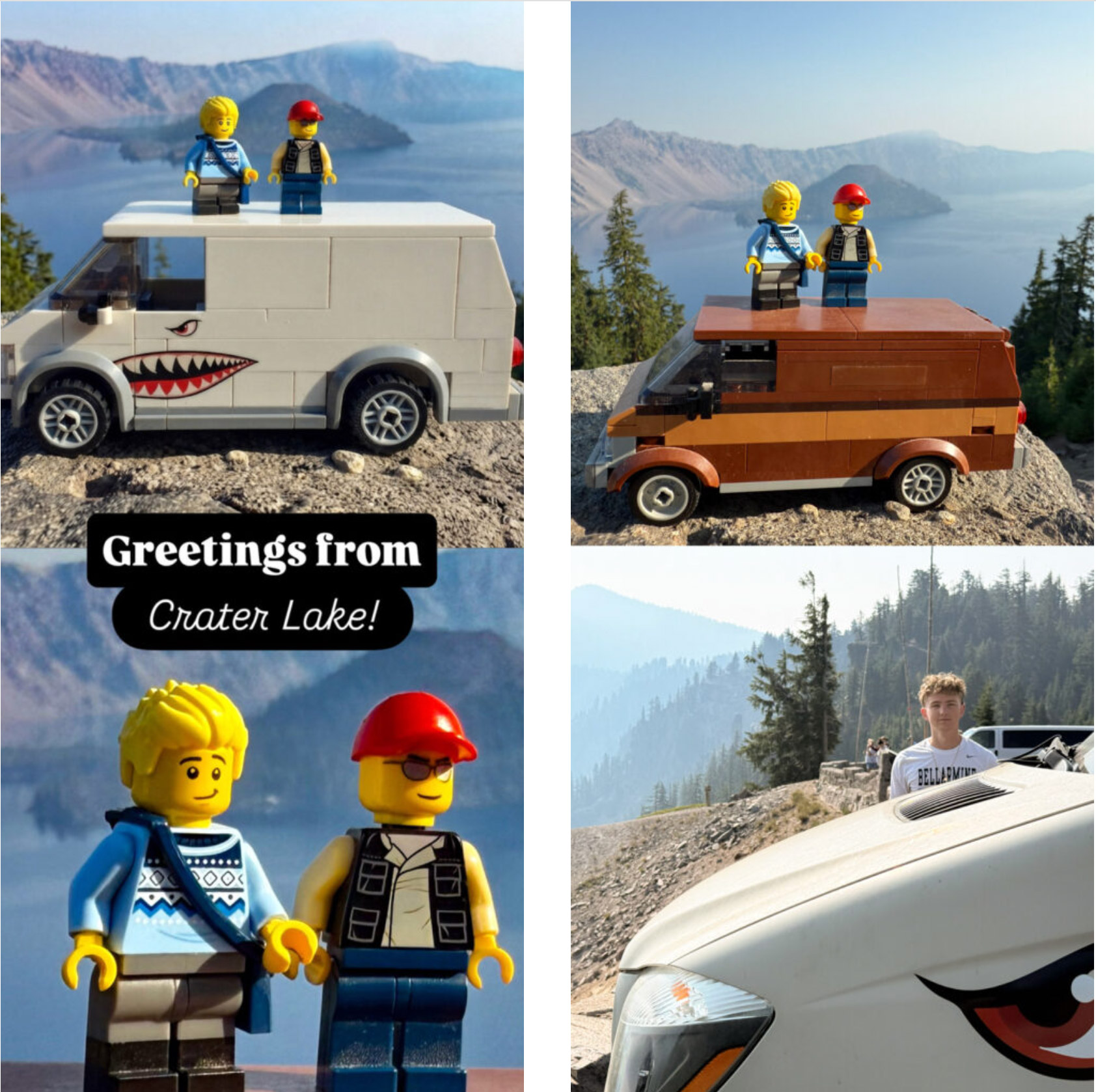
Greetings from the midst of our bittersweet (but mostly very sweet!) roadtrip to take Finn off to college in Boulder. Me being me, I of course brought our Lego selves to use in making arguably cringey (#jeezdad) family pics. I don’t have a precise match for our newly modded van, so I brought the closest equivalent & then gave Gemini a reference image to use with Nano Banana. Not bad, robot—not bad at all:
I have no words for this kind of witchcraft. In case the embedded tweet doesn’t show up in English, here’s a translation:
Wow. Maciej Dobrodziej – a digital creator – has “brought to life” one of Warsaw’s most famous photographs. The photo of a girl running in the rain on Puławska Street was taken by Zbigniew Siemaszko in 1968. Fun fact: After many years, it was possible to find Ms. Grażyna, who is the heroine of the photo. She recognized herself upon seeing… the photograph on FB.
Wow. Maciej Dobrodziej – twórca cyfrowy „ożywił” jedno z najsłynniejszych zdjęć Warszawy. Fotografie biegnącej w deszczu dziewczyny na ulicy Puławskiej zrobił Zbigniew Siemaszko w 1968 roku.
Ciekawostka: po latach udało się odnaleźć panią Grażynę, która jest bohaterką zdjęcia.… pic.twitter.com/tvNJJjlka3
“A.I. sing of arms and the man…” Wait—that was the Aeneid, but Imma go for it.
This reimagining of The Odyssey—nailing everything from casting to an apparently generated period-accurate song that actually slaps—demonstrates my long-running contention that when things become amazing enough, we can’t even process them.
People see this and neither marvel at the incredible state of technology (which has leapt forward in just the last couple of weeks), nor point out little shortcomings here & there, nor even get into another fruitless battle about the ethics of AI. Instead, at least from where I sit, I see them simply commenting on the concept & storytelling.
It’s so fun to see work from a past life enabling whole new modes of expression!
Who knew PMF for MediaPipe hand tracking would be performance art for social media 🙂
One of the unpredictable things about vibe coding is it breathes new life into tech that’s been around for ages and gives it a new audience. Threejs is another example. pic.twitter.com/QimPPiCOj7
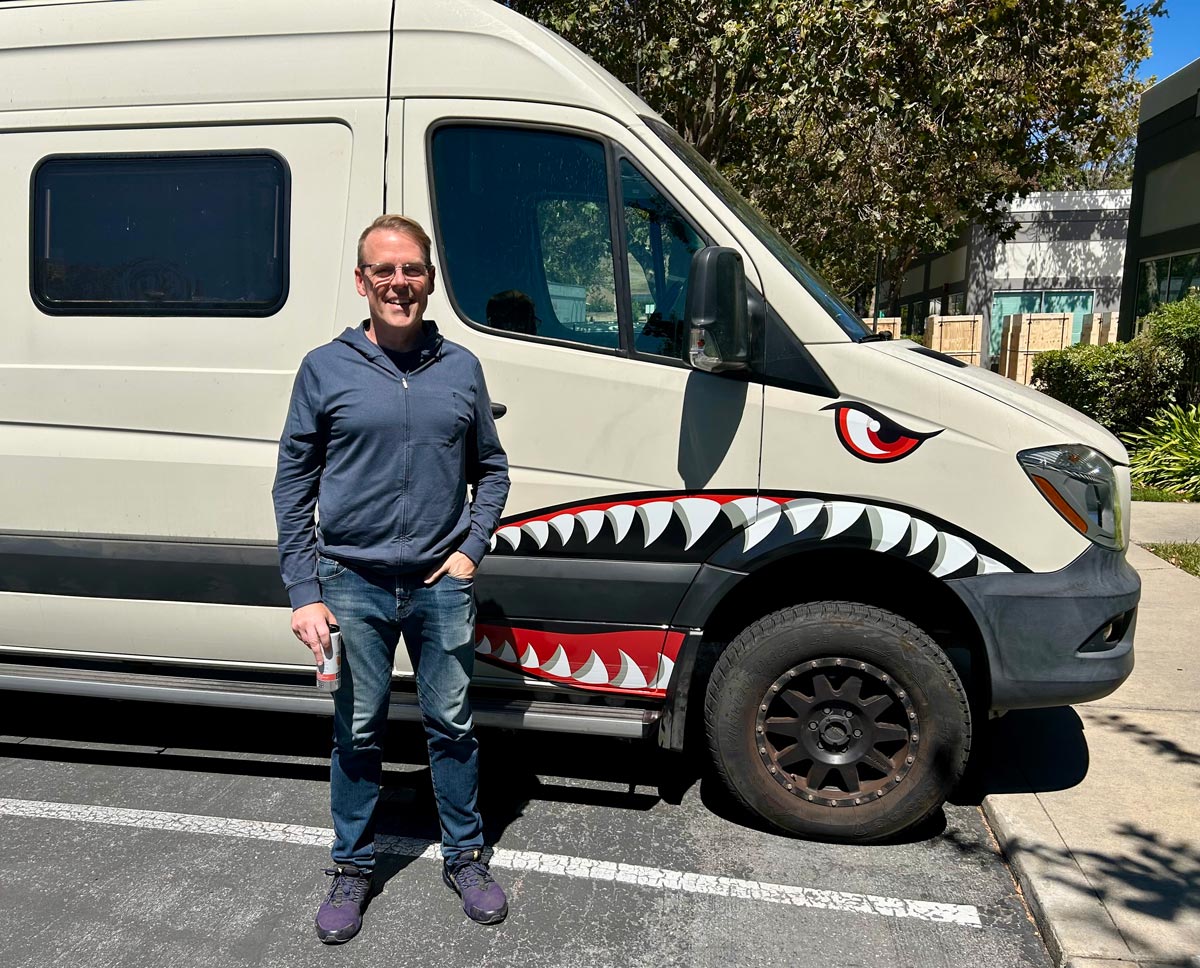
As I walked the dogs past our new camper van a few weeks back, Pinterest happened to send me some vintage World War II aircraft art. I thought, heh, how nuts would it be to give the van shark teeth? I snapped a quick pic of the van, popped it plus one of the shark mouth designs into the Gemini app, and had Nano Banana mock up the possibilities:
This helped me bring the inimitable & indulgent Margot onboard with the idea, and soon enough I found myself in Illustrator, recreating the art the old fashioned, point-by-point way. Upon seeing the design, the local graphics shop advised me on some needed mods, so I hopped into Photoshop to oblige, invoking a dash of Generative Fill. Check out the (very real!) results.
To me this is just how AI ought to work—not as a creative replacement, but rather as an accelerant that lets us try more things & communicate ideas better.
Fill your head with sweet 80’s synth chords, using Google Omni Flash to reimagine suburbia as a sci-fi dreamscape:
Transform any scene into the Upside Down using Gemini Omni Flash in @FlowbyGoogle.
Prompt: The video starts completely normal, showing the original, unmodified scene. Immediately after the start, a slow, detail-by-detail transition into the ‘Upside Down’ dimension begins. The… pic.twitter.com/gBDARHgjR5
“Correlation is not causation,” and I hope that Internet pioneer Vint Cerf announcing his retirement from Google has nothing to do with my return. 😉
The news brings to mind a couple of fun memories:
Semi-legendary story: Some Googler was chilling in what he thought was a conference room named “Vint Cerf,” only to have the real man walk in and politely shoo him out of what was actually his office.
I’ve been trying to put my finger on exactly why the AI-related buzzword du jour gets under my skin. “Taste” is anything but new, yet I can’t stand the way it gets bandied about, like some mystic shibboleth, by grasping little growth hackers.
I’ll have more to say about this (aren’t you lucky!), but I’m reminded of my all-time favorite Steve Jobs clip. He gets at “taste” being a function of work, curiosity, and hard-won love of the excellent.
If a YouTube clip could be worn out like vinyl, I’d have done so long ago, given how many times I played it for teammates at Microsoft. Steve was right 30 years ago & he’s right now. Just buying some Aeron chairs ain’t gonna flip that switch…
Meanwhile the “Scroll World” Claude skill promises to interview you (!), then whip something up with the help of generative text-to-video tech (gotta get Omni in there!).
I built a skill to let my Claude Code build premium landing pages like this in one shot. The 3 sites in the video are one-shot results, ~$10-15 each.
How it works is intriguing enough to quote at length from the GitHub page:
—–
It leans on Higgsfield for the art: cohesive isometric diorama scenes (GPT Image 2 — via Higgsfield, or the Codex CLI on a ChatGPT subscription) and the camera flights themselves (Seedance or Kling image-to-video — only models that can frame-lock a seam), scrubbed by scroll position — the same technique behind Apple’s scroll-through product pages. The camera genuinely moves; scroll only drives time. It’s framework-agnostic: you get the Higgsfield pipeline, the prompt templates, and a portable vanilla-JS scrub engine that drops into plain HTML, Next.js, Vue, or a Python-served page — nothing assumes a stack.
When invoked, the skill:
Interviews you — the subject/industry + pitch, a brand kit (import from a URL, hand it over, or have it proposed), art direction, the ordered scenes the camera visits, whether you want the mobile version (a second chain rendered natively in 9:16 portrait — composed for phones, not a crop of the landscape film), and the budget — render tiers and stills source shown with estimated credit costs, approved before anything generates.
Generates the assets — one still per scene, one “dive-in” camera clip per scene, and the connector clips that join consecutive scenes, generated from the actual rendered frames of their neighbours so every seam is frame-identical. Mobile opt-in renders a parallel portrait chain the same way, frame-locked against its own 9:16 renders.
Wires it up — a config-driven scroll engine that plays the whole chain as one flight, serving the portrait clips and posters automatically on phones.
jnack.com/BlowingYourMindClearOutYourAss—that’s the URL I picked, back circa 2005 (when men were men & we had to self-host all our videos!), to express my admiration for Nelson Chu’s Moxi watercolor app. Harnessing graphics processors to create realtime natural-media simulations has been a passion of his for the better part of 30 years.
We hosted Nelson as a summer intern on Photoshop, but we could never quite manage to marry this tech to the, ah, somewhat vintage underpinnings of PS. Later he launched a refined version as Expresii:
It remains, to my eye, just incredibly cool—never mind that its target audience will seemingly forever be limited to those with serious painting ambitions and abilities.
I thought of all this upon seeing the procedural Damage Control. Here too I dreamed of offering godlike command of realistic materials & motion:
— Miettinen Jesse – Embrace FX (@JesseMiettinen) July 14, 2026
All this stuff has remained so niche, but I think a day is coming—very soon, I hope—when realtime world models (think Google Genie, which is the realtime 3D cousin of our new Gemini Omni) make this kind of grounded manipulation absolutely ubiquitous. We shall see!
You love to see it! Here’s to many, many more fun collaborations like this—even if we inadvertently guarantee that Russell can never retire, because he remains so charmed by trying one more thing. 🙂
I love seeing my old friend & Adobe design partner Dave (mentioned innumerable times here over the years) showing off the expressive power of the collaboration so many Adobe & Google friends have been nurturing over the last several months. We have the first fruits showing now in Firefly Boards (try it now!), and there’s so much more we have in mind.
I’ve never cared much about the company name in my email address. All that stuff is always just a means to an end—a way of aligning incentives so we can help people make the world more fun and beautiful. I feel so grateful to have found a spot to stand among friends & continue this work—and we’re just getting started.
…So says my friend Chris Perry, who welcomed me to Google 12 years ago and who was essential in shipping the first feature I worked on there—face painting for the 2014 World Cup:
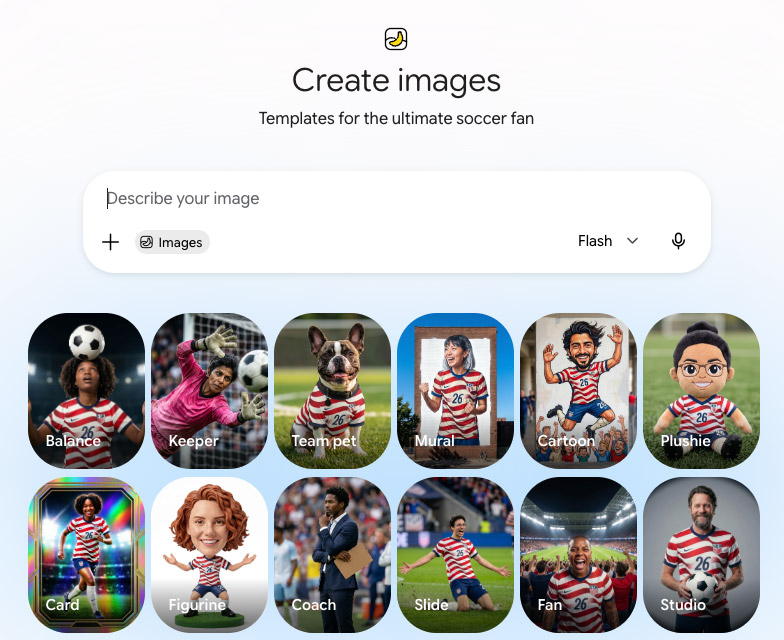
Smash cut to 2026: Chris has just left Big G to start his own company, but we’re still inviting people to paint their faces—and to do so much more—for the World Cup. Opening Gemini today, I saw this smorgasbord of Nano Banana-powered templates:
Finn & Henry (pictured up top) are now far too old and, critically, too cool to abide my applying any patriotic AI to them—but you can give it a try with pics of you & yours. 🙂
“When it’s great, there’s no debate”—ah, what a crock of crap that is.
In this fun behind-the-scenes video, Beck explains how his still-bizarre iconic rap/sitar combo came to be, and how it sat nearly forgotten for years (including by him) before having its breakout moment.
Talk about conviction & commitment from the ol’ perdedor.
Located in the Create tab — your central hub for creativity in Google Photos — Video Remix helps you make inspired content in seconds. Instantly apply cinematic relighting to spruce up a dark clip, swap out a plain background for something fun, or add artistic treatments, such as watercolor, raw sketchbook and oil painting effects.
I love seeing a plan come together. 😀 Check out this new Premiere Pro integration with Google Veo:
The Google Omni Flash model isn’t there yet, but we’ll work on connecting the dots. As Mark Twain might’ve said, “Some Adobe menus are so long, they have perspective,” and I’d love to get back to contributing to that phenomenon. 😉
In the meantime, my old partner Dave Werner is cooking with Omni inside Firefly Boards—where you can try it yourself:
So great to see Google Omni Flash in @AdobeFirefly Boards!
Despite all the turmoil in our country, my son & I felt overwhelmingly encouraged as we watched our joyous neighbors celebrating a wonderful range of traditions during Saturday’s Fourth of July parade in San Jose. Check out the highlights on Insta (below) or see a fuller set of images in our gallery.
Meanwhile Christian Cantrell is looking sharp, is not downright superheroic:
What I thought would be a quick test of Gemini Omni video editing in https://t.co/hmRbEam8vP turned out to be a pretty wild study in agentic creative processes. (1 of 3) pic.twitter.com/44HptL00HC
I’m thrilled to say that the first big launch of my Chapter 2 at Google is here! You can now build on Gemini Omni Flash in Google Enterprise Agent Platform (aka Vertex); see docs.
TBH I was so busy helping get the release out the door, and then taking some much needed rest over the Fourth of July break, that I’ve hardly had a chance to post useful info. I’ll fix that soon! In the meantime, here’s our little intro sizzle reel:
Gemini Omni: Our new model is a leap forward in world understanding, multimodality, and editing—letting you generate any output from any input, starting with video.
Coming soon to developers and enterprise customers via the Gemini API and the Gemini Enterprise Agent Platform… pic.twitter.com/af9oElAODp
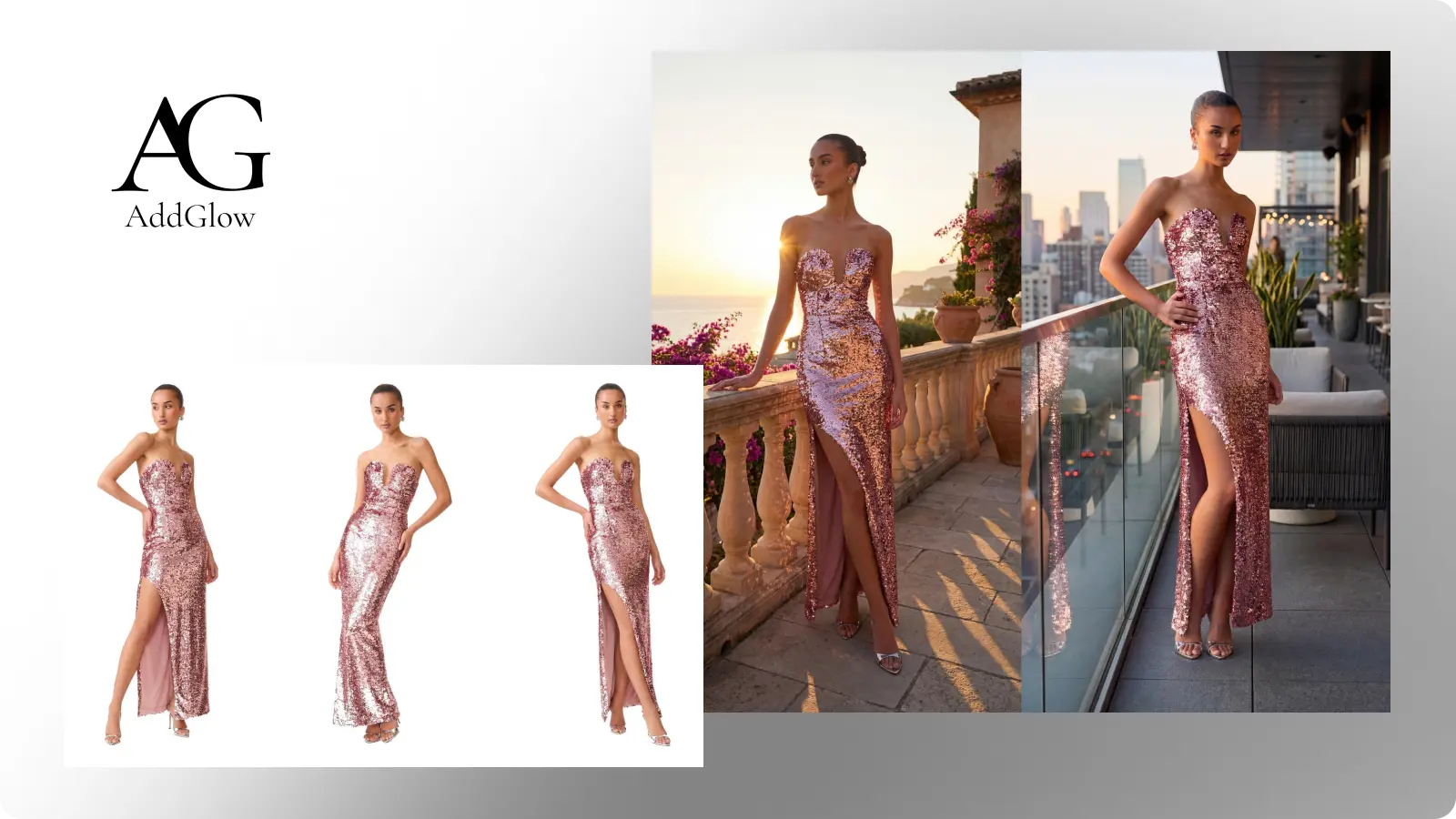
Accelerating fashion photo production with Gemini 3 Pro Image: “AddGlow helps fashion brands and retailers bypass the logistical bottlenecks of traditional photoshoots, providing a retail-specific dashboard specifically designed for enterprise-scale creative production.”
My teammate Anika & I got to meet the other day with a really big creative brand the other day (more details to share soon, I hope), and they got excited about delivering super focused, relevant experiences for their customers by building on the Flow agent & apps. Here’s Anika offering a concise tour of how to create, share, and remix the latter:
With Google Flow Tools, you can now use natural language to create bespoke tools and workflows.
In this video, you’ll see how you can:
Explore and try the various Tools within Google Flow Remix a tool to make it even more relevant for your unique workflow Create your… pic.twitter.com/uW7hY3Sdfd
“Everyone loves love,” as they say. I’ve noted many times just how much I enjoy people enjoying their work—and that pride & purpose clearly come through in this brief glimpse into the making of Skydio drones.
Skydio makes more drones than any other company in America, and it builds all of them inside one factory in Hayward, California. In this episode we go onto the floor with co-founder and CEO Adam Bry to see exactly how the Skydio X10 comes together, from a pile of thousands of parts to a finished autonomous drone that thinks more like a flying robot than a traditional quadcopter.
You will see the steps most companies never show. Skydio waterproofs the critical electronics with a nanocoating process so the X10 can fly in the rain, fuses the drone arms together using high frequency ultrasonic welding, and hand solders the motor wires onto the power board. Inside the chassis sit an NVIDIA CPU and GPU plus a Qualcomm chip running the camera feeds, all stabilized by a custom gimbal that keeps the camera locked while the drone fights wind in the air. Then comes the part that matters most. Every single drone gets pushed through a brutal burn-in stress test, flown by hand, and run through a calibration robot before it is ever allowed to ship.
At Google I/O 2026, DeepMind shipped Maps Imagery Grounding for Genie 3 — their real-time world model can now generate interactive 3D worlds conditioned to any of the 280 billion Street View images Google has captured over 20 years. Pick a location on Google Maps, choose a style, drop in a character, and walk around.
Check out his accessible & illuminating tour of the new tech:
My 16yo is lowkey impressed that at Adobe I got to work with Utah Teapot creator Martin Newell. At this point, anything that impresses a teen is very welcome. 🙂
I wonder what he’d think of Gemini Omni turning real teapots into geometry just by saying the word:
Approximately 2000 years ago (give or take a couple orders of magnitude), we shipped a cool Crop & Straighten feature in Photoshop. It enabled putting a bunch of images into a flatbed scanner (talk about words I haven’t typed in decades) and automatically turn them into individual images (“Lift & Separate,” as PM Karen Gauthier cheekily dubbed it).
Along those lines, but with radically more smarts & speed, check out what you can now do in the Google Drive app (who knew?):
We made scanning multiple documents super easy with the new Document Scanner in @googledrive .
Flip through the pages of a book or lay your receipts out on a table and our Document Scanner will identify, separate, and capture each page within the camera view. Scanner detects… pic.twitter.com/7x9a8NJnxJ
Sometimes it’s the seemingly simplest applications of tech that can be the most repeatably powerful. Here’s a quick demo of using a simple sketch of a lighting layout to direct Google Omni Flow in relighting an in-studio video:
I love the blend old-school puppetry, 3D animation, Gemini Omni, and the latest experimental video tools that went into creating TPU Training Day, the short film that debuted during Google I/O 2026.
I know you’ve heard it a million times, but it bears repeating: AI isn’t a substitute for human creativity, or in many cases even for traditional techniques. It’s just a whole new toolbox that can multiply our expressive powers.
Brainstorm and plan: Chat with the Agent to outline storyboards, develop visual mood boards, and turn high-level concepts into actionable prompts.
Generate new media: Ask the Agent to generate videos or images and select the best model to generate with.
Edit assets directly: Ask the Agent to edit selected media from your project.
Batch generate: Ask the Agent to create multiple variations of an asset at once.
Organize your assets: Ask the Agent to rename specific files, group selected media into a new Collection, or archive unused assets.
Add context & references: Drag media into the Agent prompt box from your device or project. You can also select multiple assets and let the agent know which media you are referring to.
This reminds me of how our 12yo budding naturalist Henry, aka Dr. Alias Fakename (“Elias Fah-ke-nah-may”) filmed our friend “The Wild Maria” traipsing around her natural habitat, Sasquatch-style. Check out his Attenborough-homage report (sound on!):
Despite—or maybe because—of my line of work, I have some genuinely mixed emotions about AI. Is it about empowerment, devaluation, theft, magic? Yes. It is all, as my wife would say of me, A Lot™.
Alongside whatever else it may be, however, the tech can be a genuine enabler of human expressivity. If you don’t believe me, just take 90 seconds to read & watch this heartfelt moment:
Last year, I went to Mexico City and taught AI tools to a small group of filmmakers and artists.
My favorite moment in was when I walked away from the group and came back to find this artist crying because she had finally been able to visualize a story she wanted to produce… pic.twitter.com/WCGnQPyk0B
I think this new platform will be a major sleeper hit:
With Google Flow Tools, you can build creative workflows customized to fit your creative process. Explore a gallery of premade Tools built by creatives, remix existing ones to fit your needs, or create your own from scratch by just typing a description of what you want to create. You can shape and iterate on these Tools fluidly, adjusting them for individual projects, or singular clips and images. All users can explore Tools in Google Flow, and Google AI subscribers can create custom Tools from scratch or remix existing ones.
Check out the ways some artists have been spinning up tools & putting them to work:
Before commencing his long & distinguished career as an architect, 19yo Victor Lundy captured life at an American GI.
He drew out his experiences from training at Fort Jackson (May 1944) to his journey across the Atlantic and then his time in France. In total, he produced a visual diary with 158 pencil sketches brings to life the wartime experience. Lundy applied his drawing skills to what was around him—training at Fort Jackson, South Carolina; forced marches; men at rest; the PX and tents; New York Harbor; aboard ship in the Atlantic crossing; Cherbourg Harbor; and French villages. Many vivid portraits of fellow soldiers and frontline danger also fill the pages. The sketches cover May to November 1944 when Lundy was wounded, with some gaps where notebooks were lost.
The eight surviving sketchbooks are spiral bound and 3 x 5 inches—small enough to fit in a breast pocket. Lundy used black Hardtmuth leads (a drawing pencil) and sketched quickly. “For me, drawing is sort of synonymous with thinking.”
Although I can’t say I remember enjoying the film much, I’m always a sucker for looks into the craft of visual storytelling. Here’s how craftspeople worked 17 (!!) years ago: