Here’s a great little one-minute explainer, featuring a couple of fun examples I hadn’t yet seen:
All posts by jnack
Awesome examples of Omni video transformation
This is such a wild, game-changing feature:
Gemini Omni is a major leap in world understanding & multimodal editing! It can take photos, video & audio and build entirely new scenes. Over time it’ll be able to handle any input & any output – starting w/ video
You can even give it your own videos & iterate on your ideas: pic.twitter.com/VrHPJKRJXH
— Demis Hassabis (@demishassabis) May 19, 2026
I think Carlos gets it exactly right: “I think many are focusing on the wrong aspect of the Gemini Omni model when comparing it to Seedance 2.0, since conceptually they are entirely different things. This is a model for editing videos (like Nano Banana) like we’ve never had before!“
Creo que muchos están enfocando mal el modelo de Gemini Omni al compararlo con Seedance 2.0 cuando conceptualmente son cosas distintas.
Este es un modelo para editar vídeos (a la Nano Banana) como nunca antes habíamos tenido! pic.twitter.com/eaqngSnbCD
— Carlos Santana (@DotCSV) May 19, 2026
i don’t think you understand how insane omni is pic.twitter.com/wvj4B4a59B
— Sam Sheffer (@samsheffer) May 19, 2026
Editing videos is where Gemini Omni Flash really shines. It is so incredibly capable.
> Make it New Year’s Eve with fireworks. Update the clock
London launched the fireworks early. https://t.co/cTGMPbT3tZ pic.twitter.com/c3Kh1y2KO5
— fofr (@fofrAI) May 19, 2026
I need Omni fireflies in @AdobeFirefly (Yo dawg…) https://t.co/BqvcTPo905
— John Nack (@jnack) May 19, 2026
“Nano Banana for video” is here!
I’m so pleased to be playing a very small role in bringing breakthrough video transformation to the world. Check out the new Gemini Omni:
The team writes,
We’re introducing Gemini Omni, where Gemini’s ability to reason meets the ability to create. Omni is our new model that can create anything from any input — starting with video. With Omni, you can combine images, audio, video and text as input and generate high-quality videos grounded in Gemini’s real-world knowledge. You can also easily edit your videos through conversation.
Today, we’re rolling out the first model in the Omni family: Gemini Omni Flash, to the Gemini app, Google Flow and YouTube Shorts. In time we will support output modalities like image and audio.
Conversational video editing is the real breakthrough:
Check it out & let us know what you think!
Putting in the mental reps
I keep finding myself thinking of this observation from Paul Graham:
“In preindustrial times most people’s jobs made them strong. Now if you want to be strong, you work out. So there are still strong people, but only those who choose to be. It will be the same with writing. There will still be smart people, but only those who choose to be.“
To reiterate from a previous post, quoting Keep the Robots Out of the Gym:
Think very carefully about where you get help from AI.
I think of it as Job vs. Gym.
- If we’re working a manual labor job, it’s fine to have AI lift heavy things for us because the actual goal is to move the thing, not to lift it.
- This is the exact opposite of going to the gym, where the goal is to lift the weight, not to move it.
He argues for identifying gym tasks (e.g. critical thinking, problem solving), and for those use just your brain (with minimal AI assistance, if any).
My primary metric for this is whether or not I am getting sharper at the skills that are closest to my identity.
Try personalized image creation via Gemini
As I often said back in the day, Google’s longstanding mission is to “organize the world’s information and make it useful.” A lot of that information is photographic, and a lot of that information is private; hence the value and power of Google Photos. It knows (with your blessings) who’s who, what places are important, and so on.
Now Nano Banana can leverage that info to make fun and beautiful things on your behalf.
Since you can already organize and label groups of people and pets in your library, those labels provide the context that Gemini needs to make your images feel truly yours…
With those labels in place, you can simply ask Gemini to “create a claymation image of me and my family enjoying our favorite activity” and Gemini can generate that specific image for you automatically. You can also experiment with different styles like watercolors, charcoal sketches or oil paintings. You can turn a quick idea into a custom creation, saving you the trouble of searching for, downloading and re-uploading files just to see a concept come to life.
3D pets, now & then
Check out this charming & revealing image->3D creation from Gábor Pribék:
What if anatomy explorers felt alive?
This 3D dog, including the skeleton, organs and rig, was generated with ai and reacts to the cursor in real time with head tracking and tail movement.
– Used GPT Images 2 for consistency
– @omma_ai for 3D generation and code using @threejs… pic.twitter.com/Wo9MhBEeOj— Gábor Pribék (@gaborpribek) May 12, 2026
Folks in the replies fondly remembered back to the Cat Explorer demo for Leap Motion (rest in power):
Google Earth + Nano Banana? Go Go Godzilla!
I love this kind of simple, scrappy creativity,:
Google Earth now allows importing ANY 3D model, so I used @tripoai on @fal to get Godzilla into Tokyo, and my Chrome extension to transform it into a movie scene pic.twitter.com/150iiy5UjX
— Blendi (@BlendiByl) May 13, 2026
- Capture any Google Earth 3D view
- Transform with AI (Nano Banana Pro) into cinematic shots
- Generate videos (Veo 3.1) with customizable duration and audio
GenFill + Vividon = Magic
It’s insane what we can do now—from object removal to lighting changes—that was simply out of the question even a year ago.
Check out this little progression of edits, starting with the newly enhanced Generative Fill in the Photoshop beta, followed by a couple of steps of Remove, followed by a pass with Vividon & a few tweaks in Camera Raw (running inside PS):
Photoshop GenFill + https://t.co/FoIY1oy8vJ relighting = Magic #F35 #MoffettField pic.twitter.com/4JM7lQJnt9
— John Nack (@jnack) May 12, 2026
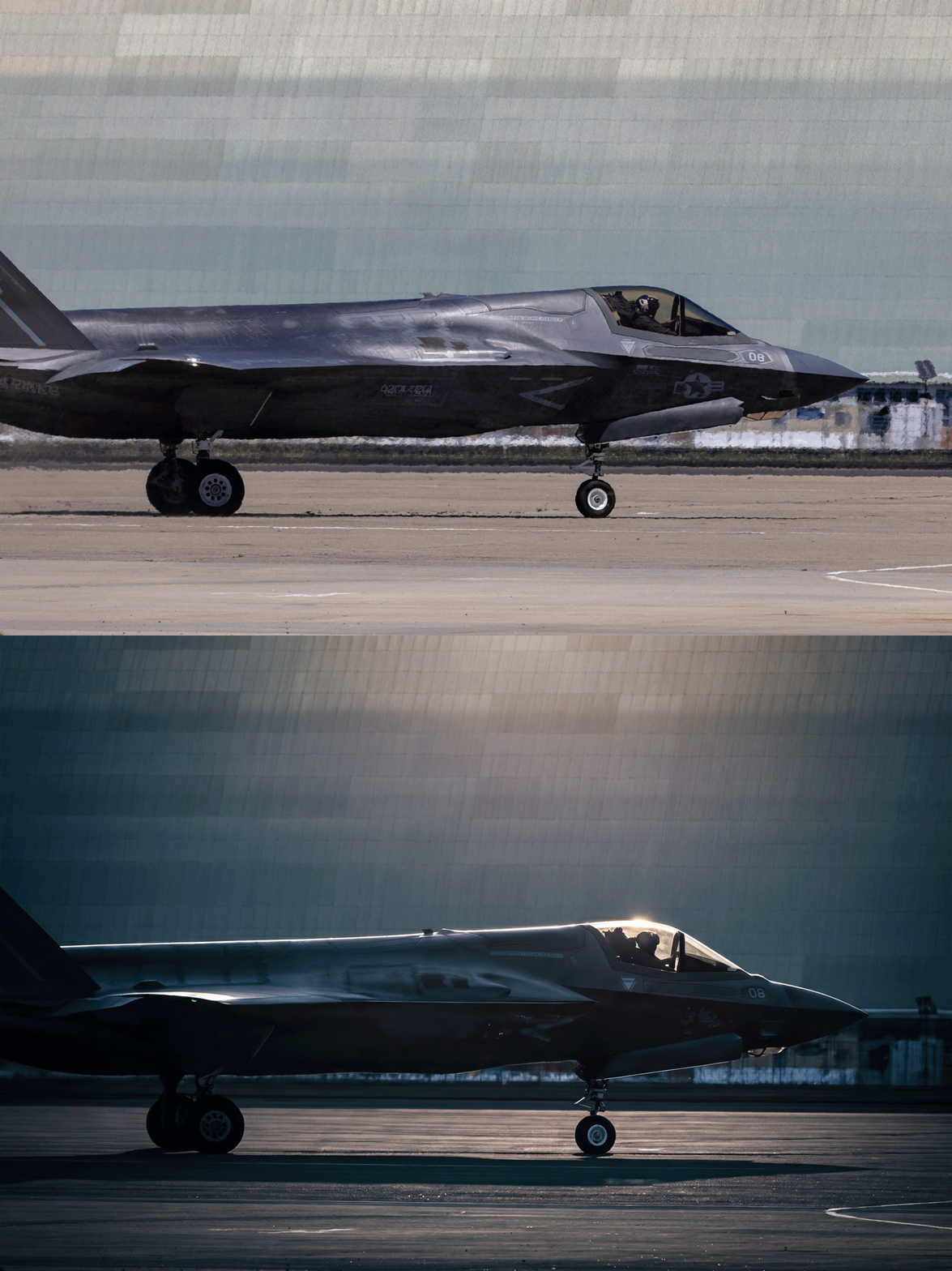
Nutty & I’m here for it. Per PetaPixel,
Co-founder and Chief Innovation Officer Marcus Kurn adds that the ability to deliver two or three lighting variations alongside every final image is a real differentiator: “once you start delivering two or three lighting variations with every final image, your clients will never want to go back.”
“Tip for aging designers”: Make PS thumbnails huge
Here’s a simple, solid tip from James Barnard about making Photoshop docs easier to navigate:
Vividon relighting comes to Photoshop
“No prompting, no friction. Just incredible results.”
As I mentioned back in January, Vividon offers new generative relighting tech that promises amazing realism & identity preservation:
Vividon places every relight on its own Photoshop layer. Adjust opacity, change blend modes, paint in or out exactly what you want, or remove it entirely. Your original always stays untouched.
Check out a 10s demo below, and visit their site for a more interactive preview:
And here’s a full 2-minute tour:
“A vehicle that cares back”
“People will forget you said, people will forget what you did, but people will never forget how you made them feel.” — Maya Angelou
I’ve reflected on this maxim countless times over the last couple of years, as I’ve considered the relationships I want with AI—particularly with notional creative partners. I want a partner who cares—who (which?) actually takes the time to get to know me, asking thoughtful questions, noodling on answers, and genuinely taking my feedback to heart.
I thought of this while listening to Stewart Brand talking to Ezra Klein the other day. Check out this poetic & provocative passage:
Well, it wound up that, basically, most of the book is Chapter 2, “Vehicles.” And the land vehicle that humans have used for 6,000 years is a horse, and the horse takes a lot of maintenance.
I’ll read something here from the book, if I may. There’s this philosopher named Albert Borgmann who wrote:
You cannot remain unmoved by the gentleness and conformation of a well-bred and well-trained horse — more than a thousand pounds of big-boned, well-muscled animal, slick of coat and sweet of smell, obedient and mannerly, and yet forever a menace with its innocent power and ineradicable inclination to seek refuge in flight, and always a burden with its need to be fed, wormed and shod, with its liability to cuts and infections, to laming and heaves. But when it greets you with a nicker, nuzzles your chest and regards you with a large and liquid eye, the question of where you want to be and what you want to do has been answered.
And I end with: “I wonder if that might come again someday — a vehicle that cares back.”
TIL: The surprising origin of Bézier curves
I had no idea! Merci, Monsieur Pierre.
The scarily beautiful animation of Sincitium
Side note: “Macrófago” is 100% the best word I’ve learned all week.
Sincitium is finally here.
We are pleased to present our latest piece: a concept trailer created specifically for the @runwayml Big Pitch Contest. For this project, we wanted to explore a completely different aesthetic from our usual studio style, and this film is the result of… pic.twitter.com/FHKkZWjjJg
— Contanimation (@Delachica_) May 4, 2026
AI filmmaking turns a (creepy, fun) corner
This is the first time I can recall watching a genuine narrative (not a handful of gee-whiz demo shots) made with AI & not really caring about the production details. We’re turning the inevitable corner where it’s just the quality of ideas & narrative that’ll matter—not so much how the proverbial sausage was made.
WE FOUND SOMETHING IN… [THE DEAD MALL]
Seedance 2.0 Omni-ReferenceA girl gang and their scooter storms into an abandoned mall at 2 a.m. Inside, they stumble on something that has no business being there. Instead of running, they stay, and what follows spirals into total,… pic.twitter.com/fC25Q24w8H
— DAN · MXVDXN (@mxvdxn) May 1, 2026
FuruFuru crashes the set
Is it still brainrot if it’s really skillfully done, like several of these clip-bombing bits from FuruFuru? Check it out & be the judge:
I am obsessed with this Japanese man using AI video to put himself into movies
(he’s on IG at @ai_am_furufuru) pic.twitter.com/ePeVPkpEG4
— Justine Moore (@venturetwins) May 3, 2026
Deeper in the Flow state: Object insertion, and Doodle to edit
Tap the pencil icon on any clip to insert objects directly into videos or remove elements, without changing anything else:
You can also draw or annotate on an image. Flow understands your doodles and incorporates them into your final frame. You can doodle directly in Flow instead of turning to a separate editing app.
Change camera angle in Google Flow
Speaking of changing angles in photos & video, Google Flow now enables changing camera angle and motion in existing clips:
A couple more examples:
See yourself from a new angle in Google Photos
Get some fresh perspective from our amazing teammates in research:
Today we are announcing a new approach to fix scene alignment after a photo was taken. Our method, now available as part of the Auto frame feature in Google Photos, uses machine learning (ML) models to understand the scene and its spatial layout and uses generative AI to imagine the photo from that new perspective. In contrast to classical photo editing, our method interprets a photo as a 3D scene — think of a real moment frozen in time — and change the camera position automatically within that space.
How to get the most from Nano Banana
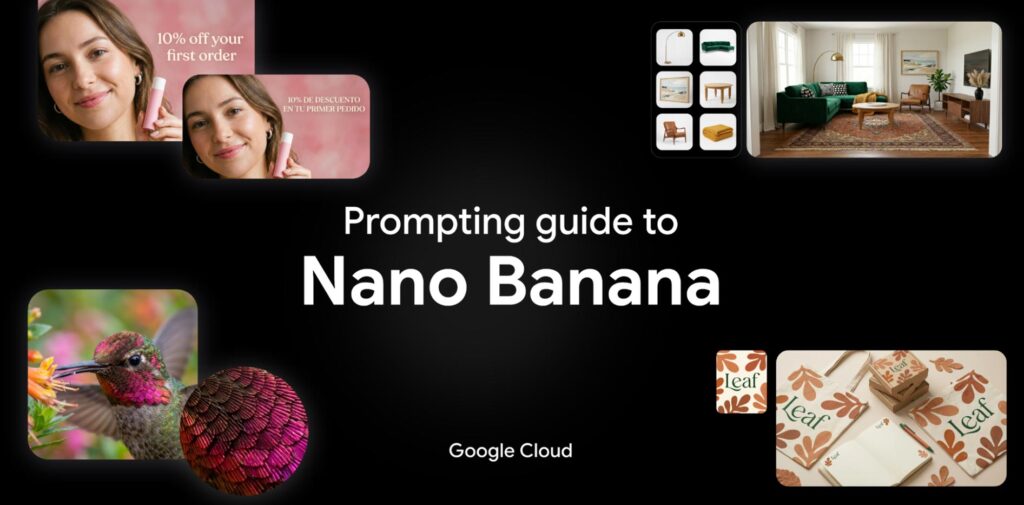
My new teammates have posted a series of detailed tips & tech specs (e.g. you can upload as many as 14 images together with a prompt). Check it out!
1. Introduction to Nano Banana
- The Models: Overview of Nano Banana 2 (powered by real-time web search) and Nano Banana Pro (built for high-end reasoning).
- Core Strengths: Deep reasoning capabilities, accurate visual rendering, and premium features like text rendering and upscaling (2K/4K).
2. Technical Specs at a Glance
- Context Windows: Up to 131,072 input tokens for Nano Banana 2.
- Versatility: Supports multiple aspect ratios (from 1:1 to 21:9) and up to 14 reference images in a single prompt.
- Safety: Built-in SynthID watermarking and C2PA credentials for responsible AI use.
3. Best Practices for Prompting
- Be Specific: Focus on concrete details regarding subject, lighting, and composition.
- Positive Framing: Describe what should be there (e.g., “empty street”) rather than what shouldn’t.
- Director’s Perspective: Use cinematic terms like “low angle,” “bokeh,” or “aerial view.”
4. Five Powerful Prompting Frameworks
- Image Generation: Using the [Subject] + [Action] + [Context] + [Style] formula.
- Image Editing: Utilizing “Semantic Masking” to change specific parts of an image via text.
- Real-Time Data: Leveraging web search to create visuals based on current events or weather.
- Text Rendering: How to get legible, localized text in over 10 languages within your images.
- Creative Direction: Advanced tips for controlling lighting (e.g., Chiaroscuro), camera hardware (e.g., GoPro vs. Fujifilm), and film stock.
5. The Creative Ecosystem
- How to combine Nano Banana with other models like Gemini (for prompt engineering), Veo (for video keyframes), and Lyria (for AI soundtracks).
Photoshop, 3D, and redemption
“Being early is the same as being wrong.” — Marc Andreessen, Vol. ~900
We put 3D into Photoshop nearly 20 years ago, and it got used by nearly 20 people total, lol. For many of the past several years, it was on the team’s “gotta throw overboard, as soon as we can find time” list—but happily that time was never found.
I am so glad to see this foundation now finding a meaningful niche, and I have high hopes for its generative future. Posing a person or thing directly is so much more intuitive than trying to precisely describe an outcome via prompt, and simple 3D manipulation + generative rendering could well deliver game-changing best of both worlds.
ついに新機能「オブジェクトを回転」が正式版に追加されました#PR #AdobePhotoshop #AdobePartner@creativecloudjp pic.twitter.com/f93OYx2hWo
— タマケン | デザイン (@DesignSpot_Jap) April 28, 2026
Sketching to control Nano Banana in Photoshop
Just like it says on the tin. Check it out:
Photoshop is the most powerful way to use Nano Banana 2
In photoshop you can sketch and control exactly where everything goes in your nano banana 2 generation
Here’s how I’ve been using it: #AdobeFireflyAmbassadors #Ad #AdobePartnerModels pic.twitter.com/c7YzV55JNS
— Allen T. (@Mr_AllenT) April 6, 2026
Canva’s new Magic Layers converter is really impressive
As generative imaging models like Nano Banana get increasingly adept at rendering text-heavy layouts, the ability to convert those layouts into native text/image compositions is of course hugely valuable for editing. Check out Canva’s new Magic Layers feature:
Tus Posters con GPT Images 2.0 por fin son 100% editables
Con Canva puedes separar las capas y personalizar cada texto o imagen. Se acabó el conformarse con lo que te dé la IA: ahora el diseño es 100% tuyo
Te explico cómo hacerlo pic.twitter.com/UudG6Kk4zP
— ImPaul (@impaulxyz) April 26, 2026
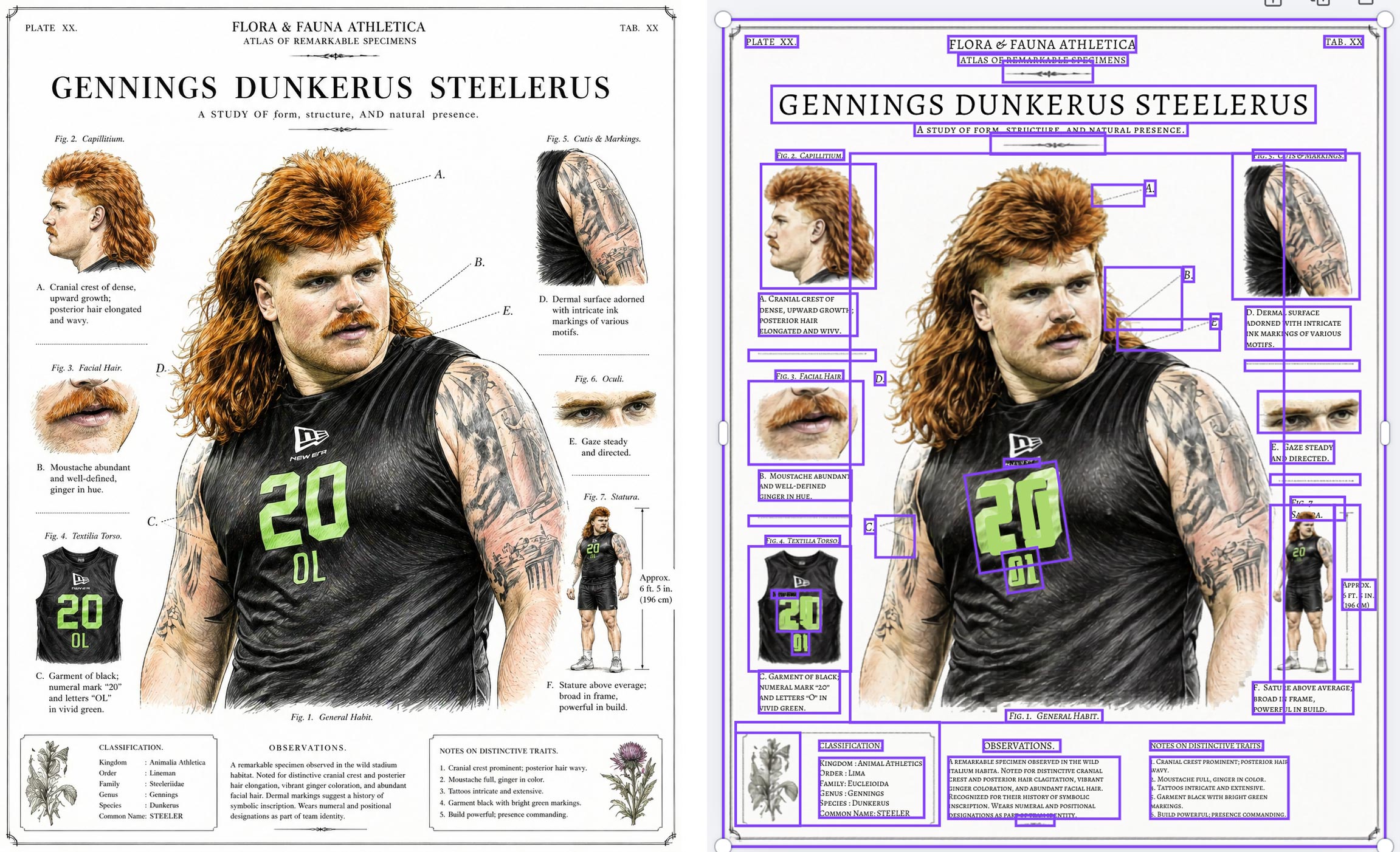
I couldn’t resist trying it out with a silly infographic I made using the new ChatGPT image model, and dang if it didn’t do a pretty a great job:
“LooseRoPE” promises super intuitive illustration & compositing
Man, it must be nearly 20 years ago that we started envisioning drag-and-drop-simple composition and compositing in Photoshop—back when gradient-domain painting & blending was the emerging hotness. After plenty of false starts, could these simple interaction patterns finally become mainstream? Maybe! I must know more of this witchcraft:
Do you like image editing? Don’t like prompt engineering? Want to see what a giraffe-duck hybrid looks like?
If you answered yes at least once, you may like our new #SIGGRAPH2026 paper: LooseRoPE, which presents a new, prompt-free way to edit images using simple visual cues pic.twitter.com/JMzMDHJ9wE— Etai Sella (@etai_sella) April 23, 2026
A love letter to the Chicago lakefront
My mom and her sisters (all with the skin tone 255/255/255) spent way too many days turning themselves into rotisserie chickens here over the years. That’s one of millions of stories, ranging from shipwrecks to chicanery, plucky birds to an African American rodeo scene, that have unfolded along Chicago’s amazing lakefront. Having grown up in Illinois & visited hundreds of times over the years, I really enjoyed this tour from WTTW & Geoffrey Baer:
Recent 3D hotness from Apple & Microsoft
Apple’s LiTo can generate Gaussian spalts with realistic view-dependent rendering:
This is the biggest announcement from @Apple that nobody has talked about.
Generating #GaussianSplatting with #AI using models like Trellis or Sam3D hasn’t made much sense…until now.
Meshes are still far easier to edit, integrate cleanly into #3D workflows, and with recent… pic.twitter.com/tTe2f1gk36
— Gabriele Romagnoli (@GabRoXR) April 25, 2026
Meanwhile Microsoft’s open-source Trellis tech promises super fast 2D-to-3D conversion:
MICROSOFT DROPPED A 4B PARAMETER MODEL THAT TURNS ONE IMAGE INTO A 3D ASSET IN 3 SECONDS
and it’s open source
TRELLIS.2 fully textured, physically accurate 3D models with PBR textures out of the box
not a rough mesh..not a placeholder
roughness, metallic, opacity the kind of… pic.twitter.com/TWxdmB63VB
— Vaishnavi (@_vmlops) April 26, 2026
You can now verify Google AI-generated videos in the Gemini app
You can now check if a video was edited or created with Google AI directly in the Gemini app.
Just upload a video and ask something like, “Was this generated using Google AI?” Gemini will scan for the imperceptible SynthID watermark across both the audio and visual tracks and use its own reasoning to return a response that gives you context. For example, it might say: “SynthID detected within the audio between 10-20 secs. No SynthID detected in the visuals.”
Uploaded files can be up to 100 MB and 90 seconds long.
Scout with Maps, animate with Veo
Check out this super cool mashup between Google Maps & my new product, Veo (video generation):
280 billion Street View images + generative AI = Maps Imagery Grounding.
At #GoogleCloudNext, we announced that brands can now generate beautiful AI visuals, all anchored in Street View.
For example, when storyboarding, filmmakers can visualize a scene – like a spaceship taking… pic.twitter.com/epwc0GvAm2
— Miriam Daniel (@miriamkdaniel) April 22, 2026
The team writes,
With Maps Imagery Grounding, a film studio can use a laptop to quickly visualize a scene at a specific place, like Washington Square Park in New York City—before scouts ever set foot on set. It’s easy to use: just type a prompt like “generate an image of a futuristic spaceship hovering in front of the Washington Square Arch” into the Gemini Enterprise Agent Platform and enable grounding with Google Maps Imagery in settings. In seconds, you can storyboard your creative vision with an accurate image—and you can even use Veo to animate the scene.
Slick 360º camera control for Nano Banana
Check out this cool little UI from Flora:
Get every angle from one product shot. Camera control rotates around any image in a full 360. Use it on PDPs, campaign stills, lifestyle, whatever you shot last week.
Now live in FLORA. pic.twitter.com/AqmxlAnGCZ
— FLORA © (@floraai) April 21, 2026
Google Photos adds touch-up features
My first week at Google in 2014, I was asked to send a company-wide dogfood email about automatic teeth whitening in Photos. We got draaaaaged hard by offended Googlers, & the feature never launched.
The important lesson: cosmetic stuff can be welcome, but only as opt-in, not as AI-imposed judgement of your appearance. I used to liken the difference to my wife walking through a department store & being offered a makeover by a beauty products salesperson—versus that person simply grabbing her & forcibly applying the makeup (!).
In any case, now you can opt into using these features in Photos (only on Android at the moment, it appears):
New touch-up tools are now rolling out in Google Photos to help you make quick, subtle fixes — like refining skin texture, brightening eyes, or whitening teeth. You’re in total control of the chosen effect intensity for every face in the frame. pic.twitter.com/CqgbNXjPIm
— Google Photos (@googlephotos) April 20, 2026
You could have a steam train…
Despite—or perhaps because of—growing up without MTV (I know, the Gen X horror...), I’ve always had a real fascination with the video for Peter Gabriel’s Sledgehammer. Check out its rad zoetrope picture disc incarnation:
The zoetrope picture disc 12” of Sledgehammer is out this Saturday as part of #RecordStoreDay
Designed by Drew Tetz and Marc Bessant.
Please visit the Record Store Day website to check out the full list of releases and also visit your local record store to see what they plan to… pic.twitter.com/arJfTYLk4k
— Peter Gabriel (@itspetergabriel) April 13, 2026
And, because why not, it’s Friday & you deserve nice things, here’s the original vid:
Did you know that Google Slides can make you into a video avatar?
I had no idea! And yet here “I” am, thanks to this new-to-me feature. In at least this first test, the visual likeness is very good, the gestures are a little off, and the voice is that of someone else (not shocking, as the creation flow asked me to read aloud only a couple of numbers):
“AI will never suffer from bipolar disorder and autism like me”
Spending four minutes listening to Diplo’s thoughts on how art will be made going forward, and specifically on the value of quirky, messy, world-experiencing humans will be a good use of your time, I promise. The machine needs us ghosts.
if you are a creative you need to adapt or just like give up and become an uber driver until everyone has a waymo. I know it’s not cool or classy to speak like this but i’m not gonna candy coat the future – it is what it is . sorry for bad new’s my purist . there will always need… https://t.co/SXswII51wv
— diplo (@diplo) April 14, 2026
“A rare look at how Hollywood is already using AI”
I’ve been sending this video to friends & family to explain what the heck it is I actually, y’know, do for a living. (It’s somehow related to enabling all this!)
Here’s a good summary from Gemini:
- Digital Clones for A-listers (0:33–1:56): The Creative Artist Agency (CAA) is helping actors create and store secure digital doubles of their likeness and vocal inflections. This serves as a “vault” to protect their intellectual property and assert rights against unauthorized use.
- Deep Voodoo’s AI Innovations (2:15–3:54): Founded by Trey Parker and Matt Stone of South Park, this studio uses proprietary facial scanning and AI to perform tasks like real-time de-aging for projects like the TV series Before and Billy Joel‘s recent music video.
- Production Efficiency and Ethics (6:03–7:40): Director Darren Aronofsky and filmmaker Eliza McNitt utilized Google’s Veo 3 model for the short film Ancestra. AI allowed them to create complex cosmic visuals and even recreate a newborn baby digitally to avoid the ethical concerns of filming with a real infant.
- Commercially Safe AI Tools (8:00–9:10): Asteria Film Company, co-founded by Natasha Lyonne and Bin Moser, focuses on building “commercially safe” AI models trained strictly on licensed materials to avoid copyright infringement, emphasizing that learning to use AI is an essential skill for modern filmmakers.
- The Human Element (4:48–5:13): Despite the rapid evolution of AI, industry unions like SAG-AFTRA emphasize that human performers bring a unique, special quality to projects that algorithms cannot replicate, advocating for guardrails to ensure AI serves as a tool for creators rather than a replacement.
Veo & the making of “Ancestra”
Honestly, in taking my new role at Google & working to bring Veo and other models to creators, it’ll likely be hard to focus on the more boring bits (which, as with every job, will certainly be there) when storytellers like Darren Aronofsky & Eliza McNitt are pushing the limits of the tech & all I want to do is dive in up to my eyeballs. 🙂 But, as they say, that’s a good problem to have, and I look forward to learning more over time.
Meanwhile, check out this look into the making of ANCESTRA, made by Eliza (and team) about her own birth:
Here’s the film itself:
No Star Wars? No Photoshop.
The last time I visited Industrial Light & Magic, Russell Brown & I grabbed lunch with Photoshop co-creator John Knoll. As they’d just retired a bunch of bulky rendering hardware, John was busily removing the fascia (adorned with Imperial logos) and adding decorative blinkenlights, creating some pretty exceptional décor for his office.
I was reminded of this seeing Russell share this 1-minute history of how John’s work at ILM proved to be crucial in his & Thomas’s creation of Photoshop:
Here’s the full episode
00:00 Cold Open — AI, Creativity & The Big Question
00:50 Welcome to Creative Outsiders
01:09 Introducing Russell Brown (“Doc”)
02:00 Photoshop Origins: ILM, Star Wars & The Abyss
06:55 The “Holy Sh*t Moment” — Taking Control of Images
11:10 From Rub-Down Type to Digital Creativity
12:05 Where Creativity Comes From
16:00 Becoming the Best at What You Love
18:15 Enter AI — Tool or Threat?
24:00 The Future of Photography & AI Workflows
30:15 Creating Films with AI & Storyboarding
34:00 The Ethics of AI in Photography
37:00 AI for Pre-Visualization (Not Replacement)
43:00 From Photoshop Fear to AI Fear
44:30 Why Russell Shoots on iPhone
48:00 Simplicity, Constraints & Creativity
And just in case you’re curious, here’s John recreating the first demo of Photoshop, some 20 years after the fact (which is itself now 16 years ago, OMG…):
“Sketch to Vector” comes to Illustrator
Nano Banana + Adobe tech FTW! Here’s a quick look:
And here’s a deeper dive:
The epic typography of Artemis
Call that logo Shai-Hulud, ’cause it’s one enormous worm.
NASA reintroduced its iconic 1975 ‘worm’ logo back in 2020, cool to see it in full glory on the side of an Artemis II rocket booster. Each letter is 6 ft 10” tall and altogether 25 ft long. The Exploration Ground Systems Team use a laser projector to tape off, then paint by hand. pic.twitter.com/JMIQUcApWw
— David McGillivray (@dmcgco) April 7, 2026
Reflection removal comes to Photoshop
Here’s a practical, down-to-earth application of AI from my old teammates Dana & co.:
Big news: I’m back at Google!
Hey gang—I am beyond delighted to say that I’m returning to Google, taking a Cloud AI PM role focusing on generative media!
As Paul Simon told us, “These are the days of miracles and wonder”—and I wonder at my amazingly good fortune getting to help shape these miracles.
Ever since 2000, I’ve focused my PM career on “unblocking the light,” helping people make the world more beautiful and fun. From Photoshop to Google Photos to M365, I’ve loved learning what truly matters to creators. Nothing beats zeroing in on real needs, then marshaling some big giant brains to deliver everything from big breakthroughs to crafty little mint-on-the-pillow delights.
Returning from last fall’s Adobe MAX, I summarized attendees’ vibe as “Overwhelmed, But Optimistic.” Now the pressure—and privilege—is to turn that optimism into action.
There’s so much I don’t yet know about this role—but what I know for sure is that I can’t do it alone.
I know I need you.
As we all navigate this bewitching, bewildering time, let’s stick together. Please keep me honest, grounded in knowing just what you need—and what you don’t. That way I can advocate accordingly, helping Google focus on exactly what’ll benefit you most.
Questions & ideas for collaboration are always most welcome: [last name @ employer dot com]. And in the meantime I’ll keep sharing my most interesting finds on the ol’ blog—especially in the burgeoning AI/ML category.
And with that, friends, here we go!
Photo history: How NASA trained moonwalkers to shoot
I love behind-the-scenes little insights like these. Click or tap as needed to see the full post:
NASA trained astronauts to take photos without being able to see what they were shooting. They bolted a camera to each astronaut’s chest, removed the viewfinder, and handed them pressurized gloves so thick they could barely feel the shutter button. Before each Apollo mission,… https://t.co/QS1bOKtNvo pic.twitter.com/tJxgRVlwJ3
— Anish Moonka (@anishmoonka) April 6, 2026
Phota launches, promising maximum identity preservation
Phota—about which I expressed some initial misgivings, given its ability to rewrite memories—has launched Phota Studio & their API. From what I can tell, it builds upon a Nano Banana foundation and adds personalization that relies on uploading dozens of images of each individual in order to maximize identity preservation:
With Phota, for the first time, you can generate, edit, and enhance photos while keeping your identity intact, every time.
We’re not building a generic foundation model. We build personal models about you, and about the people and pets around you. At the center are profiles, built from your personal album that learn the details of your appearance that make you recognizable as yourself: how you smile, your eye color, and how your face looks from different angles. Your personal model is private and only used by you.
Today, we introduce Phota Studio and Phota API, powered by our photography model that brings flagship image model capabilities, personalized to you.
With personalization, an image model stops being just playful and starts becoming useful for photography.
With Phota Studio, you… pic.twitter.com/UFOW32Vpvh
— Phota Labs (@PhotaLabs) March 26, 2026
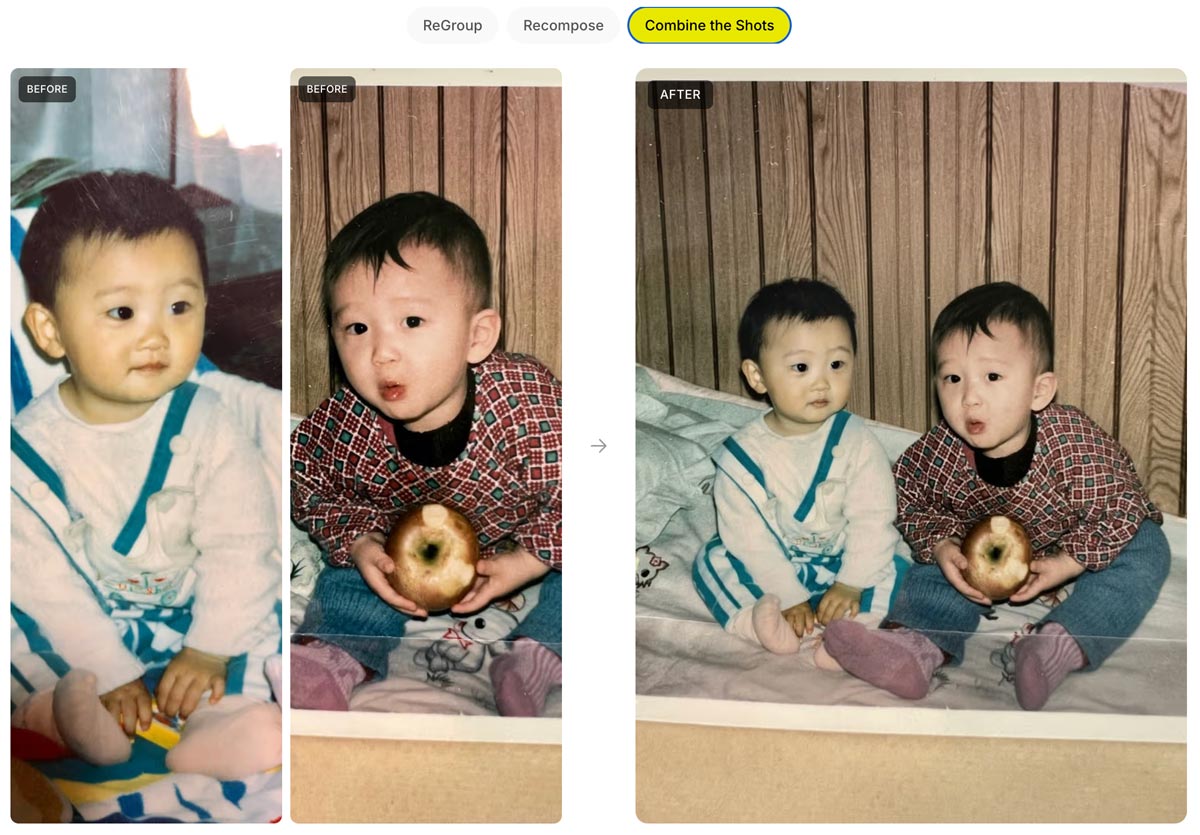
Here’s a quick thread in which I tried inserting myself into a couple of images, using both Phota’s model (which depended on my uploading 30+ images of myself) and just Nano Banana straight out of the Gemini app:
Currently having fun Phota-bombing historical events in @PhotaLabs, which mixes their custom, identity-optimized model with @NanoBanana: pic.twitter.com/f3atvLkbxM
— John Nack (@jnack) April 6, 2026
Full-body Tetris
Heh—it’s fun to see the fruits of my former team’s efforts going to fun use: Google’s open-source MediaPipe framework enables body tracking, among many other things:
i made tetris but the board and pieces are attached to your body and it’s quite tiring to play pic.twitter.com/yEoA49igpX
— AA (@measure_plan) March 31, 2026
Inside the design of “Project Hail Mary”
I love love love the attention to detail that Phil Lord and Christopher Miller brought to the film. Check out the lengths they & their crew went to on everything from devising rotating lights for the inter-ship tunnel (conveying constant rotation) to nailing film grain. And I love the exuberance & generosity of creators in sharing so many insights into design & process.
FreePik enables 3D photo shoots
I love seeing progress like this: upload a product pic, convert it to 3D, and photograph it on a virtual set:
Your next 3D photo shoot will be done with AI
3D Scenes generates full environments from any image
→ Place your objects in the scene
→ Move the camera like a real shoot
→ Consistent lightning and detail across every angleAvailable now on Freepik pic.twitter.com/blLN6fN1YW
— Freepik (@freepik) March 26, 2026
Go from 2D to a 3D
Upload your product photo → AI builds the scene around it → navigate freely in a 3D space
Rotate, zoom and explore every angle pic.twitter.com/waJf70Bdmn
— Freepik (@freepik) March 26, 2026
Photoshop’s Remove Tool gets smarter
“Now with more distractions” isn’t usually the kind of thing one would tout—but as you’ll see, it’s just the kind of smarts people want for clean-up work:
Photoshop’s Remove Tool is getting a HUGE upgrade with more distractions.
A LOT more! pic.twitter.com/EYHp3Dilmm
— Howard Pinsky (@Pinsky) March 27, 2026
BTS: “Endless Buckets”
I dug this quick tour from Robert Hranitzky, giving a peek behind the scenes on a recent project:
Runway debuts Multi-Shot
Here’s a fun, ultra-simple way to turn an image (or just a prompt) into a short, multi-shot narrative:
Introducing the Multi-Shot App. An easy way to go from a simple prompt to a thoughtfully crafted scene. All with dialogue, sound effects, intentional cuts, pacing and cinematic framing. Start from an image or go purely Text to Video for total creative exploration. Available now… pic.twitter.com/ek5uuuVf06
— Runway (@runwayml) March 26, 2026
Just for fun I fed it this image…
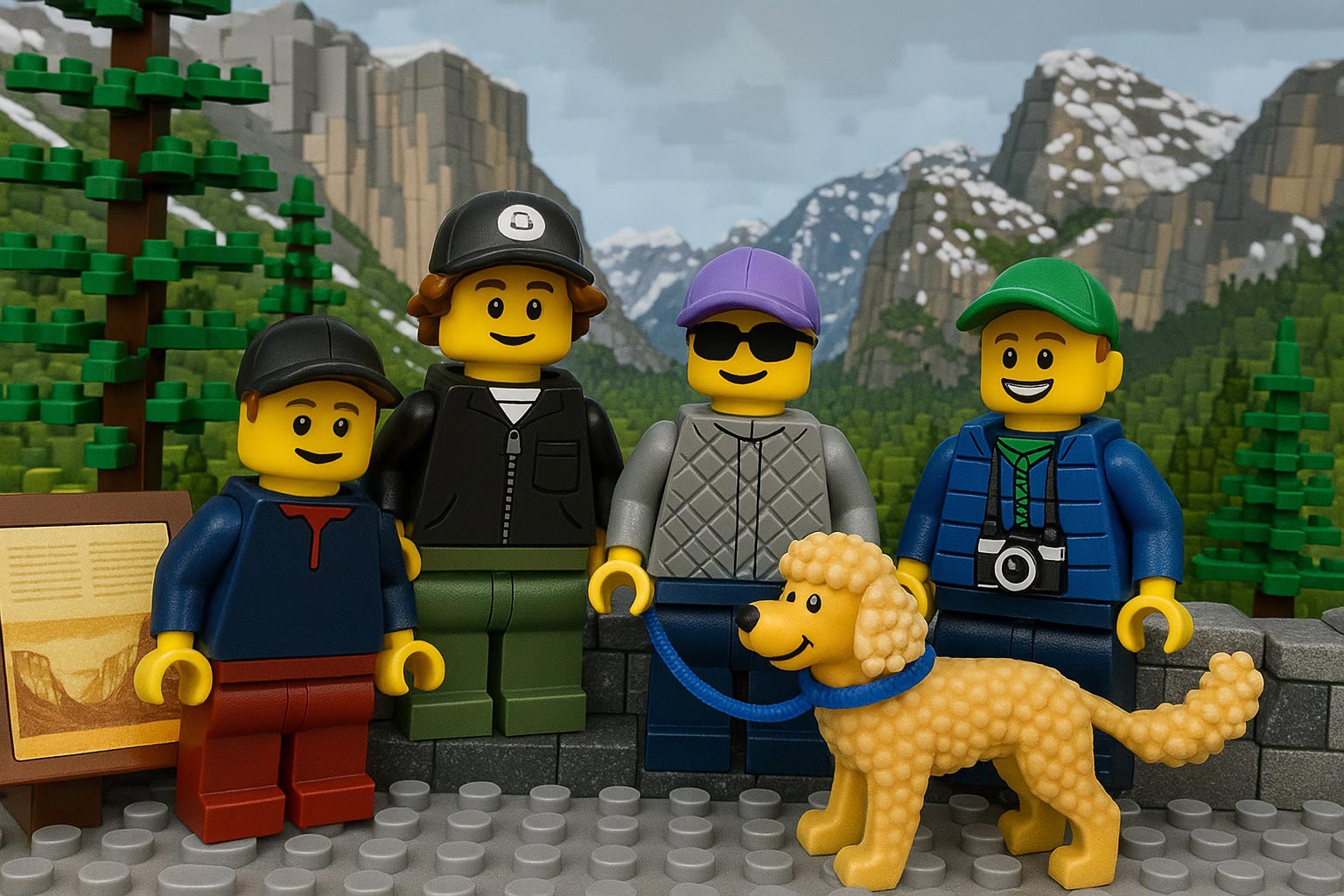
…and this prompt (based on an all-too-true story):
A family of Lego people and their dog gaze around Yosemite’s most iconic vista, then reminisce about that time they got stuck there in the snow in their VW van, expressing hope that they don’t get stuck again!
Check out the results:
I Love(art) to move it, move it…
I’ve long quoted James Ratliff, the super sharp designer behind Adobe’s Project Graph (who’s recently decamped to Figma), in nicely phrasing how the process of generating & refining ideas generally starts broad/declarative (searching, prompting) and moves towards fine-grained methods (selecting, moving, etc.):
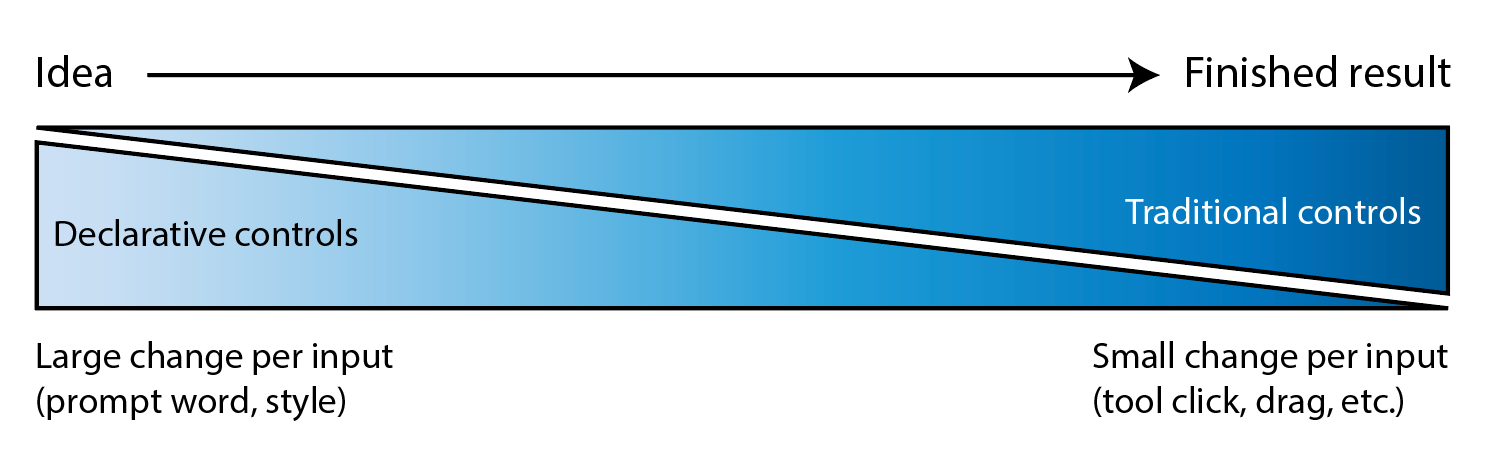
I see an increasing number of tool & model creators mixing modalities—even in the Gemini Super Bowl ad featuring a mom & daughter drawing a simple circle to show where they’d like to add a dog bed.
I’m eager to check out Lovart’s take on the possibilities, especially for animation:
⚡️ New on Lovart: Move Object
→ Select any object with rectangular or lasso tool
→ Move it wherever you want
→ Prompt optional modifications
→ One clean, consistent imageNo masks. No layers. No re-roll. pic.twitter.com/Sw800icnsu
— LovartAI (@lovart_ai) March 25, 2026
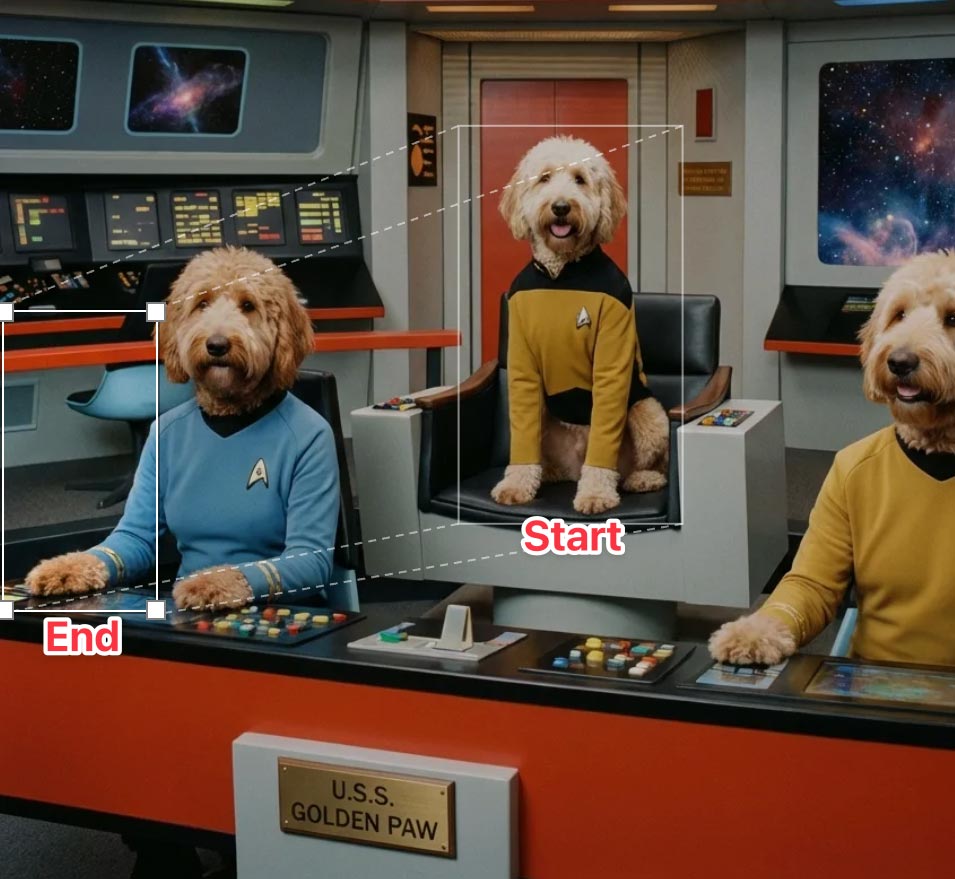
Update: Here’s a look at the UI, in which you can move & scale the selection rectangle, as well as the before & after images:
Spline enables agentic 3D creation
“3D scenes, websites, games, apps,” promises Spline. “Describe anything and Omma builds it for you in seconds.”
Omma combines code generation (LLMs), 3D AI mesh generation, and Image generation all in one place for you to build and ship. Deploy to production, assign custom domains, and more.
Sora is the new Peach
Ten years ago (!), the embryonic social app Peach suddenly blew up on the scene—only to molder shortly thereafter. Adam Lisagor tartly predicted that outcome right after Peach debuted:
I just joined Peach. Did you see that thing on Peach? Only teens use Peach these days. Nobody uses Peach anymore. Oh my god, remember Peach?
— Adam Lisagor (@adamlisagor) January 9, 2016
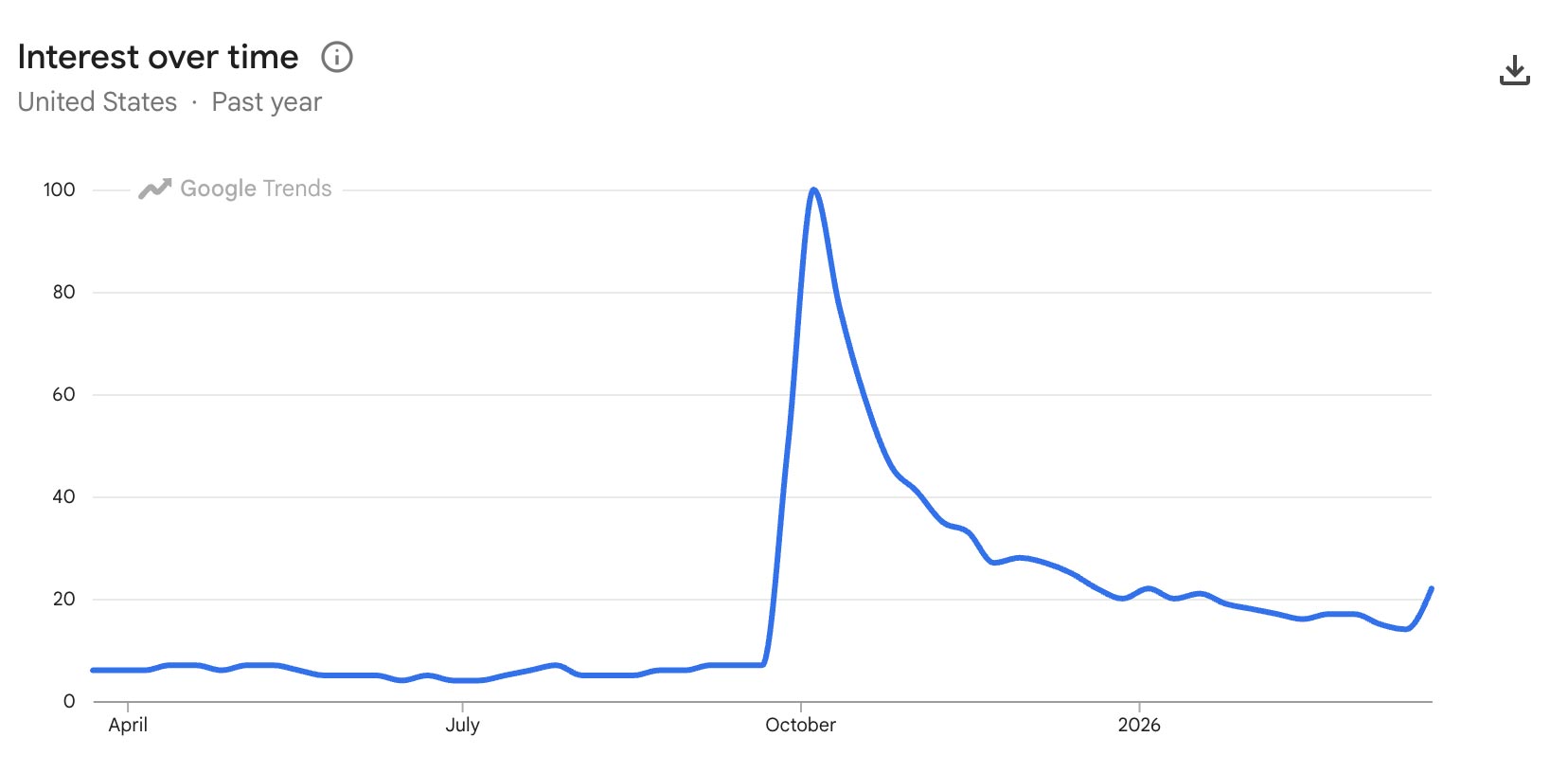
I’m reminded of this upon hearing that OpenAI has bailed out on Sora, which they launched just a few months ago. In a way I’m not surprised—check out how interest in the tech spiked & then rapidly cratered—except that just a couple of months ago Disney signed a billion-dollar deal to use it. ¯\_(ツ)_/¯