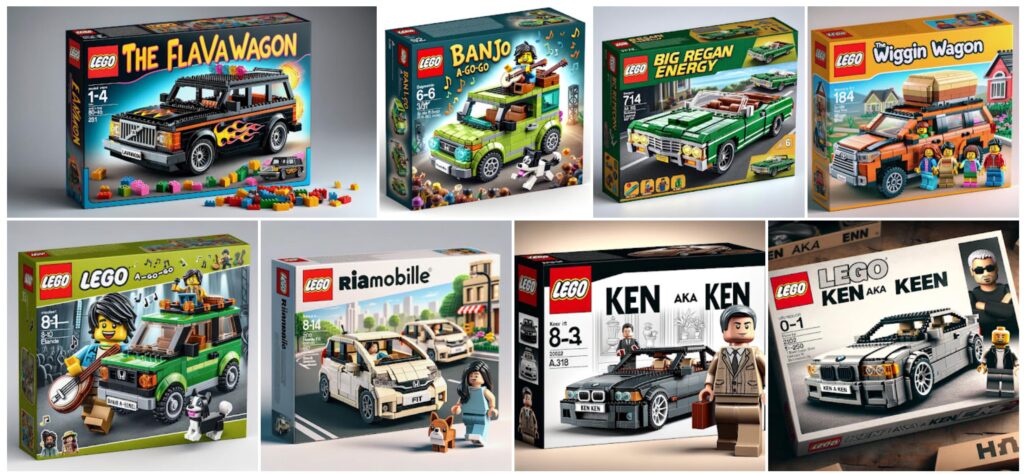
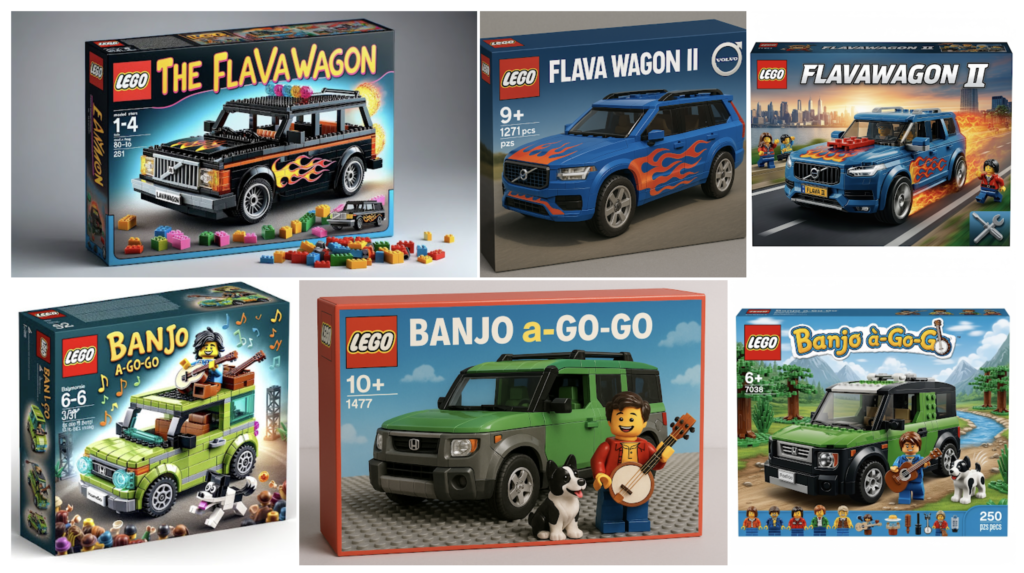
Now that Google’s Nano Banana model has dropped, I felt like revisiting the challenge, comparing results to the original plus ones from ChatGPT 4o.
As you can see in the results, 4o increases realism relative to DALL•E, but it loses a lot of expressiveness & soul. Nano Banana manages to deliver the best of both worlds.
Rob de Winter is back at it, mixing in Google’s new model alongside Flux Kontext.
Rob notes,
From my experiments so far: • Gemini shines at easy conversational prompting, character consistency, color accuracy, understanding reference images • Flux Kontext wins at relighting, blending, and atmosphere consistency
And yes, I do feel like I’m having a stroke when I type our actual phrases like that. 🙂 But putting that aside, check out the hairstyling magic that can come from pairing Google’s latest image-editing model with an image-to-video system:
Want to try a new haircut? Check out this AI workflow:
1. upload a selfie & prompt your desired haircut 2. uses Nano Banana to generate your haircut 3. then Kling 2.1 morphs from old you to new you 4. Claude helping behind the scenes with all the prompts
Nearly a decade ago now (good grief), my entree to working with the Google AI team was in collaborating with Peyman Milanfar & team to ship a cool upsampling algorithm in Google+ (double good grief) and related apps. Since then they’ve continued to redefine what’s possible, and on the latest Pixel devices, zoom now extends to an eye-popping 100x. Check out this 7-second demo:
I’d seen some eye-popping snippets of the Google XR team’s TED talk a few months back, but until now I hadn’t watched the whole thing. It’s well worth doing so, and I truly can’t process the step change in realtime perceptual capabilities that has recently arrived in Gemini:
“Coming first to Pixel 10 in the U.S., you can simply describe the edits you want to make by text or voice in Photos’ editor, and watch the changes appear. And to further improve transparency around AI edits, we’re adding support for C2PA Content Credentials in Google Photos.”
Because this is an open-ended, conversational experience, you don’t have to indicate which tools you want to use. For example, you could ask for a specific edit, like “remove the cars in the background” or something more general like “restore this old photo” and Photos will understand the changes you’re trying to make. You can even make multiple requests in a single prompt like “remove the reflections and fix the washed out colors.”
Turntable is now available in the Adobe #Illustrator Public Beta Build 29.9.14!!!
A feature that lets you “turn” your 2D artwork to view it from different angles. With just a few steps, you can generate multiple views without redrawing from scratch.
A couple of weeks ago I saw Photoshop trainer Rob de Winter experimenting with integrating ChatGPT’s image model into Photoshop, much as I’d been quietly colluding with Christian Cantrell to do three years ago using DALL•E (long before Firefly existed, when Adobe was afraid to do anything in the generative space).
I suggested that Rob try using Flux Kontext, and he promptly whipped up this free plugin. Check out the results:
From Rob’s site:
This custom-made Flux Kontext JSX-plugin lets you create context-aware AI edits directly inside Photoshop, based on your selection and a short prompt. Your selection is sent to Replicate’s Flux Kontext models (Pro or Max), and the result is placed back as a new layer with a mask, keeping lighting, shadows, and materials consistent.
Watching the face-swapping portion of Jesús’s otherwise excellent demo above made me wince: this part of Photoshop’s toolbox just hasn’t evolved in years and years. It’s especially painful for me, as I returned to Adobe in 2021 to make things like this better. Despite building some really solid tech, however, we were blocked by concerns about ethics (“What if a war criminal got access to this?”; yes, seriously). So it goes.
Maybe someday PS will update its face-related features (heck, for all I know they’re integrating a new API now!). In the meantime, here’s a nice 4-minute tour of how to do this (for free!) in Ideogram:
Wow—well, you sure can’t fault these guys for beating around the bush: video creator Higgsfield has introduced a browser extension that lets you click any image, then convert it to video & create related images. For better or worse, here’s how it works (additional details in thread):
this should be banned..
AI now can clone any ad, change the actor, keep the brand and make it yours
Jesús Ramirez is a master Photoshop compositor, so it’s especially helpful to see his exploration of some of the new tool’s strengths & weaknesses (e.g. limited resolution)—including ways to work around them.
The AI generator—of which I’ve been a longtime fan—has introduced the ability to upload a single image of a person (or cat!), then use it in creating images. It’s hard to overstate just how long people have wanted this kind of control & simplicity.
For a deeper look, here’s a quick demo from the team:
The app promises to let you turn static images into short videos and transform them into fun art styles, plus explore a new creation hub.
I’m excited to try it out, but despite the iOS app having been just updated, it’s not yet available—at least for me. Meanwhile, although I just bit the bullet & signed up for the $20/mo. plan, the three video attempts that Gemini allowed me today all failed. ¯\_(ツ)_/¯
Even though I got absolutely wrecked for having the temerity to use one of my son’s cute old drawings in an AI project last year (no point in now digging up the hundreds of flames it drew), I still enjoy seeing this kind of creative interpretation:
My mom sent me a 30-year-old drawing…
That I made for her when I was a kid.
Naturally, I animated with Midjourney..
+ It’s not perfect + But it’s awesome + And it captures the innocent chaos + Of my childhood imagination.
Man, am I now gonna splash out for another monthly subscription? I haven’t done so yet, but these results are pretty darn impressive:
To turn your photos into videos, select ‘Videos’ from the tool menu in the prompt box and upload a photo. … The photo-to-video capability is starting to roll out today to Google AI Pro and Ultra subscribers in select countries around the world. Try it out at gemini.google.com. These same capabilities are also available in Flow, Google’s AI filmmaking tool.
Okay, so this isn’t precisely what I thought it was at first (video inpainting), but rather an creation->inpainting->animation flow. Still, the results look impressive:
How it works:
→ Generate an image in Higgsfield Soul → Inpaint directly with a mask and a prompt → Combine with Camera moves, VFX, and Avatars to turn static edits into living, speaking visuals pic.twitter.com/ENHqdA3WHm
As I’ve noted previously, Google has been trying to crack the try-on game for a long time. Back in the day (c. 2017), we really want to create AR-enabled mirrors that could do this kind of thing. The tech wasn’t quite ready, and for the realtime mirror use case it likely still isn’t, but check out the new free iOS & Android app Doppl:
In May, Google Shopping announced the ability to virtually try billions of clothing items on yourself, just by uploading a photo. Doppl builds on these capabilities, bringing additional experimental features, including the ability to use photos or screenshots to “try on” outfits whenever inspiration strikes.
Doppl also brings your looks to life with AI-generated videos — converting static images into dynamic visuals that give you an even better sense for how an outfit might feel. Just upload a picture of an outfit, and Doppl does the rest.
Several years ago, MyHeritage saw a huge (albeit short-lived) spike in interest from their Deep Nostalgia feature that animated one’s old photos. Everything old is new again, in many senses. Check out Reddit founder Alexis Ohanian talk about how touching he found the tech—as well as tons of blowback from people who find it dystopian.
Damn, I wasn’t ready for how this would feel. We didn’t have a camcorder, so there’s no video of me with my mom. I dropped one of my favorite photos of us in midjourney as ‘starting frame for an AI video’ and wow… This is how she hugged me. I’ve rewatched it 50 times. pic.twitter.com/n2jNwdCkxF
I’ve heard people referring to the recent release of Google’s Veo 3 as the ChatGPT moment for video generation—that is, a true inflection point at which a mere curosity becomes something of real value. The spatial & character coherence of its output, and especially its ability to generate speech & other audio, turn it into a genuine storytelling tool.
You’ve probably seen some of the myriad vlogger-genre creations making the rounds. Here’s one of my faves:
John Gruber recently linked back to this clip in which designer Neven Mrgan highlights what feels like an important consideration in the age of mass-generated AI “designs”:
I think that was what mattered is that they looked rich, they looked like a lot of work had been put into them. That’s what people latch onto. It seems it’s something that, yes, they should have spent money on, and they should be spending time on right now.
Regardless of what tools were used in the making of a piece, does it feel rich, crafted, thoughtfully made? Does it have a point, and a point of view? As production gets faster, those qualities will become all the more critical for anything—and anyone—wishing to stand out.
A while back, Sam Harris & Ricky Gervais discussed the impossibility of translating a joke discovered during a dream (“What noise does a monster make?”) back into our consensus waking reality. Like… what?
I get the same vibes watching ChatGPT try to dredge up some model of me and of… humor?… in creating a comic strip based on our interactions. I find it uncanny, inscrutable, and yet consequently charming all at once.
“Hey ChatGPT, based on what you know about me, please create a four-panel comic you think I’d like…” https://t.co/U7WRfShGRh
Opt in to get started: Head over to Search Labs and opt into the “try on” experiment.
Browse your style: When you’re shopping for shirts, pants or dresses on Google, simply tap the “try it on” icon on product listings.
Strike a pose: Upload a full-length photo of yourself. For best results, ensure it’s a full-body shot with good lighting and fitted clothing. Within moments, you can see how the garment will look on you.
Man, for 18 years (yes, I keep the receipts) I’ve been wanting to ship an interactive relighting experience—and now my team has done it! Check out the quick demo below plus details on DP Review.
We’ve released the code for LegoGPT. This autoregressive model generates physically stable and buildable designs from text prompts, by integrating physics laws and assembly constraints into LLM training and inference.
Continuing their excellent work to offer more artistic control over image creation, the fast-moving crew at Krea has introduced GPT Paint—essentially a simple canvas for composing image references to guide the generative process. You can directly sketch, and/or position reference images, then combine the input with prompts & style references to fine-tune compositions:
introducing GPT Paint.
now you can prompt ChatGPT visually through edit marks, basic shapes, notes, and reference images.
Historically, approaches like this have sounded great but—at least in my experience—have fallen short.
Think about what you’d get from just saying “draw a photorealistic beautiful red Ferrari” vs. feeing in a crude sketch + the same prompt.
In my quick tests here, however, providing a simple reference sketch seems helpful—maybe because GPT-4o is smart enough to say, “Okay, make a duck with this rough pose/position—but don’t worry about exactly matching the finger-painted brushstrokes.” The increased sense of intentionality & creative ownership feels very cool. Here’s a quick test:
I’m not quite sure where the spooky skull and, um, lightning-infused martini came from. 🙂
Having created 200+ images in just the last month via this still-new image model (see new blog category that gathers some of them), I’m delighted to say that my team is working to bring it to Microsoft Designer, Copilot, and beyond. From the boss himself:
5/ Create: This one is fun. Turn a PowerPoint into an explainer video, or generate an image from a prompt in Copilot with just a few clicks.
We’ve also added new features to make Copilot even more personalized to you, plus a redesigned app built for human-agent collaboration. pic.twitter.com/m1oTf53aai
“You’re now the proud owner of the most dangerously cozy footwear in the sky. Plush, cartoon A-10 Warthogs with big doe eyes and turbine engines ready to warm your toes and deliver cuddly close air support. Let me know if you want tiny GAU-8 Gatling gun detailing on the front.”… pic.twitter.com/lKLRJGALaw
Back at Adobe we introduced Firefly text-to-vector creation, but behind the scenes it was really text-to-image-to-tracing. That could be fine, actually, provided that the conversion process did some smart things around segmenting the image, moving objects onto their own layers, filling holes, and then harmoniously vectorizing the results. I’m not sure whether Adobe actually got around to shipping that support.
In any event, StarVector promises actual, direct creation of SVG. The results look simple enough that it hasn’t yet piqued my interest enough to spend my time with it, but I’m glad that folks are trying.
Three years ago (seems like an eternity), I remarked regarding generative imaging.,
The disruption always makes me think of The Onion’s classic “Dolphins Evolve Opposable Thumbs“: “Holy f*ck, that’s it for us monkeys.” My new friend August replied with the armed dolphin below.
I’m reminded of this seeing Google’s latest AI-powered translation (?!) work. Just don’t tell them about abacuses!
Meet DolphinGemma, an AI helping us dive deeper into the world of dolphin communication. pic.twitter.com/2wYiSSXMnn
Wait, first, WTF is MCP? Check out my old friend (and former Illustrator PM) Mordy’s quick & approachable breakdown of Model Context Protocol and why it promises to be interesting to us (e.g. connecting Claude to the images on one’s hard drive).
The team showed of good new stuff, including—OMG—showing how to use Photoshop! (On an extremely personal level, “This is what it’s like when worlds colliiiide!!”)
As it marks its 50th anniversary, Microsoft is updating Copilot with a host of new features that bring it in line with other AI systems like ChatGPT or Claude. We got a look at them during the tech giant’s 50th anniversary event today, including new search capabilities, Copilot Vision which will be able to analyze real-time video from a mobile camera. Copilot will also now be able to use the web on your behalf. Here’s everything you missed.
2025 marks an unheard-of 40th year in Adobe creative director Russell Brown’s remarkable tenure at the company. I remember first encountering him via the Out Of Office message marking his 15-year (!) sabbatical (off to Burning Man with Rick Smolan, if I recall correctly). If it weren’t for Russell’s last-minute intervention back in 2002, when I was living out my last hours before being laid off from Adobe (interviewing at Microsoft, lol), I’d never have had the career I did, and you wouldn’t be reading this now.
In any event, early in the pandemic Russell kept himself busy & entertained by taking a wild series of self portraits. Having done some 3D printing with him (the output of which still forms my Twitter avatar!), I thought, “Hmm, what would those personas look like as plastic action figures? Let’s see what ChatGPT thinks.” And voila, here they are.
Click through the tweet below if you’re curious about the making-of process (e.g. the app starting to render him very faithfully, then freaking out midway through & insisting on delivering a more stylized, less specific rendition). But forget that—how insane is it that any of this is possible??
Can you show ChatGPT 5 portraits of legendary Adobe creative director Russell Brown and get a whole set of action figures? Yep! pic.twitter.com/gLTIcGqLJ0