This is why I’m glad that the Sacramento delta (where we lived in a van down by the river last night) remains, to the best of my knowledge, gator-free: otherwise my drone might’ve met this kind of colorful fate:
[Via]
This is why I’m glad that the Sacramento delta (where we lived in a van down by the river last night) remains, to the best of my knowledge, gator-free: otherwise my drone might’ve met this kind of colorful fate:
[Via]
Hmm—I’m not sure what to think about this & would welcome your thoughts. Promising to “Give people an idea of your appearance, while still protecting your true identity,” this Anonymizer service will take in your image, then generate multiple faces that vaguely approximate your characteristics:

Here’s what it made for me:

I find the results impressive but a touch eerie, and as I say, I’m not sure how to feel. Is this something you’d find useful (vs., say, just using something other than a photograph as your avatar)?
As I mentioned back in May,
You might remember the portrait relighting features that launched on Google Pixel devices last year, leveraging some earlier research. Now a number of my former Google colleagues have created a new method for figuring out how a portrait is lit, then imposing new light sources in order to help it blend into new environments.
Two-Minute Papers has put together a nice, accessible summary of how it works:

My vices boil down largely to buying Bailey’s and semi-goofball cameras. I might need to combine the latter (but not the former!) in replicating a technique like this, which cuts between a chest-mounted Insta360 GO2 and a pole-mounted Insta360 One X2:
In the magical, frequently bizarre world of generative adversarial networks, changing one attribute will often accidentally affect other “entangled” ones (e.g. I’ve seen a change of gaze cause people to grow beards!). This new tech promises better isolation of—and thus control over—things like hair style, lighting, skin tone, and more.

A bunch of my former Google colleagues, including with whom I’m now working as she’s joined Adobe, have introduced new techniques that promise amazing colorization of old photos.
By characterizing the quirks & limitations of old cameras and film, then creating and manipulating a “digital sibling,” the team is able to achieve some really lifelike results:

These academic videos are often kinda dry, but I promise that this one is pretty intriguing:
Dropping by the Tehachapi Loop (“the Eight Wonder of the railroading world”) last year en route to Colorado was a highlight of the journey and one of my son Henry’s greatest railfanning experiences ever—which is really saying something!
This year Hen & I set out for some sunset trainspotting. We were thrilled to see multiple trains passing each other & looping over one another via the corkscrew tracks. Giant hat tip to the great Wynton Marsalis & co. for the “Big Train” accompaniment here:
As a papa-razzo, I was especially pleased to have the little chap rocking my DSLR while I flew, capturing some fun shots:


Tangential bonus(-ish): Here’s a little zoom around Red Rocks outside Vegas the next day:
Eat your heart out, The Natural.
PetaPixel writes,
Filmmaker Ryan McIntyre recently had the opportunity to use the Phantom TMX 7510 slow-motion camera’s 100,000 frames per second and combined it with a Laowa 24mm 2x Macro Probe lens to capture spectacular footage of vintage flashbulbs bursting brightly.
Break on through to the other side with the Photoshop master:
Learn the secret of turning daytime images into nighttime images with this advanced Adobe Photoshop tip and technique. This tutorial discusses painting techniques, masking, Levels controls, and Sky replacement.
Many years ago I had the chance to drop by Jay Maisel‘s iconic converted bank building in the Bowery. (This must’ve been before phone cameras got good, as otherwise I’d have shot the bejesus out of the place.) It was everything you’d hope it to be.
As luck would have it, my father-in-law (having no idea about the visit) dialed up the documentary “Jay Myself” last night, and whole family (down to my 12yo budding photographer son) loved it. I think you would, too!
I’m continuing to enjoy whipping around my Insta360, whether on land…
…or in the air:
Thus I’m eager to try out more of the fun shots shown in the lightning tour below. (I’ve just gotta finally figure out how to wrangle my footage in Premiere Pro, rather than relying on Insta Studio.)
I’ve admired the motion graphics of Bradley Munkowitz since my design days in the 90’s (!), and I enjoyed this insight into one of his most recent creations:
What I didn’t know until now is that he collaborated with the folks at Bot & Dolly—who created the brilliant work below before getting acquired by Google and, as best I can tell, having their talent completely wasted there 😭.
Hey all—greetings from somewhere in the great American west, which I’m happily exploring with my wife, kids, and dog. Being an obviously crazy person, I can’t just, y’know, relax and stop posting for a while, but you may notice that my cadence here drops for a few days.
In the meantime, I’ll try to gather up some good stuff to share. Here’s a shot I captured while flying over the Tehachapi Loop on Friday (best when viewed full screen).
Just for fun, here’s a different rendering of the same file (courtesy of running the Mavic Pro’s 360º stitch through Insta360 Studio):

And, why not, heres’ another shot of the trains in action. I can’t wait to get some time to edit & share the footage.

Psst, hey, Russell Brown, tell me again when we’re taking our Pixels to the desert… 😌✨
Pixel owners love using astrophotography in Night Sight to take incredible photos of the night sky, and now it’s getting even better. You can now create videos of the stars moving across the sky all during the same exposure. Once you take a photo in Night Sight, both the photo and video will be saved in your camera roll. Try waiting longer to capture even more of the stars in your video. This feature is available on Pixel 4 and newer phones and you can learn more at g.co/pixel/astrophotography.

I love when tech opens a new portal in time, bringing the past closer & making it more relatable.
“I’m real black, like won’t show up on your camera phone,” sang Childish Gambino. It remains a good joke, but ten years later, it’s long past time for devices to be far fairer in how they capture and represent the world. I’m really happy to see my old teammates at Google focusing on just this area:
I’m really happy to see Adobe putting skin in the game to increase diversity & inclusion in stock imagery:
Introducing the Artist Development Fund, a new $500,000 creative commission program from Adobe Stock. As an expression of our commitment to inclusion we’re looking for artists who self-identify with and expertly depict diverse communities within their work.
Here’s how it works:
The fund also ensures artists are compensated for their work. We will be awarding funding of $12,500 each to a total of 40 global artists on a rolling basis during 2021. Artist Development Fund recipients will also gain unique opportunities, including having their work and stories featured across Adobe social and editorial channels to help promote accurate and inclusive cultural representation within the creative industry.

If you liked yesterday’s news about Total Relighting, or pretty much anything else related to HDR capture over the last 20 years, you might dig this SIGGRAPH LA session, happening tonight at 7pm Pacific:
Paul Debevec is one of the most recognized researchers in the field of CG today. LA ACM SIGGRAPH’s “fireside chat” with Paul and Carolyn Giardina, of the Hollywood Reporter, will allow us a glimpse at the person behind all the innovative scientific work. This event promises to be one of our most popularas Paul always draws a crowd and is constantly in demand to speak at conferences around the world.
This stuff makes my head spin around—and not just because the demo depicts heads spinning around!
You might remember the portrait relighting features that launched on Google Pixel devices last year, leveraging some earlier research. Now a number of my former Google colleagues have created a new method for figuring out how a portrait is lit, then imposing new light sources in order to help it blend into new environments. Check it out:
Check out how StyleMapGAN (paper, PDF, code) enables combinations of human & animal faces, vehicles, buildings, and more. Unlike simple copy-paste-blend, this technique permits interactive morphing between source & target pixels:

From the authors, a bit about what’s going on here:
Generative adversarial networks (GANs) synthesize realistic images from random latent vectors. Although manipulating the latent vectors controls the synthesized outputs, editing real images with GANs suffers from i) time-consuming optimization for projecting real images to the latent vectors, ii) or inaccurate embedding through an encoder. We propose StyleMapGAN: the intermediate latent space has spatial dimensions, and a spatially variant modulation replaces AdaIN. It makes the embedding through an encoder more accurate than existing optimization-based methods while maintaining the properties of GANs. Experimental results demonstrate that our method significantly outperforms state-of-the-art models in various image manipulation tasks such as local editing and image interpolation. Last but not least, conventional editing methods on GANs are still valid on our StyleMapGAN. Source code is available at https://github.com/naver-ai/StyleMapGAN.
One of the candidates for this year’s visual effects Oscars was the documentary Welcome to Chechnya, where the faces of people who had to remain anonymous were digitally altered to make them unrecognizable without hiding their facial expressions. Here’s a look at how it was done:
[Via Florian Kainz]
Okay, I’m a day late for May the Fourth, but in the spirit of yesterday’s DIY filmmaking fun, here’s a neat use of an Insta360 device to create in-camera visual effects. (Besides the cam, one only needs giant scale models of Big Ben, etc.—as of course we all have. 🙃 But even “flying” around one’s back yard would be fun.)
During our epic Illinois-to-California run down Route 66 in March, my son Henry and I had fun capturing all kinds of images, including via my Insta360 One X2 camera. Here are a couple of “bullet time” slow-mo vids I thought were kind of fun. The first comes from the Round Barn in Arcadia, OK…
…and the second from the Wigwam Motel in Holbrook, AZ (see photos):
It’s a bummer that the optical quality here suffers from having the company’s cheap-o lens guards applied. (Without the guards, one errant swipe of the selfie stick can result in permanent scratches to the lens, necessitating shipment back to China for repairs.) They say they’re working on more premium glass ones, for which they’ll likely get yet more of my dough. ¯\_(ツ)_/¯
“People tend to overestimate what can be done in one year and to underestimate what can be done in five or ten years,” as the old saying goes. Similarly, it can be hard to notice one’s own kid’s progress until confronted with an example of that kid from a few years back.
My son Henry has recently taken a shine to photography & has been shooting with my iPhone 7 Plus. While passing through Albuquerque a few weeks back, we ended up shooting side by side—him with the 7, and me with an iPhone 12 Pro Max (four years newer). We share a camera roll, and as I scrolled through I was really struck seeing the output of the two devices placed side by side.

I don’t hold up any of these photos (all unedited besides cropping) as art, but it’s fun to compare them & to appreciate just how far mobile photography has advanced in a few short years. See gallery for more.

Fernando Livschitz (whose brilliant, trippy work I’ve featured many times previously) is back at it, creating a range of uncanny dream-scenes:

Back in February I got to try my hand at some long-exposure phone photography in Death Valley with Russell Brown, interspersing chilly morning & evening shoots with low-key Adobe interviewing. 😌
Stellar times chilling (literally!) with Russell Preston Brown. 💫
Posted by John Nack on Thursday, February 4, 2021
View this post on Instagram
After driving 2,000+ miles down Route 66 and beyond in six days—the last of which also included getting onboarded at Adobe!—I’ve only just begun to breathe & go through the titanic number of photos and videos my son & I captured. I’ll try to share more good stuff soon, but in the meantime you might get a kick (heh) out of this little vid, captured via my Insta360 One X2:
Now one of these days I just need to dust off my After Effects skills enough to nuke the telltale pole shadows. Someday…!
Over the last 20 years or so, photographers have faced a slightly Faustian bargain: shoot JPEG & get the benefits of a camera manufacturer’s ability to tune output with a camera’s on-board smarts; or shoot raw and get more dynamic range and white balance flexibility—at the cost of losing that tuning and having to do more manual work.
Fortunately Adobe & Apple have been collaborating for many months to get Apple’s ProRAW variant of DNG supported in Camera Raw and Lightroom, and here Russell Brown provides a quick tour of how capture and editing work:
View this post on Instagram
We can’t celebrate in person with pals this year, but here’s a bit of good cheer from our wee man (victim of the old “raisin cookie fake-out”):
Meanwhile, I just stumbled across this hearty “Sláinte” from Bill Burr. 😌
And on a less goofball note,
May the road rise to meet you,
May the wind be always at your back.
May the sun shine warm upon your face,
The rains fall soft upon your fields.
And until we meet again,
May God hold you in the palm of His hand.
☘️ J.
Last month in Death Valley, I had the pleasure of assisting (in the most minor ways possible) Russell Brown in capturing some great flame imagery (like this). Now Russell has posted a handy four-minute tutorial on getting great results by adjusting one’s exposure during capture (via an interface I’d somehow never used!) and then tweaking the results in Lightroom:
Photo-taking often presents a Faustian bargain: be able to relive memories later, but at the cost of being less present in the experience as it happens. When my team researched why people do & don’t take photos, wanting to be present & not intrusive/obnoxious were key reasons not to bring out a camera.
So what if you could wear not just a lightweight, unobtrusive capture device, but actually wear a photographer—an intelligence that could capture the best moments, leaving your hands & mind free in the moment? Even naive, interval-based capture could produce a really interesting journey through space, as Blaise Agüera y Arcas demonstrated at Microsoft back in 2013:
It’s a long-held dream that products like Google’s Clips camera (which Blaise led at Google) have tried so achieve, thus far without any notable success. Clips proved to be too large & heavy for many people to wear comfortably, and training an AI model to find “good” moments ends up being much harder than one might imagine. Google discontinued Clips, though as a consolation prize I ended up delighting my young son by bringing home reams of unused printed circuit boards (which for some reason resembled the Millennium Falcon). Meanwhile Microsoft discontinued PhotoSynth.
The need remains & the dream won’t die, however, so I was excited ~18 months ago when Insta360 introduced the GO, a $199, “20-gram steadicam” for $199. It promised ultra lightweight wearability, photo capture, and a slick AirPods-style case for both recharging & data transfer. The wide FOV capture promised post-capture reframing driven by (you guessed it) mythical AI that could select the best moments.
Others (including many on the Insta forum) were skeptical, but I was enamored enough that my wife bought me one for Christmas. Sadly, buying Insta products is a little like Russian Roulette (e.g. I have loved the One X & subsequent X2, while the One R has been a worthless paperweight), and the GO ended up on the bummer side of the ledger. I found it way too hard to reliably start/stop & to transfer data. It’s been another paperweight.
To their possible credit (TBD), though, Insta has persisted with the product and has released the GO 2—now more expensive ($299) but promising a host of improvements (wireless preview & transfer, better storage & battery, etc.). Check it out:
“Looks perfect for a proctologist, which is where Insta can shove it,” said one salty user on the Insta forum. Will it finally work well? I don’t know—but I’m just hungry/sucker enough to pull the trigger, F around & find out. Hopefully it’ll arrive in advance of the road trip I’m planning with my son, so stay tuned for real-world findings.
Meanwhile, here’s a review I found thorough & informative—and not least in its innovative use of gummi bears as a unity of measure 🙃:
Oh, and I did not order the forthcoming Minion mod (a real thing, they swear):

Sky Candy Studios is blowing my mind into next week. Mark it ∞:
Here’s another amazing one, “Shot on DJI Air Unit and Rotor Riot Cinewhoop.”
Incredible, on every level:
NatGeo writes,
After more than six months of filming and countless tweaks, Jan van IJken was able to shrink what would take around four weeks in nature down to just six minutes of otherworldly beauty. If you’d like to learn more, read on here.
[Via]
Cue Mac from Predator derailing: “I’m gonna have me some fun… I’m gonna have me some fun…”
I’m likely not, though: piloting a 90mph missile would almost immediately introduce me to the phrase Rapid Unscheduled Disassembly. Still, though, it does look really cool:
Check out The Verge’s complete review for details.
:no_upscale()/cdn.vox-cdn.com/uploads/chorus_asset/file/22338227/vpavic_210223_4377_0626.jpg)
I just stumbled across this fun little iPhone parody from a few years back—but honestly, isn’t this pitch basically the appeal of ostensibly super hot apps that promise disposable photography and the gritty “realness” of early, ugly Instagram?
Topi Kauppinen creates a beautifully uncanny effect, turning 2D stills from The Shining into 3D:
Just a little fun exploring the land of big sticks (mineral & selfie). Shot on Insta360 One X2, edited in its app + Splice.
Do I seem like the kind of guy who’d have tiny Lego representations of himself, his wife, our kids (the Micronaxx), and even our dog? What a silly question. 😌
I had a ball zipping around Death Valley, unleashing our little crew on sand dunes, lonesome highways, and everything in between. In particular I was struck by just how often I got more usable shallow depth-of-field images from my iPhone (which, like my Pixel, lets me edit the blur post-capture) than from my trusty, if aging, DSLR & L-series lens.
Anyway, in case this sort of thing is up your alley, please enjoy the results.


“Enjoy your delicious moments,” say the somewhat Zen pizza boxes from our favorite local joint. In that spirit, let’s stay frosty:
PetaPixel notes,
Jens writes that the melting snowflake video was shot on his Sony a6300 with either the Sony 90mm macro lens or the Laowa 60mm 2:1 macro lens. He does list the Sony a7R IV as his “main camera,” but it’s still impressive that this high-resolution video was shot thanks to one of Sony’s entry-level offerings.
Inspired by the awesome work of photogrammetry expert Azad Balabanian, I used my drone at the Trona Pinnacles to capture some video loops as I sat atop one of the structures. My VFX-expert friend & fellow Google PM Bilawal Singh Sidhu used it to whip up this fun, interactive 3D portrait:
The file is big enough that I’ve had some trouble loading it on my iPhone. If that affects you as well, check out this quick screen recording:

The facial fidelity isn’t on par with the crazy little 3D prints of my head I got made 15 (!) years ago—but for for footage coming from an automated flying robot, I’ll take it. 🤘😛
“If you want to be a better photographer, stand in front of more interesting things.” Seems like solid advice, especially when one gets the chance to sit atop the pinnacles of an ancient seabed & orbit them with a drone.
I enjoyed capturing a few 360º panoramas while I was up there. Click/tap and drag these to explore:
Greetings from Death Valley! I’ve been so busy running around with Adobe’s Russell Brown & some amazing models that I’ve had no time to post. I’m having a lot of fun using my new extended selfie stick & creating faux-drone shots like these, which I think you may really dig:
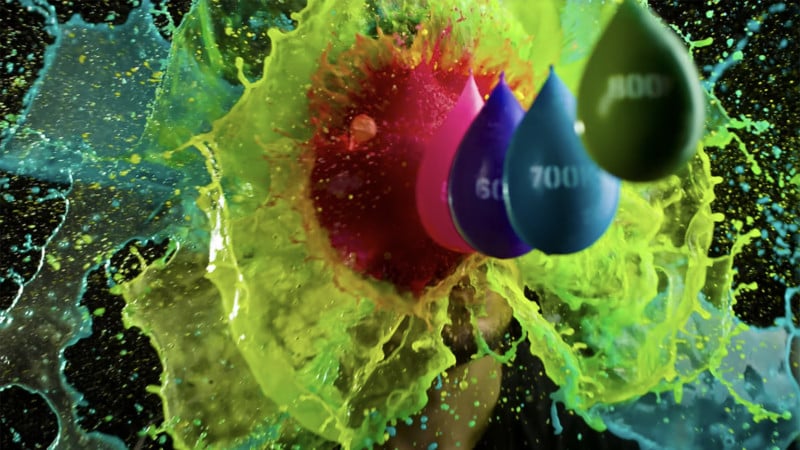
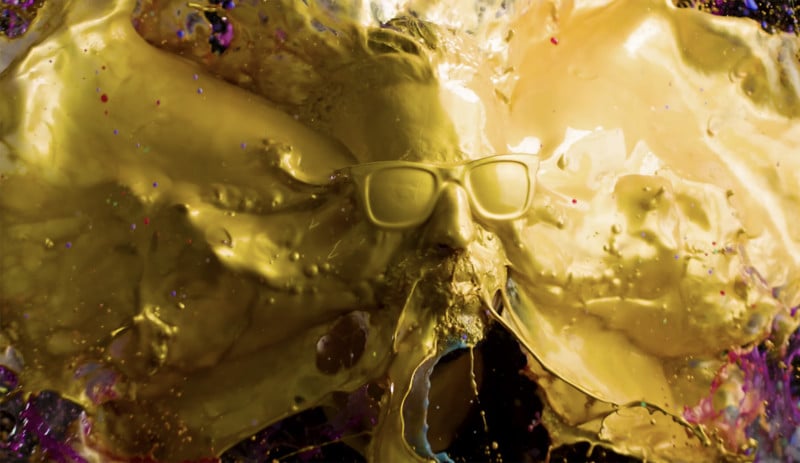
Here’s an eye-popping (hopefully not literally!) way to celebrate reaching 1 million YouTube subscribers. Let the good times, and viscous paint, flow:
[Via]
Lovely work from Leica, testifying to the power of presence, capture, and connection.
Per PetaPixel,
“A witness, someone who sees what others simply watch,” the company writes in a description of the campaign. “When Leica invented the first 35mm camera in 1914, it allowed people to capture their world and the world around them and document its events, no matter how small or big they were. Today, as for more than one century, Leica keeps celebrating the witnesses, the ones who see the everyday beauty, grace and poetry, and the never ending irony and drama of our human condition, and bring their cameras to the eye in order to frame it and fix it forever.
I love seeing progress towards making the world more accessible, and tech that’s good for inclusion can also benefit all users & businesses. Here the researchers write,
To make our models work better for everyone, we fine-tuned them so that data was sampled from images across all geographies, and using translations of hashtags in many languages. We also evaluated our concepts along gender, skin tone, and age axes. The resulting models are both more accurate and culturally and demographically inclusive — for instance, they can identify weddings around the world based (in part) on traditional apparel instead of labeling only photos featuring white wedding dresses.

PetaPixel writes,
Facebook says that this new model is more reliably able to recognize more than 1,200 concepts, which is more than 10 times as many as the original version launched in 2016.
Our kids were born with such voluminous, Dizzy Gillespie-grade cheeks that we immediately dubbed them “The Squirrels,” and we later gave our van the license plate SQRLPOD. This has nothing to do with anything, but I thought of it fondly upon seeing this charming 1-minute portrait:
Niki Colemont, is a wildlife photographer and a survivor who fled the Rwandan genocide at just four years old, arriving in Belgium as a refugee. The National Geographic 2019 finalist photographer finds peace today in photographing squirrels, who he considers “the perfect models.”
“For he is truly his brother’s keeper, and the finder of lost children…”
Photographer Ty Poland tells the story, including this MacGyver-y bit:
Next up, we needed a lasso. Thankfully our good friend Martin Sanchez had an extra pair of shoes in the trunk. On top of that, he had just polished off a fresh iced coffee from Dunkin with a straw. With these two ingredients, we were able to construct an open lasso. By simply putting the straw over the shoelace and adding a small key chain for weight, we were able to center the lasso to the Mavic 2 Pro for the rescue.
If you want to be successful, says Twitter founder Evan Williams, “Take a human desire, preferably one that has been around for a really long time…Identify that desire and use modern technology to take out steps.”
My old Photoshop boss Kevin Connor liked to cite the Healing Brush as an example of how tech kept evolving to offer more specialized, efficient solutions (in this case, from the more general Clone Stamp to something purpose-built). Content-Aware Fill, which we shipped back in 2010, was another such optimization, and now its use is getting even more specialized/direct.
PetaPixel writes,
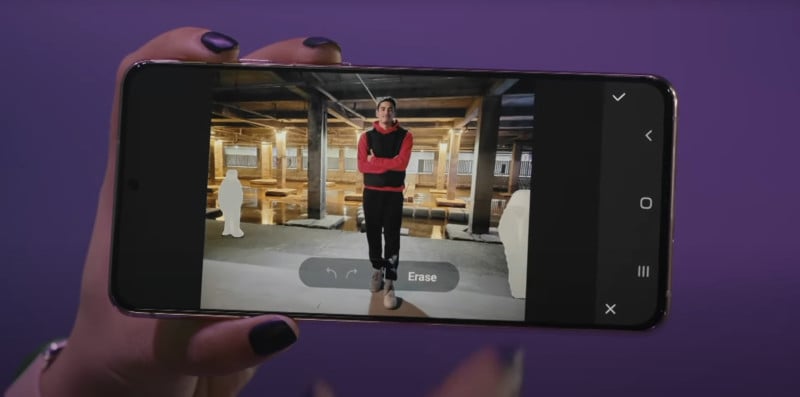
Samsung added Object Eraser, a tool powered by AI that appears to work by combining object recognition with something like Adobe’s Content-Aware Fill. In any photo captured on an S21 series phone, simply tap the button to tell activate Object Eraser, then just tap on the people you want to remove, and then the phone automatically does all the work.
I was excited to learn today that Adobe’s Russell Brown, together with a large group of other experts, is set to teach night photography techniques February 12-14:
28 speakers in 6 categories will present 30+ talks over three days. Our goal: “Inspiring night photographers across the galaxy.”
Check out the schedule & site for more. Meanwhile I’m hoping to get out to the desert with Russell in a couple of weeks, and I hope to help produce some really cool stuff. 🤞
View this post on Instagram
I’m a longtime admirer of Reuben Wu’s beautiful light painting work, and planning to head to Death Valley next month, I thought I’d try to learn more about his techniques. Happily he’s shared a quick, enlightening (heh) peek behind the scenes of his process:

I also enjoyed this more detailed how-to piece from Daniel James. He’s convinced me to spring for the Lume Cube Mavic Pro kit, though I welcome any additional input!