“I know it’s not the ‘woke’ thing to say, but I hope the world is enslaved by an ancient soulless sentience.” — my Lovecraft-loving weirdo friend
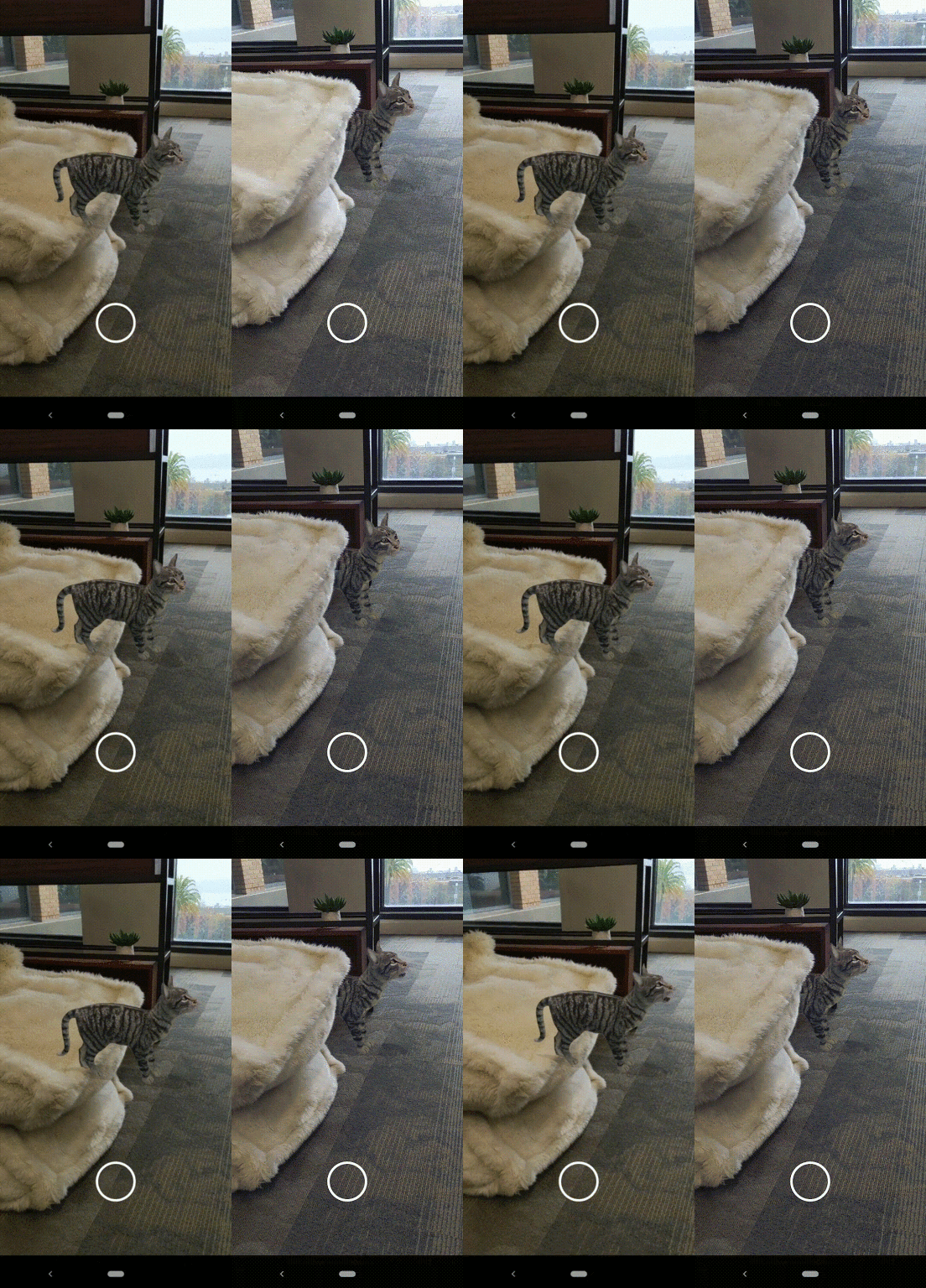
Heh—they’re not all creepy, to be sure, but come browse fun stuff on Google Arts & Culture, view the models in 3D, and if you’re on your phone, place them in your space via AR.
Some of the creatures include the Aegirocassis, a sea creature that existed 480 million years ago; a creepy-looking ancient crustacean; and a digital remodel of the whale skeleton, which is currently in view in the National History Museum’s Hintze Hall.
Exceedingly tangentially: who doesn’t love a good coelacanth reference?
My old teammates keep slapping out the bangers, releasing machine-learning tech to help build apps that key off the human form.
First up is Media Pipe Iris, enabling depth estimation for faces without fancy (iPhone X-/Pixel 4-style) hardware, and that in turn opens up access to accurate virtual try-on for glasses, hats, etc.:
The model enables cool tricks like realtime eye recoloring:
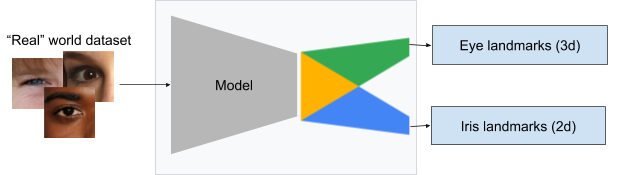
I always find it interesting to glimpse the work that goes in behind the scenes. For example:
To train the model from the cropped eye region, we manually annotated ~50k images, representing a variety of illumination conditions and head poses from geographically diverse regions, as shown below.
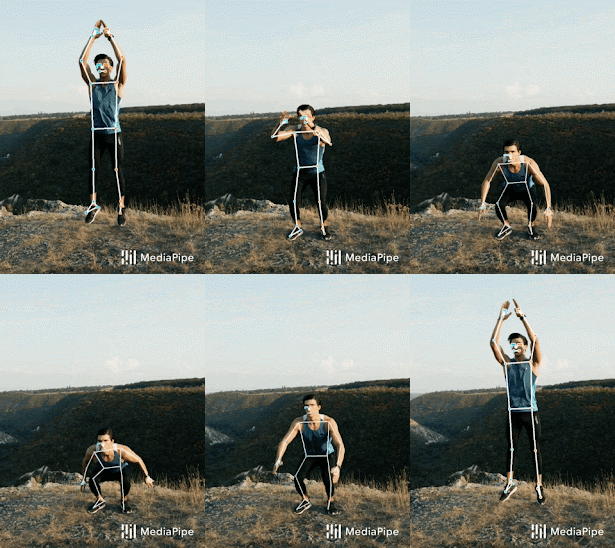
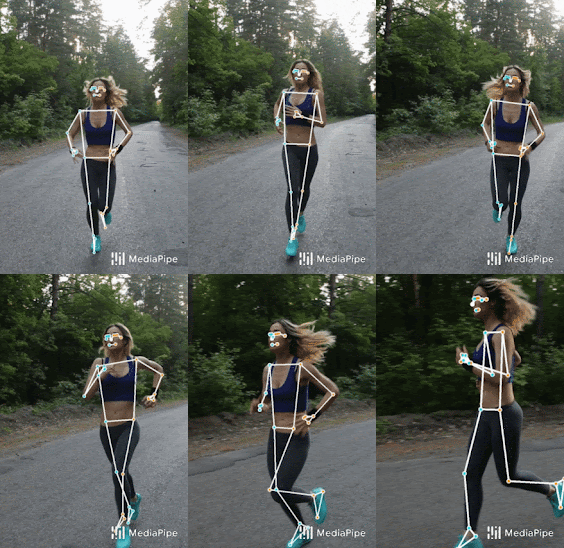
The team has followed up this release with MediaPipe BlazePose, which is in testing now & planned for release via the cross-platform ML Kit soon:
Our approach provides human pose tracking by employing machine learning (ML) to infer 33, 2D landmarks of a body from a single frame. In contrast to current pose models based on the standard COCO topology, BlazePose accurately localizes more keypoints, making it uniquely suited for fitness applications…
If one leverages GPU inference, BlazePose achieves super-real-time performance, enabling it to run subsequent ML models, like face or hand tracking.
Now I can’t wait for apps to help my long-suffering CrossFit coaches actually quantify the crappiness of my form. Thanks, team! 😛
“Comparison is the thief of joy.” — Theodore Roosevelt “Move your ass, fat boy!” — CrossFit
Okay, CF doesn’t say the latter, at least at my gym, but there’s a lot to be said for having a mix of social support/pressure—which is exactly why I’m happy to pay for CF as well as Peloton (leaderboards, encouragement, etc.).
Now the Ghost Pacer headset promises to run you ragged, or at least keep you honest, through augmented reality:
Noah Snavely is the O.G. researcher whose thesis work gave rise to the PhotoSynth crowd-sourcing imaging tech with which Microsoft blew minds back in the mid-aughts. He’s been at Google for the last several years, and now his team of student researchers are whipping up new magic from large sets of tourist photos:
Hello, view synthesis devotees. I invite you to some new work at @eccvconf. We gather tourist photos of famous landmarks and learn a new neural 3D representation that can synthesize new views with natural, modifyable lighting. We call it "Crowdsampling the Plenoptic Function". pic.twitter.com/8461yS1rAu
My mom loves to remind me about how she sweltered, hugely pregnant with me, through a muggy Illinois summer while listening to cicadas drone on & on. Now I want to bring a taste of the 70’s back to her via Google’s latest AR content.
You can now search for all these little (and not-so-little) guys via your Android or iPhone and see them in your room:
“To the best of our knowledge, this is the first method capable of rendering photo-realistic and temporally coherent results at megapixel resolution,” the team of researchers at Disney Research Studios and ETH Zurich write in their new paper, titled “High-Resolution Neural Face Swapping for Visual Effects.”
The new method developed aims to “disentangle” the “static identity information” of a person’s face from the “dynamic behavioral information,” allowing any performance to be transferable between any two people.
Artist/technologist Erik Natzke has kept me inspired for the better part of 20 years. His work played a key role in sending me down a multi-year rabbit hole trying to get Flash (and later HTML) to be a live layer type within Photoshop and other Adobe apps. The creative possibilities were tremendous, and though I’ll always be sad we couldn’t make it happen, I’m glad we tried & grateful for the inspiration.
Anyway, since going independent following a multi-year stint at Adobe, Erik has been sharing delightful AR explorations—recently featuring virtual Legos interacting with realtime depth maps of a scene. He’s been sharing so much so quickly lately that I can’t keep up and would encourage you to follow his Twitter & Instagram feeds, but meanwhile here are some fun tastes:
Closer to figuring out URP. A good kind of confusion to have with all the potential to uncover. Having less geometry would certainly optimize this, but like the lego aesthetic. Need to be more steady with the iPad too. Feels totally different in hand. #madewithunitypic.twitter.com/hc6JVCGbm1
It may seem like a small thing, but I’m happy to say that my previous team’s work on realtime human segmentation + realtime browser-based machine learning will be coming to Google Meet soon, powering virtual backgrounds:
Since making Google Meet premium video meetings free and available to everyone, we’ve continued to accelerate the development of new features… In the coming months, we’ll make it easy to blur out your background, or replace it with an image of your choosing so you can keep your team’s focus solely on you.
My team has been collaborating with Maps folks for the last year+ to power great AR experiences, and while the feature below isn’t AR per se, it leverages the same tech stack to address a longstanding problem with GPS. Per 9to5 Google,
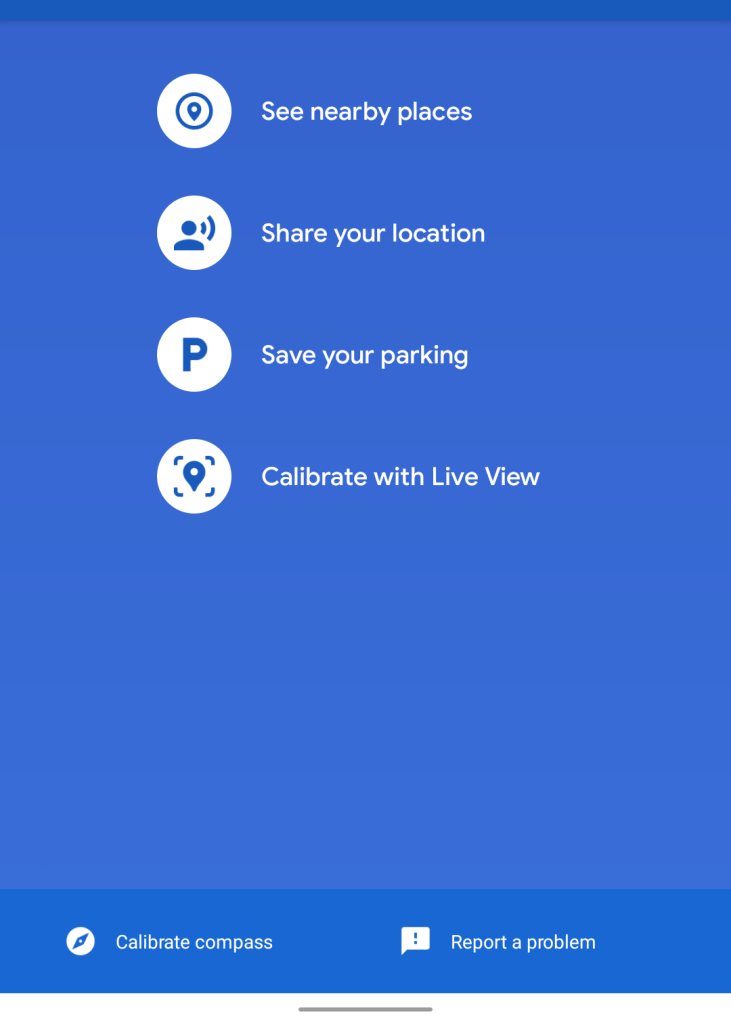
Google is now letting you “Calibrate with Live View” to improve the accuracy of the blue dot in Maps. Most are familiar with the dot that marks current location having a beam to signify what direction you’re pointed in. […]
Tapping the blue circle will open a full-screen menu with the new option at the bottom under “Save your parking.” This will launch the same camera UI used by Live View and should only take a few seconds of panning.
Afterwards, your location should be highly accurate and not jump around. Meanwhile, the beam is replaced by a solid arrow.
Google started adding augmented reality animals to searches last year at Google I/O and has since introduced a veritable menagerie, covering cats, scorpions, bears, tigers, and many more. Now, a herd of dinosaurs has also been added to this list, each of which uses graphics developed for the Jurassic World Alive augmented reality mobile game.
The full list of available dinosaurs includes the Tyrannosaurus rex, Velociraptor, Triceratops, Spinosaurus, Stegosaurus, Brachiosaurus, Ankylosaurus, Dilophosaurus, Pteranodon, and Parasaurolophus.
Today, we’re taking a major step forward and announcing the Depth API is available in ARCore 1.18 for Android and Unity, including AR Foundation, across hundreds of millions of compatible Android devices.
As we highlighted last year, a key capability of the Depth API is occlusion: the ability for digital objects to accurately appear behind real world objects. This makes objects feel as if they’re actually in your space, creating a more realistic AR experience.
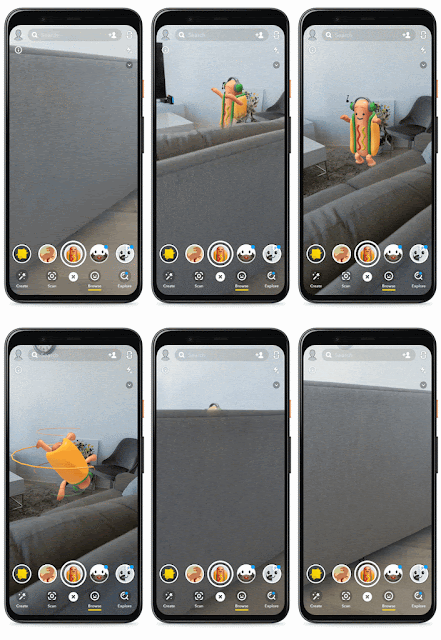
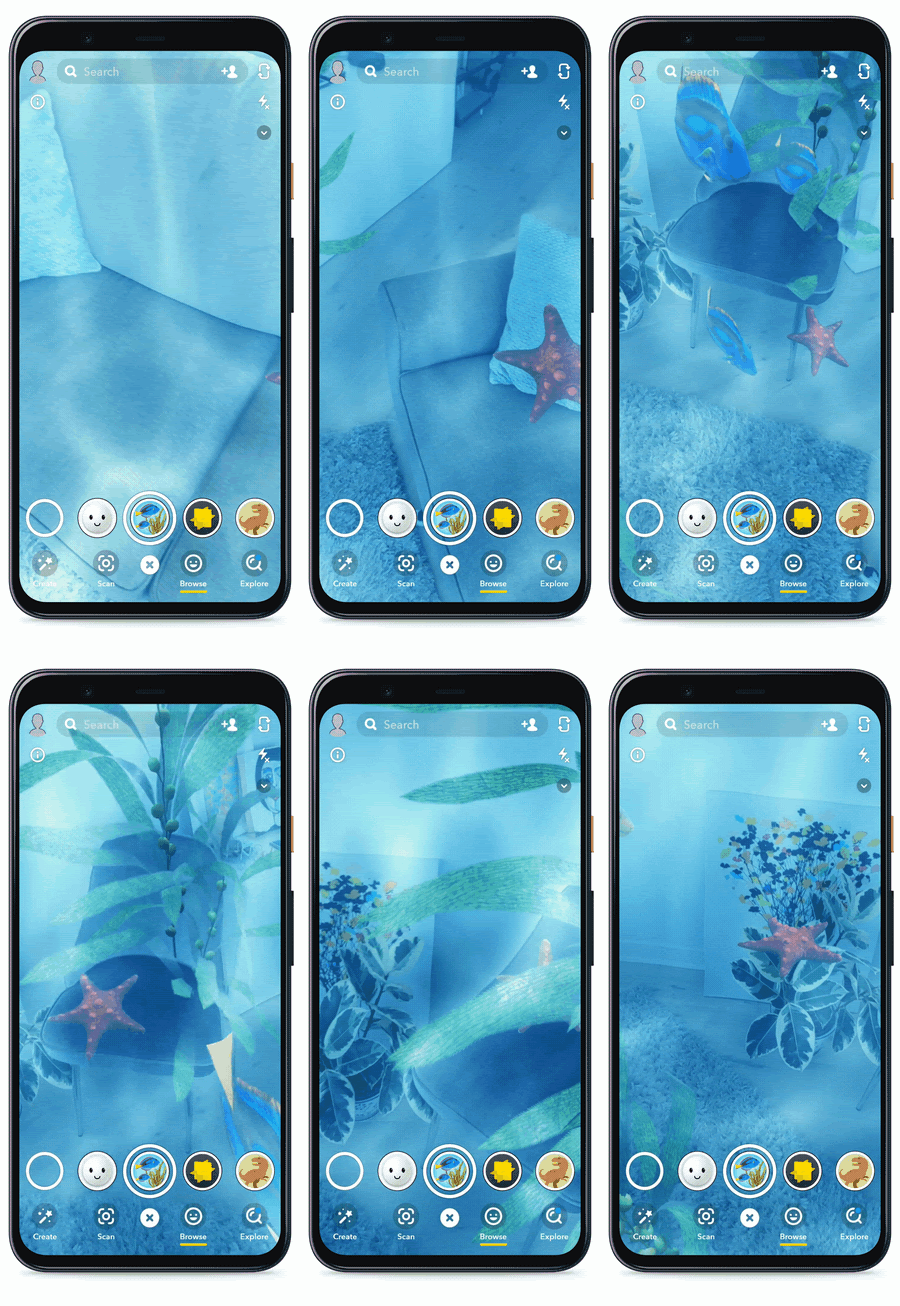
Check out the new Depth Lab app (also available as an open-source Unity project) to try it for yourself. You can play hide-the-hot-dog with Snap, as well as check out an Android-exclusive undersea lens:
This is kinda inside-baseball, but I’m really happy that friends from my previous team will now have their work distributed on hundreds of millions, if not billions, of devices:
[A] face contours model — which can detect over 100 points in and around a user’s face and overlay masks and beautification elements atop them — has been added to the list of APIs shipped through Google Play Services…
Lastly, two new APIs are now available as part of the ML Kit early access program: entity extraction and pose detection… Pose detection supports 33 skeletal points like hands and feet tracking.
Let’s see what rad stuff the world can build with these foundational components. Here’s an example of folks putting an earlier version to use, and you can find a ton more in my Body Tracking category:
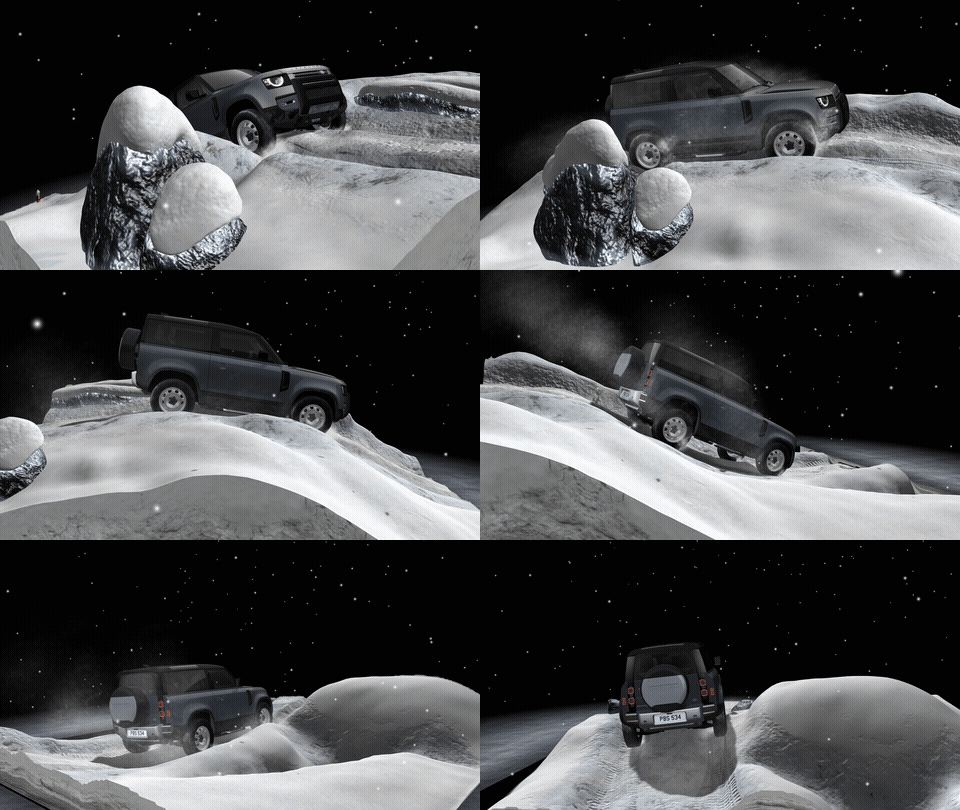
The Land Rover app for iOS & Android, leveraging Unity + ARKit & ARCore, goes beyond ye old “spin car in space & maybe change wheels” approach we’ve long seen. Somehow I can’t embed the video, but it’s worth a look, and you can get a taste of the immersive environments it enables here:
Resolve allows project teams to review large BIM files on the Oculus Quest in a collaborative environment. With a few clicks teams can bring in files from Autodesk BIM 360 and use Resolve to leave speech-to-text annotations, measure, markup, and inspect BIM properties in VR.
I love seeing the continued evolution of the Web platform & democratization of machine learning, enabling the kind of “permissionless innovation” I’ve long sought to facilitate.
It’s as much about testing/showcasing emerging standards as anything. Per The Verge:
If you’ve got an Android device, just open up the Chrome browser and go to goo.gle/sodar to launch the tool, named SODAR. There’s no app required, though it won’t work on iOS or older Android devices. Your phone will use augmented reality to map the space around you, superimposing a two-meter radius circle on the view from your camera.
Sodar – use WebXR to help visualise social distancing guidelines in your environment. Using Sodar on supported mobile devices, create an augmented reality two meter radius ring around you. #hacktohelphttps://t.co/Bu78QrEN9fpic.twitter.com/kufatNFDQk
— Experiments with Google (@ExpWithGoogle) May 28, 2020
Inspired by her hometown in Congo, Anifa was intentional about shedding light on issues facing the Central African country with a short documentary at the start of the show. From mineral site conditions to the women and children who suffer as a result of these issues, Anifa’s mission was to educate before debuting any clothes. “Serving was a big part of who I am, and what I want to do,” she said in the short documentary.
With the exception of a single yellow chair, it appears as though every visual shown during the performance was generated in post. What really sells the performance, however, is the choreography. Throughout the entirety of the performance, Perry reacts and responds to every visual element shown “on-stage”.
So, this is what I do all day: I help shape the efforts of a bunch of smart people working to make Google better at answering questions, by making the results a lot richer & more interactive.
My subtle-not-subtle ambition is to help creative people (like those I served at Adobe) bring their beautiful, immersive work (3D & AR) to an enormous audience, by solving the last-mile problem much like Flash Player did back in the day. It’s all about my 20-year mission of standing out of creators’ light.
Recently the team has turned on some great new features & content. On both iOS & Android you can search for numerous subjects (animals, biology, anatomy, and more), then view the results in 3D or in your environment via AR. On Android you can also now navigate among search results, record videos, and share the results.
We’re partnering with BioDigital so that you can explore 11 human body systems with AR in Search on mobile. Search for circulatory system and tap “View in 3D” to see a heart up close or look up skeletal system to trace the bones in the human body and see how they connect. Read labels on each body part to learn more about it or view life-size images in AR to better understand its scale.
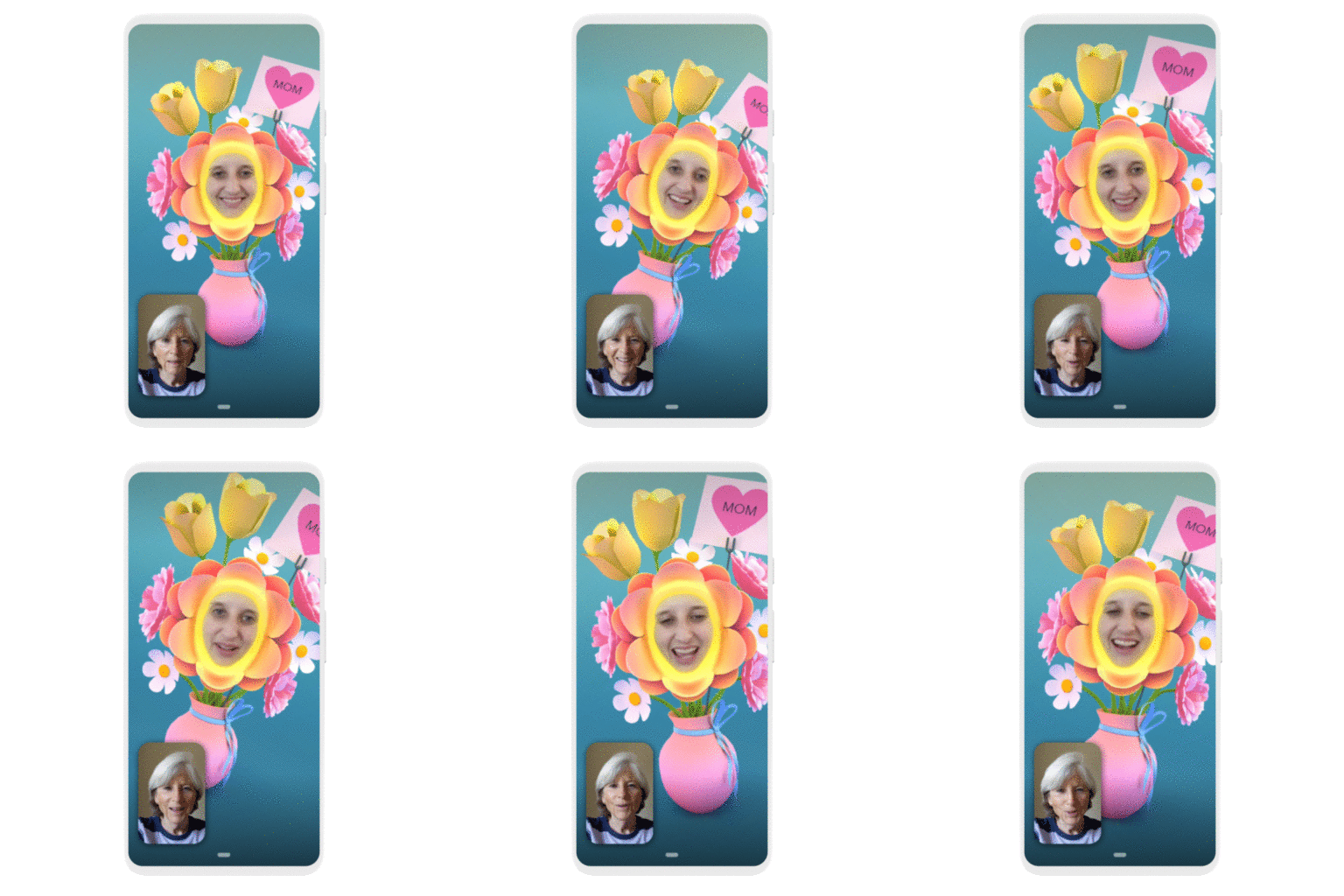
In addition to bringing masks and effects to our new family mode, we’re bringing them to any one-on-one video calls on Android and iOS—starting this week with a Mother’s Day effect. We’re also rolling out more effects and masks that help you express yourself, from wearing heart glasses to transforming into a flower.
Hmm—I look forward to taking this thing for a spin:
The developers write,
MATTERPORT CAPTURE APP ALLOWS YOU TO: * Share your 3D virtual tour on social and messaging platforms with a Matterport-generated URL * Sit back and relax, with automatic image processing, color correction, and face blurring * Guide viewers around by highlighting features in your space with Mattertags and labels * Add measurements to your 3D capture to accurately size the space
Back when I was pitching myself for the job I somehow got in Google AI’s Perception group, I talked a lot about democratizing access to perceptive tech to enable permissionless innovation. Not that I can take any credit for it, but I love seeing more of the vision become reality through tech the team has built:
The fully immersive AR experience brings to life a magical world crafted by Georges Méliès, a French illusionist and film director from the early 1900’s… Back to the Moon transports you into Méliès magical world inspired by some of his most well-known films. The experience honors Méliès unique style of filmmaking, highlighting several of his groundbreaking techniques… [It] features an original score by composer Mathieu Alvado performed by the legendary London Symphony Orchestra.
Download Back to the Moon in AR through the free Google Spotlights Stories app on Android or iOS.
“Just before the current health situation locked us in, I was about to go Freeriding with my family. It was supposed to be the big adventure of the year, the one I had been eagerly awaiting for a year,” explains Herrero. “Therefore, the lockdown had me thinking about skiing the whole time, so I started to think how I could ski without leaving my living room.”
A couple of years ago, Adobe unveiled some really promising style-transfer tech that could apply the look of oil paintings to animated characters:
I have no idea whether it uses any of the same tech, but now 8th Wall is bringing a similar-looking experience to augmented reality via an entirely browser-based stack—very cool:
During the COVID-19 crisis, we’re committed to supporting the community with complimentary access to Unity Learn Premium for three months (March 19 through June 20). Get exclusive access to Unity experts, live interactive sessions, on-demand learning resources, and more.
“This is certainly the coolest thing I’ve ever worked on, and it might be one of the coolest things I’ve ever seen.”
My Google Research colleague Jon Barron routinely makes amazing stuff, so when he gets a little breathless about a project, you know it’s something special. I’ll pass the mic to him to explain their new work around capturing multiple photos, then synthesizing a 3D model:
I’ve been collaborating with Berkeley for the last few months and we seem to have cracked neural rendering. You just train a boring (non-convolutional) neural network with five inputs (xyz position and viewing angle) and four outputs (RGB+alpha), combine it with the fundamentals of volume rendering, and get an absurdly simple algorithm that beats the state of the art in neural rendering / view synthesis by *miles*.
You can change the camera angle, change the lighting, insert objects, extract depth maps — pretty much anything you would do with a CGI model, and the renderings are basically photorealistic. It’s so simple that you can implement the entire algorithm in a few dozen lines of TensorFlow.
If you’re on an iPhone or compatible Android device, try watching this video in the YouTube app to see what my team has cooked up around virtual makeup try-on (complementing the lipstick try-ons we launched a while back):
Tapping on a given item will show the dish, along with pictures also taken by customers. You can then choose to search for that dish to see what it is, or use Google Translate to display it in your native language.
He first appears as a crude collection of 3-D pixels—or voxels. Soon, he looks like a conglomeration of blocks morphing into the shape of an animal. Gradually, his image evolves until he becomes a sharp representation of a northern white rhino, grunting and squealing as he might in a grassy African or Asian field. There comes a moment—just a moment—when the viewer’s eyes meet his. Then, the 3-D creature vanishes, just like his sub-species, which due to human poaching is disappearing into extinction.
The Mill, which has studios in London, New York, Los Angeles, Chicago, Bangalore and Berlin, provided animation for this project, and Dr. Andrea Banino at DeepMind, an international company that develops useful forms of artificial intelligence, provided the experimental data to set the rhino’s paths. After each two-minute episode, the rhino reappears and follows another of the three programmed paths.
2008 TC3 is the smallest shown with a mean diameter of about 4.1 meters, while the largest is 1 Ceres, which has a mean diameter of about 939 kilometers.
Related/previous: Visualizing relative tree sizes.
The Looking Glass is powered by our proprietary 45-element light field technology, generating 45 distinct and simultaneous perspectives of three-dimensional content of any sort.
This means multiple people around a Looking Glass are shown different perspectives of that three-dimensional content—whether that’s a 3D animation, DICOM medical imaging data, or a Unity project – in super-stereoscopic 3D, in the real world without any VR or AR headgear.
Back in 2014, Action Movie Dad posted a delightful vid of his niño evading the hot foot:
But now instead of needing an hour-long tutorial on how to create this effect, you can do it it realtime, with zero effort, on your friggin’ telephone. (Old Man Nack does wonder just how much this cheapens the VFX coin—but on charges progress.)
Heh—here’s a super fun application of body tracking tech (see whole category here for previous news) that shows off how folks have been working to redefine what’s possible with. realtime machine learning on the Web (!):
[A] finger could be used to write legibly in the air without a touch surface, as well as providing input taps, flick gestures, and potentially pinches that could control a screened device from afar. Thanks to the magnetic sensing implementation, researchers suggest that even a visually obscured finger could be used to send text messages, interact with device UIs, and play games. Moreover, AuraRing has been designed to work on multiple finger and hand sizes.
It’s pretty OT for my blog, I know, but as someone who’s been working in computer vision for the last couple of years, I find it interesting to see how others are applying these techniques.
Equipped with ultra-high definition cameras and high-powered illumination, the [Train Inspection Portal (TIP)] produces 360° scans of railcars passing through the portal at track speed. Advanced machine vision technology and software algorithms identify defects and automatically flag cars for repair.
I found myself blocked from doing anything interesting with Apple’s Reality Composer tool due to the lack of readily available USDZ-format files. My kingdom for a Lego minifig!
Therefore it’s cool to see that they’ve released a simple utility meant to facilitate conversion:
The new Reality Converter app makes it easy to convert, view, and customize USDZ 3D objects on Mac. Simply drag-and-drop common 3D file formats, such as .obj, .gltf and .usd, to view the converted USDZ result, customize material properties with your own textures, and edit file metadata. You can even preview your USDZ object under a variety of lighting and environment conditions with built-in IBL options.
In MediaPipe v0.6.7.1, we are excited to release a box tracking solution, that has been powering real-time tracking in Motion Stills, YouTube’s privacy blur, and Google Lens for several years and that is leveraging classic computer vision approaches. Pairing tracking with ML inference results in valuable and efficient pipelines. In this blog, we pair box tracking with object detection to create an object detection and tracking pipeline. With tracking, this pipeline offers several advantages over running detection per frame.
Read on for more, and let us know what you create!
Check out how it enables real objects to occlude virtual ones:
Here’s a somewhat deeper dive into the whole shebang:
The features are designed to be widely available, not requiring special sensors:
The Depth API is not dependent on specialized cameras and sensors, and it will only get better as hardware improves. For example, the addition of depth sensors, like time-of-flight (ToF) sensors, to new devices will help create more detailed depth maps to improve existing capabilities like occlusion, and unlock new capabilities such as dynamic occlusion—the ability to occlude behind moving objects.
And we’re looking for partners:
We’ve only begun to scratch the surface of what’s possible with the Depth API and we want to see how you will innovate with this feature. If you are interested in trying the new Depth API, please fill out our call for collaborators form.
Looks like a simple but perhaps compelling use of ML & AR:
Zenia encompasses the best of computer vision and machine learning. She uses motion tracking and the data from thousands of yoga lessons to analyze my movements. During the practice, Zenia provides gentle feedback and also takes care of basic safety rules.
[T]he prototype app uses Google’s augmented reality platform ARCore to present photoreal renderings of performers against the backdrop of users’ living spaces.
I’m excited at the prospects for volumetric capture of artists in action. What a world.





/cdn.vox-cdn.com/uploads/chorus_image/image/66999425/google_ar_dinosaurs.0.jpg)