Brooklyn Aerials shot “Nostalgia” using a RED Epic Dragon Monochrome with the Freefly ALTA drone. The results are lovely:
And here’s a glimpse behind the scenes:
Brooklyn Aerials shot “Nostalgia” using a RED Epic Dragon Monochrome with the Freefly ALTA drone. The results are lovely:
And here’s a glimpse behind the scenes:
Got a case of vemödalen (“the frustration of photographing something amazing when thousands of identical photos already exist”)? Or perhaps you’ve just wanted a camera that sounds like a Geiger counter while blurting “NEIN” at you in big red letters?
Philipp Schmitt’s Camera Restricta concept wants to help. PetaPixel explains,
“Camera Restricta introduces new limitations to prevent an overflow of digital imagery,” he says. “As a byproduct, these limitations also bring about new sensations like the thrill of being the first or last person to photograph a certain place.”
[Vimeo]
Adios, bothersome fences, reflections, etc. That’s presuming that normal users would be sufficiently motivated to move their devices during capture. Time will hopefully tell.
The video accompanying our SIGGRAPH 2015 paper ” A Computational Approach for Obstruction-Free Photography”. We present a unified computational approach for taking photos through reflecting or occluding elements such as windows and fences. Rather than capturing a single image, we instruct the user to take a short image sequence while slightly moving the camera. Differences that often exist in the relative position of the background and the obstructing elements from the camera allow us to separate them based on their motions, and to recover the desired background scene as if the visual obstructions were not there. We show results on controlled experiments and many real and practical scenarios, including shooting through reflections, fences, and raindrop-covered windows.
[YouTube]
I had a ball sitting down with my ex-Photoshop/current Google Photos friend Aravind Krishnaswamy to chat with Andy Ihnatko, Russell Ivanovic, and Yasmine Evjen for this week’s Material Podcast. We talked about computer vision, the future of memory keeping, my wife hypothetically getting bum-rushed by a lady from the Clinique counter, and much more. (Oh, and the jury’s still out on whether there were snakes in the wall. You’ll see.)
Did I just see… this?
DC presents Robbie “Maddo” Maddison’s “Pipe Dream,” giving the world a chance to witness history being made as Maddo rides his dirt bike on the powerful and iconic waves of Tahiti. From his helmet to motocross boots, Maddo was dressed for FMX when he took his dirt bike into the unchartered saltwater terrain of the Pacific Ocean in French Polynesia.
So how was it done? See the making-of:
Henry Jun Wah Lee has captured some amazing lenticular cloud formations, brilliant colors, and volcano-spawned plumes.
Now I’m all pumped to watch The Mountain throw enormous crap through the air tomorrow.
I love capturing panos via The App Formerly Known As Photo Sphere, now significantly updated & renamed Street View (download for iOS, Android). PetaPixel writes,
Users can quickly browse all available traditional Street View content in addition to the newer 360-degree photospheres. Simply input a location, zoom in, and you are ready to start walking the streets of your favorite city. You can also explore beautiful photography through a pull-up tab that displays presorted collections and the ‘Explore’ tab. If you want to create your own photosphere you can do so, but will need a smartphone that contains a gyroscope sensor.
I particularly enjoy uploading my spheres to Google Maps to help other people explore the places I’ve visited.
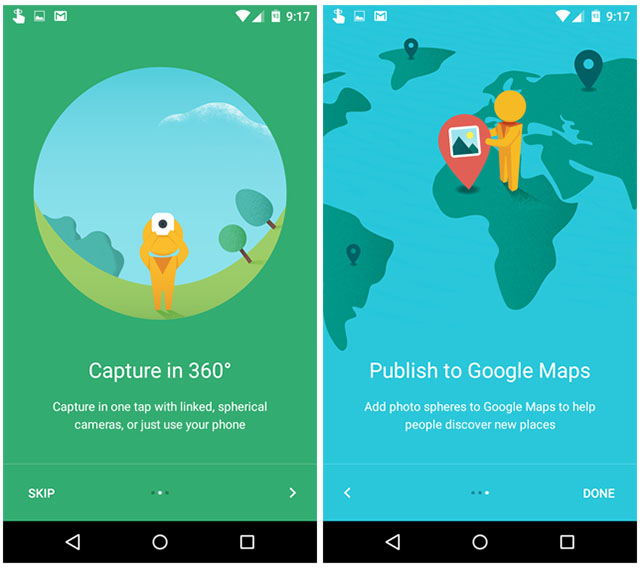
Coincidentally, Ricoh just introduced the Theta S, a new version of their spherical 360º capture app that generates Street View-compatible images. Check out this 360º-degree video that you can spin around while streaming from YouTube:
[YouTube]
Back in 2003 we blew a lot of minds by showing Photoshop’s Match Color feature sucking up the color palette of one photo or painting, then depositing it onto another. This kind of thing kept getting love as it evolved (see 2010 demo), eventually matching lighting among images. As far as I know no one has ended up using such functionality in practice (and yes, Match Color is still sitting in Photoshop on your hard drive right now), but it’s still cool.
Now the tech has taken another leap forward. Per PetaPixel,
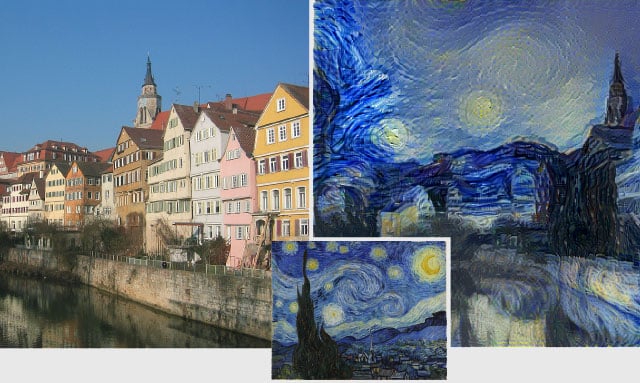
In a newly published research paper titled “A Neural Algorithm of Artistic Style,” scientists at the University of Tubingen in Germany describe how their deep neural network can create new artistic images when provided with a random photo and a painting to learn style from.
“Here we introduce an artificial system based on a Deep Neural Network that creates artistic images of high perceptual quality,” the paper says. “The system uses neural representations to separate and recombine content and style of arbitrary images, providing a neural algorithm for the creation of artistic images.”
Check out many more examples via the article.
Props to Bjorn Jonsson for assembling NASA photos into this animation:
The time covered is 09:35 to 13:35 (closest approach occurred near 11:50). Pluto’s atmosphere is included and should be fairly realistic from about 10 seconds into the animation and to the end. Earlier it is largely just guesswork that can be improved in the future once all data has been downlinked from the spacecraft. Light from Pluto’s satellite Charon illuminates Pluto’s night side but is exaggerated here, in reality it would be only barely visible or not visible at all.
I’m delighted to say that Lynda.com has just published my half-hour tour of Google Photos. It’s split into really small, focused chapters (e.g. explaining storage & backup options), so you can jump right to what matters most. Even if you’re not yet a member, you can see one chapter for free, and you can start a free trial to see the whole thing.

The creation process gave me a new appreciation for just how good the Lynda staff is. Scott Erickson, Susan Varnum, and Zach Bobbit were enormously patient in the studio and did heroic editing to keep me from sounding like a tongue-tied doofus. Scott in particular offered great on-the-fly direction, channeling a new user’s perspective & challenging me to rethink, streamline, & clarify. Thanks, guys; you’re a real credit to the whole organization!
Google Photos is of course rapidly developing, adding a bunch of new features in just the last few days, so it would be great to work more with the Lynda team as the product evolves. Feedback, questions, and requests are of course most welcome.
I’m absolutely charmed by this loving four-minute peek inside “24 Hours of Lemons,” a sort of Burning Man for gearheads.
[Vimeo]
#TBT FTW!!
Every day now—literally every day—I look forward to my Assistant showing me memories from this date in the past. I find myself sharing these with lots of friends & family with whom I otherwise wouldn’t connect. Here’s how it works:
Google Photos will now ask whether you’d like to see memories past days. If you say yes, you’ll start receiving Assistant cards containing collages like this one, and tapping them will take you to galleries (example) that you can share with just a tap or two.

TechCrunch writes,
It’s kind of like Timehop and Facebook’s memories — but not really. It won’t bother you daily unless you had a worthwhile group of photos to show you. […]
[PM Chris Perry says] “Visual quality of photos is taken into account. No screenshots. We’ll look at photos taken over a longer timespan, something that was more of an ‘event.’ Something that’s going to emotionally resonate. We look at the presence of landmarks. Those get promoted to collages. People are a strong signal that we’ll use to help remind you.”
I can’t tell you just how much I’ve been enjoying this feature as we’ve been testing it, and I hope you enjoy it, too. As always, feedback is most welcome.
Modulo lack of optical zoom, I’ve had more than enough resolution in my iPhone for years. What I want there & in my SLR is more dynamic range. Maybe new tech like this can help deliver it:
[YouTube] [Via Jim Goldstein]
“Hmm, what would French intellectuals devise to comment on ‘self-design and the production of sincerity?’” you might just have been asking yourself (or, let’s hope, not). If so, rejoice in knowing that Gregory Chatonsky is on the case:
[He’s] developed a program that pulls tagged Instagram photos of Kim K in real time, and filters them through a software program he made using Unity3d.
The software automatically navigates a generative 3D skin model, created from more than 51,000 pictures of the star. The project looks at the same subject, Kim Kardashian, but is constantly using a different image, creating what the artist describes as a “fascinating difference in the repetition.” […]
“It is simply an extended skin, everything is on the surface. There is nothing to look behind.”
“Discuss.”
[Vimeo]
“Actually just boarding a flight to Myanmar and Aung San Suu Kyi is on my flight!”
So wrote Josh (then PM for editing in Google+ Photos) back in November 2013, when I’d just started thinking about possible adventures outside of Adobe & proposed that we grab a beer. I’d known Josh for many years in his capacity as the PM for the highly regarded Nik Collection of Photoshop plug-ins (Silver Efex Pro, etc.) prior to their acquisition by Google. When I reached out he was just starting a year+ of travel, photography, and epic beard growth (note to self: sell company to Google!). Once he returned, I encouraged him & my Lightroom friends to chat about ways they could make the world more interesting for visual artists.
Well, now they’re doing just that, with Josh joining the Adobe Digital Imaging PM team. I’m really excited to see what they can do together. Have fun, guys!

Want to remove annoying reflections & other impediments? Check out this demo. As PetaPixel summarizes, “Basically, instead of shooting a single static photo, the photographer captures a short sequence of images while slightly moving the camera around between frames.”
Per the team’s description:
The video accompanying our SIGGRAPH 2015 paper “A Computational Approach for Obstruction-Free Photography”. We present a unified computational approach for taking photos through reflecting or occluding elements such as windows and fences. Rather than capturing a single image, we instruct the user to take a short image sequence while slightly moving the camera. Differences that often exist in the relative position of the background and the obstructing elements from the camera allow us to separate them based on their motions, and to recover the desired background scene as if the visual obstructions were not there. We show results on controlled experiments and many real and practical scenarios, including shooting through reflections, fences, and raindrop-covered windows.
[YouTube]
American Ninja Warrior, you’ve got some big fans in our 6- and 7-year-old sons. Inspired by the competitors on that show, the boys put their skills to the test in Lake Tahoe by scrambling up a pier, then leaping off into the sand. It was particularly fun to set my DSLR to burst mode, then capture Finn’s jumps from all angles. After I inserted my memory card & let auto backup run, Google Photos presented me with a bunch of GIF animations. In a few cases there wasn’t enough visual similarity to trigger animation creation, so I simply drag-selected the photos on my iPhone, tapped the “+” button, and chose Animation. Here are a few results if you’re interested.

Dig the effect of a filter in one part of your image, but find it too strong in another part? Use brushing to adjust the mask that controls filter strength & location:
I really admire the workflow speed these guys have been able to achieve, especially now that you can copy/paste settings & share presets. It feels a lot like Lightroom: make adjustments, swipe to the next image, apply previous edits, swipe to the next, etc.
[YouTube]
This is an incredibly useful—albeit rather buried—bit of functionality, letting you craft a look for one image, then transfer it to another:
[YouTube]
If you go to google.com/maps/timeline and have Location History turned on, you (and only you) can click on specific places you’ve visited, and/or specify particular dates, then see the photos associated with those places/dates. Here’s a screenshot from my travels last month (click for full res):

You can edit or remove any location, or give places personalized, private names like Mom’s House or Sketchy Café. When you’re logged in you’ll see those names right in Google Maps.
Sometimes even I forget just how much this little app can do:
[YouTube]
Actually giving friends photos (vs. merely sharing them in a hard-to-download/keep manner) is one of my favorite things about Google Photos. When you share a link to one or more images or videos, your recipient can simply click the little “cloud download” icon to add the content to her library. (Try it now with some aircraft/missile photos I shot Monday evening.)
The slightly frustrating thing is that if the images you’re given weren’t recently captured, it can be hard to find them in your library because they’re sorted according to capture date. Fortunately you can easily show recent files: bookmark this link or just click the search bar, then click the “Recently added” tile at the bottom. And boom, whatever files you just added from your friend will now show up at the top of the list.
I got a kick out of this insight into Google’s wearable (and borrowable!) Street View capture devices:
In this episode we’re learning how Google Street View gets off the streets and into some of the crazier places it goes – like the Grand Canyon, the Pyramids of Giza, and the Amazon Jungle.
If you’d like to apply to borrow the Trekker (aka the Google Street View backpack) to map a place you care about, g.co/trekker.
[YouTube]
This new Mac app promises to make you a “dope-ass montage in seconds.” I love the ultra simplicity (drop in footage, drop in music, press big red button), though my initial test (using admittedly rough sledding footage) didn’t yield great results. If you take it for a spin (the download is free; you pay to save output), I’d be curious to hear how you like it.
[Vimeo]
- Brush allows working with a finer tip size and deeper zoom
- Quick access to online resources: links to Snapseed’s YouTube channel and Google+ page in the Help & feedback menu
- Many new languages supported: Català, Dansk, Ελληνικά, English (British), Español (Latinoamérica), Suomi, हिन्दी, Hrvatski, Magyar, Bahasa Melayu, Norsk (Bokmål), Português (Portugal), Română, Slovenčina, Українська, Tiếng Việt
- Fixed several crashes and other bugs
The update will be rolling out today on Android devices through the Play Store and on iOS devices through the App Store.
As always, please let us know what you think & where you’d like to see things go next!
Last week Aravind Krishnaswamy (Google Photos engineering manager & my former Photoshop teammate) and I had the pleasure of sitting down with author Jan Kabili to record an episode of This Week in Photo’s The Fix. You can enjoy our handsome mugs (plus demos!) here, or you can listen via iTunes. The 45 minutes flew by for us; hope you dig ‘em.
[YouTube]
I’ve often wanted to demo the negligible visual impact of the compression applied by the High Quality option in Google Photos, so I figured I’d register a memorable short URL for the purpose. To my great surprise, I discovered that tinyurl.com/googlephotoscompression was already taken. Clicking through, I found that back in May Brian Young of PetaPixel did a detailed review of compression in Photos. Hopefully it’ll help put folks’ minds further at ease about choosing this option (which I use for everything that comes off my iPhone).
Oh, and as for the gallery I like to show, I registered tinyurl.com/googlephotosquality. Pass it on. 🙂
Visit photos.google.com/apps to grab the uploader for Mac or Windows. Once you turn it on, it’ll take things from there.
I’m captivated by Yesterday’s Tomorrow from Uncage the Soul Productions:
We knew this piece needed a soul, some heart, but not via the traditional history timeline narrative. But what is the story, the words? For inspiration, guidance and insight- we interviewed multiple 90+ Portlanders and spent an evening with each asking all the questions we could about their lives and opinions on a big list of life issues. Our favorite of these amazing people is Katherine Livingston. Her eyes are bright, her wits are sharp, she was born in Portland, her grandfather was involved in commissioning the Skidmore Fountain, she recently held the world record for fastest 2000 meters on a stationary rowing machine for the 95-100 yr old bracket, and this weekend she turns 100 years old. The length of that last sentence should be an indicator of how impactful she was to us. We were honored to sit down and listen to her share her story and insights of living for 100 years. These sentiments became the words that guide the piece.
[Vimeo] [Via Alex Powell]
I’ll be honest—I figured I needed to hear yet more about the “Fearless Genius” of Steve Jobs like I needed a hole in the head. During WWDC, however, I got the very pleasant surprise of hearing photographer Doug Menuez recount stories of documenting a range of Silicon Valley innovators (including the Adobe founders & Russell Brown) 1985-2000. I think you’d enjoy his talk (below) and a selection of images from the book.
[Vimeo]
You can try, as I did, reading a longish essay from John Lasseter on “Technology and The Evolution of Storytelling,” or you can just spend about 10 seconds watching this footage and go, “Bam, I get it.”
In this film, Steven worked with Team O’Neill surfer and professional athlete Malia Manuel to capture a unique perspective on a single day’s surf session in Western Australia. Utilising drones for the majority of the videography, Steven plays with perspective, taking the viewer into, above, and beyond the waves.
I’ve grudgingly come to accept that most people regard photography much like I regard wine: there’s bad wine, and then there’s wine. I know there’s crap (crummy liturgical stuff, etc.), and I know that all the rest tastes pretty good. Sure, I might notice & like something outstanding, but generally good enough is good enough.
That’s how it is with most people’s photos: “Is it way too dark or blurry? Is my head cut off? No? Fine, then.”
No matter how well or poorly I do my job, most people simply won’t edit photos—at all, ever. They just don’t care. And if they do edit photos, it’ll overwhelmingly be to crop & rotate them, and maybe to brighten things up & add a filter. None of this is unique to Google: we saw exactly the same thing with Adobe Revel (built on the world-class—and for its audience, irrelevant—Lightroom engine).
So, on a per-user basis, editing hardly matters, and yet the scale at which Google operates is enormous, so the editor gets used millions of times. “A small number times a big number is still a big number.”
I’m reminded of an observation from Adam Carolla. Paraphrasing my recollection:
Let’s say you loved watermelon. If someone gave you a watermelon the size of a minivan, you’d probably say, “Wow, that’s a ton of watermelon!!” But then if you realized they carved it out of a watermelon the size of the Hindenburg, you’d probably say, “Come on, that’s all I get?!”
I’m proud of the new Google Photos editor—of the way we were able to radically streamline the UI while retaining tons of smarts under the hood (e.g. centering vignettes on faces, treating faces specially when applying midtone contrast, etc.). And I’m proud of the new Snapseed, which puts big power one tap away for nerds like us. I just have to be happy driving my fruity little minivan next to a Zeppelin—or metaphors to that effect.
Calbuco, as seen by Jonas Dengler and Martin Heck:
They write,
Volcano Calbuco erupted on April 22, 2015, for the first time in four decades. Located close to the cities of Puerto Varas and Puerto Montt in southern Chile. We (Jonas Dengler and Martin Heck) spend the prior couple of days on the neighboring volcano Osorno (~20km linear distance) shooting timelapses. After an amazing night under the night sky we took the cable car downwards after a delay caused by repairs. Already late we headed south to catch the ferry on Routa 7 down to Patagonia. After 10min on the ferry we noticed a massive, almost nuclear looking cloud boiling upwards just were we left a few hours ago. Frenetically looking for a good outlook we then rushed to the only non-forested place to get a decent view of the show. We quickly put every bit of camera-equipment we could find on the constantly growing mushroom-cloud. We shot timelapses in 8K and 4K with a Pentax 645Z and Canon 6D. On the A7s we shot 4K video to the Shogun. We filled almost all of our memory cards in the prior night so I had to do backups while shooting all this stuff.
[YouTube]
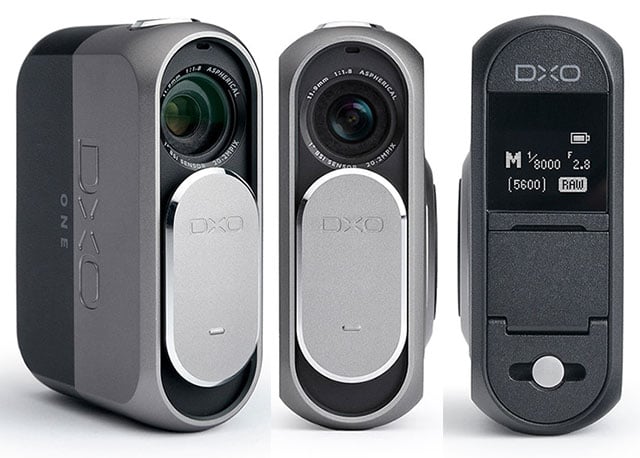
Now this thing ($599) looks seriously interesting. PetaPixel writes,
Inside the camera is a 1-inch CMOS BSI sensor — the same size used by Nikon 1 mirrorless cameras — and on the front of the camera is a 32mm-equivalent f/1.8 lens with a 6-blade iris. Those specs are crammed into a 2.65-inch (6.9cm) tall camera that weighs just 3.8oz (108g) and fits comfortably in your palm and pocket.
What do you think?

[Via Torsten Beckmann]
Simply because this would have been the 11-year-old me’s Favorite Thing Ever, I’ll point out the B-Unstoppable flying tank thingamabob. PetaPixel notes,
According to B, a hybrid model can be very useful in certain situations. For example, driving saves up to 60% of energy when compared to flying. In addition, the tank mode is much quieter than flying and can enable pilots to reach previously difficult areas. We also can’t forget that driving a tank-drone hybrid sounds like a ton of fun.
https://www.youtube.com/watch?v=uGdP9hTLDnk
[YouTube]
Google is committed to exploring and preserving the ocean. Today, in time for World Oceans Day on June 8, and in partnership with XL Catlin Seaview Survey, NOAA’s Office of National Marine Sanctuaries and the Chagos Conservation Trust, you can explore brand new Street View imagery of more than 40 locations around the world, including the American Samoa and Chagos Islands and underwater dives in Bali, the Bahamas and the Great Barrier Reef. We hope the release of this imagery inspires people to learn more about this precious natural resource.
As Lightroom is to Photoshop, Google Photos is to Snapseed:
On iOS & Android you can use Snapseed to edit any image in Photos by simply opening the image in Photos, tapping the overflow menu (upper right corner), and choosing “Edit in Snapseed.” This means that applying deep editing functionality requires just one additional tap relative to using the lightweight (but deceptively powerful) editor in Photos.
We think this integration works well, but of course there are always ideas on how it could be improved. Now that Photos & Snapseed have been available for a bit, how are you finding the integration? Any particular likes/dislikes/requests?
Thanks,
J.
*This currently works on iOS & Web; Photos on Android writes edited pixels as new files.
Even if the soundtrack gets a little Inception Horn-y, this is quite an impressive bit of filmmaking from EarthCam. As Khoi Vinh notes, “[I]t seems like a marvel of meticulous, patient shot-planning; because the sheer mass of its subject changes so dramatically, the camera must pan to accommodate the construction’s progress slowly, over the course of years.”
[YouTube]
Wes Anderson meets “The Shining”—brilliant. Steve Ramsden writes, “I noticed how Wes Anderson and Stanley Kubrick frame their shots in a similar way – this was the result: ‘The Grand Overlook Hotel!’”
[Vimeo]
Please go, kick the tires, and let us know what other refinements you’d like. (More good stuff is on the way!)
Very cool:
[YouTube]
A few great quotes from the piece on Re/code:
I consider it the best photo backup-and-sync cloud service I’ve tested — better than the leading competitors from Apple, Amazon, Dropbox and Microsoft.
The coolest aspect of the new Google Photos is that once you click the search button — before you even type anything — the app presents you with groups of pictures organized by three categories: People, Places and Things.
The new Google Photos brings the company’s expertise in artificial intelligence, data mining and machine learning to bear on the task of storing, organizing and finding your photos. And that, combined with its cross-platform approach, makes it the best of breed.
[Via Jignashu Parikh]