Good news for the many users of Adobe Ideas: the Layers feature (which now brings with it scaling, movement, and rotation; see recent) is on sale for $1.99 (regularly $4.99) for a limited time. The feature is an in-app purchase: tap the layers icon (lower left), then hit the plus button next to “Buy Layers.”
Category Archives: Illustration
(rt) Illustration: Star Wars as icons, poisonous treats, & more
- Nice: Wayne Dorrington has retold Star Wars entirely in icons. [Via]
- “Y’know, for kids…”
- Apropos of nothing, here’s a lovely kids’-book illustration.
- Weird packaging design: “Won’t This New Energy Drink Result in Children Drinking Poison?“
- I love the gorgeous, textured work of Irish illustrator Eoin Ryan. [Via]
- In an intriguing little video experiment, participants are asked to trace one another’s work as closely as possible. Things degenerate quickly.
- Check out some nifty Charlie Harper-esque illustrations from Ben Newman.

New features in Adobe Ideas 1.2
Check out scaling, rotation, a swappable toolbar, VGA output, and more in this quick demo from PM David Macy:
Adobe Ideas remains a free download (with in-app purchase of layers) for iOS devices.
Video: A few moments with Eric Carle
Given the tremendous amount of time we spend reading Eric Carle books to our lads, it’s funny that I’ve known very little about him until now. His life story is compelling, and I enjoyed this short interview:
[Via Mordy Golding]
(rt) Illustrations: Beautiful posters, Escher riffs, & more
- Reelizer is a nicely curated set of movie posters. (I’m digging Jeremy Jusay’s take on The Thin Red Line.) [Via]
- “By Valor & Arms”: It’s The State Mottos Project.
- Reserve monocle? Emergency Oreo? Sixteen Ways to Use Your Wrist Now That Watches are Obsolete.
- Props to the MC:
- Check out these neat Escheresque images made by Josh Sommers using Photoshop + Pixel Bender. [Via]
- Oscar Ramos has made some gorgeous modern Escheresque illustrations.
- I love the simplicity of the restroom icons in the Adobe Hamburg office.
Video: "Cliché!"
Kim Jong Phil
“I’ve concluded that to be effective–to be functional–I must guzzle an eye-popping cocktail of delusion and narcissism.
It occurred to me that being an artist* is a great deal like being a dictator.
Just like a dictator, I must live in a closed loop of self-delusion…”
This is now easily one of my favorite things ever. [Via]
* For “artist” also swap in “great product manager” (says the guy with 3D-printed busts of himself) ;-)). And no, I don’t *really* believe this, though sometimes you’ve gotta fight for your vision, and “all progress depends on the unreasonable man.”
(rt) Illustrations: 1.21 Jiggawatts, The Four Icon Challenge, & more
- Mildly nasty infographic OTD: Starbucks Trenta vs. your stomach.
- Oprah’s “SketchBook O” app sheds light on her audience’s demons.
- “Jigga What?” Excellent Back to the Future & GI Joe shirts. [Via]
- Fun illustrations: The Four Icon Challenge tackles 2001, The Big Lebowski, & more. [Via Chris Regan]
- Let It Dough! – More terrific visual storytelling from Christoph Niemann.
Video: Friday Afternoon in the Universe
Jack Kerouac + DJ Shadow wrapped in beautiful 3D (but not 3D-y) animation from Sean McClintock? Yeah, that’ll work:
Friday Afternoon in the Universe from Sean McClintock on Vimeo.
[Via]
(rt) Illustration: Loose Tweets, great posters, & more
- Poster art:
- “Loose Tweets Sink Fleets!” Brian Moore makes propaganda posters of WWIII. [Via]
- Mubi.com rounds up the best movie posters of 2010. And here’s another decent, if more mainstream, collection. [Via]
- Art history:
- Check out the cheerful models who were used in “American Gothic” standing next to the painting. [Via]
- You can buy fantastic Susan Kare prints of original Mac icons. Moof! [Via]
- I’ll see you on the Dark Side of the Dorito.
An epic 750,000-layer PSD is done
Bert Monroy eats your wimpy little 50-layer files for breakfast!
After four years and more than three quarters of a million Photoshop layers (spread across several docs), his monster Times Square file is online & zoomable. According to his site,
- The image size is 60 inches by 300 inches.
- The flattened file weighs in at 6.52 Gigabytes.
- It took four years to create.
- The painting is comprised of almost three thousand individual Photoshop and Illustrator files.
Faces in the crowd include the Knoll brothers, numerous Photoshop experts & authors, and even, somewhere in the lower-rigth quadrant, me. Amazing work, Bert; congrats!
Awesome app o' the day: Toontastic
The other day I said that creation on tablets would be more about fun, about speed, and about the unbridled pleasure of creation than what we know today. Toontastic is the sort of thing I have in mind:
I just spent half an hour creating cartoons with our 2- and 1-year-old sons, quitting only when I had to go to work. We had a pirate-loaded ball.
I’m reminded of my own childhood, when I tried animation with flipbooks and even an Etch-a-Sketch Animator. Apple IIgs apps were similarly promising but frustrating. It wasn’t ’til college that I found Director & Flash, but of course those are complex pro tools. I love seeing the creation experience taken to the next level.
Thanks to reader Hendrik for pointing out the app.
Video: "Why Can't We Walk Straight?"
Here’s a neat little animation from Benjamin Arthur on an interesting subject; worth watching despite Robert Krulwich’s characteristically twee & cloying narrative style.
[Via]
Illustrations: Fun logos, social commentary, & more
- Round, logo-y:
- I dig the details in the fun “Get Zero” competition logo.
- Let’s bones it out!
- Kottke uncovered an interesting depiction of the World’s Tallest Buildings, 1884. [Via]
- Cycling enthusiasts lay down some cheeky social commentary in a bike lane.
- Map Your Moves: “This map distills more than 4000 moves from over 1700 people, collected in an informal survey by WNYC, a New York based public radio station.” [Via]

(rt) Interesting Miscellany: Riffing on Starbucks, Android goggles, & more
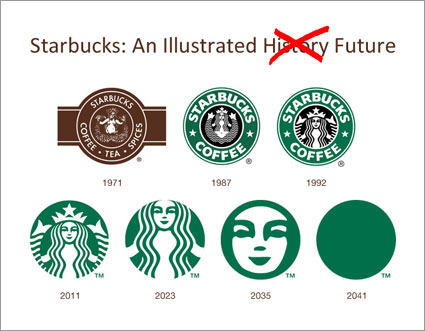
- Heh: The predicted ongoing simplification of the Starbucks logo [Via Russell Brown]
- Design:
- S&P meet PS: Photoshop salt and pepper shakers!
- I love Randy Hage’s crazy-detailed NYC storefront models. [Via]
- New ski goggles run Android (!), offering built-in maps & video.
- Heh–check out this MacGyver-style iPad drawing aid (low-tech palm rejection).
- Kickin’ it dough-school: Shell-toes in Play-Doh.
- Know who won’t be boldly going through these doors? Girls.
Painting with lasers & Photoshop (seriously!)
Honest to God, I kind of live for seeing inventive people like Russell Brown combine the tools we make in really novel, unintended ways. Here Russell uses Pixel Bender CS5, a laser etching machine, a printer, and some old-school artistic media to create digital paintings with real depth:
Russell’s also giving away ten copies of his book on the subject, From Reality to Renaissance; see more info if you’re interested.
[Via]
(rt) Illustrations: Strangelove, disfigured Muppets, & more
- I love “The Haunted Household“: Clever, beautifully simple illustrations from Christoph Niemann.
- “I’m so cute and cuddly! I help you pee!” Hello, Kidney. See also “In Cutero.”
- Check out some great Strangelove-style desktop wallpaper from Ross Zietz.
- Dig these minimalist posters for musical genres. I love the one for the Twist.
- Infographics:
- The horror! “What I remember most about LEGOs.” [Via]
- Outstanding: “People Who Touch Your Junk.” (I’d suggest listing my kids, but they do it pro bono.) [Via]
- So, this exists, then: http://muppetswithpeopleeyes.tumblr.com/ (And if you write to say you can’t unsee it, I’ll reply in the vein of Airplane!: “You saw the URL, you knew what you were getting into: I say, let ’em crash.”)
Video: The Tale of How
To quote Towlie, “I have no idea what’s goin’ on right now…,” but it’s rather beautifully animated:
Update: Here’s the making-of video. I’d skip past the first three minutes or so.
[Via Maria Brenny]
A New Year's Photoshop resolution (no DPI required)
Happy New Year, everyone!

I’ve been unsuccessful in tracking down the origin of this great little image, but I hope the creator won’t mind my sharing it here. Props to Tymn Armstrong for the image. [Via Pierre-Etienne Courtejoie & Jeff Almasol]
(rt) Illustrations: Best of 2010, Gatsby letterpress, & more
- If all the countries in the world geographic positions based on population, you’d get something like this.
- Best-of:
- “The Best Illustrations of 2010“: An uneven collection, but containing some gems.
- “Funniest T-Shirt Designs of the Decade“? Not sure, but some clever, well executed stuff.
- Gorgeous: Letterpress business cards for Jay Gatsby’s guests.
- A beautiful invitation to marriage at the La Brea Tar Pits…
(rt) Great recent posters: Star Wars, games, & more
- Star Wars:
- Check out three terrific posters from Olly Moss. [Via]
- Justin Van Genderen crushes it with gorgeous posters for fictional cities (including Bespin, Coruscant, and more). [ia Margot Nack]
- Mondotees offers plenty o’ solid Star Wars posters, though you may need to scroll down. (The line work brings back Bones Brigade memories.)
- “Fake Criterions” is whole blog of overly serious/artsy movie posters. [Via]
- Rachel Morris has made fun posters for the NYU Game Center. [Via]
A tiny tip on Illustrator anti-aliasing
A reader today wrote, “Can anyone tell me if it’s possible to drag a one-pixel-width diagonal line in Illustrator without it forcing anti-aliasing?”
My suggestion: Try choosing Effect->Rasterize, then choosing 72PPI and no anti-aliasing. If you often need this technique, you can create a graphical style & then easily apply the look to multiple paths. You can also get some funky lo-fi pixel-art looks by cranking the PPI setting way down.
Fortunately it’s largely unnecessary to think about this stuff now that Illustrator CS5 has excellent pixel chops (at last).
Infographic video: 200 countries over 200 years
In “The Joy of Stats,” Hans Rosling “tells the story of the world in 200 countries over 200 years using 120,000 numbers… plotting life expectancy against income for every country since 1810.” Cool.
(rt) Illustration: Cool vans, Weezer raveled, & more
- “Would it be cooler as a van?” What a fantastic illustration concept: Famous movie cars made “Cooler as a Van.” (Resident car guy Hughes wants to give famous vans the opposite treatment: “What wouldn’t be cooler not being a van?” Mystery Gremlin, maybe?) [Via]
- Check out Tom Whalen’s dynamite Art Deco-styled Batman poster. [Via]
- “Li’l Elvis and his Bad Hair” concerns “a young boy and his bad, but *well intentioned*, talking hair.” (For ten years I have been, you would have no way of knowing, tinyElvis@adobe.com. You’re welcome, spam bots.)
- Weezer Dry Cleaning: “We Won’t Destroy Your Sweater.”
(rt) Brilliant NatGeo photos, painterly fashion photos, & more
- Brilliant photography (amazing storms, bugs, & more) abounds in the National Geographic 2010 contest.
- Mark Leibowitz creates beautifully impressionistic fashion photos. [Via]
- Romain Laurent catches great portraits mid-splash. See his site for even more striking images. [Via]
- Think you’re a hardy photographer? Would you keep shooting after your legs were just blown off?
- “I drew a little balloon,” says spittle artist Finn. So, there’s that, then.
Illustrator iPad Sketch Elements
The guys at Teehan+Lax, the creators of the popular iPad GUI PSD, have created a complementary set of vector-based iPad Sketch Elements. The widgets are deliberately visually rougher, meant to facilitate faster & looser comping. Cool; thanks, guys.
Video: An optical illusion for public safety
“You’re probably not expecting kids to run out on the road.” Nor, presumably, are you expecting that event to be simulated via large street art. Is this effort helpful, alarming, desensitizing? I don’t know, but it’s certainly interesting.
[Via]
(rt) Illustration: Pixel art, beautiful cards, & more
- “Achtung!” Here’s a rather brilliant TSA Checkpoint sign. [Via]
- Goodness abounds in the beautiful state card designs in this Dribbble set.
- Pixel art:
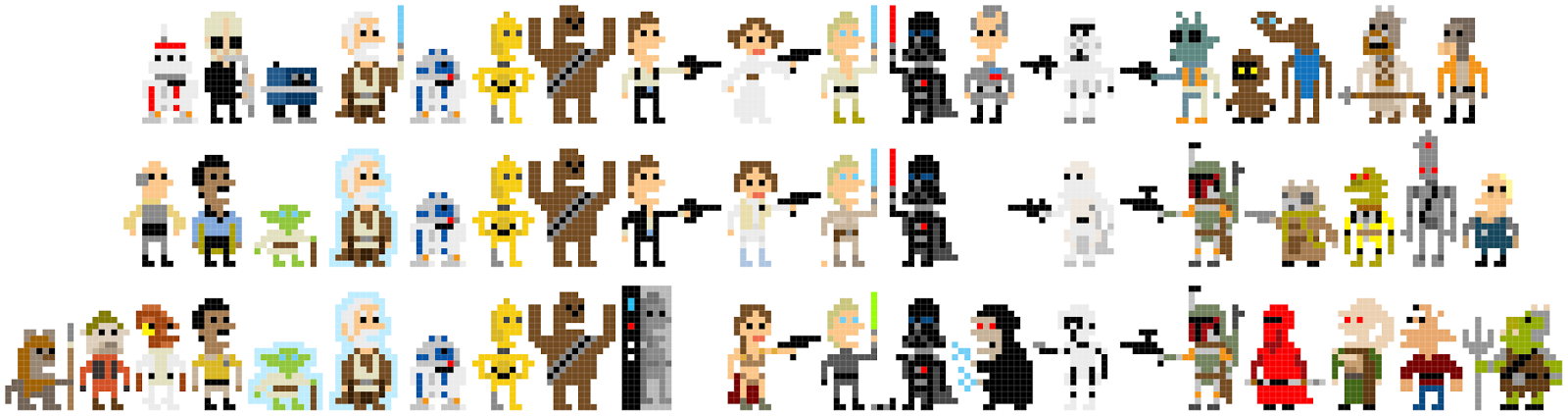
- I love Andy Rash’s pixel Star Wars characters. If those are up your alley, see his pixel Bond, Borat, and others.
- “Koopa, It’s What’s For Supper.” Jude Buffum’s made meat-cut diagrams for Nintendo characters. [Via]
- Cinematic characters:
- Halloween party stylings: Four duelling DeNiros & more appear in Ivan Brunetti’s great New Yorker cover.
- “It’s Murray Time…” Bill Murray as other Wes Anderson characters. (Malkovichian.)
- Lee Rubenstein’s created crazy lo-fi creatures from CS5 splash screens. [Via]
Video: OKGO + Geoff McFetridge = Animated toast (really)
[Via]
Microsoft enables Illustrator->HTML5 Canvas
How cool: Microsoft’s Mike Swanson has enabled Illustrator (CS3-CS5, Mac & Win) to export vector graphics as HTML5 Canvas elements. As former Illustrator PM Mordy Golding puts it,
Wouldn’t it be cool if you could generate great-looking and useful HTML5 content (with interactivity, motion, interaction, etc) DIRECTLY from Illustrator? Now you can — with a new FREE plugin for Illustrator.
Here’s a great 90-second demo (no embedding option I can discover, unfortunately). Now Illustrator can create SVG, CSS, and Canvas content, thanks to this plug-in plus the recently released Illustrator CS5 HTML5 pack. Way to go, Mike & Microsoft.
[Semi-pointless historical footnote: the plug-in brings back memories of Macromedia’s ancient Flash Writer plug-in for Illustrator (the system requirements for which still list Windows NT!). Here, I’ll make that same part of your brain twinge again: “DeBabelizer!”]
Adobe Ideas adds iOS4 support, layers, more
I’m really pleased to say that the Adobe Ideas team has released version 1.1, offering a range of free enhancements plus the app’s first optional paid feature.
Free features:
- Support for iPhone 4 retina display
- Support for iOS4 Multi-tasking
- Support for Redo
- Available in French, German and Japanese
- Sketches save much faster, avoiding loss of data when you close the app or you need to answer a phone call.
- Save drawing to “saved photos” album on iPad and iPhone (no longer a need to create a screenshot)
In-app purchase (optional):
- Layers: Available for in-app purchase. Create up to 10 drawing layers plus a photo layer for each sketch; control order and opacity for each layer.
Here’s a quick (sub-2-minute) demo:
You might also be interested in the Ideas Facebook page, Flickr Gallery, and team blog. Congrats, guys!
(rt) Illustration: Black Swans, fun with Carbonite, & more
- “Holy crap is Africa big,” observes Daniel Jalkut. [Via]
- Check out some bold & excellent “Black Swan” movie posters. [Via]
- Star Wars:
- Heh: Mr. and Mrs. The Hutt Make a Compromise.
- I like José Pulido’s Día de los Muertos-style Star Wars illustrations.
- Long, long ago–specifically, from the 70’s: Boba Fett’s invoice to Jabba the Hutt.
Video: Star Wars via paper animation
Heh–a great tune, too:
[Via]
Subaru gets A-Ha-ish
To be honest, when compared to Mike Patterson’s Take On Me & previous work, this piece comes up short, but it’s worth a look just for the little trick revealed towards the end.
Viva zoetropes. [Via]
Tangential but fun: Subaru is running a tongue-in-cheek campaign for The 2011 Mediocrity.
President Obama uses Adobe Ideas
Well, for a moment, anyway: he used it to sign an iPad. Tablet owner Sylvester Cann even put up a little mini site to capture the moment. Cool! [Via Ideas engineer Paul George]
(rt) Illustration: Beautiful Fireworks, duck fear, & more
- Web tech:
- Smashing Magazine rounds up impressive illustrations done in Adobe Fireworks, including the Firefox & Adobe CS icons.
- Colorzilla offers a nice Photoshop-like CSS gradient editor.
- Check out a beautiful webcam/fluid experiment by Eugene Zatepyakin. [Via]
- “Anatidaephobia” translates as “The best accidental advert placement in the history of mankind.” [Via]
- Nerdtastic: PANTONE Visa Cards. [Via]
- Rocking this laptop skin would be up there with growing a mullet for irony.

Photoshop CS5 paintings from Jack Davis
Author Jack Davis has been producing some really nice work in CS5:
New Dry Media brushes for CS5
Building on the success of his Artists’ Brushes for Photoshop CS5, digital painter John Derry has released John’s Dry Media for Photoshop CS5, a $19.95 set of brushes for Photoshop CS5. Here he demonstrates creating a painting from scratch:
And here’s turning a photo into a pastel painting:
Related: John’s Lynda.com tutorial, Photoshop CS5: Painting with the Mixer Brush.
The short film that gave birth to A-Ha's "Take On Me"
This 1981 gem from animator Mike Patterson paved the way to his now-classic animation for A-Ha:
The BBC has the back story on how the song & video came to be.
Banksy does the Simpsons
Street artist Banksy has overseen what must qualify as the darkest Simpsons opening ever:
Update: The NYT has a Q&A with Simpsons producer Al Jean about how the piece came to be. [Via]
Video: A Paul Rand retrospective
Great work from Jeremy Cox:
For Paul Rand’s posthumous induction into The One Club Hall of Fame, Imaginary Forces created this short film, combining original animation with a videotaped interview of Rand himself, that encapsulated his unique and timeless contribution to the design community.
After I’d proposed to Margot, I sent her this graphic in an email simply titled “You.” She deciphered (and loved) the meaning, which is why she’s The One. 🙂

It’d be nice for Mad Men to give Rand a little shout-out, she notes. [Via]
Video: "Mars"
(rt) Illustration: Van Gogh, Chewbacca, and more
- Rocking this laptop skin would be up there with growing a mullet for irony. (Might get you some good customer reviews & tribute vids, though.)
- Photoshop + Van Gogh = tilt-shift good times.
- “Chewbacca riding a squirrel fighting Nazis = YES!” [Via]
- During the BP oil spill, Bob Staake did a rather excellent Escher-style New Yorker cover.
Illustration: Soviets, Star Wars, & facial hair
- JustinVG makes great Star Wars planets & Soviet-style posters.
- I know such collections can be a dime a dozen, but maybe you, too, will like these lovely, simple iPhone wallpapers.
- Dig the simple, nuanced presentation of Shyama Golden‘s portfolio.
- I love the color palettes from illustrator Melancoloric. [Via]
- Moustache Buttons. “Useless? Maybe. Hilarious and beautiful? You betcha!” [Via Zorana Gee]
(rt) Illustration: Great shirts, Bill Murray, & more
- Shirts:
- How many can you get? 80’s films as logos.
- I love Neven Mrgan’s falling-stuff-as-dude Incident shirt.
- Offbeat but impressive: Hand Painting Ads by Guido Daniele.
- “For relaxing times… Suntory Time” Just ordered this great poster. Good Don Draper & Joan, too.
- A nice tutorial on creating a digital bokeh effect using Photoshop’s brush engine.
New PSDs for iPhone 4, Android UIs
- The folks at Teehan+Lax have updated their iPhone GUI PSD, scaling it up to take advantage of the iPhone 4’s high-density Retina Display.
- The staff of Webdesignshock have created a similar PSD for creating Android UIs. [Via Dave Dobish]
Feedback, please: Potential Web/drawing features in Photoshop
Photoshop’s vector shapes & layer effects (strokes, gradients, etc.) are mainstays of Web & mobile design work, but they haven’t gotten updated in a while. If the Photoshop team were to improve this area of the app, what improvements would you find the most important?
The following list isn’t exhaustive, but it includes popular requests we’ve heard. It would be great to get your feedback via this quick survey. We can’t do everything (certainly all at once, anyway), so please let us know what matters most.
- Enable “real” vector shapes (stroke & fill directly editable, without reliance on layer effects or a dialog box)
- Support dashed- and dotted-line strokes
- Enable smart shapes:
- Preserve corner roundness when scaling rounded rectangles
- Support other parameterized shapes (e.g. stars with an adjustable number of points; lines with arrowheads)
- Make various layer effects enhancements:
- Apply effects at the layer group level
- Re-order effects
- Duplicate effects (e.g. apply multiple strokes per layer)
- Enable panel-based editing of effects (instead of relying on a dialog box)
- Add/edit effects on multiple selected layers at once
- Make graphical styles “live” (i.e. if edit the style definition, all styled objects update)
- Enable layer search (i.e. type to filter by layer name or attributes)
- Improve snap-to-pixel behavior
- Improve text rendering
- Export text & graphical styles as CSS
- Support guide sets (e.g. for grid layouts)
- Support linked files (i.e. edit one file to update buttons, icons, etc. across multiple PSDs)
Notes:
- We want to know what’s more important than other things, so please bear that in mind when assigning relative ratings. (That is, don’t make everything “extremely important” or “not important.”)
- Please don’t tell me that Photoshop should never be improved vis-à-vis Web & mobile design, and that everyone should use Fireworks (or Illustrator or whatever). You may be completely right about those apps, but it’s just not relevant to this survey.
- Inevitably there’s some amount of overlap among these items (e.g. applying effects at the layer group level would offer an alternative to applying multiple copies of one effect on a layer; for example, you could stroke a layer, then add another stroke on a group containing that layer).
Many thanks in advance,
J.
Video: "Cache Rules Everything Around Me"
Illustrator CS5 gains HTML5 chops
Double rainbow ‘cross the sky, oh my God, so intense... Wait, that’s something else–but this is pretty great, too: the Illustrator team has just released the Illustrator CS5 HTML5 Pack, downloadable from Adobe Labs. Highlights include the ability to:
- Export named character styles as CSS
- Export artwork appearances as CSS
- Include selected Graphic Styles as CSS in SVG
- Create parameterized SVG (vector graphics tagged with variables)
- Create multi-screen SVG (leveraging media queries to serve up design variations)
See the download page or Mordy Golding’s nice summary for more details. You can ask questions & provide feedback on the Labs user forum.
I’m curious to see whether this news makes it onto the Mac sites that’ve beaten Adobe up for a perceived lack of enthusiasm about HTML5 (tough, as it just doesn’t fit that sterile, stupid narrative). The funny thing is that these changes build on the SVG support that Illustrator has been shipping for ten years. Sometimes it just takes a while for the world to catch up.
Adobe CTO Kevin Lynch wasn’t kidding when he said, “We’re going to make the best tools in the world for HTML5.” These Illustrator developments have been in the works for a while; Dreamweaver has just made its HTML5 Pack for CS5 official; and you’ll see more from Adobe going forward.
Update: Here’s a demo from evangelist Greg Rewis:
(rt) Illustration: AT-AT as Eeyore & more
- Dig James Hance’s Star Wars characters in the style of Winnie-the-Pooh illustrations. [Via]
- Illustration: Three terrific Star Wars posters. [Via]
- Completing the Star Wars tweet hat trick: the excellent San-Francisco-as-Cloud-City t-shirt.