Big news: I’m back at Google!

Hey gang—I am beyond delighted to say that I’m returning to Google, taking a Cloud AI PM role focusing on generative media!

As Paul Simon told us, “These are the days of miracles and wonder”—and I wonder at my amazingly good fortune getting to help shape these miracles.

Ever since 2000, I’ve focused my PM career on “unblocking the light,” helping people make the world more beautiful and fun. From Photoshop to Google Photos to M365, I’ve loved learning what truly matters to creators. Nothing beats zeroing in on real needs, then marshaling some big giant brains to deliver everything from big breakthroughs to crafty little mint-on-the-pillow delights.

Returning from last fall’s Adobe MAX, I summarized attendees’ vibe as “Overwhelmed, But Optimistic.” Now the pressure—and privilege—is to turn that optimism into action.

There’s so much I don’t yet know about this role—but what I know for sure is that I can’t do it alone.

I know I need you.

As we all navigate this bewitching, bewildering time, let’s stick together. Please keep me honest, grounded in knowing just what you need—and what you don’t. That way I can advocate accordingly, helping Google focus on exactly what’ll benefit you most.

Questions & ideas for collaboration are always most welcome: [last name @ employer dot com]. And in the meantime I’ll keep sharing my most interesting finds on the ol’ blog—especially in the burgeoning AI/ML category.

And with that, friends, here we go!

Photo history: How NASA trained moonwalkers to shoot

I love behind-the-scenes little insights like these. Click or tap as needed to see the full post:

Phota launches, promising maximum identity preservation

Phota—about which I expressed some initial misgivings, given its ability to rewrite memories—has launched Phota Studio & their API. From what I can tell, it builds upon a Nano Banana foundation and adds personalization that relies on uploading dozens of images of each individual in order to maximize identity preservation:

With Phota, for the first time, you can generate, edit, and enhance photos while keeping your identity intact, every time.

We’re not building a generic foundation model. We build personal models about you, and about the people and pets around you. At the center are profiles, built from your personal album that learn the details of your appearance that make you recognizable as yourself: how you smile, your eye color, and how your face looks from different angles. Your personal model is private and only used by you.

Here’s a quick thread in which I tried inserting myself into a couple of images, using both Phota’s model (which depended on my uploading 30+ images of myself) and just Nano Banana straight out of the Gemini app:

Inside the design of “Project Hail Mary”

I love love love the attention to detail that Phil Lord and Christopher Miller brought to the film. Check out the lengths they & their crew went to on everything from devising rotating lights for the inter-ship tunnel (conveying constant rotation) to nailing film grain. And I love the exuberance & generosity of creators in sharing so many insights into design & process.

FreePik enables 3D photo shoots

I love seeing progress like this: upload a product pic, convert it to 3D, and photograph it on a virtual set:

Runway debuts Multi-Shot

Here’s a fun, ultra-simple way to turn an image (or just a prompt) into a short, multi-shot narrative:

Just for fun I fed it this image…

…and this prompt (based on an all-too-true story):

A family of Lego people and their dog gaze around Yosemite’s most iconic vista, then reminisce about that time they got stuck there in the snow in their VW van, expressing hope that they don’t get stuck again!

Check out the results:

I Love(art) to move it, move it…

I’ve long quoted James Ratliff, the super sharp designer behind Adobe’s Project Graph (who’s recently decamped to Figma), in nicely phrasing how the process of generating & refining ideas generally starts broad/declarative (searching, prompting) and moves towards fine-grained methods (selecting, moving, etc.):

I see an increasing number of tool & model creators mixing modalities—even in the Gemini Super Bowl ad featuring a mom & daughter drawing a simple circle to show where they’d like to add a dog bed.

I’m eager to check out Lovart’s take on the possibilities, especially for animation:

Update: Here’s a look at the UI, in which you can move & scale the selection rectangle, as well as the before & after images:

Spline enables agentic 3D creation

“3D scenes, websites, games, apps,” promises Spline. “Describe anything and Omma builds it for you in seconds.”

Omma combines code generation (LLMs), 3D AI mesh generation, and Image generation all in one place for you to build and ship. Deploy to production, assign custom domains, and more.

Sora is the new Peach

Ten years ago (!), the embryonic social app Peach suddenly blew up on the scene—only to molder shortly thereafter. Adam Lisagor tartly predicted that outcome right after Peach debuted:

I’m reminded of this upon hearing that OpenAI has bailed out on Sora, which they launched just a few months ago. In a way I’m not surprised—check out how interest in the tech spiked & then rapidly cratered—except that just a couple of months ago Disney signed a billion-dollar deal to use it. ¯\_(ツ)_/¯

Luma UNI-1 promises layered creation

When can we get this (or equivalent) into Photoshop??

On a conceptually (though not necessarily technically) related note, the LICA dataset may help model makers train layered generation:

Photoshop drops Rotate Object!

Speaking of spinning right ’round, check this out:

Check out another view, from Paul Trani:

Runway promises 100ms (!!) HD video generation

Five years ago, I spent an afternoon with a buddy watching Disco Diffusion resolve a weird, blurry, but ultimately delightful scene over the course of 15 minutes. Now Runway & NVIDIA are previewing generation that’s a mere ~90,000x faster than that. Ludicrous speed, go!!

Pass the Craic pipe: It’s St. Paddy’s!

Now throw your shoulders back and go effin’ nuts. 😀

And for some more blog-appropriate content: Here are some fun pics & vids my son Henry & I captured on Saturday during SF’s wonderfully diverse & quirky St. Patrick’s Day parade:

Bonus: here’s a gallery of Irish wolfhounds, if you’re into that kind of thing. I couldn’t quite get these good boys to align like Cerberus, so I resorted to telling Gemini my hopes & dreams—as one does.

Tips: Getting great text from Nano Banana

Structuring your prompt well turns out to be key in avoiding garbled text. As the presenter says, “It’s not about writing more. It’s about writing in the right order.” Check out this brief overview.

In this tutorial, you’ll see how to use Nano Banana Pro and Kling 3.0 Omni together to solve one of the most common pain points in AI product video: text that blurs, warps, or drifts mid-motion. We’ll walk through a practical workflow for maintaining legibility and visual consistency in product shots, so your labels, logos, and copy stay clean from the first frame to the last.

Antigravity 360 drone spins me right ’round

Hey, remember the pandemic? We sure made some impulse buys then, didn’t we?

For me it was Insta360’s bizarre, modular 360º camera plus the elaborate mounting kit that promised to strap its shards onto the top & bottom of my DJI Mavic, enabling some magical, drone-less captures. Suffice it to say the thing was a complete POS—dysfunctional even as a handheld action cam, much less as a bunch of theoretically interconnected pieces thousands of feet in the air.

And yet… who doesn’t love the promise of capturing immersive footage that enables crazy post-processing camera moves? Insta’s on it, releasing their first 360º drone, the Antigravity A1:

Some cool details:

With Antigravity’s proprietary FreeMotion technology, the drone — together with the Vision goggles and Grip controller — enables an immersive flying experience that feels both natural and intuitive. Pilots can fly in one direction while looking in another. This level of immersion enables more freedom to explore. The 360 immersion doesn’t end just because the drone lands — recorded footage can be viewed in 360 over and over again, letting users discover new angles every time they watch.

Using AI to save pets

Long dog walks are for nothing if not visualizing whatever silliness pops into my head—which today happened to be our puppy Ziggy becoming an impossible object called a “Ziggule.”

I shared this with my cousin Alicia, who does a tremendous amount of work sheltering & rescuing dogs in Austin, and she requested a portrait of their current foster pooch (Tesseract). I was of course all too happy to oblige:

As it happens, folks at Google have had the same idea, and they’ve been putting Nano Banana to work helping zhuzh up pics of shelter pets in hopes of helping them find their forever homes. Let’s hear it for using AI & old-fashioned human creativity for good!

Adobe Research shows promising “Vidmento” tech

As you’ve likely heard me say, I’ve gotten psyched up too many times about AI video-editing tech that fell short of its ambitions—but I’m hoping that this work from Adobe & Harvard collaborators can deliver what it describes:

We present Vidmento, an interactive video authoring tool that expands initial materials and ideas into compelling video stories through blending captured and generative media. To preserve narrative continuity and creative intent, Vidmento generates contextual clips that align with the user’s existing footage and story.

Per the site, Vidmento should enable:

  1. Story Discovery: Surface the stories within captured clips.
  2. Narrative Development: Suggest what’s needed to move the story forward.
  3. Contextual Blending: Generating visuals that align with real footage.
  4. Creative Control: Give creators controls to fine-tune the visuals and story.

Computer animation in 1971 (!)

The older I get, the harder it is to get the Kids These Days™ to grok just what a road-to-Damascus moment the arrival of the Mac presented. I flap my arms like some conspiracy nut at his cork board, trying in vain to convey the idea that in the pre-Mac days, personal computer “art” consisted of pecking out some green ASCII blocks on an Apple ][. Okay, grandpa, let’s get you to bed…

Anyway, predating even me (heh) is this glimpse of how computer animation was painstakingly eeked out via data tape (!) back in 1971.


View this post on Instagram


A post shared by HUMANOID HISTORY (@humanoidhistory)

[Via Uri Ar]

From carbohydrates to polygons

Among the misbegotten “Oh, everyone will love this—but rarely will anyone actually use it” AR demos of 2017 (right alongside “See whether this toaster fits on my counter!”), imagining restaurants plopping a 3D model onto your plate was always a banger. Leaving aside whether anyone would actually want or value that experience, the cost of realistically modeling dishes was prohibitive.

This new tech at least promises to take the grunt work out of model creation, turning a single photo into an AR-ready 3D asset (give or take a tine or two ;-)):

Mograph: Canva Calls In The Cavalry

“Wow, that’s some really sharp After Effects work,” I thought last year, when my wife showed me some animation her Airbnb colleague had created. But nope—the work came straight out of Canva.

Not content to chill with their surprisingly capable foundation, Canva is continuing to build out the “Creative Operating System” and has announced the acquisition of up-and-coming 2D animation tool Cavalry:

In their blog post they seem pretty adamant that the acquisition won’t result in dumbing down the core app:

Built for professional motion designers

Cavalry earned its place in the motion design world by doing something different. Its procedural, systems-based approach prioritises flexibility, repeatability, and performance. It wasn’t built as a simplified alternative; it was built specifically for professional motion designers and the complex workflows they rely on. That professional focus remains central.

We’ve invested in Cavalry because of its depth as a professional-grade motion tool. The goal isn’t to simplify what makes it powerful, but to support and strengthen it. Professional motion design demands precision, flexibility, and tools that can scale across complex projects.

Much as with their acquisition of Affinity, however, I’d fully expect Canva to integrate underlying tech into the core design platform, radically simplifying the interface to it—including by providing agentic and chat-based touchpoints.

As with the myriad node-based systems that sprung up last year, I wouldn’t expect most people to ever see or touch the underlying data structures. Rather, what’s essential is that the main tool can understand & modify them, so that it can deliver brilliant results at scale. That necessitates a very approachable, and totally complementary, UX.

I’m excited to see what’s next!

Speak it -> See it, with Krea’s new voice mode

I try not to curse on this blog, doing so maybe a dozen times in 20+ (!!) years of posting. But circa 2013-2017, when I saw what felt like uncritical praise for Adobe’s voice-driven editing prototypes, I called bullshit.

The high-level concept was fine, but the tech at the time struck me as the worst of both worlds: the imprecision of language (e.g. how does a normal person know the term “saturation,” and how does an expert describe exactly how much they want?) combined with the fragility of traditional selection & adjustment algorithms.

Now, however, generative tech can indeed interpret our language & effect changes—and in the case of Krea’s new realtime mode, in a highly responsive way:

Whether or not voice per se becomes a popular modality here, closing the gap between idea & visual is just so seductive. To emphasize a previously made point:

Remembering Aldus

I got into the Mac scene just a touch too late to have interacted with Aldus (acquired by Adobe in 1994), and I’m sorry not to have known the late Paul Brainerd, who passed away a couple of weeks ago. To mark the occasion, some friends have been resharing this video, created when the company became part of the Big Red A. It’s fun to see a few familiar faces & to remember the tech vibe of those early days:

Weird wings: A five-engined 747

Engine Engine, Number Five…

I had no idea that the ol’ girl had it in (er, on) her—but this is too odd & thus interesting not to pass along:

Meanwhile, speaking of odd: Having just visited the Mojave aircraft boneyard (see pics) and Spaceport, from which the weird creations of Burt Rutan & co. operate, I couldn’t resist trying this silliness:

Photoshop is totally cooked… except not

I couldn’t have contrived a better example of the power & pitfalls of generative imaging if I tried.

Here’s a pretty crummy cell phone picture I took yesterday from a moving train & then enhanced with a single prompt using Gemini. The results are incredible—if you don’t really care about the exact capacity of your jumbo jet! 🙂

The current state of AI-driven editing drives home the wisdom of that old Russian staying, “Trust… but verify.”

See also my previously shared example, in which Nano Banana quietly upgraded this propeller-driven plane into a jet:

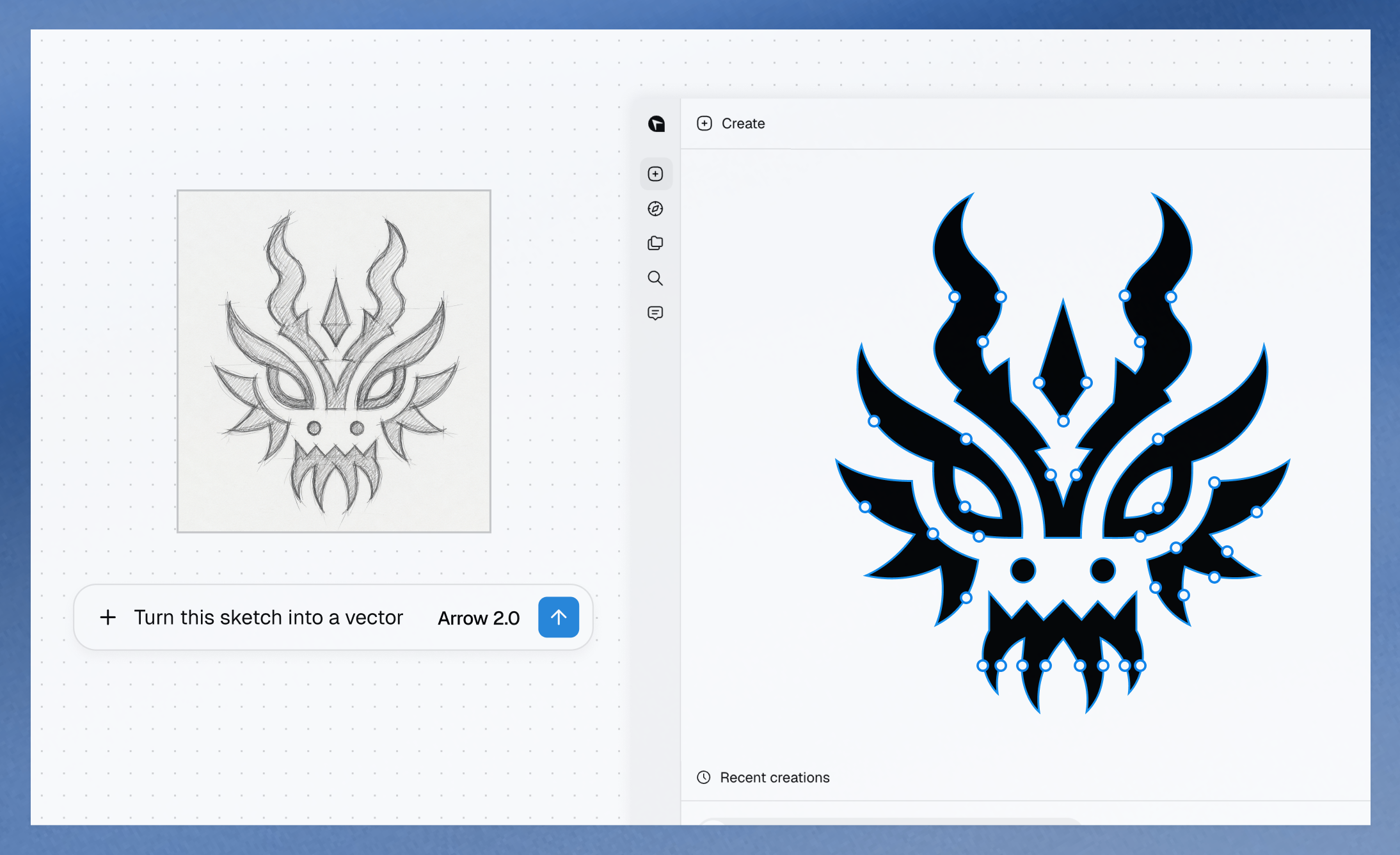
AI + SVG: Vector all the things!

When it rains, it pours: No sooner did I post about text->vector than I saw two new entrants in that space. The new Quiver AI is claimed to have “solved vector design with AI”:

Here’s my first quick test, in which Quiver & Illustrator utterly smoke direct chat->vector output in Gemini & ChatGPT:

Meanwhile, check out what Recraft produced:

Elsewhere, Hero Studio promises great image->SVG conversion. I’ve applied for access & am eager to take it for a spin:

Can AI finally generate useful vectors?

When we launched Firefly three years ago (!), we talked up prompt-based vector creation. When the feature later arrived in Illustrator, it was really text-to-image-to-tracing. That could be fine, actually, provided that the conversion process did some smart things around segmenting the image, moving objects onto their own layers, filling holes, and then harmoniously vectorizing the results. I’m not sure whether Adobe actually got around to shipping that support.

In any case, Recraft now promises create vector creation directly from prompts:

Meanwhile Gemini promises SVG creation right out of the box. My previous attempts to use it produced results that were, um, impressionistic…

…and based on what they’re showing vis-à-vis recent updates, I haven’t been in a hurry to try again:

Photo tips: “The formats of our memories”

My longtime Adobe friend Adam Pratt founded the media digitization & preservation company Chaos to Memories a few years ago, and now he and his team have really comprehensive overview of the various formats one may encounter:

Every photo project should start with gathering all these materials because it helps us grasp the scope of your project and work efficiently. To help you identify the different types in your collection, many common photo, video, audio, and digital formats are explained in the list below.

Creative technologist needed on the Flux team

I’ve really enjoyed collaborating with Black Forest Labs, the brain-geniuses behind Flux (and before that, Stable Diffusion). They’re looking for a creative technologist to join their team. Here’s a bit of the job listing in case the ideal candidate might be you or someone you know:

BFL’s models need someone who knows them inside out – not just what they can do today, but what nobody’s tried yet. This role sits at the intersection of creative excellence, deep model knowledge, and go-to-market impact. You’ll create the work that makes people realize what’s possible with generative media – original pieces, experiments, and creative assets that set the standard for what FLUX can do and show it to the world

Create original creative work that pushes FLUX to its limits – experiments, visual explorations, and pieces that show what’s possible before anyone else figures it out

Collaborate with the research and product teams from the start of training/product development to understand the core strengths of each new model/product and create assets that amplify and showcase these. You will also provide feedback to those teams throughout the development process on what needs to improve.

UI: Realtime generation & the undiscovered country

Former Apple designer Tuhin Kumar, who recently logged three years at Luma AI, makes a great point here:

To the extent I give Adobe gentle but unending grief about their near-total absence from the world of UI innovation, this is the kind of thing I have in mind. What if any layer in Photoshop—or any shape in Illustrator—could have realtime-rendering generative parameters attached?

Like, where are they? Don’t they want to lead? (It’s a genuine question: maybe the strategy is just to let everyone else try things, and then to finally follow along at scale.) And who knows, maybe certain folks are presently beavering away on secret awesome things. Maybe… I will continue hoping so!

Shooting up a storm

Supporting my MiniMe Henry’s burgeoning interest in photography remains a great joy. Having recently captured the Super Bowl flyover with him (see previous), I prayed that Monday’s torrential downpour in LA just might give us some spectacular skies—and, what do you know, it did! Check out our gallery (selects below), featuring one seriously exuberant kid!

I’ve also been enjoying Hen’s great eye for reflections, put to good use during our recent visit to the USS Hornet:

Nano Banana goes to the Super Bowl

It’s hard to believe that when I dropped by Google in 2022, arguing vociferously that we work together to put Imagen into Photoshop, they yawned & said, “Can you show up with nine figures?”—and now they’re spending eight figures on a 60-second ad to promote the evolved version of that tech. Funny ol’ world…

Bad To The B-ONE

MiniMe on the lens + Dad in Lightroom/Photoshop, making the dream work. 🙂


Check out our gallery for full-res shots plus a few behind-the-scenes pics. BTW: Can you tell which clouds were really there and which ones came via Photoshop’s Sky Replacement feature? If not, then the feature and I have done our jobs!

And peep this incredibly smooth camerawork that paired the flyover with the home of the brave:


View this post on Instagram


A post shared by ESPN (@espn)

BTS: Choreographing today’s giant Super Bowl flyover

Through insanely good timing, I caught Friday’s practice flyover as the jets headed up to Levi’s Stadium:

Right now my MiniMe & I are getting set to head up to the Bayshore Trail with proper cameras, as we hope to catch the real event at 3:30 local time.

Meanwhile, I’ve been enjoying this deep dive video (courtesy of our Photoshop teammate Sagar Pathak, who’s gotten just insane access in past years). It features interviews with multiple pilots, producers, and more as they explain the challenges of safely putting eight cross-service aircraft into a tight formation over hundreds of thousands of people—and in front of a hundred+ million viewers. I think you’ll dig it.

Interactive relighting control for Qwen image creation

A couple of weeks ago I mentioned a cool, simple UI for changing camera angles using the Qwen imaging model. Along related lines, here’s an interface for relighting images: