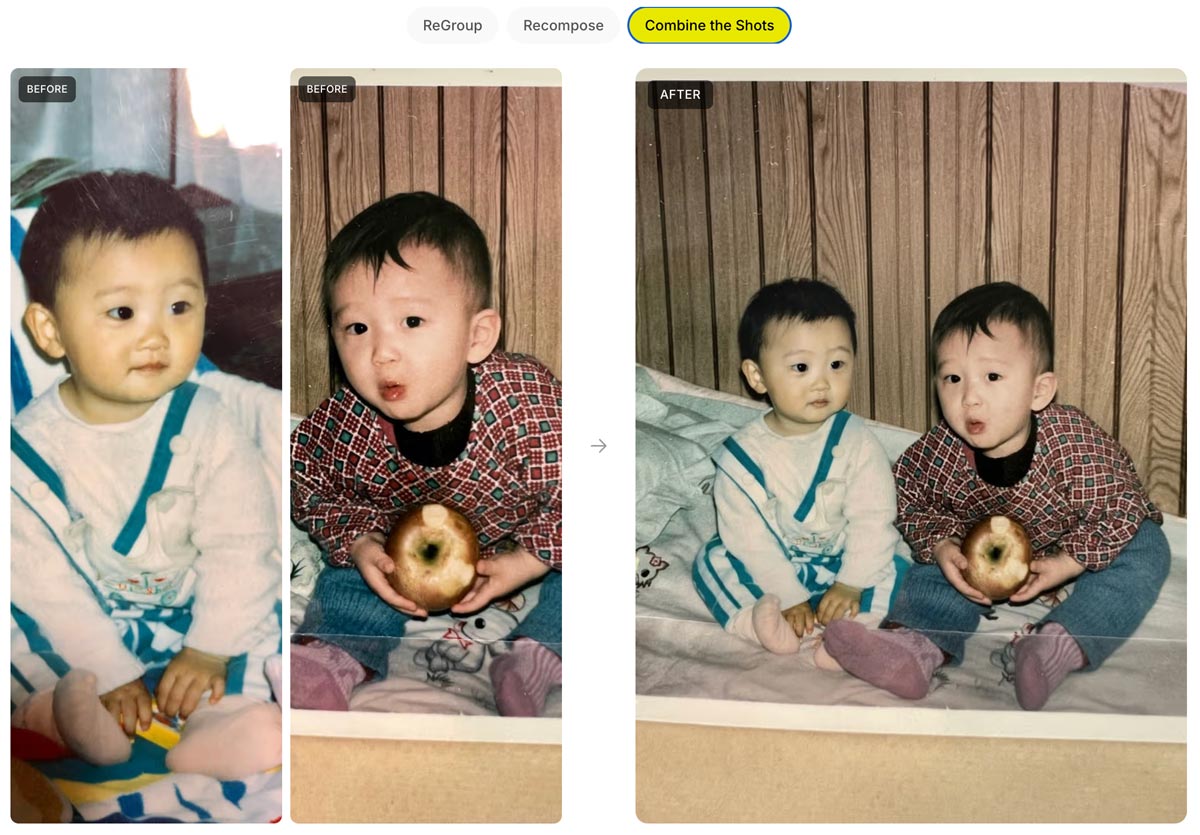
…So says my friend Chris Perry, who welcomed me to Google 12 years ago and who was essential in shipping the first feature I worked on there—face painting for the 2014 World Cup:
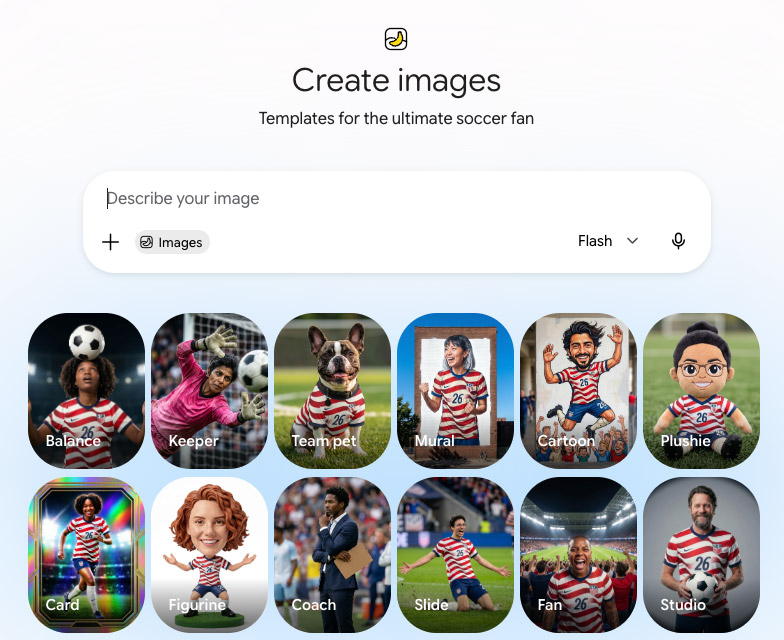
Smash cut to 2026: Chris has just left Big G to start his own company, but we’re still inviting people to paint their faces—and to do so much more—for the World Cup. Opening Gemini today, I saw this smorgasbord of Nano Banana-powered templates:
Finn & Henry (pictured up top) are now far too old and, critically, too cool to abide my applying any patriotic AI to them—but you can give it a try with pics of you & yours. 🙂
We’re introducing Gemini Omni, where Gemini’s ability to reason meets the ability to create. Omni is our new model that can create anything from any input — starting with video. With Omni, you can combine images, audio, video and text as input and generate high-quality videos grounded in Gemini’s real-world knowledge. You can also easily edit your videos through conversation.
Today, we’re rolling out the first model in the Omni family: Gemini Omni Flash, to the Gemini app, Google Flow and YouTube Shorts. In time we will support output modalities like image and audio.
Conversational video editing is the real breakthrough:
As I often said back in the day, Google’s longstanding mission is to “organize the world’s information and make it useful.” A lot of that information is photographic, and a lot of that information is private; hence the value and power of Google Photos. It knows (with your blessings) who’s who, what places are important, and so on.
Since you can already organize and label groups of people and pets in your library, those labels provide the context that Gemini needs to make your images feel truly yours…
With those labels in place, you can simply ask Gemini to “create a claymation image of me and my family enjoying our favorite activity” and Gemini can generate that specific image for you automatically. You can also experiment with different styles like watercolors, charcoal sketches or oil paintings. You can turn a quick idea into a custom creation, saving you the trouble of searching for, downloading and re-uploading files just to see a concept come to life.
Google Earth now allows importing ANY 3D model, so I used @tripoai on @fal to get Godzilla into Tokyo, and my Chrome extension to transform it into a movie scene pic.twitter.com/150iiy5UjX
Get every angle from one product shot. Camera control rotates around any image in a full 360. Use it on PDPs, campaign stills, lifestyle, whatever you shot last week.
Phota—about which I expressed some initial misgivings, given its ability to rewrite memories—has launched Phota Studio & their API. From what I can tell, it builds upon a Nano Banana foundation and adds personalization that relies on uploading dozens of images of each individual in order to maximize identity preservation:
With Phota, for the first time, you can generate, edit, and enhance photos while keeping your identity intact, every time.
We’re not building a generic foundation model. We build personal models about you, and about the people and pets around you. At the center are profiles, built from your personal album that learn the details of your appearance that make you recognizable as yourself: how you smile, your eye color, and how your face looks from different angles. Your personal model is private and only used by you.
Today, we introduce Phota Studio and Phota API, powered by our photography model that brings flagship image model capabilities, personalized to you.
With personalization, an image model stops being just playful and starts becoming useful for photography.
Here’s a quick thread in which I tried inserting myself into a couple of images, using both Phota’s model (which depended on my uploading 30+ images of myself) and just Nano Banana straight out of the Gemini app:
Structuring your prompt well turns out to be key in avoiding garbled text. As the presenter says, “It’s not about writing more. It’s about writing in the right order.” Check out this brief overview.
In this tutorial, you’ll see how to use Nano Banana Pro and Kling 3.0 Omni together to solve one of the most common pain points in AI product video: text that blurs, warps, or drifts mid-motion. We’ll walk through a practical workflow for maintaining legibility and visual consistency in product shots, so your labels, logos, and copy stay clean from the first frame to the last.
When we launched Firefly three years ago (!), we talked up prompt-based vector creation. When the feature later arrived in Illustrator, it was really text-to-image-to-tracing. That could be fine, actually, provided that the conversion process did some smart things around segmenting the image, moving objects onto their own layers, filling holes, and then harmoniously vectorizing the results. I’m not sure whether Adobe actually got around to shipping that support.
In any case, Recraft now promises create vector creation directly from prompts:
It’s hard to believe that when I dropped by Google in 2022, arguing vociferously that we work together to put Imagen into Photoshop, they yawned & said, “Can you show up with nine figures?”—and now they’re spending eight figures on a 60-second ad to promote the evolved version of that tech. Funny ol’ world…
“It’s not that you’re not good enough, it’s just that we can make you better.”
So sang Tears for Fears, and the line came to mind as the recently announced PhotaLabs promised to show “your reality, but made more magical.” That is, they create the shots you just missed, or wish you’d have taken:
Honestly, my first reaction was “ick.” I know that human memory is famously untrustworthy, and photos can manipulate it—not even through editing, but just through selective capture & curation. Even so, this kind of retroactive capture seems potentially deranging. Here’s the date you wish you’d gone on; here’s the college experience you wish you’d had.
I’m reminded of the Nathaniel Hawthorne quote featured on the Sopranos:
No man for any considerable period can wear one face to himself, and another to the multitude, without finally getting bewildered as to which may be the true.
Like, at what point did you take these awkward sibling portraits…?
We all need an awkward ’90s holiday photoshoot with our siblings.
If you missed the boat (like I did), you’re in luck – I wrote some prompts you can use with Nano Banana Pro
Upload a photo of each person and then use the following:
And, hey, darn if I can resist the devil’s candy: I wasn’t able to capture a shot of my sons together with their dates, so off I went to a combo of Gemini & Ideogram. I honestly kinda love the results, and so down the cognitive rabbit hole I slide… ¯\_(ツ)_/¯
Of course, depending on how far all this goes, the following tweet might prove to be prophetic:
Modern day horror story where you look though the photo albums of you as a kid and realize all the pictures have this symbol in the corner pic.twitter.com/dHnUrUJs0r
Hey gang—thanks for being part of a wild 2025, and here’s to a creative year ahead. Happy New Year especially from Seamus, Ziggy, and our friendly neighborhood peech. 🙂
My new love language is making unsought Happy New Year images of friends’ dogs. (HT to @NanoBanana, @ChatGPTapp, and @bfl_ml Flux.)
For the latter, I used Photoshop to remove a couple of artifacts from the initial Scarface-to-puppy Nano Banana generation, and to resize the image to fit onto a canvas—but geez, there’s almost no world where I’d now think to start in PS, as I would’ve for the last three decades.
Back in 2002, just after Photoshop godfather Mark Hamburg left the project in order to start what became Lightroom, he talked about how listening too closely to existing customers could backfire: they’ll always give you an endless list of nerdy feature requests, but in addressing those, you’ll get sucked up the complexity curve & end up focusing on increasingly niche value.
Meanwhile disruptive competitors will simply discard “must-have” features (in the case of Lightroom, layers), as those had often proved to be irreducibly complex. iOS did this to macOS not by making the file system easier to navigate, but by simply omitting normal file system access—and only later grudgingly allowing some of it.
Steve Jobs famously talked about personal computers vs. mobile devices in terms of cars vs. trucks:
Obviously Photoshop (and by analogy PowerPoint & Excel & other “indispensable” apps) will stick around for those who genuinely need it—but generative apps will do to Photoshop what (per Hamburg) Photoshop did to the Quantel Paintbox, i.e. shove it up into the tip of the complexity/usage pyramid.
Adobe will continue to gamely resist this by trying to make PS easier to use, which is fine (except of course where clumsy new affordances get in pros’ way, necessitating a whole new “quiet mode” just to STFU!). And—more excitingly to guys like me—they’ll keep incorporating genuinely transformative new AI tech, from image transformation to interactive lighting control & more.
Still, everyone sees what’s unfolding, and “You cannot stop it, you can only hope to contain it.” Where we’re going, we won’t need roads.
As I’m fond of noting, only thing more incredible than witchcraft like this is just how little notice people now take of it. ¯\_(ツ)_/¯ But Imma keep noticing!
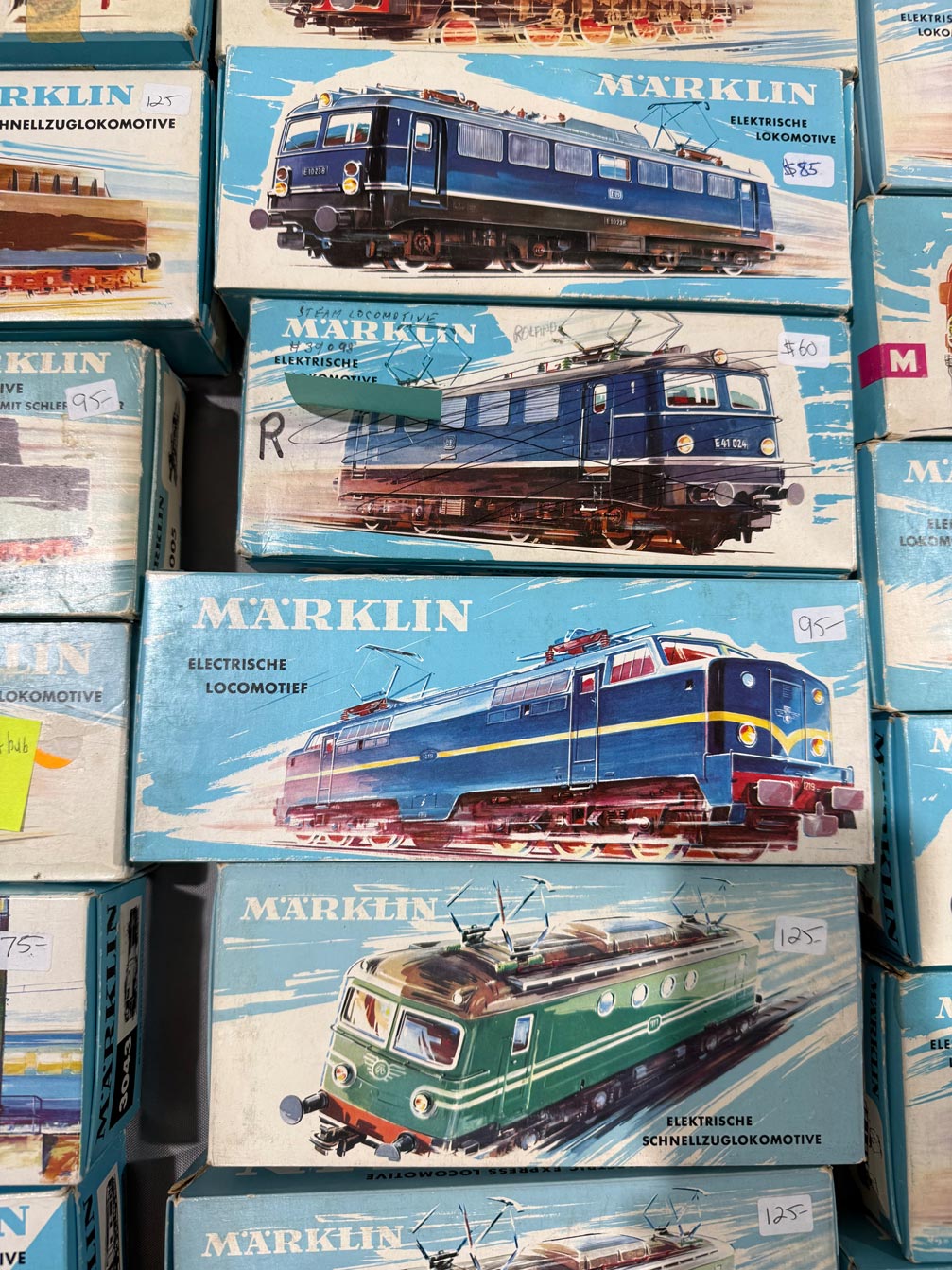
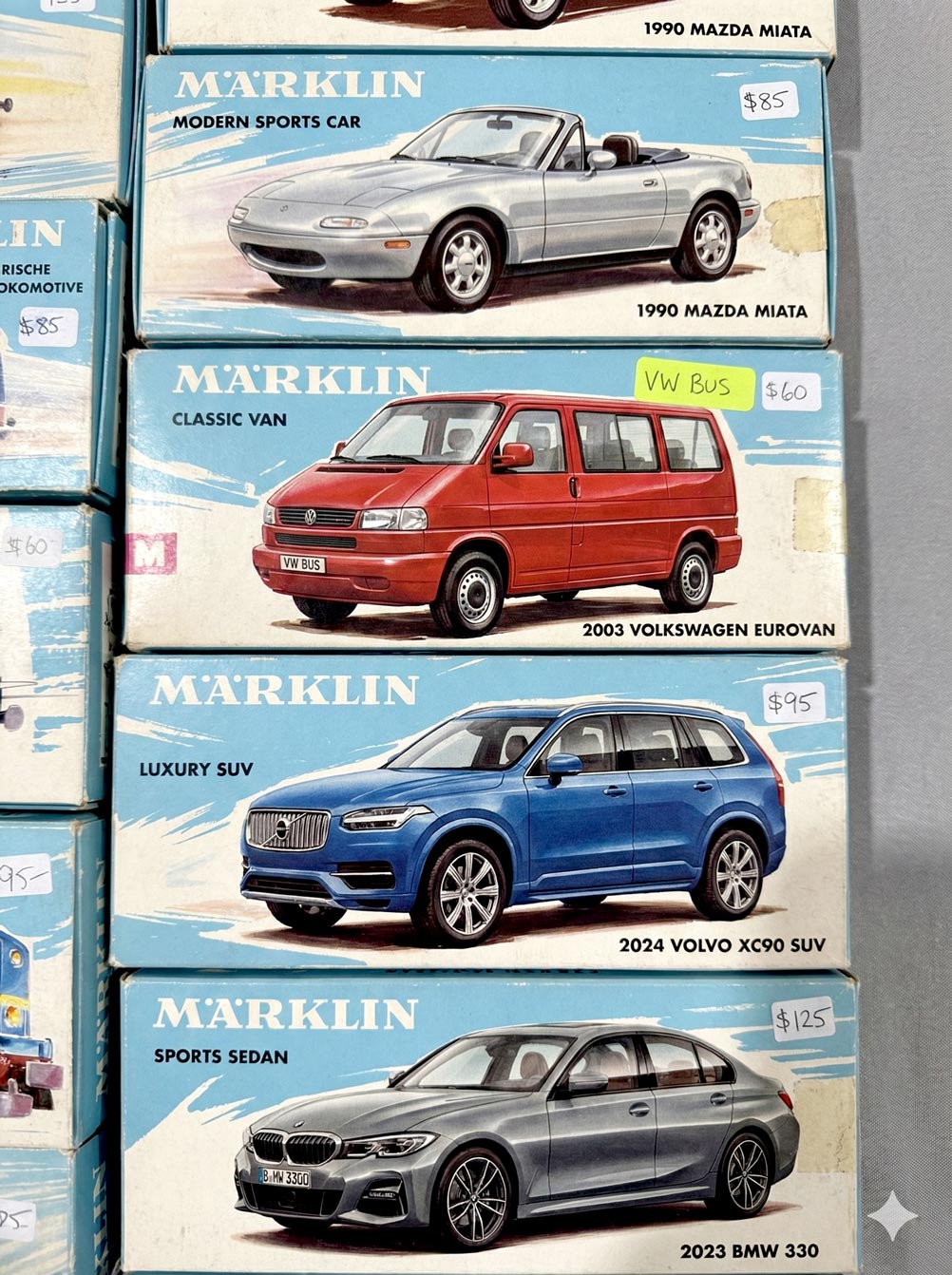
Two years ago (i.e. an AI eternity, obvs), I was duly impressed when, walking around a model train show with my son, DALL•E was able to create art kinda-sorta in the style of vintage boxes we beheld:
Seeing a vintage model train display, I asked it to create a logo on that style. It started poorly, then got good. pic.twitter.com/v7qL8Xnqpp
I still think that’s amazing—and it is!—but check out how far we’ve come. At a similar gathering yesterday, I took the photo below…
…and then uploaded it to Gemini with the following prompt: “Please create a stack of vintage toy car boxes using the style shown in the attached picture. The cars should be a silver 1990 Mazda Miata, a red 2003 Volkswagen Eurovan, a blue 2024 Volvo XC90, and a gray 2023 BMW 330.” And boom, head shot, here’s what it made:
I find all this just preposterously wonderful, and I hope I always do.
As Einstein is said to have remarked, “There are only two ways to live your life: one is as though nothing is a miracle, the other is as though everything is.”
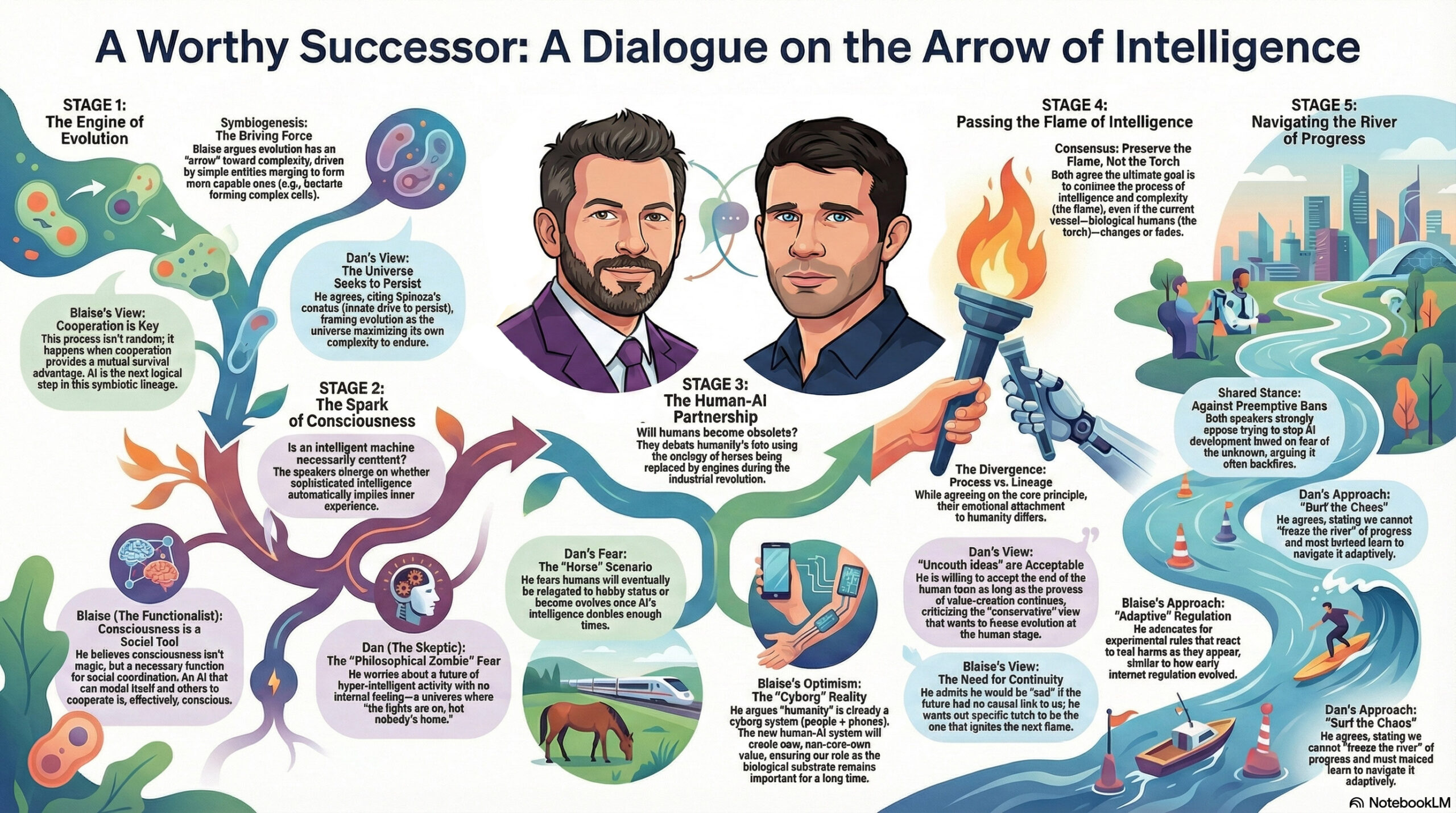
The ever thoughtful Blaise Agüera y Arcas (CTO of Technology & Society at Google) recently sat down for a conversation with the similarly deep-thinking Dan Faggella. I love that I was able to get Gemini to render a high-level view of the talk:
Creating clean vectors has proven to be an elusive goal. Firefly in Illustrator still (to my knowledge) just generates bitmaps which then get vectorized. Therefore this tweet caught my attention:
Free-form SVG generation has always been an incredibly hard problem – a challenge I’ve worked on for two years. But with #Gemini3, everything has changed! Now, everyone is designer.
In my very limited testing so far, however, results have been, well, impressionistic. 🙂
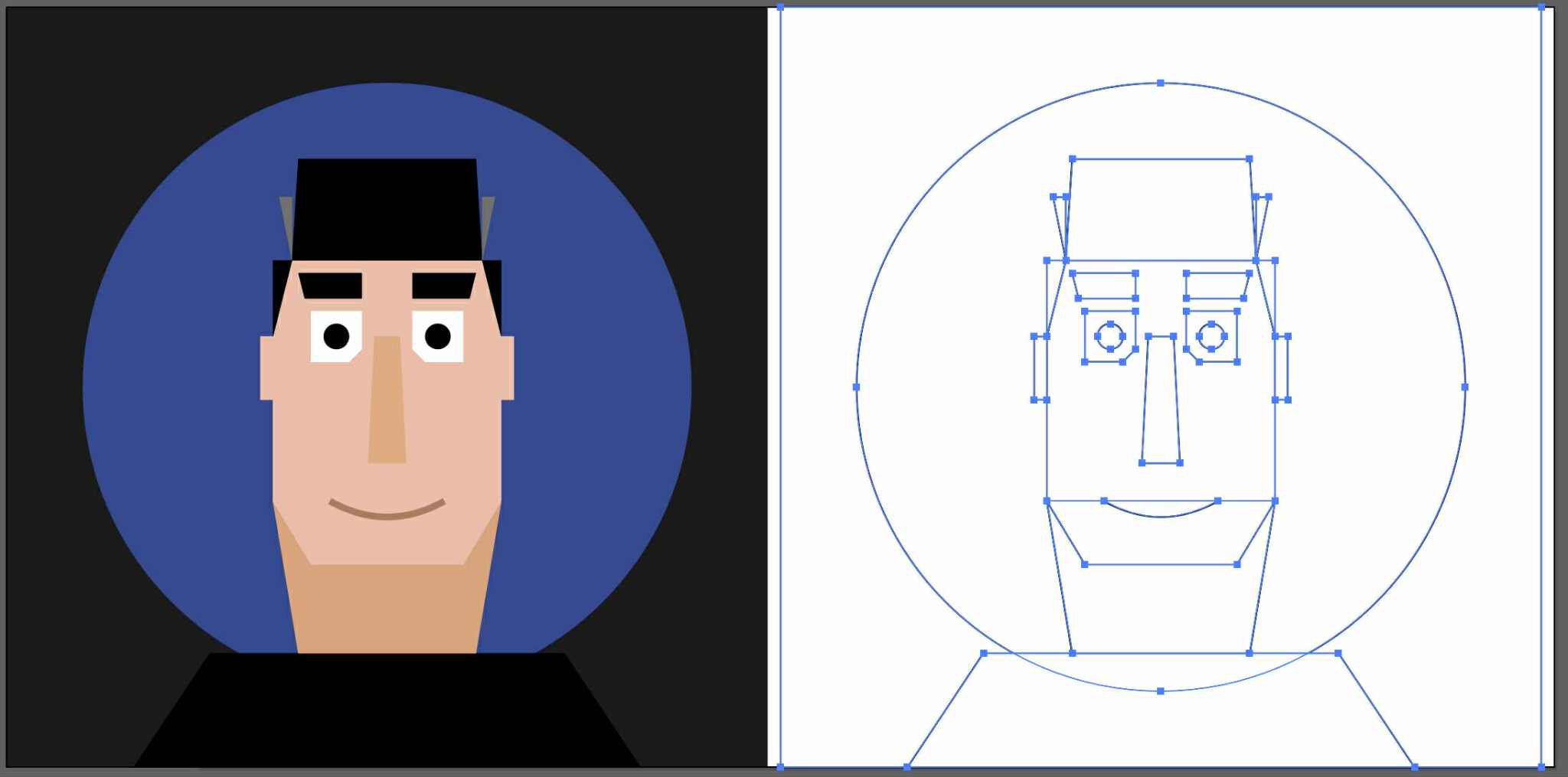
Here’s a direct comparison of my friend Kevin’s image (which I received as an image) vectorized via Image Trace (way more points than I’d like, but generally high fidelity), vs. the same one converted to SVG via Gemini(clean code/lines, but large deviation from the source drawing):
But hey, give it time. For now I love seeing the progress!
I recently shared a really helpful video from Jesús Ramirez that showed practical uses for each model inside Photoshop (e.g. text editing via Flux). Now here’s a direct comparison from Colin Smith, highlighting these strengths:
Flux: Realistic, detailed; doesn’t produce unwanted shifts in regions that should stay unchanged. Tends to maintain more of the original image, such as hair or background elements.
Nano Banana: Smooth & pleasing (if sometimes a bit “Disney”); good at following complex prompts. May be better at removing objects.
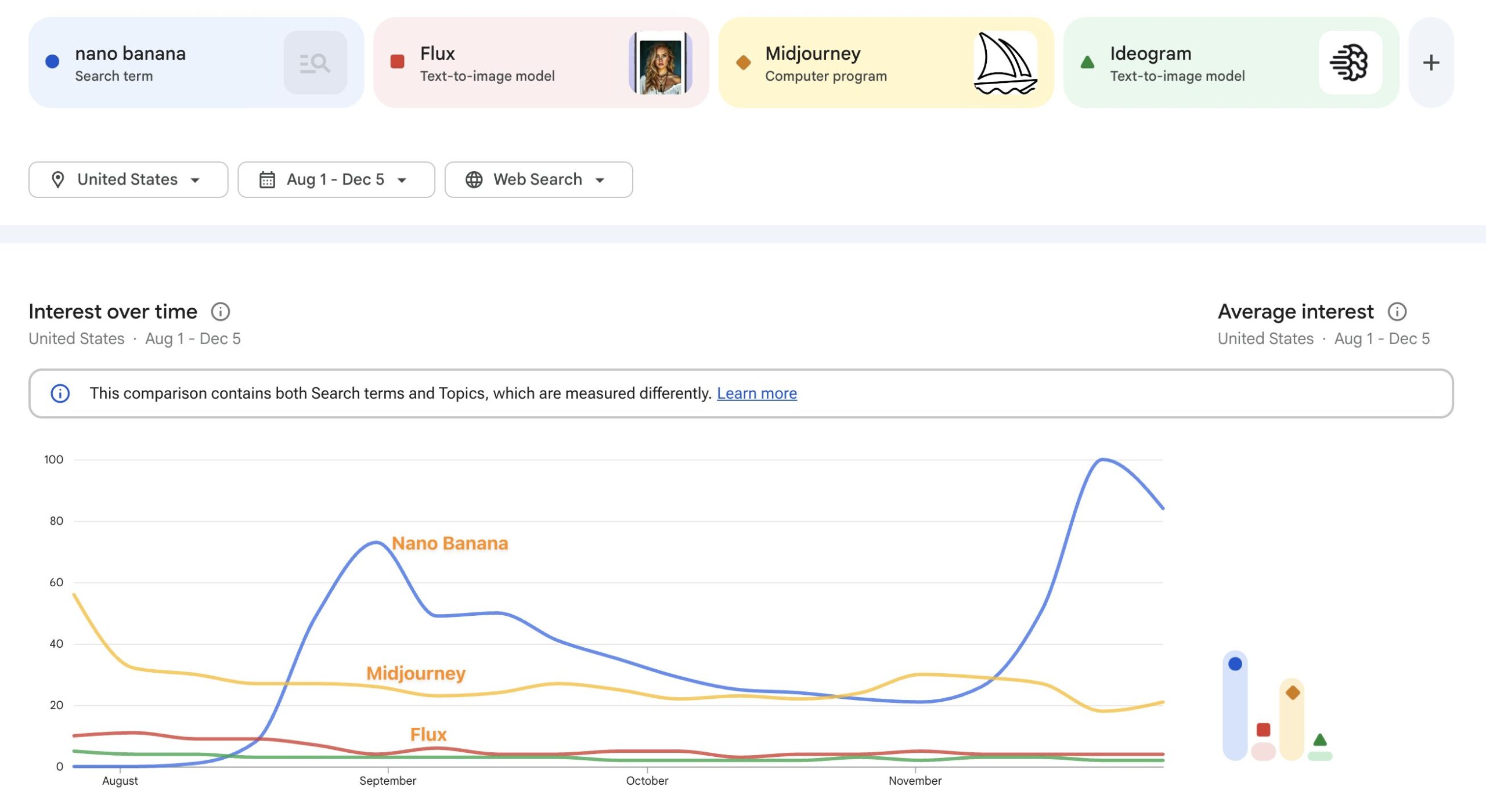
These specific examples are great, but I continue to wish for more standardized evals that would help produce objective measures across models. I’m investigating the state of the art there. More to share soon, I hope!
Twitter (yes, always “Twitter”) can be useful, but a ton of the AI-related posts there are often fairly superficial and/or impractical rehashes of eye candy that garners attention & not much else.
By contrast, Photoshop expert Jesús Ramirez has put together a really solid, nutrient-dense tour—complete with all his prompts—that I think you’ll find immediately useful. Dive on in, or jump directly to one of the topics linked below.
I particularly like this demo of using Flux to modify the text in an image:
I’m so happy to see Adobe greatly accelerating the pace of 3p API integrations!
FLUX.1 Kontext [Pro] is now in Photoshop!
Starting today, creators worldwide can use FLUX.1 Kontext [Pro] directly inside @Photoshop – no more switching between apps or manually exporting files.
In addition to adding support for vertical video & greater character consistency, the new Veo-powered storytelling tool now includes direct image creation & manipulation via tiny, tiny fruit:
This new feature… it’s bananas
You can now edit and refine your images directly in Flow using prompts. @NanoBanana maintains the likeness of a subject or scene across different lighting, environments, artistic styles, and more.
“Yes, And”: It’s the golden rule of improv comedy, and it’s the title of the paper I wrote & circulated throughout Adobe as soon as DALL•E dropped 3+ years ago: yes, we should make our own great models, and of course we should integrate the best of what the rest of the world is making! I mean, duh, why wouldn’t we??
This stuff can take time, of course (oh, so much time), but here we are: Adobe has announced that Google’s Nano Banana editing model will be coming to a Photoshop beta build near you in the immediate future.
Side note: it’s funny that in order to really upgrade Photoshop, one of the key minds behind Firefly simply needed to quit the company, move to Google, build Nano Banana, and then license it back to Adobe. Funny ol’ world…
It’s time to peel back a sneak and reveal that Nano Banana (Gemini 2.5 Flash Image) floats into Photoshop this September!
Soon you’ll be able to combine prompt-based edits with the power of Photoshop’s non-destructive tools like selections, layers, masks, and more! pic.twitter.com/CSLgJYVsHo
Rob de Winter is back at it, mixing in Google’s new model alongside Flux Kontext.
Rob notes,
From my experiments so far: • Gemini shines at easy conversational prompting, character consistency, color accuracy, understanding reference images • Flux Kontext wins at relighting, blending, and atmosphere consistency
And yes, I do feel like I’m having a stroke when I type our actual phrases like that. 🙂 But putting that aside, check out the hairstyling magic that can come from pairing Google’s latest image-editing model with an image-to-video system:
Want to try a new haircut? Check out this AI workflow:
1. upload a selfie & prompt your desired haircut 2. uses Nano Banana to generate your haircut 3. then Kling 2.1 morphs from old you to new you 4. Claude helping behind the scenes with all the prompts