It’s just a super quick tease, but this vid shows Windows 11 calling Express in order to make an Instagram reel from the user’s photos. Check it out:


It’s just a super quick tease, but this vid shows Windows 11 calling Express in order to make an Instagram reel from the user’s photos. Check it out:
My old teammates Richard Tucker, Noah Snavely, and co. have been busy. Check out this quick video & interactive demo:
Excited to share our work on Generative Image Dynamics!
We learn a generative image-space prior for scene dynamics, which can turn a still photo into a seamless looping video or let you interact with objects in the picture. Check out the interactive demo:https://t.co/GLPBVpouJY pic.twitter.com/6h1Qq0kL2G
— Zhengqi Li (@zhengqi_li) September 15, 2023
80lv notes,
According to the team, they trained the prior using a dataset of motion trajectories extracted from real-life video sequences that featured natural, oscillating motions like those seen in trees, flowers, candles, and wind-blown clothing. These trajectories can then be applied to convert static images into smooth-looping dynamic videos, slow-motion clips, or interactive experiences that allow users to interact with the elements within the image.
Man, if you feel like you can’t keep up with technology while you do your day job, just please know that the same is true even at the company where one works, regarding one’s old app. At least we have smart folks like Deke McClelland to show us what’s been happening:
Here are four minutes that I promise you won’t regret spending as Nathan Shipley demonstrates DALL•E 3 working inside ChatGPT to build up an entire visual world:
I mean, seriously, the demo runs through creating:
Insane. Also charming: its extremely human inability to reliably spell “Dachshund!”
In case you missed any or all of last week’s news, here’s a quick recap:
Firefly-powered workflows that have so far been limited to the beta versions of Adobe’s apps — like Illustrator’s vector recoloring, Express text-to-image effects, and Photoshop’s Generative Fill tools — are now generally available to most users (though there are some regional restrictions in countries with strict AI laws like China).
Adobe is also launching a standalone Firefly web app that will allow users to explore some of its generative capabilities without subscribing to specific Adobe Creative Suite applications. Adobe Express Premium and the Firefly web app will be included as part of a paid Creative Cloud subscription plan.

Specifically around credits:
To help manage the compute demand (and the costs associated with generative AI), Adobe is also introducing a new credit-based system that users can “cash in” to access the fastest Firefly-powered workflows. The Firefly web app, Express Premium, and Creative Cloud paid plans will include a monthly allocation of Generative Credits starting today, with all-app Creative Cloud subscribers receiving 1,000 credits per month.
Users can still generate Firefly content if they exceed their credit limit, though the experience will be slower. Free plans for supported apps will also include a credit allocation (subject to the app), but this is a hard limit and will require customers to purchase additional credits if they’re used up before the monthly reset. Customers can buy additional Firefly Generative Credit subscription packs starting at $4.99.
None of this AI magic would be possible without beautiful source materials from creative people, and in a new blog post and FAQ, the Adobe Stock team provides some new info:
All eligible Adobe Stock contributors with photos, vectors or illustrations in the standard and Premium collection, whose content was used to train the first commercial Firefly model will receive a Firefly bonus. This initial bonus, which will be different for each contributor, is based on the all-time total number of approved images submitted to Adobe Stock that were used for Firefly training, and the number of licenses that those images generated in the 12-month period between June 3rd, 2022, to June 2nd, 2023. The bonus is planned to pay out once a year and is currently weighted towards number of licenses issued for an image, which we consider a useful proxy for the demand and usefulness of those images. The next Firefly Bonus is planned for 2024 for new content used for training Firefly.
They’ve also provided info on what’s permissible around submitting AI-generated content:
With Adobe Firefly now commercially available, Firefly-generated works that meet our generative AI submission guidelines will now be eligible for submission to Adobe Stock. Given the proliferation of generative AI in tools like Photoshop, and many more tools and cameras to come, we anticipate that assets in the future will contain some number of generated pixels and we want to set up Adobe Stock for the future while protecting artists. We are increasing our moderation capabilities and systems to be more effective at preventing the use of creators’ names as prompts with a focus on protecting creators’ IP. Contributors who submit content that infringes or violates the IP rights of other creators will be removed from Adobe Stock.
I had fun catching up with folks at the AI Salon (see background) a couple of weeks ago, talking about the past, present, and future of Adobe Firefly. If that’s up your alley, here’s my talk (cued up to my starting point). Note that the content about watermarks & stock contributors predates last week’s “ready for commercial use” announcements.
From Dana Rao, Adobe’s General Counsel & Chief Trust Officer:
Adobe has proposed that Congress establish a new Federal Anti-Impersonation Right (the “FAIR” Act) to address this type of economic harm. Such a law would provide a right of action to an artist against those that are intentionally and commercially impersonating their work or likeness through AI tools. This protection would provide a new mechanism for artists to protect their livelihood from people misusing this new technology, without having to rely solely on laws around copyright and fair use. In this law, it’s simple: intentional impersonation using AI tools for commercial gain isn’t fair.
This is really tricky territory, as we seek to find a balance between enabling creative use of tools & protection of artists. I encourage you to read the whole post, and I’d love to hear your thoughts.
During our Ireland trip a few weeks back, I captured some aerial views of the town from which my great-grandfather emigrated.
As it often does, Luma generated a really nice 3D model from my orbiting footage:
I’m so pleased that we’ve now shipped a feature I’ve been nurturing since the launch of Firefly six years—er, months 🤪—ago.
It enables all kinds of fun visual ping-pong, like riffing on sloth politicians:

.
“Get cinematic and professional-looking drone Flythroughs in minutes from shaky amateur recorded videos.” The results are slick:
Tangentially, here’s another impressive application of Luma tech—turning drone footage into a dramatically manipulable 3D scene:
Check out this intriguing collaboration with Lupe Fiasco (more interesting than you might think, I promise!):
Just me, my dad, our Irish cousins, and 900 of their closest sheep. ☘️😌☘️
Beautifully put. We’ll be forever in his debt.
“Believe in creativity. Believe in imagination. Believe in innovation. Believe in the future.” As we say farewell to our co-founder Dr. John Warnock, we remember how his incredible ideas touched and transformed countless lives. Thank you for the gift of your creativity. ❤️️ pic.twitter.com/SrxOYohkqu
— Adobe (@Adobe) September 1, 2023
I’m so pleased & even proud (having at least having offered my encouragement to him over the years) to see my buddy Bilawal spreading his wings and spreading the good word about AI-powered creativity.
Check out his quick thoughts on “Channel-surfing realities layered on top of the real world,” “3D screenshots for the real world,” and more:
Favorite quote 😉:
“All they need to do is have a creative vision, and a Nack for working in concert with these AI models”—beautifully said, my friend! 🙏😜. pic.twitter.com/f6oUNSQXul
— John Nack (@jnack) September 1, 2023
Amazing & wonderful:
Breakthrough brain implant and digital avatar allow stroke survivor to speak with facial expressions for first time in 18 years.
Fun stuff from Red Giant:
Among other magic, “Simply input an image, and our AI will automatically turn 2D into 3D in less than 15 minutes.”
Check out this quick tutorial from Kris Kashtanova:
Tutorial: How to make a lo-fi animation with new Adobe Express!
Adobe Express is available to everyone today and I made this super short tutorial for you of what’s possible. It has GenAI, background remove, making cool animations and more.
Get it here: https://t.co/PovZvcmDqL pic.twitter.com/jG3hAYoGKk— Kris Kashtanova (@icreatelife) August 16, 2023
Just a wee bit o’ the droning for ya, overflying our cousins’ ancient neighbors (such show-offs!):
I’ve been flying a bunch here in Ireland this week & can’t wait to share some good stuff soon. (Weren’t transatlantic plane rides meant for video editing?) In the meantime, I’m only now learning of a really promising-looking way to have the drone focus on a subject of interest, leaving the operator free to vary other aspects of flight (height, rotation, etc.). Check it out:
Like so many folks inside Adobe & far beyond, I’m saddened by the passing of our co-founder & a truly great innovator. I’m traveling this week in Ireland & thus haven’t time to compose a proper remembrance, but I’ve shared a few meaningful bits in this thread (click or tap through to see):
I am so sorry to hear of the passing of Adobe cofounder John Warnock. He changed all our lives, and those of millions more, for the better. God bless and godspeed, sir. 🙏 pic.twitter.com/ZHZDdkqcOO
— John Nack (@jnack) August 20, 2023
You know you’ve entered the cultural conversation when things like this happen. I’m reminded of the first Snapchat filters inspiring real-world Halloween costumes showing puking rainbows & more.
Who will move on to the FINAL?! 🤩 pic.twitter.com/22dHaiefyl
— FOX Soccer (@FOXSoccer) August 15, 2023
Good stuff just shipped on firefly.adobe.com:
You may need to perform a hard refresh on your browser to see the changes. Cmd (Ctrl) + Shift + R.
If anything looks amiss, or if there’s more you’d like to see changed, please let us know!

The title says pretty much everything, but FYI:
I’ve yet to see Wes Anderson’s latest, but I enjoyed this brief peek into how it was made:
Bonus: Bird!
This is me, giving my now-48yo brain a birthday break by skipping any attempt at meaningfulness & instead sharing just some pure exuberant mayhem. 🤘😛🤘
Super exciting stuff from this new plugin, free while it’s in beta:
1/ Introducing Alpaca’s public beta (goodbye waitlist!) for @Photoshop. So many exciting new features to share with this update! More below. Try it for free here: https://t.co/j2GAxt8VPY pic.twitter.com/gJHD5iv3vd
— Alpaca (@alpacaml) August 3, 2023
Speaking of using Generative Fill to build up areas with missing detail, check out this 30-second demo of old photo restoration:
Restoring old photos using Generative Fill in @Photoshop?! 🤯 pic.twitter.com/UlXj5paDTD
— Howard Pinsky (@Pinsky) August 3, 2023
And though it’s not presently available in Photoshop, check out this use of ControlNet to revive an old family photo:
ControlNet did a good job rejuvenating a stained blurry 70 year old photo of my 90 year old grandparents.
by u/prean625 in StableDiffusion
I found PiXimpefect’s clever use of Quick Mask + GenFill interesting. It’s basically “Select Subject -> Quick Mask -> paint over hair edges -> generate,” filling in areas where the original selection/removal process left something to be desired.
I had a ball chatting with members of the Firefly community, including our new evangelist Kris Kashtanova & O.G. designer/evangelist Rufus Deuchler. It was a really energetic & wide-ranging conversation, and if you’d like to check it out, here ya go:
Here’s a recording of today’s Space with @rufusd and @jnack from @Adobe
We’ll definitely do this again. Thank you all for joining us today.
— Kris Kashtanova (@icreatelife) August 3, 2023
I dig this simple, creative application from Nemanja Sekulic:
It’s here (in your beta copy of Photoshop, same as Generative Fill), and it works pretty much exactly as I think you’d expect: drag out crop handles, then optionally specify what you want placed into the expanded region.
In addition:
Today, we’re excited to announce that Firefly-powered features in Photoshop (beta) will now support text prompts in 100+ languages — enabling users around the world to bring their creative vision to life with text prompts in the language they prefer.

It’s 2023, and you can make all of this with your GD telephone. And just as amazingly, a year or two from now, we’ll look back on feeling this way & find it quaint.
GN 💫 I got too excited and edited a first video draft on my phone in my trusty splice app 👀
images generated in #midjourney, edited in #photoshop and animated in #runway gen2 https://t.co/jKBeMevnqM pic.twitter.com/QQyu4FqqpG
— Julie W. Design (@juliewdesign_) July 24, 2023
Check out my teammate CJ’s exploration around using ChatGPT to produce expression code for use in After Effects:
Happy Monday, courtesy of the AI-wrangling minds at Curious Refuge. 😌

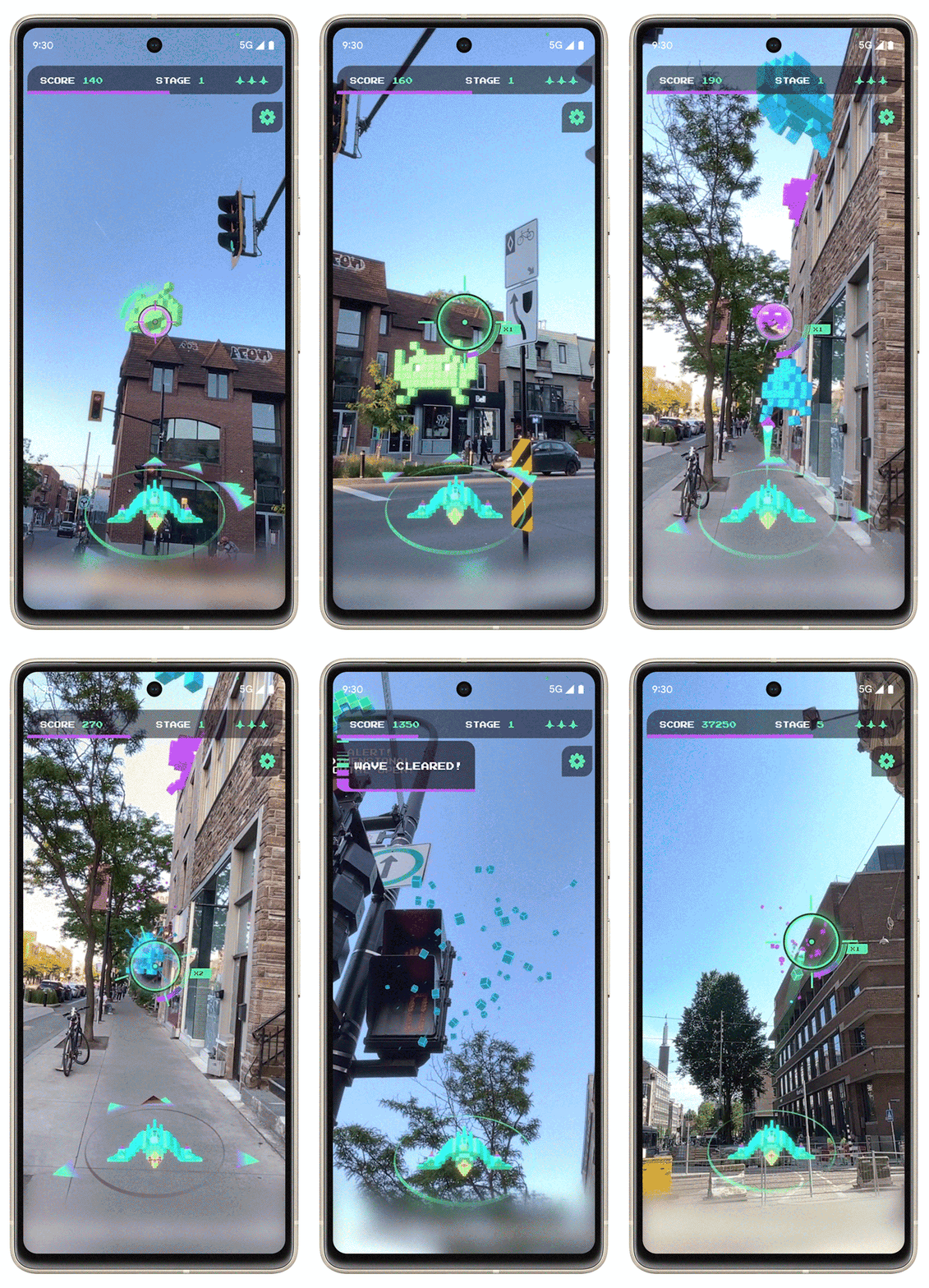
“SPACE INVADERS: World Defense,” a mobile game on Android and iOS, invites players from around the world to get outside and defend the Earth. Space Invaders spawn from buildings and rooftops, hide behind structures and hover in the sky. Through global immersive gameplay, players from all over the world have to work together to save the planet.
What’s real, and what’s Generative Fill? Watch as photographer Peter McKinnon tries to tell the difference in real time!
What’s a great creative challenge?
What fun games make you feel more connected with friends?
What’s the “Why” (not just the “What” & “How”) at the heart of generative imaging?
These are some of the questions we’ve been asking ourselves as we seek out some delightful, low-friction ways to get folks creating & growing their skills. To that end I had a ball joining my teammates Candice, Beth Anne, and Gus for a Firefly livestream a couple of weeks ago, engaging in a good chat with the audience as we showed off some of the weirder & more experimental ideas we’ve had. I’ve cued up this vid to roughly the part where we get into those ideas, and I’d love to hear your thoughts on those—or really anything in the whole conversation. TIA!
10,000x smaller & 25x faster? My old Google teammates & their collaborators, who changed the generative game last year by enabling custom model training, are now proposing to upend things further by enabling training via a single image—and massively faster, too. Check out this thread:
In the corner of my eye, our very stable (golden)doodle is happily sawing logs while I share this link to Stable Doodle, a fun little drawing tool from the folks at Stable Diffusion:
It helps produce sketch-to-image combos like this:

Check it out!
Details, if you’re interested:
What’s new with Adobe Firefly?
Firefly can now support prompts in over 100 languages. Also, the Firefly website is now available in Japanese, French, German, Spanish, and Brazilian Portuguese, with additional languages to come.
How are the translations of prompts done?
Support for over 100 languages is in beta and uses machine translation to English provided by Microsoft Translator. This means that translations are done by computers and not manually by humans.
What if I see errors in translations or my prompt isn’t accurately translated?
Because Firefly uses machine translation, and given the nuances of each language, it’s possible certain generations based on translated prompts may be inaccurate or unexpected. You can report negative translation results using the Report tool available in every image.
Can I type in a prompt in another language in the Adobe Express, Photoshop, and Illustrator beta apps?
Not at this time, though this capability will be coming to those apps in the future.
Which languages will the Firefly site be in on 7/12?
We are localizing the Firefly website into Japanese, French, German, Spanish, Brazilian Portuguese and expanding to others on a rolling basis.
On the extremely off chance that you (or more likely, someone you know) is new to Firefly, check out this handy intro speed run from evangelist Paul Trani:
I had a ball chatting last week with Farhad & Faraz on the Bad Decisions Podcast. (My worst decision was to so fully embrace vacation that I spaced on when we were supposed to chat, leaving me to scramble from the dog park & go tear-assing home to hop on the chat. Hence my terrible hair, which Farhad more than offset with his. 😌) We had a fast-paced, wide-ranging conversation, and I hope you find it valuable. As always I’d love to hear any & all feedback on what we’re doing & what you need.
If you enjoyed yesterday’s session with Tomasz & Lisa, I think you’ll really dig this one as well:
Join Lisa Carney and Jesús Ramirez as they walk you through their real world projects and how they use Generative Ai tools to help their workflow. Join them as they show you they make revisions from client feedback, create different formats from a single piece, and collaborate together using Creative Cloud Libraries. Stay tuned to check out some of their work from real life TV shows!
Guest Lisa Carney is a photographer and photo retoucher based in LA. Host Jesús Ramirez is a San Francisco Bay Area Graphic Designer and the founder of the Photoshop Training Channel on YouTube.
Tomas Opasinski & Lisa Carney are *legit* Hollywood photo compositors, in Friday’s Adobe Live session they showed how they use Firefly to design movie posters.
Interestingly, easily the first half had little if anything to do with AI or other technology per se, and everything to do with the design language of posters (e.g. comedies being set on white, Japanese posters emphasizing text)—which I found just as intriguing.
Having really enjoyed my Insta360 One X, X2, and X3 cams over the years, I’ve bought—and been burned by—the tiny GO & GO2:
And yet… I still believe that having an unobtrusive, AI-powered “wearable photographer” (as Google Clips sought to be) is a worthy and potentially game-changing north star. (See the second link above for some interesting history & perspective). So, damn if I’m not looking at the new GO 3 and thinking, “Maybe this time Lucy won’t pull away the football…”
Here’s Casey Neistat’s perspective:

