Category Archives: Illustration

Grade-A Illustration

Linework in the key of A:

Animation

  • Celebrating the family’s big screen premiere, Harper’s Bazaar feautres a great spread of Simpsons Couture.  “Marge lets down her hair for Versace. Lisa gives up her pearls for Alber Elbaz. Homer dresses as Karl Lagerfeld. Selma & Patty in Viktor & Rolf.” [Via]
  • Illustrator Techniques demonstrates how to use the app to imitate A Scanner Darkly.  They also interview lead animator Sterling Allen. [Via Thorsten Wulff]

Avian

Automotive

  • For the Audi A5, UK-based designers GT have created A Rhythm of Lines–a site that lets you create abstract car-related artwork (kinda; I find it a little obscure). [Via]
  • Car Design News is hosting a series of tutorials on car rendering, heavily using Photoshop. [Via]

Assorted

Amazing

  • Yukio Miyamoto is a master Illustrator artist, producing insanely detailed, photorealistic artwork.  Fellow artist Kevin Hulsey (himself a total badass) hosts a number of Yukio’s pieces.
  • Elsewhere in Japan, farmers make huge rice paddy renderings of famous artwork.  Arigato! [Via]

Cool new infographics

  • The Internets, it’s well known, are a series of tubes. That reality is now depicted in this info graphic from Information Architects Japan, mashing up online players with a map of the Tokyo subway system.  Nice to see Adobe occupying what seems to be some sunny downtown space (“They continue to move towards the center of gravity without being too loud about it”).  More info on the project is here. [Via]
  • Edward Tufte celebrates the NYT infographics of Megan Jagerman in a detailed profile on his site. [Via]  Speaking of work done in the paper, this week they posted a cool Flash-based map of The Wealthiest Americans Ever, efficiently plotting net worth, rank, and life span.
  • CraigStatsSF combines data from Craigslist with Google Maps in order to produce heat maps that depict housing cost and density by region.  (Disclaimer: “We only identify with hotpockets which are tasty and lethal.”) [Via]
  • I don’t know whether it’s an infographic per se, and it’s hardly new, but Henrich Bunting’s 16th-century depiction of the world as a cloverleaf (joined at Jerusalem) is interesting enough to deserve mention. [Via]
  • Free Press features a visual representation of how AT&T has been reconstituted, T2-style, after being broken up in 1984. Somehow I keep hearing Johnny Rotten saying, “Ever get the feeling you’ve been cheated?” [Via]
  • Update: Greg Dizzia has posted a chart that graphically depicts the details of every relationship he’s ever had. (Note: The chart is work-safe, but it may not be everyone’s cup of tea.) [Via]

Pagans, Spinners, and Mentos, oh my

  • "HWJR": How Would Jesus Roll? One man’s sacrilege is another’s act of devotion, as displayed through these illustrated Jesus rims. [Via]
  • File under "How [Not] to Win Friends and Influence Pagans": folks in England are displeased by the giant chalk Homer illustration. [Via]
  • The I Am Bored blog has amassed a great collection of CD hole art.  (I wonder whether CD art will someday be a collector’s item, as album art has become.) [Via] On a related note, a certain pharmaceutical has gotten a similar notion. (I suppose the pagans would approve.)
  • Mentos pioneers gumvertising, creating images out of the iconic little freshmakers. They have a site for creating your own images by drawing with gum, but it seems to be down at the moment.
  • The "Zebra memorial crossing" is meant to memorialize pedestrians who’ve been struck by cars, thereby making the streets safer.  Seemingly obvious irony: it appears to distract pedestrians at exactly the moment they’re in harm’s way.
  • I enjoy the work of Russian illustrator Gordei.  Not speaking Russian makes things that much more mysterious & intriguing. [Via]
  • Washroom iconography: Useful. Washroom iconography + wiseass labels: way better. [Via]

Great Star Wars-related art

Something about the Star Wars franchise continues to inspire all kinds of creativity:

Blowin' up real good

While getting frozen yogurt the other night, I observed a posse* of little boys–maybe 5 or 6 years old–swarming around a small pink "Little Mermaid"-themed chair.  They were goading one of their little buddies to body slam himself into the chair, chanting "Dooo it, dooo it… Destroy IT, destroy IT!!"  Ah, the complete purity of that human impulse to see some stuff smashed all to hell.

In honor of today’s American holiday devoted, in some part, to that impulse:

  • Gene Gable features some cool vintage Fourth of July artwork on CreativePro.com.
  • Similar goodness comes from American U.  Go heavy or go home, right?
  • The NYT hosts a slideshow from explosives summer camp in Missouri. Adios, watermelon. (Here’s the accompanying article).
  • In the spirit of fire-breathing, wheel-popping patriotism, check out these shots from a Wisconsin tractor pull (recalling a little slice of my youth).  Not pictured: Sierra Club reps.
  • Not tied to the Fourth, but in the vein of vintage artwork, check out these fruit crate designs. [Via]  (See also previous.)
  • Update: For more bombs bursting in air, see Firework-Art.com. Man, all this really makes me miss summer car trips as a kid, where we could buy legally questionable goodies from web-footed Southerners by the roadside. [Via]

Happy (and grudgingly safe) Fourth,
J.

*What would the correct term (a la "pride of lions") be? Gaggle of boys? Hootenany? Fisticuff?

Of Dilbert, Hipsters, & Samurai Hamsters

  • Dilbert creator Scott Adams has posted descriptions & photos of how he draws Dilbert in Photoshop via a Cintiq monitor. [Via]
  • Oogmerk Opticians show how overconceptualized eye furniture can make anyone look like a hipster.  (Too bad one of the "after" images isn’t labeled "Adobe UI Designer." ;-))
  • Through Christopher Koelle’s blog I found Justin Gerard, who has created a heck of a portfolio featuring Samurai Hamsters and more.
  • In Holland a coke-addled driver created some impromptu land art (illustration of a sort) while trying to evade police. [Via Reen Bodo]  Elsewhere fruit flies make their own weird illustrations when exposed to cocaine. [Via]
  • I love the illustrations on these White Stripes limited-edition USB thumb drives, featuring Jack, Meg, or both. [Via]
  • The Strange Maps blog features and interesting map of the US, with states labeled according to countries with similar gross domestic products. [Via]  And on a related note–and back on the Lego tip–kids are creating a massive Lego map of the US.
  • Iconfactory offers a beautiful set of Dia de lost Muertos icons. [Via]

Of Dilbert, Hipsters, & Samurai Hamsters

  • Dilbert creator Scott Adams has posted descriptions & photos of how he draws Dilbert in Photoshop via a Cintiq monitor. [Via]
  • Oogmerk Opticians show how overconceptualized eye furniture can make anyone look like a hipster.  (Too bad one of the "after" images isn’t labeled "Adobe UI Designer." ;-))
  • Through Christopher Koelle’s blog I found Justin Gerard, who has created a heck of a portfolio featuring Samurai Hamsters and more.
  • In Holland a coke-addled driver created some impromptu land art (illustration of a sort) while trying to evade police. [Via Reen Bodo]  Elsewhere fruit flies make their own weird illustrations when exposed to cocaine. [Via]
  • I love the illustrations on these White Stripes limited-edition USB thumb drives, featuring Jack, Meg, or both. [Via]
  • The Strange Maps blog features and interesting map of the US, with states labeled according to countries with similar gross domestic products. [Via]  And on a related note–and back on the Lego tip–kids are creating a massive Lego map of the US.
  • Iconfactory offers a beautiful set of Dia de lost Muertos icons. [Via]

War, illustrated

  • "Machine gunner turned author" Colby Buzzell has recorded his Iraq war experiences on his blog and elsewhere.  He’s now teamed up with illustrator Christopher Koelle and animators The Law of the Few to produce Men in Black–four and a half gripping minutes of storytelling. [Via]
  • Christopher shares his thoughts & the Photoshop techniques behind the work on his blog.
  • In a related vein, Canadian trooper Richard Johnson’s Kandahar Journal offers an illustrated, soldier’s-eye-view from Afghanistan. [Via]

Side note: I type this from the Denver airport, where I find myself holed up (thanks, lightning).  After showing a CNN ad saying "Get the Facts. Not Fear," CNN Headline News just featured a segment titled–I kid you not–"Watch for underwater terrorists."  I shall, uh, get right on that.  (Apparently Atlanta is where irony goes to die.)

Friday Design: Booze, kids, and cutlery

Tasty Flash bits: Milk, missives, and grins

I’ve encountered some savory Flash business around the Web recently:

  • Get the Glass features gorgeous illustration & great game play–all in the name of milk. [Via Veronique Brossier]
  • I’m not sure whether Blank Missives has a point, or whether having a point is the point, or… anyway, it sure does look nice.  Dig that typography, too. [Via]
  • The reflective "wet floor effect" comes to the excellent SlideShowPro.  More info is at developer Todd Dominey’s site. [Via]
  • Neave.com features what Bridge engineer Rob Corell calls a "grin-inducing Flash effect."  This kind of thing makes me really want to capture the life and imagination of Flash apps & infuse it into desktop tools.
  • Buzzword is a terrific name for what promises to be a cool product: Flash-based online word processing. Here’s more press on it.

And finally, on a note near and dear to my heart, ZDNet’s Ryan Stewart lists his Top Five Features in Flash CS3.  #1?  Photoshop integration!  [Via]

Friday Illustration

From the Dept. of the Brilliantly Simple:

And elsewhere:

Finally, it’s a little tangential, but I spotted a nice shout-out for CS3 on illustration blog Drawn: "You’ve probably already heard all the buzz about it being the biggest upgrade ever, bla bla bla. Well, this time the buzz is true… I predict our industry (I mean anything graphically creative) is about to undergo a huge jump in look, feel, efficiency, and impact because of this." Thanks, guys! [Via Joe Ault]

FreeHand no longer updated; moving to Illustrator

After a long and storied career, Adobe (neé Altsys, Aldus, and Macromedia) FreeHand has reached the end of its development road. The application has not been revised since Macromedia released MX nearly four years ago, after which the company removed FreeHand from the Studio product line.  Adobe has created an FAQ (PDF) that explains the details of the decision not to rev FreeHand, talks about Illustrator CS3 features added to make FreeHand users more comfortable, and more.  [Note: The official product pages aren’t all updated yet; hence my posting this info on the blog.] Here are the highlights:

Adobe and FreeHand
Adobe does not plan to develop and deliver any new feature-based releases of FreeHand, or to deliver patches or updates for new operating systems or hardware. Adobe will, however, continue to sell FreeHand MX, and will offer technical and customer support according to our support policies.

FreeHand Upgrade Path
A special upgrade to Illustrator CS3 is available to all registered owners of FreeHand for $199 U.S. This upgrade is available worldwide through the Adobe Store and through the Channel. There is no direct FreeHand to Creative Suite 3 upgrade, but FreeHand owners who also own Adobe or Macromedia products that are eligible for upgrade to the Suite can use that path to move to the Suite.

Support for Customers Making the Move
A number of materials are available at no cost to help customers make the move from FreeHand to Illustrator. All of these materials can be found on the Switch to Illustrator pages on Adobe.com and on the Illustrator Design Center.

FreeHand to Illustrator Migration Guideavailable as a PDF and in printed form.
Targeted to designers and illustrators, this four-color manual provides a graphical comparison of the FreeHand and Illustrator workspaces, along with differences in terminology, features, and functions between the two applications.

Migrating from FreeHand to Illustrator: A technical resourcePDF format
Designed for production managers, IT managers and designers, this technical resource provides the best ways to move legacy FreeHand content into Illustrator, handle different file formats, outputting files, and other information.

Migrating from FreeHand to Illustrator with Mordy Golding—(video training)
Video training produced by lynda.com. The CS3 update to this series is completed and will be available shortly.

Scoble, the Phillustrator, & me

A couple of weeks ago, Robert Scoble (former Microsoft blogfatha) visited the Adobe San Jose office.  We spent just under an hour talking about Photoshop, and you can catch the broadcast here (also available fullscreen).  Our chat touches on engineer/pilot Thomas Knoll’s frugal Midwestern ways; HDR imaging; Eyes Wide Shut incantations; raw Smart Objects; the redemption of Brightness/Contrast; and more*.

Robert also spoke recently with lots of other Adobe folks, including Phil "the Phillustrator" Guindi**, talking about what’s new in AICS3.  Here’s a full rundown of recent sessions:

Adobe Premiere CS3 49 minutes.

Adobe Flash/Flex architecture overview 30 minutes.
Adobe Flex goes open source 25 minutes.
Adobe Flash CS3 overview 55 minutes.
Adobe Apollo overview 43 minutes.
Adobe Dreamweaver CS3 34 minutes.
Adobe Connect overview 29 minutes.
Adobe Acrobat 8.0 19 minutes.

*And it includes, of course, my weird lip-smacking mannerisms; yeesh.  Yeah, and you thought it was hard just to listen to oneself recorded…
**Naming credit goes to our friend Bryan Hughes. I persist in calling Phil’s new little son “Phillustrator Elements.”

Scoble, the Phillustrator, & me

A couple of weeks ago, Robert Scoble (former Microsoft blogfatha) visited the Adobe San Jose office.  We spent just under an hour talking about Photoshop, and you can catch the broadcast here (also available fullscreen).  Our chat touches on engineer/pilot Thomas Knoll’s frugal Midwestern ways; HDR imaging; Eyes Wide Shut incantations; raw Smart Objects; the redemption of Brightness/Contrast; and more*.

Robert also spoke recently with lots of other Adobe folks, including Phil "the Phillustrator" Guindi**, talking about what’s new in AICS3.  Here’s a full rundown of recent sessions:

Adobe Premiere CS3 49 minutes.

Adobe Flash/Flex architecture overview 30 minutes.
Adobe Flex goes open source 25 minutes.
Adobe Flash CS3 overview 55 minutes.
Adobe Apollo overview 43 minutes.
Adobe Dreamweaver CS3 34 minutes.
Adobe Connect overview 29 minutes.
Adobe Acrobat 8.0 19 minutes.

*And it includes, of course, my weird lip-smacking mannerisms; yeesh.  Yeah, and you thought it was hard just to listen to oneself recorded…
**Naming credit goes to our friend Bryan Hughes. I persist in calling Phil’s new little son “Phillustrator Elements.”

Adventures in Infographics

I’m intrigued by work that strives to make sense of large, complicated sets of data (see previous).  Along those lines:

  • This London-style NYC subway map is generating a lot of conversation, both online & inside Adobe.  Weird, I remember discussing this exact topic when I first started at an NY Web shop–nine years ago!  Bridge engineering manager Arno Gourdol points out Mr. Beck’s Underground Map, a thorough account of the Tube map design.  And from there I found this page, brimming with more resources on the subject. [Via]
  • PingMag chats with Andrew Vande Moere, creator of the Infosthetics blog, about the beauty of data visualization.  Both links are chock full of loveliness.  (Bonus: No Edward Tufte w/young white-gloved flunkies.)
  • The Strange Maps blog depicts right- vs. left-hand driving around the globe, while providing the interesting back story of how these conventions came to be. [Via]
  • Covering 5000 years in 90 seconds, Maps of War shows the tides of conquest that have swept through the Middle East. [Via]
  • The US government gets into the game, using census data to drive home the aging of the populace.
  • I dig illustrator Christoph Niemann’s witty little visual comparison of some pieces of music.  (I’m a Jaws-level pianist at best.)
  • Pentagram designer Paula Scher created this anatomy of a blog conversation for the NYT. Ahh, the descent into ennui… [Via]
  • At FITC last weekend I really enjoyed meeting Evan Roth, the dude behind the SkyMall demographic visualization, laser graffiti, and much more. Though I’m coming up short on links to it, he’s created a method of visualizing one’s daily clicks: wiring up two USB cables from a single mouse, plugging one into a main work computer, and plugging the other into a machine running Photoshop or other graphics app.  As you click around email, the Web, etc., you produce a drawing (of sorts) on the other machine, with paint blobs mapped to the same coordinates as your clicks.  (It sounds like AttenTV might be doing vaguely similar, for profit.)  Oh, and bringing this post full circle, Evan’s crew at Eyebeam has created an interactive NYC subway map.

Illustration bits: Dust My Ride, Creep My Clown, & more

  • It’s tax time in the US, and illustrator Christoph Niemann created an elegant commentary for the cover of the New Yorker.  Elsewhere, his "Empires of Evil" flags (lighter-hearted than the name would suggest) are inspired, and he certainly has a new take on, er, dental hygiene. [Via]
  • Dust artist (yes, dust) Scott Wade has produced some amazing images for Mitsubishi’s new ad campaign. (For more dustiness, see previous.)
  • I can dig illustrator Tara McPherson’s muted palettes. [Via Geoff Scott]
  • On the other end of the chromatic spectrum, Nathan Fox punches up retro-fueled imagery.
  • Our pals at the Chopping Block have launched Chop Shop, a spot to sell all manner of groovy swag (gotta love the 10-Year Plan).  I delight in the great spit and polish (try rolling over the little characters in the header, for instance)–excellent A2Detail.
  • Everyone’s favorite alcoholic raven/alt newspaper survivor, Drinky Crow, is getting his own show. [Via]
  • And lastly, Digital Newsflash offers an interesting moniker for a certain CS3 branding image: "Creep-o the Clown." Heh–yeah, that does induce a little coulrophobia, no?

Illustration bits: Dust My Ride, Creep My Clown, & more

  • It’s tax time in the US, and illustrator Christoph Niemann created an elegant commentary for the cover of the New Yorker.  Elsewhere, his "Empires of Evil" flags (lighter-hearted than the name would suggest) are inspired, and he certainly has a new take on, er, dental hygiene. [Via]
  • Dust artist (yes, dust) Scott Wade has produced some amazing images for Mitsubishi’s new ad campaign. (For more dustiness, see previous.)
  • I can dig illustrator Tara McPherson’s muted palettes. [Via Geoff Scott]
  • On the other end of the chromatic spectrum, Nathan Fox punches up retro-fueled imagery.
  • Our pals at the Chopping Block have launched Chop Shop, a spot to sell all manner of groovy swag (gotta love the 10-Year Plan).  I delight in the great spit and polish (try rolling over the little characters in the header, for instance)–excellent A2Detail.
  • Everyone’s favorite alcoholic raven/alt newspaper survivor, Drinky Crow, is getting his own show. [Via]
  • And lastly, Digital Newsflash offers an interesting moniker for a certain CS3 branding image: "Creep-o the Clown." Heh–yeah, that does induce a little coulrophobia, no?

Poster art, giant chickens, & more

//na// Illustrated bits worth sharing:

Poster art, giant chickens, & more

//na// Illustrated bits worth sharing:

A great video tour of Illustrator CS3

"Oh my–it’s like Illustrator and Flash have run off and gotten married," says Mordy Golding in the latest episode of his Real World Illustrator video podcast.  Mordy, formerly a PM on the Illustrator team, hits not only the big-ticket items, but also the little things that sometimes matter most.  I only wish Mordy had spent more time on the rad Live Color feature in AICS3–but he promises to delve deeper into it in a future episode.  (It’s one of those features that makes Photoshop and the other apps jealous, so we’ll have to try to steal it in the future. ;-))

From the podcast I learned a little detail that I think is quite cool: the new Flash Text panel (screenshot) lets you designate text to be used in Flash as static or dynamic.  You can even designate the URL from which the text is fed.  And, as I’ve mentioned previously, Illustrator now lets you name & edit symbols just as you do in Flash, and symbols, instance names, gradients, etc. are preserved when you copy and paste from Illustrator to Flash.  Niiice.

Photorealistic painting; Make your own "Cars"; more

  • Artist Cali Rezo creates some beautiful, photorealistic paintings in Photoshop, as well as more stylized pieces.  She shares some behind-the-scenes snapshots, as well as a step-by-step animation of a piece coming together. [Via]
  • I Met The Walrus is an Jerry Levitan’s story of how, as a 14-year-old in 1969, he snuck into John Lennon’s hotel room & recorded an interview.  The trailer (or is it the whole film?) features some great illustrated animation.  (More on the story is here.) [Via]
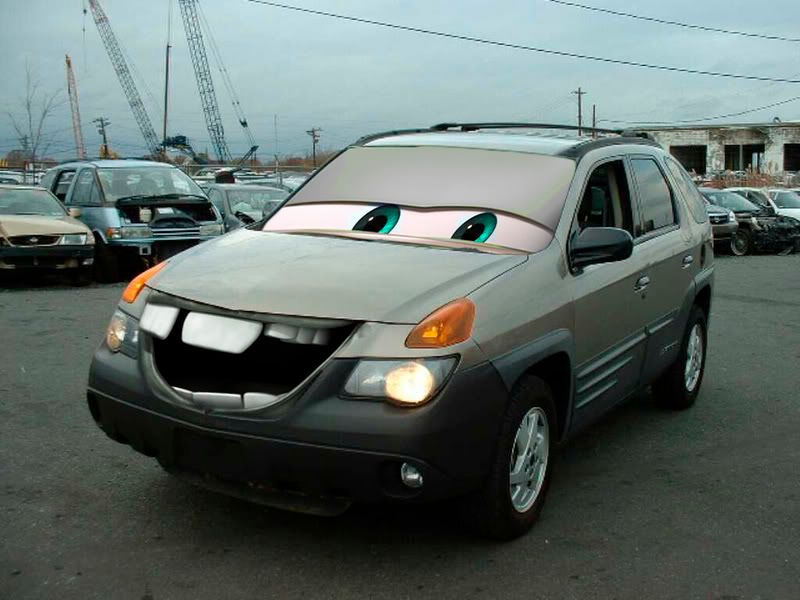
  • Make your car resemble those in "Cars" by following this tutorial.  Appropriately, a Pontiac Aztek gets a goofy, gap-toothed grin & actually looks better as a result. [Via]
  • Weirdly, I encountered the same topic on Autoblog just the next day.  They’ve posted some great examples, and now their collection of images is growing.

For more automotive rendering bits, see previous.

Photorealistic painting; Make your own "Cars"; more

  • Artist Cali Rezo creates some beautiful, photorealistic paintings in Photoshop, as well as more stylized pieces.  She shares some behind-the-scenes snapshots, as well as a step-by-step animation of a piece coming together. [Via]
  • I Met The Walrus is an Jerry Levitan’s story of how, as a 14-year-old in 1969, he snuck into John Lennon’s hotel room & recorded an interview.  The trailer (or is it the whole film?) features some great illustrated animation.  (More on the story is here.) [Via]
  • Make your car resemble those in "Cars" by following this tutorial.  Appropriately, a Pontiac Aztek gets a goofy, gap-toothed grin & actually looks better as a result. [Via]
  • Weirdly, I encountered the same topic on Autoblog just the next day.  They’ve posted some great examples, and now their collection of images is growing.

For more automotive rendering bits, see previous.

Terrific whiteboard stop-motion video

Created by Kristofer Strom of Ljudbilden & Piloten, the video for Swedish band Minilogue’s "Hitchhiker’s Choice" is the antithesis of high-tech, CGI-laden graphics we’re accustomed to seeing–and I love it. [Via].  The work reminds me of Mario Cavalli’s marvellous Compaq "Bird" ad from several years back.  (Working on the Compaq site at the time, I always scratched my head that the company’s UK office could be so adventurous while the folks in Texas always sought to play it safe.)  Kristofer has also created Pen on Paper, a free-flowing montage drawn on one long, continuous strip of paper (as seen in this video).

Excellent Worth1000 Photoshoppery

  • As kid I loved Wacky Packages, the little 70’s-era goofs on popular brands of the times.  Now the crew at Worth1000.com grabs that baton, mashing up classics with commerce in these Fine Art Ads. [Via]
  • Along somewhat similar lines, Kasper Hauser’s Sky Maul is a pretty darn funny compendium of "Happy Crap You Can Buy from a Plane." [Via]
  • I love this take on Escher as a child–hilarious and kind of heartbreaking all at once.  ("Don’t let the bastards grind you down…")
  • Elsewhere the site features good critter-hacking: Evolution Gone Wild, and some rather excellent Cybernetic Animals.
  • It’s deeply, deeply nasty–to the point where I didn’t scroll too far–but the "That’s Not Turkey!" gallery may make you grateful for what you didn’t eat on Thanksgiving.
  • Oh, and if that’s not quite disturbing enough, how about a meat chess board, or meat body suit? Rare is the new black, I’m told.

Kicking the Tires: Photoshop rendering tutorials

My fellow Photoshop PM Ashley Still interacts with customers using Photoshop in vertical markets (engineering, healthcare, etc.) and has turned up some good resources on using the app in automotive, industrial, and clothing design:

On a slightly related note, Michael Halbert is one talented motherscratcher, offering a wealth of tutorials (including good videos) on achieving a traditional scratchboard look. [Via].  He’s also featured in the Adobe.com Print Gallery.

Zombies, Communism, & other illustrated goodness

  • I’m a fan of both Constructivism & retro-ironic propaganda (think Chinese military ballet), so I dig seeing this collection of Soviet Photomontages 1917-1953.  See also Soviet carpet propaganda. (Doesn’t it seem a little weird to encourage walking all over your icons?). [Via]
  • Think your colleagues are zombies?  ZombiePortraits.com will illustrate your point for just $85. [Via]
  • Talk about mudflaps, my rickshaw’s got ’em…  Okay, I have no truck, much less a rickshaw, but if I did I’d be tempted to pimp it with beautifully illustrated Bollywood mudflaps. [Via]
  • Flags of our Clients shows what happens when you’re too attentive to feedback on your illustrations–in this case, flags of the world.
  • Computer Arts discusses the digital illustration revolution. Memorable quote (from 1992): "John Warwicker, Creative Director of design collective Tomato, said without even a trace of irony: ‘I can envisage a time when we’ll all need our own individual Macs.’" [Via]
  • Illustration Friday has an interview with illustrator Anita Kunz, showing some of her great images.
  • Alberto Cerriteño does straight-up gorgeous work. [Via]
  • Creating optical illusions in a room is one thing, but can you make your room look like a cartoon? [Via]
  • I haven’t tried Akvis Sketch, but the new version of this Photoshop plug-in promises to convert your images to sketches quickly and easily. [Via]
  • Gene Gable has posted a collection of lovely vintage map art in his CreativePro.com column.  (Sadly, nowhere be monsters.)

Zombies, Communism, & other illustrated goodness

  • I’m a fan of both Constructivism & retro-ironic propaganda (think Chinese military ballet), so I dig seeing this collection of Soviet Photomontages 1917-1953.  See also Soviet carpet propaganda. (Doesn’t it seem a little weird to encourage walking all over your icons?). [Via]
  • Think your colleagues are zombies?  ZombiePortraits.com will illustrate your point for just $85. [Via]
  • Talk about mudflaps, my rickshaw’s got ’em…  Okay, I have no truck, much less a rickshaw, but if I did I’d be tempted to pimp it with beautifully illustrated Bollywood mudflaps. [Via]
  • Flags of our Clients shows what happens when you’re too attentive to feedback on your illustrations–in this case, flags of the world.
  • Computer Arts discusses the digital illustration revolution. Memorable quote (from 1992): "John Warwicker, Creative Director of design collective Tomato, said without even a trace of irony: ‘I can envisage a time when we’ll all need our own individual Macs.’" [Via]
  • Illustration Friday has an interview with illustrator Anita Kunz, showing some of her great images.
  • Alberto Cerriteño does straight-up gorgeous work. [Via]
  • Creating optical illusions in a room is one thing, but can you make your room look like a cartoon? [Via]
  • I haven’t tried Akvis Sketch, but the new version of this Photoshop plug-in promises to convert your images to sketches quickly and easily. [Via]
  • Gene Gable has posted a collection of lovely vintage map art in his CreativePro.com column.  (Sadly, nowhere be monsters.)

Animals photographed in the womb, & more

  • Using a combination of three-dimensional ultrasound scans, computer graphics and tiny cameras, a team of filmmakers has been able to show the entire process of animal gestation from conception to birth.  Here’s the article and amazing photo gallery.  [Via]
  • Created in After Effects & Lightwave by XVIVO for Harvard biology students, The Inner Life of a Cell depicts mighty mitochondria and the like doing their thing; check it out in high- or low-res Flash video. [Via]
  • Among the more unusual images I’ve seen, here’s the sun shot through the Earth, displaying neutrinos that pass through the planet’s mass.
  • Speaking of celestial imagery, this month’s National Geographic features stupendously gorgeous images of Saturn–just a hint of which can be found on their site.  [See also previous]
  • Rick Lieder must have the patience of Job, and it pays off in his insect macrophotography at BeeDreams.com [Via]
  • BibliOdyssey has posted The Concept of Mammals, a collection of antique critter renderings. "As was the fashion of the time," they write, "the animals were placed in contrived settings and often given human facial qualities, which only serves to heighten the sense of bizarre. And thankful we are too." [Via]  The site is jammed with other good bits, including claws, shells, whales, and more. (And if stuff trips your trigger, check out Albertus Seba’s Cabinet of Natural Curiosities.)

Animals photographed in the womb, & more

  • Using a combination of three-dimensional ultrasound scans, computer graphics and tiny cameras, a team of filmmakers has been able to show the entire process of animal gestation from conception to birth.  Here’s the article and amazing photo gallery.  [Via]
  • Created in After Effects & Lightwave by XVIVO for Harvard biology students, The Inner Life of a Cell depicts mighty mitochondria and the like doing their thing; check it out in high- or low-res Flash video. [Via]
  • Among the more unusual images I’ve seen, here’s the sun shot through the Earth, displaying neutrinos that pass through the planet’s mass.
  • Speaking of celestial imagery, this month’s National Geographic features stupendously gorgeous images of Saturn–just a hint of which can be found on their site.  [See also previous]
  • Rick Lieder must have the patience of Job, and it pays off in his insect macrophotography at BeeDreams.com [Via]
  • BibliOdyssey has posted The Concept of Mammals, a collection of antique critter renderings. "As was the fashion of the time," they write, "the animals were placed in contrived settings and often given human facial qualities, which only serves to heighten the sense of bizarre. And thankful we are too." [Via]  The site is jammed with other good bits, including claws, shells, whales, and more. (And if stuff trips your trigger, check out Albertus Seba’s Cabinet of Natural Curiosities.)

Of skulls & skaters

Okay, I know that 11-year-old mallrats & their feckless Hot Topic enablers have all but stomped the life out of skull imagery, but dammit, there are some good bits left:

[See also previous skullduggery]

Of skulls & skaters

Okay, I know that 11-year-old mallrats & their feckless Hot Topic enablers have all but stomped the life out of skull imagery, but dammit, there are some good bits left:

[See also previous skullduggery]

Pantone tats, Evil timesheets, & more

A fistful of illustration goodness:

Pantone tats, Evil timesheets, & more

A fistful of illustration goodness:

Hidden Illustrator<->Photoshop integration

Illustrator and Photoshop have been quietly growing tighter, and you may have discovered that it’s possible to export a very editable PSD file from Illustrator (preserving nested layers, masks, editable text along a path, etc.).  But what about going the other way–turning a layered PSD into a layered Illustrator composition?  It’s easy to do, though not at first glance.

Background: The compositing model (i.e. the layer blending modes & options) used by Illustrator, InDesign, and Acrobat is different than the one used by Photoshop. Therefore some blending options in Photoshop (for example, complex "Blend If" settings) can’t be replicated in Illustrator. As a result, when you place a PSD file into Illustrator, the blending is isolated.  That is, the PSD is treated as things a little world unto itself, and the blending modes within it don’t interact with anything else in the Illustrator document.  Objects like drop shadows (set to Multiply mode) only multiply against other things inside the PSD.

But here’s the trick: if you place the PSD and embed it in your Illustrator file (by unchecking the Link option in the import dialog), you can tell Illustrator to convert each layer into a separate Illustrator object. In that case the blending options should come through largely intact. Even things like text & vector layers (including text on a path & text in a shape) will be converted to the native Illustrator versions.

This is quite powerful but, ah, shall we say, non-obvious.  I don’t have a perfect solution in mind for making this capability more discoverable, but we’ll give it some thought.

Hidden Illustrator<->Photoshop integration

Illustrator and Photoshop have been quietly growing tighter, and you may have discovered that it’s possible to export a very editable PSD file from Illustrator (preserving nested layers, masks, editable text along a path, etc.).  But what about going the other way–turning a layered PSD into a layered Illustrator composition?  It’s easy to do, though not at first glance.

Background: The compositing model (i.e. the layer blending modes & options) used by Illustrator, InDesign, and Acrobat is different than the one used by Photoshop. Therefore some blending options in Photoshop (for example, complex "Blend If" settings) can’t be replicated in Illustrator. As a result, when you place a PSD file into Illustrator, the blending is isolated.  That is, the PSD is treated as things a little world unto itself, and the blending modes within it don’t interact with anything else in the Illustrator document.  Objects like drop shadows (set to Multiply mode) only multiply against other things inside the PSD.

But here’s the trick: if you place the PSD and embed it in your Illustrator file (by unchecking the Link option in the import dialog), you can tell Illustrator to convert each layer into a separate Illustrator object. In that case the blending options should come through largely intact. Even things like text & vector layers (including text on a path & text in a shape) will be converted to the native Illustrator versions.

This is quite powerful but, ah, shall we say, non-obvious.  I don’t have a perfect solution in mind for making this capability more discoverable, but we’ll give it some thought.

I {Heart} Pixel Art

David Pogue in the NY Times recently posted links to a number of great examples of pixel art:

Elsewhere, DSicons.com is devoted to pimping Mario Karts on Nintendo DS’s & will design artwork on commission. [Via] And meanwhile citizens of Taiwan are protesting their government through this virtual sit-in.
Slightly related: I love the line art in Röyksopp’s “Remind Me” video, and though it’s not pixel art, I like Adam Simpson’s bleak little isometric city. And posted previously, here’s how to draw a pixel portrait tutorial.

Iconfactory talks, Illustrator listens

In case you don’t know ’em, the guys at Iconfactory have been making some top-notch pixel art for more than 10 years. (I seem to remember using their stuff back in the System 7 days to get that ultra-mod “Copland” look.) Anyway, they’ve been migrating from FreeHand to Illustrator & posted their Top 5 Adobe Illustrator CS Pet Peeves, plus the provocatively titled follow-on “Et tu, Adobe?”. It’s all good feedback, if a little frustrating (only because we’re always needling one another about these things already).
So, a bit of good news: Illustrator PM Phil Guindi dropped these guys a note to let them know of some welcome changes coming down the pike, prompting Gedeon Maheux to write, “Phil, all we can say is…wow! We had our finger’s crossed that someone at Adobe would see our post so your email has made our day, and probably our year. :-)” Nice! It sounds like we’ve kicked off what should be a very fruitful dialog with these talented artists.
The other key point here, I think, is that what Gedeon & co. want isn’t more features per se; it’s functionality that simply works better. This is true across the board: no one says, “Oh, Photoshop? Yeah, I’d buy that, but there just isn’t enough stuff in there…” Rather, people mainly want things to work more smoothly, to just flow. I’m happy to report that the Illustrator team has a whole bunch of spit & polish tasks on their list, and I’m keeping a list of “Brain-dead things we fixed in Photoshop CS3”–now somewhere around 20 items. And that’s the goal: saving the world, one non-slapped forehead at a time. 😉

Illustrator Techniques newsletter launches

The folks behind Photoshop World & Layers magazine have just launched Illustrator Techniques, a newsletter & Web site aimed at Illustrator users of all stripes. The site is sharing some sample tutorials (here’s one on 3D in Illustrator) and hosts a user forum as well as a gallery of user work (nice ‘Vettes). The team, which includes editor/author of Illustrator CS2 Killer Tips Dave Cross & his co-author Matt Kloskowski, plans to publish 8 times annually. Much success, guys!

Mojizu: Social networking through character design

Like Japanese-style character design? You’ll be among kindred spirits at Mojizu, a site devoted to creating, sharing, and discussing little creations (“Mojis”). Members send their Mojis into battle, and the most popular ones make their way into merchandise & are up for various prizes. (Oh, and Illustrator being involved, there are of course more pinups involved.) [Via Phil “The Phillustrator” Guindi, Illustrator PM]

Pimp My Wildlife, Photoshop-style

Heh–no real attributions to the artist(s) are provided, but these animal mash-ups are quite well done. Sadly enough, no one created a liger (which apparently does exist) or a manticore. Gosh!
[Update: Jeff Tranberry points out the weirdo “carcass art” of MART: the Minnesota Association of Rogue Taxidermists. Much unwholesome madness is in their gallery. If someday I want to get my beloved cat posthumously placed onto a hang glider, or into a Kung Fu pose, etc. I’ll know where to turn.
MART in turn links to Beast Blender, a Flash-based tool for banging out custom critters. (Hey, I think I did a portrait of one of my high school teachers.)]

Vector Vixens, Belgian Béziers

Destroy your property value, the Photoshop way!

Now, here’s the flipside to the relentless pursuit of aesthetic perfection: take one pristine Victorian home, apply generous dodging & burning, and you’ll get something fit for Norman Bates’ mom. Sébastien Gaucher offers a nice little set of tutorials on his site, along with other examples of his work. (The sad thing for Bay Area residents is to realize that even the mauled “after” versions of each house would still set you back a few million bucks around here…)

Groovy Photoshop brushes & rendering techniques

  • Designer Jason Gaylor has created a handy, stylish set of Fresh Foliage Brushes (Vol. II) for Photoshop. If those are up your alley, see also Vol. I of the same set, as well as Jason’s graffiti brushes and worn brushes (Volumes I, II, and III). [Via] (For more on worn brushes & distressing images, see previous entry.)
  • Putting brushes into action, automotive designer Jonathan Tatum shares some of his moves. Seeing details pop into existence from step to step suggests a big equation with “And then a miracle occurs” hidden among the steps. (For more on automobile rendering, see also Kevin Hulsey’s techniques.)
  • Groovy Photoshop brushes & rendering techniques

  • Designer Jason Gaylor has created a handy, stylish set of Fresh Foliage Brushes (Vol. II) for Photoshop. If those are up your alley, see also Vol. I of the same set, as well as Jason’s graffiti brushes and worn brushes (Volumes I, II, and III). [Via] (For more on worn brushes & distressing images, see previous entry.)
  • Putting brushes into action, automotive designer Jonathan Tatum shares some of his moves. Seeing details pop into existence from step to step suggests a big equation with “And then a miracle occurs” hidden among the steps. (For more on automobile rendering, see also Kevin Hulsey’s techniques.)
  • My New Clip Art Technique Is Unstoppable

    HDR, 3D, plenoptic cameras… who needs all that high-fi chaos when there’s the simplicity of le cinema de clip art? [Via] Of course, I still think it’s got nothing on the (incredibly) profane genius of My New Fighting Technique Is Unstoppable* (speaking of giant pixels…).
    See? Clip art is your pal! Now, fire up some fatty drop shadows & bevels, and get busy mixing 384 typefaces per page; you’ll be a pro in no time! Related: Woman Has Perfect Clip Art For Party Invitation.
    * [Note: Chock full of bad words. Really. Just in case that’s not your bag.]

    Etchin' & Scratchin'

    If pimping your ride is passé, how about pimping your PowerBook? Cognitive scientist Dan Kurtz laser-etched a Magritte painting onto his machine. Wicked. (Here’s another image of it, plus the original Magritte.) If you’re feeling adventurous (and laser-equipped), see the how-to overview. (You could also go after your machine with a metal drill bit.)
    Bringing this a tad closer to home, Adobe’s resident creative whirlwind Russell Brown had a ball laser-etching wood at the recent ADIM Conference (check out these examples). In fact, he’ll be doing an etching class here on Monday and will have his laser in tow. Hmm, I’ve got 17″ of aluminum just itching for etching, and I’m partial to flames
    On a similar etch-stuff-on-weird-surfaces, CBS is promoting its fall lineup by scrawling ads on millions of eggs [Via NPR]. Evidently Chicago-area company EggFusion (“Promoting freshness with every impression!!”) is doing the honors. Every bite a delight, no doubt.
    And lastly, illustrator George Vlosich is a terror on the Etch-a-Sketch, lavishing dozens of hours on each creation. [Via]

    Etchin' & Scratchin'

    If pimping your ride is passé, how about pimping your PowerBook? Cognitive scientist Dan Kurtz laser-etched a Magritte painting onto his machine. Wicked. (Here’s another image of it, plus the original Magritte.) If you’re feeling adventurous (and laser-equipped), see the how-to overview. (You could also go after your machine with a metal drill bit.)
    Bringing this a tad closer to home, Adobe’s resident creative whirlwind Russell Brown had a ball laser-etching wood at the recent ADIM Conference (check out these examples). In fact, he’ll be doing an etching class here on Monday and will have his laser in tow. Hmm, I’ve got 17″ of aluminum just itching for etching, and I’m partial to flames
    On a similar etch-stuff-on-weird-surfaces, CBS is promoting its fall lineup by scrawling ads on millions of eggs [Via NPR]. Evidently Chicago-area company EggFusion (“Promoting freshness with every impression!!”) is doing the honors. Every bite a delight, no doubt.
    And lastly, illustrator George Vlosich is a terror on the Etch-a-Sketch, lavishing dozens of hours on each creation. [Via]

    Great lettering & happy accidents, inside Illustrator & out

    Not long ago I came across the excellent hand lettering of Fiodor Sumkin. I love the intricacy with which he fits characters and shading to various shapes. [Via]
    In particular, his drawing of these hands got me thinking about the enveloping functions in Illustrator. Click this image for a quick overview of how to fit type to shapes:
    Text warping tutorial
    Using these techniques, I set out to emulate Sumkin’s work. First I traced the outline of one of his hands in Illustrator, then blocked out a number of regions. The Pencil tool works well for this, as does a Wacom tablet. The result was a skeleton for the next steps:
    Outline
    Then, needing to turn each region into a solid object, I copied and pasted all the paths into Flash, broke things apart, and then used the paint bucket to block them in. I probably could have used the Illustrator Pathfinder tools and/or the new Live Paint features, but old habits die hard, and I knew I could get what I needed from Flash:
    Colored in Flash

    At that point I copied and pasted everything back into Illustrator, then picked a font that seemed likely to fill the shapes nicely–in this case Adobe’s 60’s-style Mojo. Using the text “Word Hypnotize” and the enveloping technique described above, I got… this (click for a larger version):
    Hand
    Hmmph–it’s nothing like Sumkin’s lettering, and were I to try harder to emulate it, I think I’d fit each chunk of text to an envelope mesh, then use the various mesh, path, and warp tools to deform it as necessary. But you know, I kind of like the sinuous, abstract quality that resulted–a bit as if Slim Goodbody dipped his hand in an inkwell.
    So, there’s my little happy accident o’ the day. Software generally makes it pretty easy to repeat the same steps over and over, so I’m glad to experience a little serendipity & creative destruction now and then.
    By the way, Sumkin’s lettering reminds me a touch of Marta Monteiro’s, and for more cool lettering, you might check out Rodney White (overview/gallery). Oh, and tangentially related (at best): the look of the hand I made slightly reminds me of WWI-era Cubist ship camouflage. [Via]