Category Archives: 3D

New Photoshop 3D book, iPad app

Photoshop 3D PM Zorana Gee & lead engineer Pete Falco, working with expert digital artists, have created new new book 3D in Photoshop, together with a free interactive version for iPad. Zorana writes,

Check out the only book of it’s kind that breaks down everything you need to know about working with 3D in Photoshop. Not only is it written directly by the Photoshop 3D Team themselves but also Photoshop masters, like Bert Monroy, have contributed useful and inspiring tutorials that will benefit any designer wanting to learn 3D.

Further, the team has put together a companion iPad app that takes the first chapter of the book (basic 3D concepts) and added interactive animations to each page to help illustrate the concepts. Scrolling across will read as the first chapter of the book plus interactivity and scrolling down will introduce 15 unique tutorials (only found in the iPad app) that show you how to create all the animations directly in Photoshop CS5 Extended.


3DVIA plug-in searches for 3D content from within Photoshop

The free 3DVIA plug-in for Photoshop makes it easy to pull 3D content into your files, then work on it using Photoshop’s 3D manipulation tools. From the product page:

Search over 15,000 premium and user-generated 3D models and import them directly into your working file without leaving the Photoshop window. From high-end, photoshoot quality models to stylized models, 3DVIA has something for every project need.

Photoshop 3D Effects & More, tomorrow night with Corey Barker

If you’ll be around San Francisco tomorrow night, come check out the Adobe SF user group meeting:

Corey Barker is a content developer for Kelby Media Group and Executive Producer of the popular tutorial site Planet Photoshop. He is also co-host of the the hit podcast Layers TV and makes occasional appearances on Photoshop User TV.

Corey will highlight numerous and unusual ways you can use the 3D features in Photoshop Extended to create stunning effects for any designer – both traditional 2D as well as those interested in learning more about 3D capabilities.

Things get underway at 6:30pm, and pizza will be served.

Demo: Google Liquid Galaxy

“Google’s Liquid Galaxy is… a wraparound view of 8 LCD screens providing a truly immersive experience of Google Earth and Street View.”

I’m told by Adobe folks working at the TED conference that the bandwidth used to power this really isn’t that extreme. [Via Tobias Hoellrich]

Video: Rapid creation of 3D using a video camera

Check out this bit of cleverness:

It reminds me of a more automated version of the Video Trace technology (see demo) that popped up around two years ago. It also brings to mind Strata’s Foto 3D, a tool for generating 3D models from within Photoshop using just a series of photographs.
I know Photoshop’s entry into 3D can sometimes be a little confusing (e.g. wasn’t the app big/complex enough already?), but we see 3D becoming more and more accessible & ubiquitous. It’s not a question of “if” but “when.” For more info you may want to see “Photoshop 3D is not about 3D.”

Tilt-shifting in AIR; Slick, simple 3D

  • Developer Art & Mobile has created TiltShift Generator, a simple little Flash app that lets you selectively blur parts of an image, simulating very shallow depth of field. You can download the app for use outside your browser, too. [Via Rich Townsend]
  • Box Shot 3D is a very simple, very easy-to-use little app for mapping images onto common 3D objects (boxes, bottles, business cards, etc.), then rendering a nicely lit result; see screenshots. I downloaded a copy and got good results in a minute or two.

Bert Monroy speaking to SF PUG May 14

Master digital painter Bert Monroy will be presenting his work & techniques at the San Francisco Photoshop User Group meeting May 14. In addition to showing his traditional 2D methods,

Bert will also show new exciting 3D workflows for creative designers who want to learn about Photoshop CS4 Extended’s 3D capabilities. There are many simple 3D effects one can use for many different creative outputs that many people aren’t aware of and Bert will wow us with these techniques.

I caught Bert’s presentation on the topic at Photoshop World & can vouch for the strong audience reaction. Check out the SF PUG event page for complete details. [Via Jeff Tranberry]

3D Invigorator comes to Photoshop

At NAB this week I got to chat with Zax Dow, creator of the new 3D Invigorator plug-in for Photoshop. The tool is based on Zaxwerks’ mature 3D Invigorator for After Effects. According to the company,

3D Invigorator for Photoshop allows you to create complex 3D objects using Adobe Illustrator files and fonts. You can easily model 3D objects based on the vector files, adding depth, bevels, and other 3D features. The drag and drop materials makes it simple to apply reflective, transparent, or bump mapped textures to your objects. You can combine textures, adjust the position of the textures, and add multiple lights to give every 3D object a different look.

Although the plug-in doesn’t (yet) create native 3D layers in Photoshop, it works with Smart Objects, meaning you can go back and modify 3D geometry, lighting, etc. The tool costs $199, supports Photoshop CS2-CS4 on Mac & Windows, and is available for download as a tryout from Digital Anarchy’s site.

Tangentially related: Corey Barker of NAPP points out that Archive3D.net “offers an enormous collection of free 3D models in a number of different categories.”

Script facilitates 3D file handling in Photoshop

Did you know that you can browse & download thousands of free 3D models right inside Photoshop? Yeah, there’s all kinds of cool, obscure stuff like that hanging around.

In any case, some people have reported hitting a problem where files from Google’s 3D Warehouse–or other Collada-format files–are imported into Photoshop fully or partially invisible. This happens because many Collada exporters invert the opacities in materials (meaning that 100% opaque will come in at 0% & thus be invisible). If you hit one of these files, try running this script to invert the opacities in your model’s materials. (For reference here’s the official tech doc.)

Electric Rain finds success with Configurator

“Goodbye seven-click, menu-driven plug-in launch…hello single-click access to 3D joy.” I’m really glad to see that Electric Rain has enhanced the usability of their Swift 3D.PS 3D plug-in for Photoshop by leveraging Flash panels & Adobe Configurator. On their site they posted a detailed overview of the panel creation process and benefits. Good stuff, guys.
Speaking of Configurator, thanks to all the folks who attended the Photoshop extensibility sessions that Jeff Tranberry, Tom Ruark, and I presented last week at Photoshop World. By popular demand Jeff has posted his slides alongside lots of other detailed notes on panel creation. More ambitious Configurator users will want to check out his notes on combining scripts with Configurator panels, including some details on how to package up external files using Extension Manager.

Great CGI storytelling

Here’s a little inspiration for your Friday. Filmmaker Bruce Branit has created World Builder, in which “a strange man builds a world using holographic tools for the woman he loves.” I’ve embedded it below, but it’s worth hitting the full-screen viewing button (next to the Vimeo logo).

This is how smooth and effortless I’d like Photoshop to feel.
Bruce was one half of the two-man team that produced the excellent 405: The Movie on their desktop computers back in 2000 (more info). Thanks to reader Cris DeRaud for the link.

Sunday Type: Comics, zombies, & more

  • Poor Papyrus: It’s on the hit list of this Simple Pledge. (Man, next thing you know, photographers will be told that black jeans & fanny packs are on the way out.)
  • “We meet again, my dear doctor…” Blambot presents a detailed but accessible survey of Comics Grammar & Traditions. [Via]
  • Graphic Mania features a roundup of fresh 3D typography. The fountain of type for the Zune Marketplace sorts me out.

Fun with Augmented Reality

Wikipedia describes “augmented reality” as “the combination of real-world and computer-generated data (virtual reality), where computer graphics objects are blended into real footage in real time.” Now it’s come to Flash, with some amazing results.
The GE Smart Grid site lets you print out a sheet of paper, hold it up to your Web cam, and interact with 3D graphics. I was all set to link to a quick demo of the technology, but it just went MIA from YouTube. No matter: here’s a demo of an interactive print piece for Mini:

Thanks to the open-source FLARtoolkit for Flash, augmented reality is popping up all over, as in this augmented Happy New Year’s card:

It’s even been combined with Twitter + t-shirt printing. For more info, check out David Pogue’s report from TED. [Via lots and lots of people]
Tangentially related: This funny example of “real-life multitouch” is, indeed, a sign of too much iPhone usage. (Seeing it reminds me of Photoshop QE Pete du’Fosse realizing that he was working too much when he found himself hovering a hand over his microwave’s keypad, getting frustrated when no tool tip appeared.)

New Photoshop plug-in creates & edits true 3D text and more

I’m very excited to see that Electric Rain has released Swift3D PS, a plug-in that lets you create & edit 3D layers within Photoshop CS4 Extended. According to their site, top features let you:

  • Create, bevel and extrude 3D text from any font in seconds.
  • Quickly create extrusions and 3D lathe objects with a Bézier pen tool.
  • Extend Photoshop’s workflow with After Effects CS4 Live 3D view.
  • Import, extrude and bevel existing 2D vector artwork from Illustrator or Flash.
  • Simplify 3D scene creation with targeted cameras & lighting.

Because it works inside Photoshop, the plug-in taps into the power and flexibility of Photoshop’s 3D system. After extruding some text, for example, you can still apply Smart Filters in Photoshop, paint the surface of the letters, rotate them directly in PS, and send them back to the plug-in for further updates.

Very cool; I’ve been hoping to see something like this for a long time. Swift3D PS should make it much faster and easier to create popular 3D text effects (like this) & more.

Check out some screenshots, and peep these 3-minute tutorials to see the system in action. The plug-in (Windows only at the moment) is downloadable in trial form and sells for $149 (with a 15% off coupon available now).

Update: What the heck, here’s a sample video (3 minutes):

Lenticular adventures in CS4

One of the subtleties of Photoshop CS4 Extended‘s 3D support is the
way it facilitates creation of images for use in lenticular printing.   According to Wikipedia,


Lenticular printing is a technology in which a lenticular lens is used to produce images with an illusion of depth, or the ability to change or move as the image is viewed from different angles. Examples of lenticular printing include prizes given in Cracker Jack snack boxes that showed flip and animation effects such as winking eyes, and modern airport advertising graphics that change their message depending on the viewing angle… Recent advances in large-format presses have allowed for oversized lenses to be used in lithographic lenticular printing.


Adobe evangelist Russell Brown has gotten really excited about using Photoshop to enable creation of lenticular prints, and he’s posted a great set of tutorials and sample files to help get you up to speed.  Even better, he’s used the forthcoming Configurator utility to create a panel (see screenshot) that walks you through the steps and actually executes them on demand, right within Photoshop.  Super cool.

Cool recent tech: Lifelike 3D, image detection, & more

I’m more than a little snowed under right now with preparations for next week’s announcement, but I wanted to share a few interesting finds:


Cool recent tech: Lifelike 3D, image detection, & more

I’m more than a little snowed under right now with preparations for next week’s announcement, but I wanted to share a few interesting finds:


Photoshop 3D is not about 3D

Or rather, it’s not just about 3D.  But let me back up a second.


Remember the Newton?  My first week at Adobe, I attended an outside "how to be a product manager" seminar at which the Newton was held up as a cautionary tale.  The speaker pointed out that the product’s one critical feature–the thing on which everything else depended–was a handwriting recognition system that sucked at recognizing handwriting.  Among many other things, the Newton also featured a thermometer.  Customers, according to the speaker, had a conniption: what the hell were the product designers thinking, getting distracted with stuff like a thermometer when they couldn’t get the foundation right?


The moral, obviously, is that if you’re going to branch into new territory, you’d better have made your core offering rock solid.  And even if it is solid, some customers may perceive any new work as coming at their expense.


I worry a bit about Photoshop users seeing the app branch into 3D and thinking we’ve taken our eye off the ball. Earlier this week reader Jon Padilla commented, "Some of my disgruntled co-workers grumbled ‘oh great! a bunch of cool features we’ll never learn to use…’"  No matter what Photoshop adds specifically for your needs, the presence of other features can make it easy to say, "That looks like a great product… for someone else."


Obviously we care about improving the way Photoshop gets used in 3D workflows, especially around compositing and texture painting.  If that’s all we had in mind, however, I think we would be overdoing our investment in 3D features relative to others.  As it happens, our roadmap is broad and ambitious, so let me try to give some perspective:


  • At root, Photoshop’s 3D engine is a mechanism that runs programs on a layer, non-destructively and in the context of the Photoshop layer stack.  At the moment it’s geared towards manipulating geometry, shading surfaces, etc., but shader code can perform a wide range of imaging operations.
  • Features that work on 3D data–being able to create & adjust lights, adjust textures and reflectivity, paint on transformed surfaces, etc.–work on 2D data as well.  (Wouldn’t it be nice to have Lighting Effects written in this century?)
  • As photographers finally tire of chasing Yet More Megapixels, cameras will differentiate themselves in new ways, such as by adding depth-sensing technology that records 3D data about a scene.  The same infrastructure needed for working with synthetic 3D objects (e.g. adjustable lighting, raytracing) can help composite together photographic data.
  • The field of photogrammetry–measuring objects using multiple 2D photos–is taking off, fueled by the ease with which we can now capture and analyze multiple images of a scene.  The more Photoshop can learn about the three-dimensional structure of a scene, the more effectively it can manipulate image data.


I know I’m not providing a lot of specifics, but the upshot is that we expect Photoshop’s 3D plumbing to be used for a whole lot more than spinning Coke cans and painting onto dinosaurs.  Rather than being a thermometer on a Newton, it’s a core investment that should open a lot of new doors over many years ahead, and for a very wide range of customers.

LightWave Rendition for Photoshop now shipping

The folks at NewTek are now shipping Lightwave Rendition, their 3D lighting and rendering add-on for Photoshop Extended.  According to the press release:

The resulting output delivers a high-quality, photo-realistic image, all from within the Photoshop Extended environment.


LightWave Rendition ships with sample projects and a library of 3D model art. The product also includes support for 3D models from a variety of applications, including LightWave 3D, Google™ SketchUp’s 3D Warehouse or many readily available 3D formats.  It includes:


  • Slider Controls for Render and Anti-Alias Quality, allowing for quick preview renders up to photo-quality images.
  • Material Presets for the option to apply a preset material or any selected Photoshop materials to the surface of your 3D object for complete flexibility in design.
  • Light Environments open the use of the default Photoshop Extended lighting environment or users can add to the power of LightWave Rendition for Adobe Photoshop by using any 2D layer as a light map for complete control of the final light environment.

The product is $149 for Mac and Windows & is available for purchase and download from the NewTek site.

LightWave Rendition adds new 3D power to Photoshop

I’m pleased to see that NewTek, the folks behind the LightWave 3D modeling, animation, and rendering package, have announced a new product, LightWave Rendition for Photoshop.  This plug-in technology builds on the 3D file format support in Photoshop CS3 Extended, adding on high-quality rendering and lighting manipulation.  In this screenshot they show an image as displayed by Photoshop’s built-in renderer, then hit with the LightWave renderer & touched up in Photoshop.  Here’s a second example.

According to their marketing docs, LightWave Rendition for Photoshop includes:

  • Slider Controls for Render and Anti-Alias Quality: Allows for quick preview renders up to photo-quality images.
  • Material Preset: You have the option to apply preset or selected Photoshop materials to the surface of your 3D object for complete flexibility in design.
  • Light Environment: Use the default Photoshop Extended lighting environment or add the power of LightWave Rendition for Adobe Photoshop by using any 2D layer as a light map for complete control of the final light environment.

Because the product is in beta form, you can buy it now for $99, discounted from the normal price of $149. The discount ends when the beta does.

For more cool 3D add-ons to Photoshop, see previous announcements from Strata & Daz3D.

3D text goodness

Side note: I keep trying to tell developers that I think there’s an opportunity to knock together a very simple 3D extrusion/adjustment environment as a Photoshop plug-in, leveraging PS CS3 Extended’s ability to manipulate 3D layers.  No one has yet seized the opportunity, but I’ll keep trying.

No, seriously, you *do* suck at Photoshop…

Heh–in the vein of sites like AwfulPlasticSurgery.com, now we’ve got the Photoshop Disasters blog–chock full of image manipulation mishaps.  It’s good to indulge in a little schadenfreude now and then, and with phrases like “the culturally-ravaged, post-wardrobe-malfunction neo-fundamentalist, sexual dystopia we live in,” it has to be good.  (Wasn’t that the Smucker’s slogan?) [Via Lori Grunin]

Speaking of sucking, You Suck at Photoshop #8 has been posted, getting Fergilicious with 3D layers.

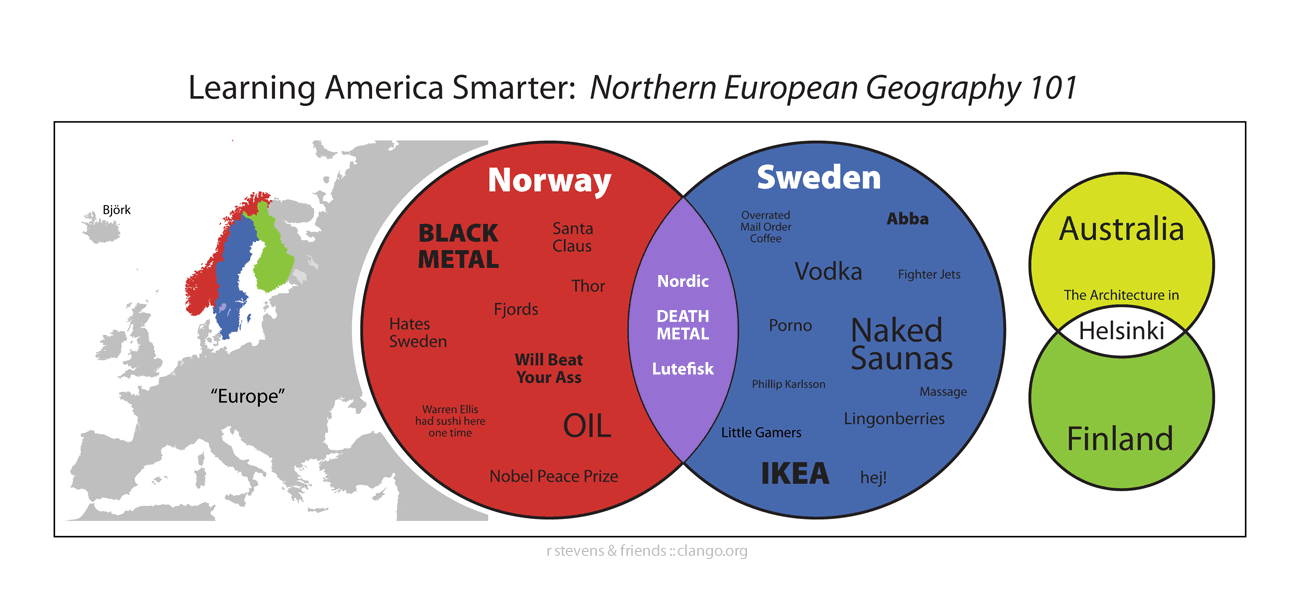
Naked saunas, 3D Flash globes, and other infographic goodness

  • My wife and I are nervously quizzing each other on these expert (and very funny) baby care instructions (boosted wholesale, it would seem, from David Sopp’s Safe Baby Handling Tips). [Via]
  • Wable is “a coffee table that displays a user’s web activity via physical bar graphing.”  Yes, I remember pining for such a thing not ever. (Are Venn-diagram kiddie pools next?)
  • Maps:
  • Signage:
  • Blogging software has made self-publishing seem simple, but beneath the covers, a whole lot’s going on.  Wired has a Flash-based diagram showing what all happens when one hits “Publish.” [Via]

Recent Flash goodness in 3D & beyond

  • When is a shopping site… something else?  When it’s this viral site for Dutch chain Hema*.  "It’s like an IKEA catalog was sliced up and fed to a Rube Goldberg machine," says Motionographer. "The magnifying glass bit is brilliant." [Via]
  • Who doesn’t like "secret interactive frivolity"?  Design firm Baker and Hill lavishes attention on the details of their fun-to-navigate company site.
  • 3D action:
    • Don’t let the ultra-retro intro fool you: Electric Oyster’s demo features the beginnings of a nifty Flash-based flight simulator. [Via]
    • National Geographic offers a 3D Atlas of Human History.  Developer g.wygonik from the always-interesting Terra Incognita provides background on the project.
    • This Adobe Japan page features 3D balls gone mad. [Via]
    • The Volvo XC70 site features a fully rotatable rendering of the car, festooned wih interactive touch points.  Stick around through the intro, then hit the arrows to continue.  (Yes, we have kid-haulers on the brain, and I’ll always have a thing for Volvo wagons.)
  • ASLuv busts out the fairy dust with this little particle sprayer.  (Don’t break the glowsticks ’til you feel the beats hit.) [Via]
  • In a sorta related vein, see Lee Brimelow’s YTMND-style Billy Mays tributePuzzling; I can dig it.
  • The Air Pocket Symphony (no relation to Adobe AIR, MacBook Air, wayward heiresses, etc.) features photorealistic objects and a nice, simple sliding animation.  [Via]
  • MyFlashFetish offers SWF bits (particularly music players, it seems) that can be embedded in your site. [Via]

* Tangential: It’s not Flash, but on the innovative shopping front, software maker Panic lets you drag and drop items into your shopping cart.  Slickness.

Recent Flash goodness in 3D & beyond

  • When is a shopping site… something else?  When it’s this viral site for Dutch chain Hema*.  "It’s like an IKEA catalog was sliced up and fed to a Rube Goldberg machine," says Motionographer. "The magnifying glass bit is brilliant." [Via]
  • Who doesn’t like "secret interactive frivolity"?  Design firm Baker and Hill lavishes attention on the details of their fun-to-navigate company site.
  • 3D action:
    • Don’t let the ultra-retro intro fool you: Electric Oyster’s demo features the beginnings of a nifty Flash-based flight simulator. [Via]
    • National Geographic offers a 3D Atlas of Human History.  Developer g.wygonik from the always-interesting Terra Incognita provides background on the project.
    • This Adobe Japan page features 3D balls gone mad. [Via]
    • The Volvo XC70 site features a fully rotatable rendering of the car, festooned wih interactive touch points.  Stick around through the intro, then hit the arrows to continue.  (Yes, we have kid-haulers on the brain, and I’ll always have a thing for Volvo wagons.)
  • ASLuv busts out the fairy dust with this little particle sprayer.  (Don’t break the glowsticks ’til you feel the beats hit.) [Via]
  • In a sorta related vein, see Lee Brimelow’s YTMND-style Billy Mays tributePuzzling; I can dig it.
  • The Air Pocket Symphony (no relation to Adobe AIR, MacBook Air, wayward heiresses, etc.) features photorealistic objects and a nice, simple sliding animation.  [Via]
  • MyFlashFetish offers SWF bits (particularly music players, it seems) that can be embedded in your site. [Via]

* Tangential: It’s not Flash, but on the innovative shopping front, software maker Panic lets you drag and drop items into your shopping cart.  Slickness.

New 3D Photoshop plug-ins

Great news: Developers are building on top of the 3D features in Photoshop CS3 Extended to deliver some great solutions.  In just the last week we’ve seen a flurry of announcments:

According to the DAZ launch announcement, their tool lets you:

  • View 3D scenes as Photoshop layers
  • Change objects and figures simultaneously
  • Render directly into Photoshop
  • Import, export and modify image maps and textures onto 3D models in Photoshop
  • Composite 2D and 3D content seamlessly
  • Access DAZ’s full library of quality 3D content  [DAZ gives away the editing application & sells adjustable content]

As for the Strata news, "In a nutshell, the technology from Strata’s 3D[in] plug-ins for Photoshop CS 3 Extended is now integrated into the Suite," says the crew on 3Dlayer.com.  With it you can:

  • Send a 3D model to PS as a 3D layer
  • Send a finished rendering to PS as separate layers (shadow layer, reflection layer, color layer, etc)
  • Send a PS image to a 3D background for tracing or placement
  • Send a 3D model direct from PS to PDF or HTML and it embeds the 3D object (you read that correctly)
  • Link PS files as 3D textures – changes made are automatically updated in the 3D texture

Good stuff all around.  We think that 3D in CS3 Extended is a big step forward, and of course we’re not planning to rest on those laurels.  I love seeing great developers like Strata and DAZ jump on the opportunity to help enrich the story.

By the way, did you know that you can browse the Google 3D Warehouse right from within Photoshop CS3 Extended?  Here’s more info.  Also, Adobe’s Steve Whatley mentions that Adobe is on tour with Maxon, showing off 3D integration between the tools.

Crazy-fast 3D slideshows for Flickr, Facebook, more

Several times now I’ve expressed my appreciation for PicLens, a beautiful (and free) little browser plug-in that enables full-screen, hardware-accelerated slideshows from Google Images, Flickr, MySpace, deviantART, and other sites.  It’s changed my whole online photo viewing experience.

Now Alec from PicLens writes to say that there’s a new version available for Firefox (Safari & IE updates to follow):

It features the all-new “3D Wall,” a magical virtual interface that can exhibit 100s, if not 1000s of images. There, you can drag, scroll, zoom, and, of course, jump into full-screen mode. You’ll have to try it out to really experience it. It brings the user one step closer to a fully immersive multimedia experience on the Web.

Once you download the 1MB plug-in (Mac or Win), go into a slideshow and try holding down and arrow key to cruise through the images.  I’d take a screenshot, but it doesn’t seem to get along with Snapz Pro.  [Update: Here’s one, though it doesn’t capture the motion.]  Really nicely done, guys!

[Update: Matthew from The Turning Gate has updated his free TTG Slimbox Gallery for Lightroom to offer PicLens compatibility.  I’ve confirmed that it does indeed work, provided you upload the exported gallery to a Web server.]

Wicked cool: Building a 3D model from video

Here’s something pretty well guaranteed to put a smile on your face, I think: the Australian Centre for Visual Technologies has developed VideoTrace, "a system for interactively generating realistic 3D models of objects from video."  A user sketches a few surfaces, after which the system works to generate 3D data.  The short video demonstration is a little ho-hum until near the middle, which is where the uncontested smiling begins. 😉 [Via]

This demo makes me think of Strata’s Foto 3D, a tool for generating 3D models from within Photoshop, using just a series of photographs.  By placing an object onto a specially printed piece of paper, then shooting it from a variety of angles, you give the software enough info to generate a 3D model that can then live as a 3D layer in Photoshop CS3 Extended.

It also reminds me of Extended’s ability to set 3D planes on a photograph using its Vanishing Point plug-in, then export the results as 3D data for use in After Effects and other tools.  With it you can export an image like this as 3D data, then set camera movement in AE and create an animation like this.

Recent Flash coolness

Some bits I’ve encountered in recent travels:

  • Mr. Doob is out of hand, creating all kinds of cool Flash experiments, 3D and otherwise.  From the fireworks on the home page to a blog full of examples, the guy is keeping busy.  I especially like this 3D cube and these spheres, both showing off depth-of-field effects enabled by Papervision 3D.  This little fluid simulation is fun, too (reload the page to reconfigure the pieces).
  • ClaraCollins.com presents the fashion designer’s work in a novel way. Mouse over the little arrows that sit above the pages of each portfolio, and you’ll see the images whip by in little time lapses. You can also rotate each portfolio 180 degrees. [Via]
  • Layer Tennis comes to Flash in a friendly clash between James Hutchinson & Trevor Van Meter. [Via]
  • Reminding me why I could afford only 120 sq. ft. in Manhattan (hello, Brooklyn!), 5th on the Park offers 1,800 sq. ft. in Harlem–for a cool $1.6 mil.  I mention it here because of the cool presentation of the building & its units.  You can roll over each face of the structure, clicking any unit to see its floor plan & other details. [Via]
  • Art Is A Gift uses a Flash UI to let you style a little "Baby Qee" critter.  Check out the gallery section, as well as the "About" link that shows kids painting the real thing as art therapy. [Via Jeff Tranberry]
  • Enfant Terrible sets off its shopping site with a cheerful, simple little animated illustration. [Via]
  • Adobe has created a 25th Anniversary Timeline of the company, on which you can see key developments in people, personnel, and the industry at a whole.  I’m undecided as to how successfully I think the sort of "mystery meat" rollover approach works.  There’s also a Flash-based 15-page overview document, complete with embedded video.  (Weirdly I don’t see a downloadable PDF version.)

Tasty new automotive 3D animation

  • Nissan has launched its Rogue crossover vehicle with the help of a really nicely executed drive through a swiftly tilting city.  [Via]  They play off the ad via their Web site, featuring more animation & a fistful of Flash games.
  • Carmaker Mini has launched their Mini Clubman model via some solid Flash video + interactivity. [Via]
  • Joseph Kosinski & Gmunk have teamed up to create the expertly rendered Hummer: Game OnOh yeah, dude–the environment gets so totally pwned!! (Sorry, had to say it.) [Via]
  • Tangentially related: Apparently Joseph will be remaking Tron (PDF).  For Honda’s excellent take on Tron, see previous.

Adobe's 3D raytracing in the news

As I’m sure you know, we’re pretty excited to have 3D capabilities inside Photoshop CS3 Extended.  That said, we know that what’s there today is really a first step into a pretty big realm.

Giving a glimpse into what the future might hold, the MIT Technology Review talks about Adobe’s research into real-time raytracing.  In a nutshell, says principal scientist Gavin Miller, "Adobe’s research goal is to discover the algorithms that enhance ray-tracing performance and make it accessible to consumers in near real-time form."

These techniques scale particularly well on multi-core systems, which is why you tend to see rendering tests show up in high-end machines’ benchmarks.  A brief slideshow accompanying the article demonstrates the differences between ray-traced images & those produced by the kind of interactive renderer used in Photoshop CS3. [Via Aravind Krishnaswamy, who works in Gavin’s group]

"Scanners," minus the exploding heads

Adobe’s own Russell Brown took his 3D head-scanning show (see previous) on the road to Photoshop World in Las Vegas this month.  Not only could attendees get their heads scanned & turned into 3D models for use in Photoshop CS3 Extended; they could get the resulting skin texture files printed onto fabric.  Scott Kelby volunteered to make sure the apparatus was safe (video), only to have his head printed onto a football that was kicked into the audience.  Here’s a quick gallery featuring some deeply disturbing imagery ;-).

"Scanners," minus the exploding heads

Adobe’s own Russell Brown took his 3D head-scanning show (see previous) on the road to Photoshop World in Las Vegas this month.  Not only could attendees get their heads scanned & turned into 3D models for use in Photoshop CS3 Extended; they could get the resulting skin texture files printed onto fabric.  Scott Kelby volunteered to make sure the apparatus was safe (video), only to have his head printed onto a football that was kicked into the audience.  Here’s a quick gallery featuring some deeply disturbing imagery ;-).

Killer Veggies From Outer Space, + more 3D

3D cars, in Flash & otherwise

3D cars, in Flash & otherwise

Adobe peeps talk 3D at Apple tomorrow

If you’re in the Bay Area and are interested in the technical details of some of Photoshop CS3’s advanced features (3D, auto-alignment, etc.), swing by the Apple campus (De Anza 3, specifically) tomorrow night for a meeting of the Silicon Valley SIGGRAPH chapter.  Refreshments roll out at 7:30, and the talk begins at 8pm.  It’s five bucks for non-members, free for students.  Details below.

Abstract

Ashley Still and Pete Falco of Adobe will give an overview of some of the new features in Photoshop CS3 Extended, including movie paint, 3D, and automatic alignment and blending of multiple images. In addition to demonstrating these new features, they will provide an overview of the Photoshop 3D Plug-in SDK that can be used to extend the current capabilities. There will be ample time for Q&A.

Speaker Bios

Pete Falco is currently Sr. Computer Scientist for Adobe Photoshop. Pete has been on the Photoshop team since 2005 and is focused on 3D and technology transfer for Photoshop. Prior to joining Adobe, Pete worked as an engineer on QuickTime VR at Apple, as the Director of Engineering at Live Picture and co-founded Zoomify. He holds a BS and ME from Rensselaer Polytechnic Institute.

Ashley Still is currently Sr. Product Manager for Adobe Photoshop. Ashley has been on the Photoshop team since 2004 and is focused on new markets and advanced technologies for Photoshop. Prior to joining Adobe, Ashley worked with an Entrepreneur in Residence at Sutter Hill Ventures developing and evaluating business plans and at eCircles.com, one of the first online sites offering photo-sharing and editing. She holds a BA from Yale University and an MBA from Stanford Graduate School of Business.